
Fake RVTools Installer Uses Sectigo Certificate to Deploy Python RAT


 8 min. read
  Published on
A fake RVTools installer has been used to deliver a modular Python-based remote access trojan to Windows systems, according to a new K7 Security Labs report. The malicious MSI impersonated RVTools, a popular VMware administration utility, and carried a valid Sectigo-issued code-signing certificate at the time it was delivered.
The attack is serious because RVTools is commonly used by VMware administrators who often hold privileged access inside enterprise networks. If an attacker compromises one of those workstations, they may gain a strong position for internal reconnaissance, remote command execution, and follow-on attacks.

Access content across the globe at the highest speed rate.
70% of our readers choose Private Internet Access
70% of our readers choose ExpressVPN

Browse the web from multiple devices with industry-standard security protocols.

Faster dedicated servers for specific actions (currently at summer discounts)
The installer used the certificate to look trustworthy and reduce early warnings from security controls. Microsoft’s SmartScreen reputation guidance says signing files with a valid certificate can reduce interruptions, which explains why attackers value signed installers in social engineering campaigns.
Why RVTools Was an Attractive Target
RVTools gives VMware administrators detailed visibility into virtual machines, clusters, datastores, networks, and vCenter environments. That makes it a trusted tool in many infrastructure teams.
Dell describes RVTools 4.7.1 as available through Dell Technologies and warns users not to download RVTools from unauthorized websites, sources, or vendors. That warning matters because fake installers can look convincing, especially when they use familiar names and valid signatures.
The fake installer abused that trust. It used a normal-looking MSI flow, requested administrator privileges, and showed a standard license agreement, making the installation process appear routine for an enterprise utility.
How the Signed Fake Installer Worked
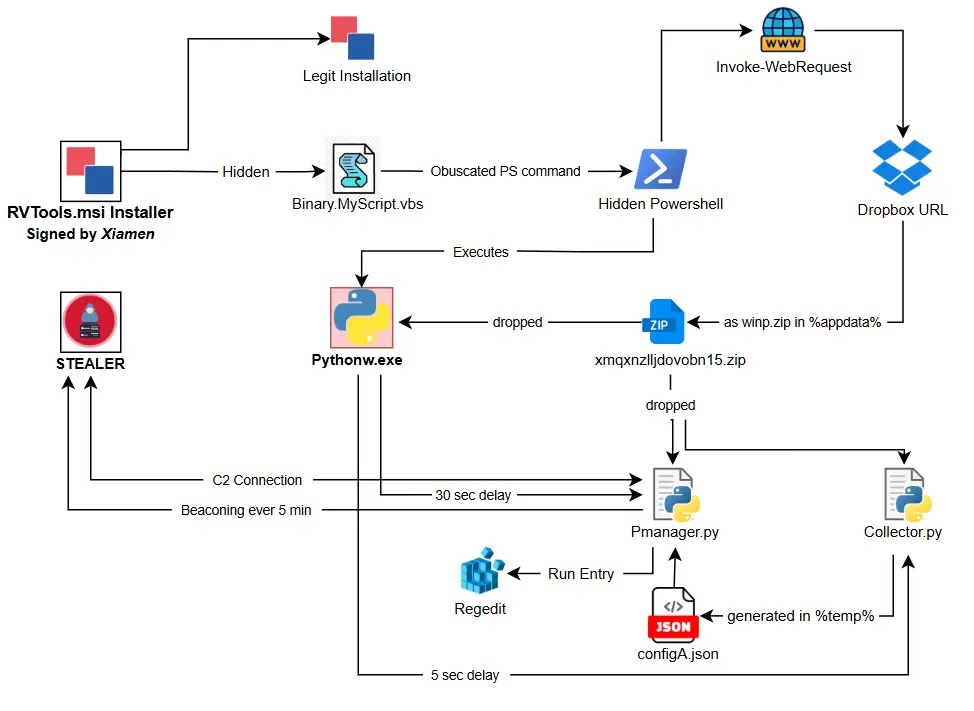
K7 found that the malicious MSI contained an embedded VBScript loader named Binary.MyScript.vbs. The script sat inside the MSI’s binary table and used decimal-to-character encoding to hide its real behavior from basic static checks.
After execution, the script launched a hidden PowerShell command. That command downloaded a roughly 33 MB archive named winp.zip from Dropbox and extracted it into the AppData folder.
The archive contained a portable Python environment and several familiar tools, including VS Code, Spyder, Jupyter Lab, cmd, and PowerShell. That helped the malware hide malicious scripts among files that could look normal on an administrator or developer workstation.
| Stage | What Happens | Why It Matters |
|---|---|---|
| Fake MSI | The user runs a signed RVTools-looking installer | The signature and installer flow help build trust |
| VBScript loader | Binary.MyScript.vbs runs from inside the MSI | The malicious script avoids appearing as a normal dropped file at first |
| PowerShell download | A hidden PowerShell process downloads winp.zip | The payload arrives after installation begins |
| Python RAT | collector.py and Pmanager.py start after reboot | The system becomes available for reconnaissance and remote control |
The RAT Collects Host and Active Directory Data
The first Python module, collector.py, profiles the infected system. It collects the hostname, MAC address, privilege level, services, running processes, network details, and Active Directory context.
The script builds a unique eight-character victim ID from the hostname and MAC address. That lets the attacker track the same machine even if the IP address changes.
The collected information is saved locally in configA.json under the temp folder. The second module, Pmanager.py, later reads this file, encrypts the data with RC4, compresses it with zlib, and sends it to command-and-control infrastructure.
Persistence Uses Registry and Scheduled Tasks
The malware survives reboots by using more than one persistence method. It writes a Registry Run entry and creates a scheduled task that can run with elevated privileges.
This behavior maps closely to common Windows persistence techniques tracked by MITRE ATT&CK. The MITRE Scheduled Task technique describes how attackers use Windows Task Scheduler to run malicious programs at startup, on a schedule, or after specific system events.
The fake installer also shows a reboot prompt that looks like a normal cleanup step. In reality, the reboot helps activate persistence and start the background components that were placed during installation.
| Component | Role | Reported Indicator |
|---|---|---|
| Malicious MSI | Initial installer | d0f5e98fb840fb5656d3f50613b6f1ec60e57392643159841bc1fa95396087a4 |
| Binary.MyScript.vbs | Embedded loader | 01A115C6F6BA3837234202A1E0D28BDC |
| collector.py | Reconnaissance module | 9192D18A955A9D03E2C70B60AAC1784A |
| Pmanager.py | C2 and persistence module | 71085940124AD3C035A181ACADC10362 |
| winp.zip | Downloaded payload archive | Stored in AppData during infection |
| configA.json | Collected host data | Stored in the temp folder |
Command-and-Control Runs Every Five Minutes
After persistence is established, Pmanager.py enters a regular beaconing loop. K7 says the RAT contacts one of five hardcoded command-and-control addresses every 300 seconds.
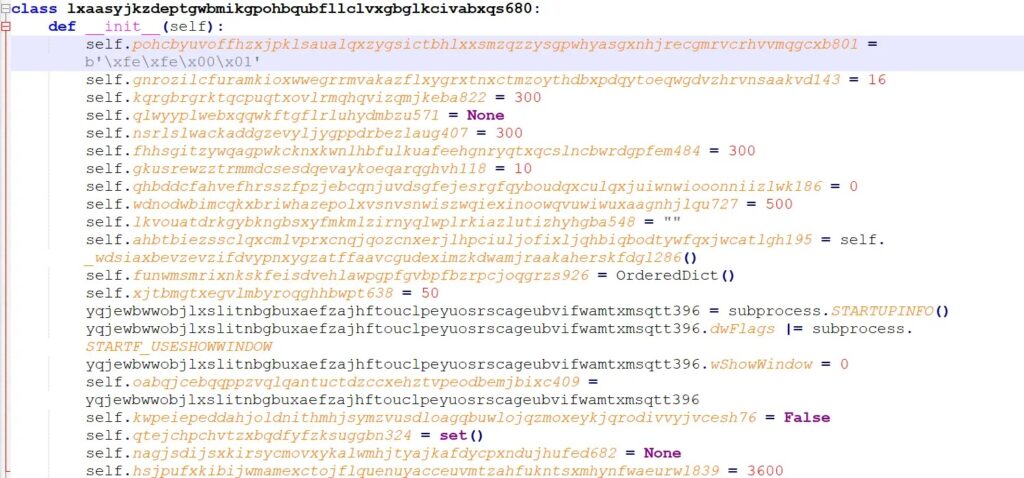
The malware can receive commands to run executables, launch PowerShell commands, download more payloads, update its delay settings, or remove itself from the system. That gives the operator flexible post-compromise control.
The K7 analysis also notes that the RAT cycles through redundant C2 servers if one connection fails, which helps it maintain access even when defenders block part of the infrastructure.
Why the Certificate Matters
The fake installer was signed with a certificate issued under the name Xiamen Lunwei Huage Network Co., Ltd. K7 says the certificate was valid at delivery time and later revoked.
A valid signature does not mean a file is safe. It only confirms that the file was signed by a certificate tied to a publisher identity. Microsoft’s SmartScreen documentation also separates signing and reputation, which means defenders should treat certificates as one signal rather than a final trust decision.
Security teams should enforce real-time certificate revocation checks where possible. Environments that only check a static signature may continue to trust files that were signed before a certificate was revoked.
What VMware Administrators Should Check
VMware administrators should confirm that any RVTools installer came from an authorized source. Dell says the only authorized and supported RVTools sources are Dell Technologies, Robware.net, and RVTools.com.
Teams should compare installed RVTools files against the official Dell RVTools installer guidance and checksum information. Any installer obtained through search ads, file mirrors, third-party download portals, or unknown links should be treated as suspicious.
- Search for winp.zip under AppData paths.
- Look for collector.py, Pmanager.py, and configA.json on administrator workstations.
- Review PowerShell execution logs for hidden Invoke-WebRequest activity.
- Check for Python processes launched from unusual folders.
- Audit scheduled tasks created around the installer execution time.
- Review Registry Run entries for unknown Python or AppData paths.
- Block unknown outbound connections from privileged admin workstations.
- Verify RVTools installers against official hashes before deployment.
Detection and Response Priorities
Security teams should start by isolating any system that ran the suspicious installer. Because RVTools users often have elevated access, responders should assume that credentials used on the machine may be exposed.
Administrators should rotate credentials used for vCenter, domain administration, backup infrastructure, and other virtualization management systems. They should also check whether the infected host had access to sensitive network shares, password vaults, or remote administration tools.
Defenders can use the MITRE Scheduled Task technique as a detection guide for suspicious task creation, especially tasks tied to AppData, temp folders, portable Python runtimes, or recently extracted archives.
The Bottom Line
The malicious RVTools installer shows how attackers can combine brand impersonation, signed software, PowerShell, and portable Python tooling into a convincing enterprise attack. The target choice also raises the risk because VMware administrators often sit close to critical infrastructure.
Organizations should not rely on code signing alone. They should verify download sources, validate checksums, enforce certificate revocation checks, and monitor privileged workstations for unusual Python, PowerShell, scheduled task, and Registry Run activity.
FAQ
Attackers distributed a fake RVTools MSI installer that used a valid Sectigo-issued certificate at delivery time. The installer deployed a multi-stage Python RAT that performed reconnaissance, established persistence, and contacted command-and-control servers.
The report describes a fake RVTools installer. Administrators should only download RVTools from Dell Technologies, Robware.net, or RVTools.com and verify the installer against official checksum information.
The certificate made the installer look more trustworthy and helped it avoid some early warnings. However, a valid signature only proves that a file was signed with a certificate. It does not prove that the file is safe.
Teams should look for winp.zip, Binary.MyScript.vbs, collector.py, Pmanager.py, and configA.json. They should also review AppData and temp folders for portable Python environments created around the installer execution time.
VMware administrators should verify RVTools download sources, check installer hashes, review privileged workstations for suspicious Python and PowerShell activity, audit scheduled tasks and Registry Run entries, and rotate credentials if a suspicious installer was executed.


Read our disclosure page to find out how can you help VPNCentral sustain the editorial team Read more


Improve this guide




User forum
0 messages