
OverlayPhantom Android Banking Trojan Targets 180 Apps With Accessibility Abuse and Screen Streaming


 8 min. read
  Published on

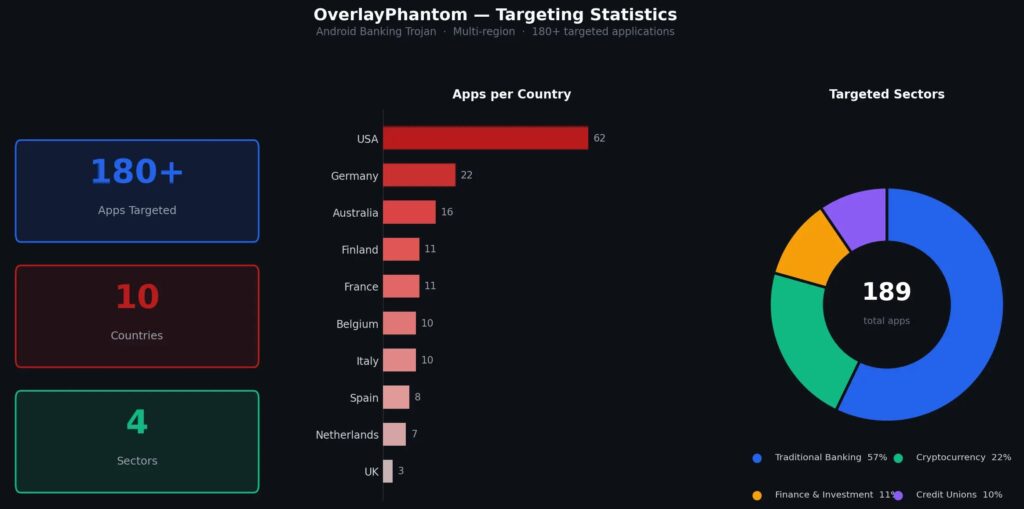
A newly documented Android banking trojan called OverlayPhantom is targeting banking, financial, and cryptocurrency apps across 10 countries. The malware uses fake app downloads, phishing overlays, Android Accessibility Service abuse, and live screen streaming to steal credentials and help attackers control infected devices.
Cyble Research and Intelligence Labs says OverlayPhantom has been active since May 2025 and targets more than 180 apps in the United States, Australia, Germany, France, Belgium, Finland, the Netherlands, Italy, Spain, and the United Kingdom.

Access content across the globe at the highest speed rate.
70% of our readers choose Private Internet Access
70% of our readers choose ExpressVPN

Browse the web from multiple devices with industry-standard security protocols.

Faster dedicated servers for specific actions (currently at summer discounts)
The trojan spreads through malicious URLs that impersonate trusted apps. Cyble observed a dropper pretending to be ID Austria, the official Austrian digital identity app, and another sample impersonating TikTok. After installation, the payload disguises itself as Google Play Services.
OverlayPhantom uses trusted names to push a fake update
The infection starts with a dropper app that presents a fake Google Play update screen. The victim believes they are installing a routine update, but the app instead guides them through the steps needed to enable Accessibility Service permissions.
Android Accessibility features serve a legitimate purpose. Google’s Android accessibility overview explains that users can customize Android with accessibility settings and apps, including tools that help with screen reading, voice control, display changes, and interaction controls.
Attackers abuse that same level of access when users grant it to malicious apps. Once OverlayPhantom receives Accessibility permission, it can watch the foreground app, simulate taps and swipes, manipulate text, open overlays, and make the device act under attacker control.
Key details at a glance
| Item | Details |
|---|---|
| Malware name | OverlayPhantom |
| Platform | Android |
| Active since | May 2025, according to Cyble |
| Main targets | Banking, finance, and cryptocurrency apps |
| Targeted apps | More than 180 |
| Targeted countries | United States, Australia, Germany, France, Belgium, Finland, Netherlands, Italy, Spain, and the United Kingdom |
| Main techniques | Accessibility abuse, phishing overlays, screen streaming, and remote commands |
OverlayPhantom’s operators use the familiar Android banking trojan playbook, but they combine several high-risk capabilities in one package. The malware can present fake login screens, stream the screen, execute remote commands, and harvest data from financial apps.
The MITRE ATT&CK mobile technique for Accessibility abuse describes how Android malware can misuse accessibility features to steal sensitive data, place fake HTML login screens over real apps, monitor text fields, and control user actions.
How OverlayPhantom controls infected Android devices
After the victim grants Accessibility permission, OverlayPhantom connects to its command-and-control infrastructure at 199.217[.]99[.]122. Cyble says the malware splits traffic across three ports: 9091 for commands, 9092 for device status updates, and 9090 for screen streaming.
The remote command set gives attackers broad control. Operators can perform taps, double taps, long presses, swipes, custom gestures, back and home actions, screen locking behavior, clipboard manipulation, and fake notifications. They can also start and stop JPEG-based screen streaming.
Screen streaming gives the attacker near real-time visibility into the victim’s phone. The MITRE ATT&CK screen capture technique notes that mobile adversaries may collect user data, credentials, and other sensitive information by capturing screenshots, videos, or foreground screen content.
Why the overlay attack matters
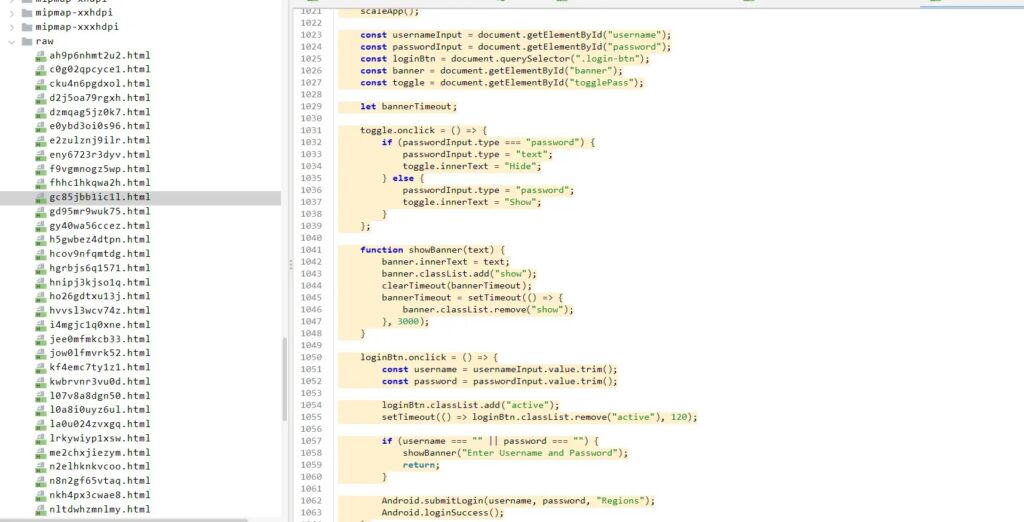
OverlayPhantom keeps a hardcoded list of targeted banking, finance, and crypto apps. When the victim opens one of those apps, the malware checks the package name and displays a fake login page on top of the real app.
That fake page runs inside a WebView and can closely copy the legitimate app’s login screen. The user enters credentials, PINs, or other sensitive data, thinking they are using their real banking or wallet app. The malware then sends the stolen data to the attacker’s server.
This technique gives attackers a clean path to credential theft without needing to break the banking app itself. The malicious layer sits above the legitimate app, while Accessibility access helps the malware detect app launches and automate interactions.
Observed technical behavior
| Capability | How OverlayPhantom uses it | Risk |
|---|---|---|
| Accessibility Service | Monitors foreground apps and automates device actions | Device takeover and credential capture |
| WebView overlays | Displays fake login pages over real apps | Banking and crypto credential theft |
| MediaProjection API | Streams the victim’s screen using JPEG frames | Real-time surveillance |
| Remote commands | Executes gestures, clipboard actions, notifications, and navigation | Unauthorized transactions and account abuse |
| Masquerading | Appears as Google Play Services | Harder detection and removal by users |
Cyble’s analysis says the malware uses more than 30 commands and embeds counterfeit HTML phishing pages inside the APK. That makes it a mature financial threat rather than a simple fake login app.
The campaign also shows why Android banking malware still relies heavily on social engineering. Instead of exploiting a system flaw first, the attackers trick victims into installing a fake trusted app and granting a permission that can control the device.
Indicators of compromise
| Type | Indicator | Description |
|---|---|---|
| URL | hxxps://bitlrewards-app[.]com/api/download/IDAustria | Observed OverlayPhantom distribution URL |
| IP address | 199.217[.]99[.]122 | Command-and-control server |
| Port | 9091 | Command channel |
| Port | 9092 | Device status and reporting channel |
| Port | 9090 | Screen streaming channel |
| SHA-256 | 9ef37376bfaa18e193cc72218924ad8ebf56d2667d348f0eae5ae6ec45ab8775f | Malware sample hash |
| SHA-256 | 8b614a2918378063d6e6655b676ceb52ae65b1510e2cc08087fcac31acb7aeb8d | Malware sample hash |
| SHA-256 | dc1f2a75f3d5b5bd054a5367bd5015ebc90f3453d63c7cce438c12dc2ae86a | Malware sample hash |
Security teams should look for the C2 IP, suspicious outbound traffic to the listed ports, and Android devices with unexpected apps posing as Google Play Services. Enterprise mobile management tools can also help identify apps with unusual Accessibility permissions.
The second MITRE ATT&CK reference for Accessibility abuse recommends user guidance and review of apps granted accessibility access. That advice fits OverlayPhantom because the malware depends on the victim granting this permission.
How users can reduce the risk
- Download Android apps only from official app stores and verified publisher pages.
- Avoid installing APK files from links received through SMS, email, social media, or messaging apps.
- Do not grant Accessibility Service permissions to apps that do not clearly need them.
- Review the Accessibility menu for unfamiliar services, especially anything pretending to be Google Play Services.
- Turn on multi-factor authentication for banking, financial, and cryptocurrency accounts.
- Keep Android and installed apps updated with the latest security patches.
- Contact your bank quickly if your phone shows unusual behavior during mobile banking sessions.
Google says Google Play Protect checks apps for harmful behavior, scans apps from Google Play before download, and checks devices for potentially harmful apps from other sources. It may also warn users, disable harmful apps, or remove them automatically.
That protection helps, but it does not remove the need for caution when installing apps outside trusted stores. OverlayPhantom relies on fake trusted branding and permission prompts, so users should treat unexpected update requests and permission tutorials as warning signs.
What banks and enterprises should monitor
Banks, crypto platforms, and enterprises with mobile fleets should treat OverlayPhantom as a device-side fraud threat. It targets the user’s phone rather than the bank’s backend, which makes traditional server-side defenses only part of the response.
App developers can also make screen capture and overlay abuse harder on sensitive screens. The MITRE screen capture guidance notes that Android developers can use protections such as secure screen flags on sensitive areas to reduce unwanted capture.
Enterprises should use mobile device management policies to limit unapproved APK installation, review granted Accessibility services, and block suspicious network destinations. Fraud teams should also watch for account activity that follows mobile device compromise, including new payees, unusual transfers, and repeated login attempts from affected regions.
OverlayPhantom shows the continuing risk of mobile banking trojans
OverlayPhantom stands out because it combines social engineering, Accessibility abuse, overlays, remote device control, and live screen streaming. That mix allows attackers to steal credentials and potentially help complete fraudulent actions while the victim sees little or no obvious warning.
The legitimate purpose of Android Accessibility remains important, and Google’s accessibility documentation shows how these tools help users control and customize devices. The danger comes when malware convinces users to grant the same powerful access to a fake app.
Users who suspect an infection should disconnect from the network, stop using banking and crypto apps on the device, contact financial providers, change passwords from a trusted device, and consider a factory reset after preserving any needed evidence. They should also keep Play Protect enabled and avoid future sideloaded downloads unless they can verify the source.
FAQ
OverlayPhantom is an Android banking trojan that targets banking, financial, and cryptocurrency apps. It uses fake app downloads, phishing overlays, Accessibility Service abuse, remote commands, and screen streaming to steal data and control infected devices.
OverlayPhantom spreads through malicious links that impersonate trusted apps such as ID Austria or TikTok. The dropper shows a fake Google Play update screen and tricks the victim into granting Accessibility Service permissions.
Accessibility permissions can let an app read screen content, monitor app activity, and perform actions such as taps or swipes. Malware can abuse this access to steal credentials, display fake login screens, and control the device.
Cyble says OverlayPhantom targets users in the United States, Australia, Germany, France, Belgium, Finland, the Netherlands, Italy, Spain, and the United Kingdom.
Users should avoid APK downloads from links, install apps only from trusted sources, keep Google Play Protect enabled, deny Accessibility permissions to unfamiliar apps, enable multi-factor authentication, and keep Android updated.


Read our disclosure page to find out how can you help VPNCentral sustain the editorial team Read more


Improve this guide




User forum
0 messages