
DriveSurge Uses ClickFix and Fake Browser Updates to Infect Website Visitors


 9 min. read
  Published on

A newly tracked threat actor called DriveSurge is compromising legitimate websites and using them to infect visitors through fake browser updates and ClickFix prompts. The campaign turns trusted sites into malware delivery points, making the attacks harder for users to spot.
Silent Push says DriveSurge has compromised thousands of websites and is using zTDS, a traffic distribution system, to route selected visitors to malicious content. The system profiles visitors before deciding whether to show a fake browser update, a ClickFix prompt, or nothing suspicious.

Access content across the globe at the highest speed rate.
70% of our readers choose Private Internet Access
70% of our readers choose ExpressVPN

Browse the web from multiple devices with industry-standard security protocols.

Faster dedicated servers for specific actions (currently at summer discounts)
The campaign appears to work like an Initial Access Broker operation. DriveSurge likely uses a pay-per-install model, where successfully infected devices become leads that can be sold to other cybercriminals for fraud, credential theft, or follow-up malware deployment.
How DriveSurge Uses Legitimate Websites
DriveSurge starts by injecting malicious JavaScript into real websites. The visitor still sees a normal-looking site, but hidden code quietly contacts attacker infrastructure in the background.
That infrastructure checks the visitor’s browser, operating system, behavior, and other signals. If the visitor matches the campaign’s target profile, the system can redirect them to a fake update page or a ClickFix-style instruction screen.
This selective delivery helps the campaign avoid bots, security crawlers, and unsupported systems. It also gives attackers more control over who sees the malicious content.
Key Details at a Glance
| Item | Details |
|---|---|
| Threat actor | DriveSurge |
| Main tactics | ClickFix prompts and fake browser update pages |
| Initial access path | Injected scripts on compromised websites |
| Traffic routing system | zTDS |
| Business model | Likely pay-per-install Initial Access Broker activity |
| Observed platforms | Windows and macOS |
Fake browser update campaigns have been a common malware delivery method for years. Silent Push research on SocGholish describes how fake update malware has supported access-selling operations, where infected systems can be passed to downstream criminal groups.
DriveSurge builds on that model with large-scale site compromise, visitor profiling, and flexible delivery paths. Instead of relying on one fake download page, the actor can route different visitors to different lures.
Fake Updates Target Multiple Browsers
In the fake update scenario, a compromised website shows a page that impersonates a browser update notice. The lure can mimic popular browsers such as Chrome, Firefox, Edge, Safari, Opera, Brave, Yandex, Vivaldi, Samsung Internet, and UC Browser.
One observed fake Mozilla Firefox update page downloaded a ZIP archive. The archive contained DLL files and an executable named Browser Update.exe, which was malware rather than a legitimate browser update.
This tactic works because users expect browsers to update often. When the prompt appears on a real website, the request may look more trustworthy than it should.
ClickFix Tricks Users Into Running the Malware
The ClickFix method avoids the usual download flow. Instead, a fake error or verification page tells the victim to copy and paste a command into PowerShell, Terminal, or another system prompt.
Proofpoint describes ClickFix as a social engineering technique that uses fake error messages to trick people into copying, pasting, and running malicious content on their own computer.
That makes the attack dangerous because the user becomes the execution step. Traditional defenses that focus only on suspicious attachments or downloaded installers may miss the moment when a user manually runs a pasted command.
DriveSurge Attack Flow
| Stage | What Happens | Why It Matters |
|---|---|---|
| Website compromise | Attackers inject malicious JavaScript into legitimate websites | Visitors trust the site and may not suspect an infection attempt |
| Visitor profiling | zTDS collects browser, device, and behavior signals | The campaign can serve payloads only to selected targets |
| Malicious lure | The user sees a fake update page or ClickFix prompt | The attack looks like a routine browser or system task |
| Payload delivery | The victim downloads malware or runs a copied command | The attacker gains initial access to the device |
| Downstream abuse | The infected device can be sold or used for more attacks | DriveSurge can feed other criminal operations |
Silent Push also found eight technical fingerprints tied to DriveSurge infrastructure, including injected scripts, domain registration pivots, delivery servers, and advertisement distribution infrastructure. These details help defenders connect seemingly separate compromised sites to the same operation.
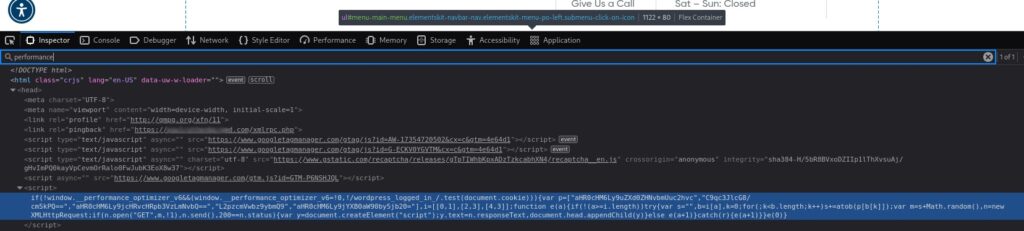
Some of the infrastructure appeared pre-weaponized, meaning it was prepared for future use but not yet fully active when researchers examined it. That gives security teams a chance to block related infrastructure before it reaches victims.
macOS Targeting Expands the Campaign
DriveSurge is not limited to Windows. Researchers found a macOS payload path that used a multi-stage shell command to download a second-stage file, run it, and then delete traces from the command chain.
Microsoft has also warned that ClickFix campaigns can target macOS users with fake utility prompts that deliver infostealers. That broader trend makes DriveSurge more concerning for mixed Windows and Mac environments.
Attackers can tailor the lure to the visitor’s operating system. A Windows user may see PowerShell instructions, while a Mac user may see Terminal commands that appear to fix a system or browser issue.
Observed Indicators of Compromise
| Type | Indicator | Description |
|---|---|---|
| Domain | beacontrace[.]bond | Malicious zTDS inject domain serving t.js |
| Domain | jclforwarding[.]com | Compromised site used to serve Fake Update or ClickFix content |
| Domain | check[.]first-node[.]rocks | Domain serving fake Mozilla Firefox update page |
| Domain | cptoptious[.]com | zTDS delivery domain used in obfuscated payloads |
| Domain | newtdsone[.]shop | zTDS delivery domain used in obfuscated payloads |
| Domain | captioto[.]com | zTDS delivery domain used in obfuscated payloads |
| Domain | banerpanel[.]live | Advertisement Distribution System panel domain |
| Domain | testio[.]ecartdev[.]com | Payload and development server |
| Domain | ycyfugihih[.]cfd | Domain linked to DriveSurge registration pivot |
| Domain | brightson[.]icu | Pre-weaponized DriveSurge infrastructure domain |
| Domain | coverlink[.]icu | Pre-weaponized DriveSurge infrastructure domain |
| Domain | datumprobe[.]icu | Pre-weaponized DriveSurge infrastructure domain |
| Domain | webgleam[.]info | Domain identified through infrastructure fingerprinting |
| Domain | cptoptions[.]com | Suspicious domain loaded into jclforwarding[.]com |
| IP address | 46[.]226[.]166[.]57 | C2 server hosting macOS payload |
| SHA256 | 90aecb370dfb1a99a1f7de0a9c6842ab1b664521fddea16b0ec9a91f322646fc | ZIP file downloaded through fake Mozilla Firefox update page |
| SHA256 | 7aa15de93cf85729ddf970e8d7897f69ece3ca29608f73e784a9ba40c9cea18d | macOS payload binary retrieved from C2 server |
| File name | t.js | Malicious injected JavaScript file |
| File name | Browser Update.exe | Fake browser update executable |
| File name | script.js | Injected JavaScript file served by fake update infrastructure |
| File name | banner-js.php | Script loaded into compromised sites through ADS infrastructure |
| File name | changelog.txt | Publicly accessible zTDS version history file |
These indicators can help with immediate blocking, but security teams should not depend on static indicators alone. DriveSurge can rotate domains, scripts, file names, and payload servers.
Behavioral detection matters more over time. Teams should watch for unusual external JavaScript injections, sudden redirects from trusted websites, fake browser update downloads, and command execution that follows browser activity.
What Website Owners Should Check
- Audit website templates, CMS database content, and theme files for unfamiliar script tags.
- Search for unknown JavaScript files such as t.js, script.js, or suspicious external script loaders.
- Review recently modified PHP files, plugins, themes, and CMS extensions.
- Remove unused plugins and themes from public sites.
- Patch WordPress, Joomla, Drupal, Magento, and other web-facing CMS software.
- Require multi-factor authentication for admin accounts.
- Use file integrity monitoring on production web directories.
- Check logs for redirects to zTDS domains or suspicious JavaScript delivery paths.
Fake update malware groups often benefit from old CMS flaws, weak admin passwords, exposed plugins, and abandoned websites. The second Silent Push fake update analysis shows why website hygiene matters: one compromised site can become part of a much larger malware delivery network.
Site owners should also warn users if they discover compromise. Visitors who downloaded a fake update or ran a command from a prompt may need endpoint scanning, password resets, and help from their IT team.
What Users Should Do When They See a Fake Update Prompt
| Suspicious Message | Safer Response |
|---|---|
| A website says your browser needs an urgent update | Close the tab and update through the browser’s built-in update menu |
| A page downloads a ZIP file for a browser update | Do not open it, because browsers do not update through random ZIP archives |
| A verification page asks you to paste a command | Do not run commands copied from a website |
| A page asks for PowerShell, Run, or Terminal | Leave the page and report it to IT |
| A trusted site suddenly shows a technical fix prompt | Treat it as suspicious because the site may be compromised |
Proofpoint’s ClickFix research shows that attackers use fake problems and instructions to make users run malicious commands themselves. Training should make this behavior easy to recognize.
Microsoft’s macOS ClickFix report also shows that users should not assume this is a Windows-only problem. Any website that asks a user to paste a command into a terminal should raise suspicion.
How Security Teams Can Detect DriveSurge Activity
- Alert on PowerShell, cmd, Terminal, curl, bash, or osascript execution that follows browser activity.
- Monitor DNS and proxy logs for known DriveSurge domains and related zTDS infrastructure.
- Hunt for downloads named Browser Update.exe or browser update ZIP files from non-browser domains.
- Inspect compromised websites for injected JavaScript, unknown PHP files, and hidden redirects.
- Block suspicious newly registered domains used for fake update and ClickFix pages.
- Review macOS endpoints for shell commands that download, run, and delete payloads.
- Train users never to paste commands from websites into PowerShell, Terminal, Command Prompt, or Run.
Unit 42 recommends defenses that focus on the user execution step, including monitoring command-line activity that follows a browser session. That kind of detection is useful because ClickFix depends on a user running a command copied from a web page.
DriveSurge shows how browser-based initial access continues to evolve. The user may not receive a phishing email or open a malicious attachment. They may simply visit a legitimate website that attackers already compromised.
Why DriveSurge Matters
DriveSurge combines three dangerous elements: trusted websites, social engineering, and automated traffic routing. That lets the actor reach victims during normal browsing sessions and adapt the lure to the user’s device.
The second Unit 42 ClickFix guidance reinforces the same point for defenders: browser-to-command execution deserves direct monitoring, not just user awareness.
For website owners, the priority is finding and removing injected scripts. For users and enterprises, the priority is simple: never install a browser update from a random page, and never paste a command from a website into PowerShell, Terminal, Command Prompt, or Run.
FAQ
DriveSurge is a newly tracked threat actor that compromises legitimate websites and uses traffic distribution infrastructure to send selected visitors to fake browser update pages or ClickFix prompts that install malware.
DriveSurge injects malicious JavaScript into real websites. When a visitor loads the page, the script contacts attacker infrastructure that profiles the visitor and may redirect them to a fake update page or a ClickFix command prompt.
ClickFix is a social engineering technique that tells users to copy and run a command to fix a fake problem or complete a fake verification step. The command installs malware instead.
Yes. Silent Push found evidence of a macOS payload path. DriveSurge can adapt its instructions and payloads based on the visitor’s device and browser profile.
Website owners should patch CMS software and plugins, audit external scripts, remove unfamiliar injected JavaScript, protect admin accounts with multi-factor authentication, and monitor file changes on production sites.


Read our disclosure page to find out how can you help VPNCentral sustain the editorial team Read more


Improve this guide




User forum
0 messages