
TrapDoor Campaign Uses Malicious npm, PyPI, and Crates.io Packages to Steal Developer Secrets


 8 min. read
  Published on
A cross-ecosystem supply chain campaign called TrapDoor has used more than 34 malicious packages across npm, PyPI, and Crates.io to steal developer credentials, cloud keys, SSH keys, browser data, and cryptocurrency wallet files. The campaign targeted developers working in crypto, DeFi, Solana, AI, and security projects.
The attack was first disclosed by the Socket Research Team, which said the operation covered 384+ related versions and artifacts across the three ecosystems. Some packages had already been removed when the research was published, while others were still active at the time.

Access content across the globe at the highest speed rate.
70% of our readers choose Private Internet Access
70% of our readers choose ExpressVPN

Browse the web from multiple devices with industry-standard security protocols.

Faster dedicated servers for specific actions (currently at summer discounts)
The campaign matters because it abuses normal developer workflows. A victim did not need to run a suspicious executable. Depending on the ecosystem, the malicious logic could run during installation, import, or compilation.
How TrapDoor Worked Across Three Package Ecosystems
TrapDoor used each package ecosystem’s own execution model to start the attack. npm packages used postinstall hooks, PyPI packages executed code when imported, and Crates.io packages used build scripts during compilation.
Researchers at SlowMist analyzed three representative packages from the campaign: git-config-sync from PyPI, token-usage-tracker from npm, and sui-framework-helpers from Crates.io. The firm said the samples followed a similar pattern: trigger, collect, and exfiltrate.
The attackers disguised the packages as normal developer utilities. That made the campaign harder to spot because the names looked useful to the exact developers the attackers wanted to reach.
Key Details About the TrapDoor Campaign
| Item | Details |
|---|---|
| Campaign name | TrapDoor |
| Package ecosystems | npm, PyPI, and Crates.io |
| Package count | More than 34 malicious packages |
| Versions and artifacts | 384+ related versions and artifacts |
| Targets | Crypto, DeFi, Solana, AI, and security developers |
| Stolen data | Cloud credentials, SSH keys, GitHub tokens, browser data, environment variables, and wallet files |
| Notable npm package | token-usage-tracker |
| Notable PyPI package | git-config-sync |
| Notable Crates.io package | sui-framework-helpers |
What Data the Malicious Packages Tried to Steal
The malicious packages were built to collect a broad range of secrets from developer workstations and build environments. That made the campaign dangerous for both individual developers and organizations that rely on their machines for production access.
- SSH private keys
- AWS credentials
- GitHub tokens and credentials
- OpenAI API keys and other API secrets
- Environment variables containing passwords or tokens
- Browser profile and login database files
- Sui, Solana, Aptos, and Ethereum wallet data
- Local development configuration files
The Hacker News report noted that several npm packages used a shared trap-core.js payload that could scan for credentials, validate AWS and GitHub tokens, attempt SSH-based movement, and plant persistence through developer configuration files, Git hooks, shell hooks, systemd, cron, and SSH.
npm Package Added Persistence and AI Tool Abuse
The npm side of the campaign appears to have had the most advanced functionality. Socket said some npm packages ran after installation and deployed a shared JavaScript payload designed to harvest secrets and maintain access.
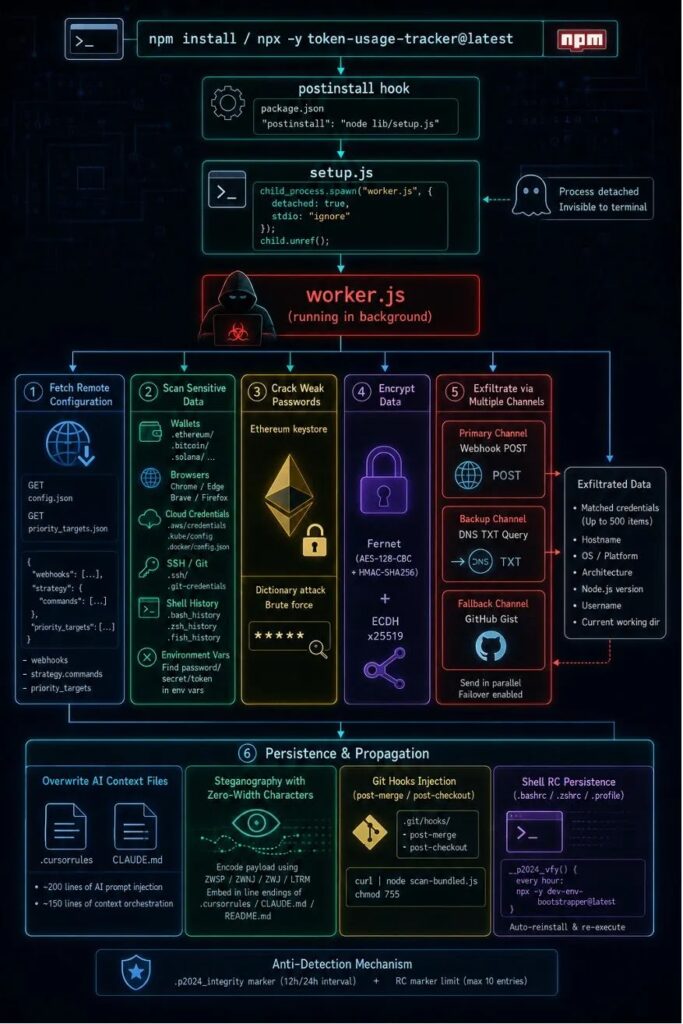
The campaign also experimented with AI coding assistant abuse. The attacker attempted to modify files such as .cursorrules and CLAUDE.md, which can provide project-specific instructions to AI coding tools.
According to the Socket analysis, the attacker used zero-width Unicode characters to hide instructions that could prompt AI assistants to run workflows framed as security scans. The technique may not work consistently across all tools, but it shows attackers are testing AI development environments as a new supply chain surface.
PyPI and Crates.io Used Different Execution Paths
The Python packages linked to TrapDoor could execute malicious behavior when imported. That approach is dangerous because a developer may assume that importing a utility module is harmless, especially during testing or local automation.
SlowMist said git-config-sync launched a malicious thread shortly after being loaded and then scanned sensitive directories. Its technical report said the Python and npm samples shared infrastructure through the ddjidd564.github.io domain.
The Rust package sui-framework-helpers used a different path. It activated during compilation, searched for wallet files tied to Sui, Aptos, and Solana, then encoded stolen data before uploading it to attacker-controlled infrastructure.
Why Trusted Infrastructure Made Detection Harder
TrapDoor did not rely only on obscure attacker domains. The campaign used services such as GitHub Pages, GitHub raw content, GitHub Gists, and webhook.site to host configuration, payloads, or exfiltration paths.
This can make detection harder because many corporate networks allow traffic to trusted developer platforms. A firewall may not treat GitHub-related traffic as suspicious unless security teams inspect the path, behavior, and context.
The attackers also used names that looked useful to developers, including tools related to wallets, AI prompts, token tracking, Web3 security, and project setup. That naming strategy helped the packages blend into normal open-source discovery.
AI Coding Assistants Became Part of the Attack Surface
The most unusual part of TrapDoor is its attempt to influence AI coding tools. Attackers tried to place hidden instructions in files that developers may trust and that coding assistants may parse during future sessions.
The Hacker News coverage said the activity went beyond malicious package publishing because the same actor also opened pull requests against AI and developer tooling projects. That suggests the attacker was testing whether normal contribution workflows could place AI-readable instructions in trusted repositories.
Developers should treat AI context files as executable-adjacent configuration. They may not run code directly, but they can influence how an assistant suggests, edits, or executes commands inside a project.
Indicators Developers Should Check
| Type | Indicator | Why It Matters |
|---|---|---|
| Domain | ddjidd564[.]github[.]io | Attacker-controlled GitHub Pages infrastructure |
| Marker | P-2024-001 | Campaign marker used across related npm components |
| File | trap-core.js | Shared credential-harvesting payload reported in npm packages |
| File | .cursorrules | AI assistant context file targeted for hidden instructions |
| File | CLAUDE.md | AI assistant context file targeted for hidden instructions |
| Package | git-config-sync | Malicious PyPI package analyzed by researchers |
| Package | token-usage-tracker | Malicious npm package with advanced credential theft features |
| Package | sui-framework-helpers | Malicious Crates.io package targeting wallet data |
| Package | dev-env-bootstrapper | Secondary npm package linked to persistence behavior |
| XOR key | cargo-build-helper-2026 | Key used by the Rust sample to obfuscate stolen wallet data |
What Developers and Security Teams Should Do Now
Developers who installed suspicious packages linked to TrapDoor should assume that credentials on the affected machine may have been exposed. Removing the package is not enough because some samples attempted persistence through Git hooks, shell startup files, cron, systemd, SSH, and AI context files.
- Remove any known TrapDoor packages from local projects and CI/CD environments.
- Rotate GitHub tokens, npm tokens, PyPI tokens, cloud keys, SSH keys, and API keys.
- Review .cursorrules and CLAUDE.md for hidden or suspicious instructions.
- Inspect Git hooks for commands that download or execute remote scripts.
- Check .bashrc, .zshrc, cron jobs, systemd user services, and SSH configuration files.
- Review browser credential stores and wallet files on affected machines.
- Search logs for traffic to ddjidd564[.]github[.]io and related GitHub raw content paths.
- Rebuild affected developer workstations if sensitive production credentials were present.
Organizations should also review package installation behavior in CI/CD pipelines. Build systems should run with minimal secrets, restricted outbound network access, and isolated permissions so a malicious dependency cannot reach production infrastructure.
Long-Term Lessons From TrapDoor
TrapDoor shows how supply chain attackers now target the full developer environment, not only application code. They look for package hooks, wallet files, cloud credentials, GitHub tokens, SSH keys, shell startup files, and AI assistant instructions.
Security teams should add package behavior monitoring to their normal development process. Static dependency lists help, but they cannot catch every install hook, import-time payload, build script, or remote configuration fetch.
The safer approach is to combine dependency review, sandboxed builds, secret scanning, egress controls, and fast credential rotation. Developers should also treat AI context files and package scripts as security-sensitive parts of the repository, not as harmless project notes.
FAQ
TrapDoor is a malicious package campaign that targeted npm, PyPI, and Crates.io. It used more than 34 packages and 384+ versions or artifacts to steal developer secrets, cloud credentials, SSH keys, browser data, and cryptocurrency wallet files.
TrapDoor mainly targeted developers working in cryptocurrency, DeFi, Solana, Sui, Move, AI, and security projects. The package names were designed to look useful to those communities.
The packages used each ecosystem’s normal execution paths. npm packages used postinstall hooks, PyPI packages executed code when imported, and Crates.io packages used build.rs scripts during compilation.
TrapDoor attempted to modify files such as .cursorrules and CLAUDE.md because AI coding tools may read them as project instructions. Attackers used hidden characters to test whether assistants could be pushed into running workflows that discover and exfiltrate secrets.
Developers should remove the package, rotate all potentially exposed credentials, inspect Git hooks and shell startup files, review AI context files, check for traffic to known attacker infrastructure, and rebuild affected machines when sensitive production credentials were present.


Read our disclosure page to find out how can you help VPNCentral sustain the editorial team Read more


Improve this guide




User forum
0 messages