
GitHub.dev Token Theft Flaw Let Attackers Steal OAuth Tokens With One Click


 7 min. read
  Published on
A recently disclosed Visual Studio Code webview flaw could let attackers steal GitHub OAuth tokens from github.dev users after a single malicious link click. Security researcher Ammar Askar published the issue on June 2, 2026, showing how a crafted repository could abuse github.dev, VS Code webviews, keyboard event forwarding, and extension installation behavior.
The biggest risk was token theft. The token passed into github.dev was not limited to the repository the user opened, according to Askar. It could provide read and write access to all repositories the signed-in GitHub user could access, including private repositories.

Access content across the globe at the highest speed rate.
70% of our readers choose Private Internet Access
70% of our readers choose ExpressVPN

Browse the web from multiple devices with industry-standard security protocols.

Faster dedicated servers for specific actions (currently at summer discounts)
Microsoft later said the issue had been mitigated for its services and that no customer action was required, according to The Hacker News. The disclosure still matters because it shows how browser-based developer tools, OAuth tokens, and extension systems can create a high-impact attack path when trust boundaries fail.
How the github.dev attack worked
The attack centered on github.dev, GitHub’s browser-based editor built around a web version of VS Code. The github.dev web-based editor lets users navigate repositories, edit files, commit changes, and work from the browser without cloning a repository locally.
When users open a repository in github.dev, GitHub provides the web editor with a token so it can interact with GitHub on the user’s behalf. That makes the editor useful, but it also makes token protection critical.
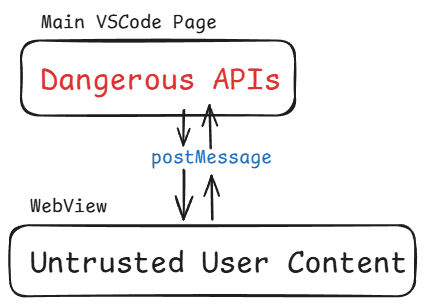
The flaw abused the communication model between VS Code’s main editor window and sandboxed webviews. VS Code uses webviews to display content such as Markdown previews and notebook output inside isolated frames.
Why webviews became the weak point
Webviews should isolate untrusted content from the main editor. However, VS Code also forwards certain events from webviews to the main editor so keyboard shortcuts continue to work while the user focuses inside rendered content.
Askar found that JavaScript running inside a webview could create fake keyboard events. Those events could then pass through the message channel and trigger privileged editor actions that should have required user intent.
The exploit chain used that behavior to install a malicious extension from the opened workspace. Once installed, the extension could access the GitHub token inside the github.dev environment and send it to an attacker-controlled server.
Why the stolen token was dangerous
The token was valuable because it could reach more than the repository used in the lure. Askar said the token could access every repository the victim could access, which raises the risk for private source code, internal tools, configuration files, and secrets accidentally stored in repositories.
| Attack stage | What happened | Risk |
|---|---|---|
| Link click | The user opened a malicious github.dev link | No download or phishing page was needed |
| Webview script | Untrusted content generated synthetic keyboard events | The webview boundary was weakened |
| Extension installation | A local workspace extension was installed | The attacker gained code execution inside the editor context |
| Token access | The extension accessed the GitHub OAuth token | Private repositories could be exposed |
| Exfiltration | The token and repository list could be sent out | The attacker could read or modify code |
The issue also highlights the importance of extension trust. Microsoft’s VS Code extension guidance warns that extensions have the same permissions as VS Code itself, which means a malicious extension can become a serious security risk.
In normal desktop workflows, Workspace Trust helps users decide whether project code can run through VS Code or its extensions. In the reported github.dev chain, the attacker relied on behavior tied to trusted web workspaces and local workspace extensions.
Microsoft says the service issue is mitigated
The public disclosure initially described the issue as a zero-day because exploit details were available before a public Microsoft patch announcement. The same day, Microsoft told The Hacker News report that the issue had been mitigated for its services and that no customer action was required.
Microsoft also said the issue does not affect VS Code Desktop. That point is important because the original write-up discussed a related desktop scenario that would require a victim to clone and open a malicious repository, which is a different attack condition from the one-click github.dev path.
No public CVE was available in the reviewed reports at the time of writing. The main known mitigation now comes from Microsoft’s service-side fix and from users avoiding unfamiliar github.dev links until their environment refreshes normal session state.
What developers should do now
Even with Microsoft’s mitigation, developers should treat browser-based IDE links with caution. A github.dev URL can look familiar and harmless, but this case shows that repository content can become part of an attack chain.
- Avoid opening unexpected github.dev links from unknown senders.
- Review installed extensions in github.dev and remove anything unfamiliar.
- Clear github.dev site data if a suspicious link was opened before Microsoft’s mitigation.
- Review recent GitHub repository activity for unexpected commits, pushes, branch changes, or settings changes.
- Rotate credentials if secrets were stored in private repositories that may have been exposed.
- Use organization-level GitHub audit logs to look for unusual OAuth, repository, or API activity.
The GitHub documentation says github.dev runs in the browser sandbox and uses the GitHub Repositories extension for most functionality. That architecture reduces some local system risk, but it also means web editor security depends heavily on how tokens and extension privileges are handled.
Developers should also pay closer attention to extension behavior. The extension marketplace documentation notes that VS Code prompts users to confirm trust for third-party extension publishers in modern releases, but attackers may still look for paths that avoid normal marketplace prompts.
Why this matters for software teams
For companies, the risk goes beyond one user account. A stolen developer token can expose private repositories, pull request data, automation scripts, CI/CD files, deployment logic, and secrets accidentally committed to source control.
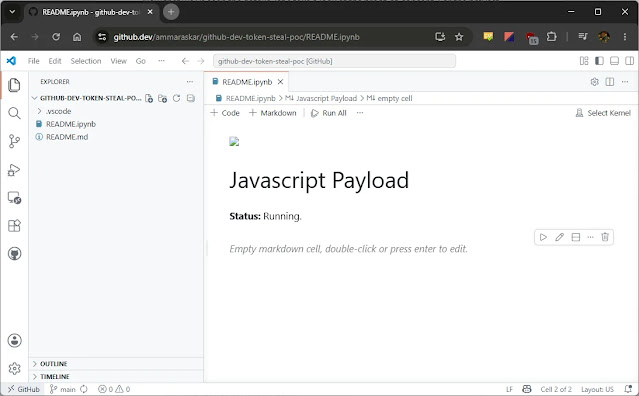
Security teams should treat web IDEs as part of the software supply chain. They should monitor OAuth token activity, extension installations, repository access patterns, and unusual API calls from developer accounts.
VS Code’s Workspace Trust model remains a key defense for local development, but this incident shows that web-based workspaces need equally strict controls. Organizations should combine trusted workspace policies with GitHub audit logging, secret scanning, and least-privilege access to sensitive repositories.
What VS Code got right
The exploit chain also showed that several defenses limited the damage. The researcher noted that stricter content security policies, Markdown sanitization, and webview isolation prevented simpler paths to code execution.
The weakness came from a usability bridge between isolated content and the editor UI. The VS Code webview model needs message passing for useful features, but that message passing must clearly separate real user input from synthetic events generated by untrusted content.
The main lesson is not that browser-based coding tools should be avoided. It is that they now hold powerful tokens and developer context. That makes them attractive targets, especially when one click can connect an attacker-controlled repository to a trusted coding environment.
FAQ
It was a VS Code webview-related issue that could let a malicious github.dev repository chain install an extension and steal the GitHub OAuth token passed into the browser-based editor.
Yes. The researcher said the token available to github.dev was not scoped only to the opened repository and could provide read and write access to other repositories the user could access, including private repositories.
Microsoft told The Hacker News that the issue had been mitigated for its services and that no customer action was required. Users should still review their github.dev extensions and recent repository activity if they opened suspicious links before the mitigation.
Microsoft said the issue does not affect VS Code Desktop. The original researcher discussed a related desktop scenario under different conditions, but the one-click token theft path focused on github.dev.
Developers should avoid unknown github.dev links, review installed extensions, clear github.dev site data after suspicious activity, monitor GitHub audit logs, and rotate exposed secrets if private repositories may have been accessed.


Read our disclosure page to find out how can you help VPNCentral sustain the editorial team Read more


Improve this guide




User forum
0 messages