
binding.gyp npm Supply Chain Attack Hit Dozens of Packages Across Maintainer Accounts


 9 min. read
  Published on
A fast-moving npm supply chain attack used a lesser-watched build file, binding.gyp, to execute malware during package installation. StepSecurity said the campaign compromised 57 npm packages across more than 286 malicious versions in a rolling wave on June 3, 2026.
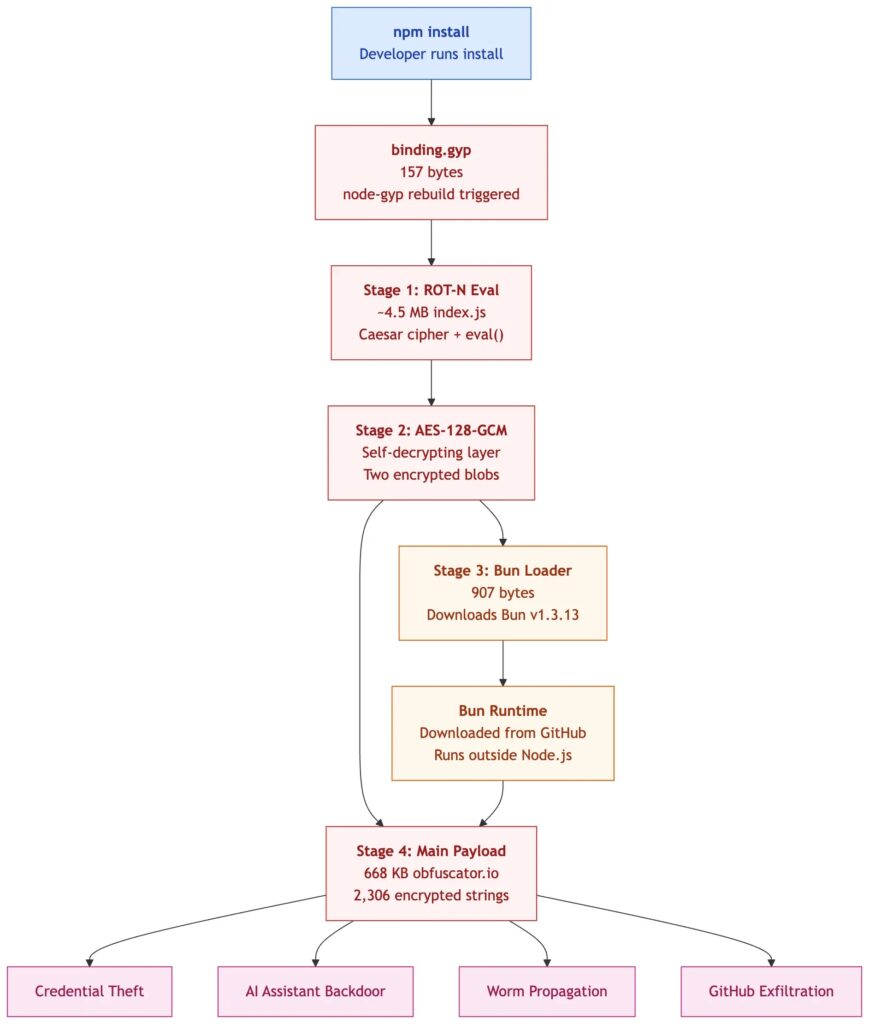
The attack stands out because it did not rely on the usual preinstall or postinstall scripts in package.json. Instead, the attacker abused npm’s native-addon build behavior, which can run node-gyp when a package contains a binding.gyp file.

Access content across the globe at the highest speed rate.
70% of our readers choose Private Internet Access
70% of our readers choose ExpressVPN

Browse the web from multiple devices with industry-standard security protocols.

Faster dedicated servers for specific actions (currently at summer discounts)
The result was a stealthier install-time attack path. Developers and CI systems could run npm install, see no suspicious lifecycle script in package.json, and still execute the malicious payload during dependency installation.
What happened in the npm attack
The campaign affected packages across several maintainer accounts. StepSecurity said the largest known target was @vapi-ai/server-sdk, the official Vapi.ai server SDK, followed by a larger cluster tied to the maintainer jagreehal and packages such as ai-sdk-ollama.
Snyk also analyzed the wave and said most of the affected packages clustered around a small number of maintainer accounts. That pattern matches how a worm spreads after stealing credentials from one account and publishing poisoned versions of every package the account can access.
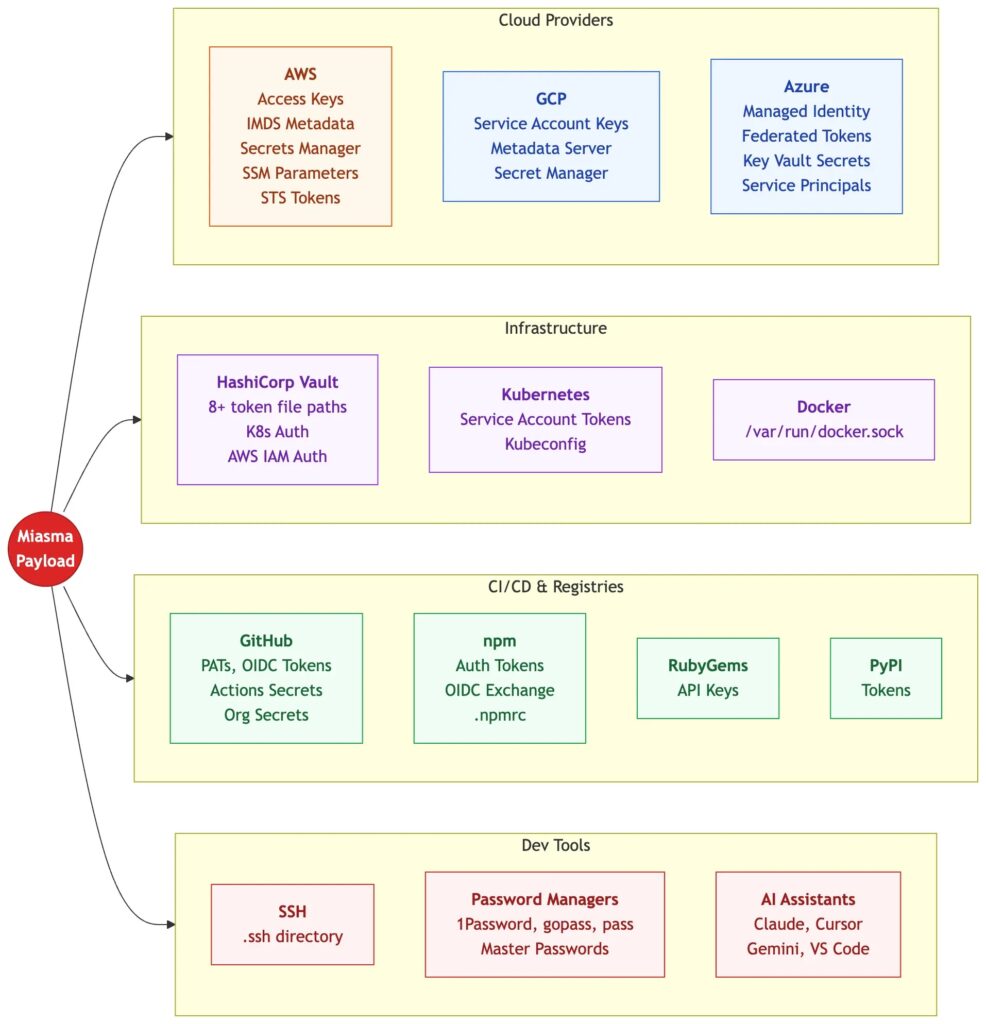
The malware belongs to the Miasma or Shai-Hulud-style supply chain worm family. These campaigns focus on stealing developer and CI/CD secrets, then using those credentials to spread into additional packages, repositories, or build environments.
| Detail | Reported finding |
|---|---|
| Attack date | June 3, 2026 |
| Compromised packages | 57 npm packages |
| Malicious versions | 286 or more versions |
| Main technique | Install-time execution through binding.gyp and node-gyp behavior |
| Malware family | Miasma, related to Mini Shai-Hulud-style supply chain worms |
Why binding.gyp made the attack harder to spot
The npm documentation explains that if a package contains a binding.gyp file and has no install or preinstall script, npm defaults to building the module with node-gyp. The official npm package.json documentation describes this behavior as part of support for native addons.
That behavior is legitimate. Many Node.js packages need node-gyp to compile native C or C++ components. The issue in this attack was that the attacker turned the build configuration path into a hidden execution path.
Security tools often focus on package.json lifecycle scripts because those have long been a common place for malicious npm packages to run code. A package with no suspicious preinstall or postinstall entry can look cleaner than it really is if scanners ignore binding.gyp and other build-time files.
How the payload behaved
The malicious packages reportedly included a small binding.gyp file and a large obfuscated JavaScript payload placed at the package root. StepSecurity noted that one analyzed package had a legitimate distribution entry point of about 27 KB, while the malicious root-level index.js was more than 4 MB.
That size difference is a useful warning sign. A root-level JavaScript file that is far larger than the declared package entry point should draw attention, especially when it appears next to a build file in a package that does not appear to need native code.
The malware used several layers of obfuscation and changed runtime behavior during execution. Researchers said it could download the Bun JavaScript runtime and use it to run later-stage code, which may bypass monitoring that only watches Node.js process activity.
| Attack stage | What it did |
|---|---|
| Install trigger | Used binding.gyp to activate node-gyp during npm install |
| Obfuscated payload | Hid the main malware under several layers of encoding and encryption |
| Runtime switch | Downloaded Bun to execute later-stage code outside the expected Node.js path |
| Credential theft | Searched developer machines and CI runners for secrets and tokens |
| Propagation | Used stolen npm tokens to publish new malicious package versions |
What credentials were at risk
The malware targeted secrets commonly present in developer and CI/CD environments. These included npm tokens, GitHub tokens, cloud credentials, SSH keys, Vault tokens, and other secrets used to build, publish, deploy, or access infrastructure.
CI runners carried the highest risk. Snyk’s analysis said any developer machine or CI runner that ran npm install and resolved one of the affected versions should fall inside the direct blast radius.
The malware also reportedly tried to poison repositories by adding configuration or hook files for developer tools and AI coding assistants. That gives the attack a persistence angle because removing the npm package alone may not remove every file that was written into a workspace.
- npm publishing tokens
- GitHub tokens and repository access tokens
- AWS, Google Cloud, and Azure credentials
- HashiCorp Vault tokens
- SSH keys and CI/CD secrets
- 1Password and developer tool secrets
- AI assistant and editor configuration files
Connection to earlier Miasma and Shai-Hulud waves
This attack follows earlier 2026 supply chain incidents tied to Mini Shai-Hulud and Miasma-style malware. In May, StepSecurity reported a self-spreading worm that compromised TanStack and other npm packages by stealing CI/CD secrets and using them for further publication.
In early June, Red Hat Cloud Services packages were also compromised. Sonatype reported that multiple legitimate packages under the @redhat-cloud-services namespace were hijacked and carried malicious code that targeted developer credentials.
The binding.gyp wave appears to build on the same playbook but moves the trigger. Earlier waves often used visible lifecycle scripts. This one shifted initial execution into a build configuration file that fewer scanners and reviewers treat as an install-time risk.
Why provenance and signing may not be enough
One of the more concerning findings is that the worm could publish malicious versions through legitimate maintainer accounts. When attackers control the publishing path, the resulting packages can look more trustworthy than random typosquatted malware.
Some waves in this broader family have also abused or produced trusted-looking supply chain metadata. That weakens the idea that provenance alone can prove a package is safe, because signed or attested artifacts can still be malicious if the trusted build or publish account was compromised.
The npm package rules also show why package contents matter beyond package.json. Files included in the package tarball can affect install behavior, even when the declared application entry point looks unchanged.
What teams should check now
Teams should first identify whether any affected package version entered their dependency tree on or after June 3, 2026. This review should include direct dependencies, transitive dependencies, lockfile updates, CI cache contents, internal mirrors, and developer machines.
Any environment that installed an affected version should be treated as compromised until proven otherwise. That includes local developer workstations, GitHub Actions runners, internal build servers, and deployment systems.
- Search lockfiles for affected packages and versions.
- Review CI logs for unexpected node-gyp rebuild activity.
- Look for large root-level index.js files in packages that should not contain them.
- Search repositories for unexpected .claude, .cursor, .gemini, or .vscode setup files.
- Check for outbound connections to unexpected GitHub repositories or Bun download endpoints.
- Rotate npm, GitHub, cloud, Vault, SSH, and CI/CD secrets from exposed environments.
- Review npm account publishing history for unexpected releases.
Recommended remediation steps
Credential rotation should come before simple cleanup. If the malware ran in a CI runner or developer machine, assume tokens and secrets from that environment may have been exposed. Removing a package does not undo token theft.
Organizations should also review earlier guidance from the Mini Shai-Hulud investigation because the same worm family repeatedly targets CI/CD secrets, package publishing credentials, and developer automation.
Defenders should not rely only on package.json script scanning. Package review pipelines should inspect binding.gyp, native build files, publish tarball contents, unexpected root files, unusually large bundled files, and differences between repository source and npm package contents.
| Priority | Action | Reason |
|---|---|---|
| Immediate | Block or remove affected package versions | Prevents new installs from triggering the payload |
| Immediate | Rotate secrets from exposed machines and CI runners | Assumes credentials were stolen during install |
| High | Audit npm publishing activity | Finds unexpected package releases from compromised accounts |
| High | Inspect AI assistant and editor files | Finds persistence files that can survive package removal |
| Ongoing | Scan package tarballs, not only repositories | Detects files added only during publish |
Why this attack matters for the npm ecosystem
npm remains one of the most important software registries in the world, and attackers know that a single package update can reach many downstream projects quickly. The binding.gyp technique adds another path defenders must monitor during installs.
The risk also extends beyond JavaScript. Sonatype’s Red Hat package analysis and the latest npm wave both show how attackers increasingly target trusted maintainers, not only fake packages.
The larger trend is clear. Supply chain attackers are moving from obvious malicious scripts toward trusted build paths, maintainer accounts, CI tokens, and development tools. The Phantom Gyp technique shows that even a tiny build file can become a high-impact execution trigger when it sits inside a trusted package.
FAQ
It is a self-spreading npm supply chain attack that used binding.gyp to trigger malicious code during npm install. The technique bypassed many checks that focus only on package.json lifecycle scripts.
StepSecurity reported 57 compromised npm packages across more than 286 malicious versions in the June 3, 2026 wave.
binding.gyp normally tells npm to build a native addon with node-gyp. In this attack, the file was abused as an install-time execution path, even though package.json did not show a suspicious install script.
Teams should treat the affected machine or CI runner as compromised, remove the malicious package version, rotate exposed secrets, review npm publishing activity, and inspect repositories for unexpected AI assistant or editor configuration files.
No. Signing and provenance help, but they cannot prove a package is safe if a trusted maintainer account, CI workflow, or publish process was compromised before the package was released.


Read our disclosure page to find out how can you help VPNCentral sustain the editorial team Read more


Improve this guide




User forum
0 messages