
EDRChoker Uses Windows QoS to Disrupt Cloud-Connected EDR Tools


 6 min. read
  Published on
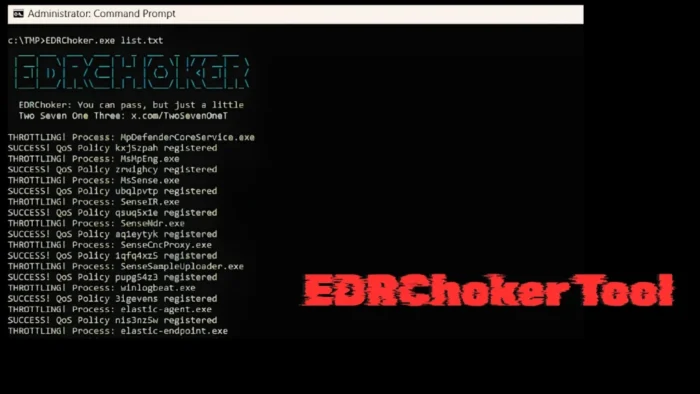
A new open-source red team tool called EDRChoker shows how Windows Quality of Service settings can be abused to interfere with cloud-connected endpoint security tools.
The EDRChoker repository describes the tool as a way to use Windows Policy-based Quality of Service to apply hard bandwidth caps to Endpoint Detection and Response agents. Instead of killing an EDR process, injecting code, or blocking traffic with a firewall rule, the tool attempts to make the agent’s network connection too slow to function normally.

Access content across the globe at the highest speed rate.
70% of our readers choose Private Internet Access
70% of our readers choose ExpressVPN

Browse the web from multiple devices with industry-standard security protocols.

Faster dedicated servers for specific actions (currently at summer discounts)
The technique matters because many modern EDR products rely on a constant connection between the local endpoint agent and a cloud management service. That connection supports telemetry uploads, policy updates, threat correlation, and remote response actions. If the agent stays alive but cannot reliably talk to its server, defenders may lose visibility at a critical moment.
How EDRChoker changes the EDR evasion model
According to the researcher’s technical write-up, EDRChoker differs from older EDR communication blocking methods that rely on Windows Defender Firewall rules or Windows Filtering Platform rules. Those older methods can leave packet-block or packet-drop artifacts that defenders already monitor in some environments.
Microsoft describes Policy-based QoS as a Windows feature for managing network traffic by application, user, and computer. Administrators can use it for legitimate bandwidth control, including throttling outbound traffic for selected applications.
EDRChoker turns that administrative feature into an evasion path. Rather than denying traffic outright, it throttles selected EDR-related processes to extremely low bandwidth. In practice, this can make TLS handshakes and cloud communication fail through repeated timeouts instead of obvious firewall blocks.
| Method | How it affects EDR communication | Defensive visibility |
|---|---|---|
| Firewall rule abuse | Blocks outbound traffic from selected security tools | May generate firewall or WFP block events |
| Windows Filtering Platform abuse | Creates filtering rules that stop telemetry from leaving the endpoint | Can trigger WFP-focused detection logic |
| QoS throttling | Slows selected EDR traffic until the cloud link becomes unreliable | May look like timeouts or degraded connectivity instead of a direct block |
Why Windows QoS is central to the technique
Windows QoS policies can apply to specific applications and can set outbound throttle rates. The New-NetQosPolicy documentation confirms that QoS policies can match an application name and apply a traffic throttling limit.
This makes QoS useful for enterprise traffic shaping, but it also creates a monitoring gap if attackers gain administrative control of a machine. A malicious or unauthorized QoS policy aimed at a security process may not look like classic EDR tampering because the process remains running.
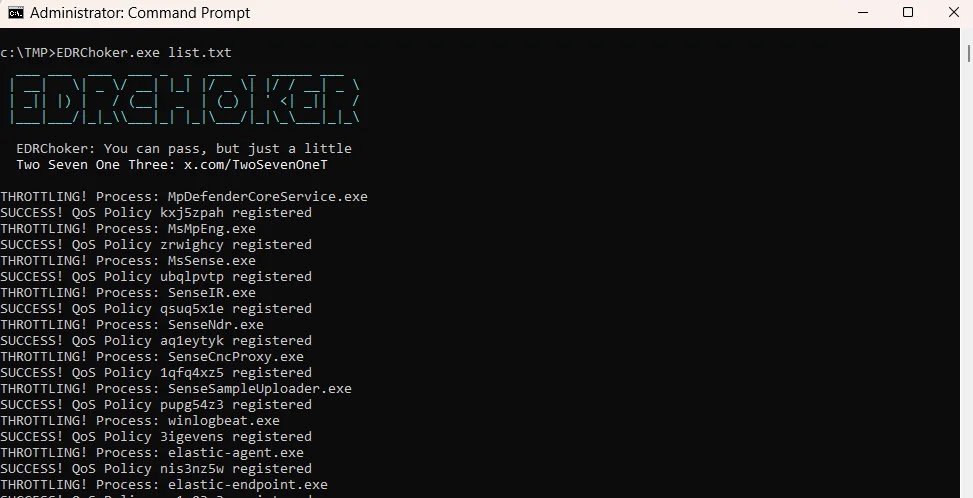
The GitHub project says EDRChoker uses Windows pacer.sys and that its rules take effect immediately. The repository also says the rules persist after Windows reboots, which increases the risk for defenders who only check whether the EDR service is active.
EDRChoker highlights a cloud dependency problem
The core issue is not limited to one tool. EDRChoker highlights a broader weakness in endpoint defense models that depend heavily on uninterrupted cloud connectivity. If the cloud channel fails, endpoint telemetry, remote policy delivery, and response actions can all degrade.
The researcher’s write-up frames the method as a way to interfere with the EDR client-server connection without relying on the same techniques defenders already expect. This makes the tool especially relevant for blue teams that monitor process tampering but do not audit QoS policy changes closely.
Elastic already documents a related evasion pattern involving Windows Filtering Platform abuse. Its Elastic detection rule identifies multiple WFP block events tied to endpoint security process names, warning that adversaries may add malicious WFP rules to stop security tools from sending telemetry.
- EDRChoker does not need to terminate the EDR process to disrupt visibility.
- The tool targets the network path between the endpoint and the cloud service.
- QoS policy abuse may appear as failed connections or repeated timeouts.
- Defenders should treat unexpected EDR connectivity loss as a possible evasion signal.
What defenders should monitor now
Security teams should review how they detect unauthorized QoS policy creation, especially on endpoints where normal users should not change network shaping rules. Microsoft’s Microsoft documentation shows that QoS policies can apply through Group Policy and can target applications, IP addresses, protocols, and ports.
Admins should also review PowerShell activity related to NetQos cmdlets. The PowerShell documentation makes clear that QoS policies can be created with application match conditions, which gives defenders a practical place to start when building alerts.
EDR and SIEM teams should correlate three signals: sudden EDR cloud disconnects, new or modified QoS policies, and privileged script or PowerShell execution. A single signal may look like network trouble, but the combination can point to deliberate security tool interference.
| Defensive check | Why it matters |
|---|---|
| Audit QoS policy inventory | Find unexpected policies that target security software processes |
| Monitor NetQos-related PowerShell usage | Detect suspicious creation or modification of bandwidth rules |
| Alert on EDR cloud disconnects | Catch agents that remain installed but stop reporting telemetry |
| Correlate with admin logons | Identify whether policy changes followed privilege misuse |
Why this matters for enterprise security
EDRChoker does not introduce a traditional software vulnerability with a CVE. It instead demonstrates how a legitimate Windows traffic management feature can become a defense evasion mechanism after an attacker gains enough privileges.
That distinction matters for response teams. Patching alone may not solve the problem. Organizations need visibility into policy changes, endpoint connectivity health, and administrative activity that can alter how security tools communicate.
Elastic’s Elastic’s investigation guidance for WFP-based evasion recommends reviewing suspicious network rule changes and restoring affected security software to normal operation. The same broader lesson applies here: defenders should not only check whether an EDR process is running. They should also confirm that it can communicate, update, and send telemetry reliably.
FAQ
EDRChoker is an open-source red team tool that uses Windows Policy-based Quality of Service to throttle network traffic from selected EDR processes. Its goal is to disrupt communication between an endpoint agent and its cloud management server without terminating the EDR process.
EDRChoker is designed to interfere with EDR communication rather than fully uninstall or terminate the EDR product. The endpoint agent may still appear to run locally, but its cloud connection can become unreliable or unusable.
Firewall and Windows Filtering Platform abuse can create packet block or packet drop events that many defenders already monitor. QoS throttling may instead look like slow connections, repeated timeouts, or cloud service failures, which can make it harder to separate from normal network problems.
Organizations should monitor for unauthorized QoS policy creation, NetQos-related PowerShell activity, sudden EDR cloud disconnects, and privileged changes to network policy. Correlating these signals can help distinguish an attack from routine connectivity issues.


Read our disclosure page to find out how can you help VPNCentral sustain the editorial team Read more


Improve this guide




User forum
0 messages