
OWASP CVE Lite CLI Brings Local Vulnerability Scanning to JavaScript Projects


 9 min. read
  Published on
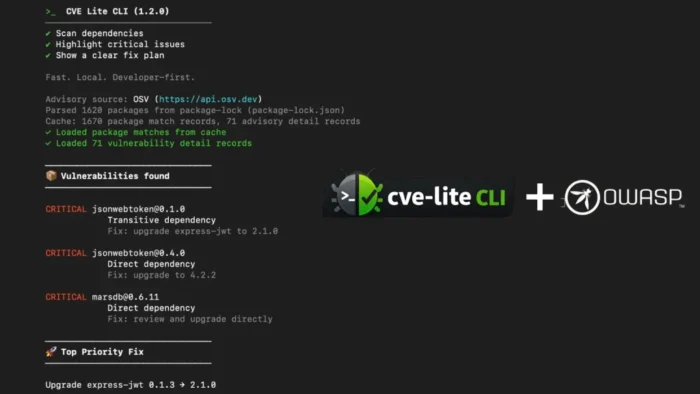
OWASP CVE Lite CLI is a free, open-source tool that scans JavaScript and TypeScript projects for vulnerable dependencies from the developer’s terminal.
The tool is now listed as an OWASP Foundation project and is designed for developers who want fast local vulnerability checks before they push code. The official CVE Lite CLI site says it scans lockfiles locally, explains dependency paths, and shows what developers should update.

Access content across the globe at the highest speed rate.
🔥 Save 81% + 2 bonus months! 🔥
70% of our readers choose Private Internet Access
70% of our readers choose ExpressVPN
2
Browse the web from multiple devices with industry-standard security protocols.
🔥 Save 73%! 🔥

Faster dedicated servers for specific actions (currently at summer discounts)
🔥 Save 69%! 🔥
The project is maintained by Sonu Kapoor and is available through the OWASP GitHub repository. Its main pitch is simple: security findings should appear where developers already work, not only later in CI dashboards or security backlogs.
What CVE Lite CLI does
CVE Lite CLI checks a project’s resolved dependency tree and matches installed packages against advisory data from OSV. It focuses on JavaScript and TypeScript ecosystems and supports lockfiles for npm, pnpm, Yarn, and Bun.
The tool’s parser coverage guide says it uses lockfiles as the source of truth when available. If no lockfile exists, it can fall back to package.json, but only for exact pinned direct dependencies because package.json alone does not show a full resolved dependency tree.
This approach helps developers avoid one of the biggest problems with dependency scanning: noisy output with little guidance. Instead of only listing CVE IDs, CVE Lite CLI tries to show the dependency path and the package-manager command that can fix the issue.
| Feature | What it does |
|---|---|
| Local lockfile scanning | Reads project lockfiles on the developer’s machine |
| Package manager detection | Supports npm, pnpm, Yarn, and Bun lockfiles |
| Direct and transitive visibility | Shows whether the vulnerable package is declared directly or pulled in by another package |
| Remediation guidance | Generates copy-ready update commands where the tool has enough confidence |
| CI output options | Can generate SARIF and CycloneDX SBOM files for security workflows |
Why developers may find it useful
Many vulnerability tools are built around CI systems, security dashboards, or automated pull requests. Those workflows help, but they often reach developers after a change is already in review.
The CVE Lite CLI project takes a different route. It lets developers run a scan locally, review the highest-risk findings, apply suggested fixes, and rescan before opening a pull request.
The official OWASP project page describes the tool as local-first and says it does not require an account, subscription, or cloud dashboard. That makes it easier to add to smaller teams, open-source projects, and individual developer workflows.
- Developers can run scans before pushing code.
- Teams can catch vulnerable packages earlier in the development cycle.
- The tool prioritizes clear update actions instead of raw advisory lists.
- Projects can use it locally, in CI, or in controlled environments.
The tool focuses on remediation, not just detection
One of the strongest parts of CVE Lite CLI is its remediation model. The remediation strategy guide says the scanner is intentionally conservative and prefers a specific command only when the lockfile, advisory data, and package metadata support it.
The tool separates direct dependencies from transitive dependencies because they need different fixes. A direct dependency can usually be updated by changing the package itself. A transitive dependency often requires updating the parent package that brought it into the project.
This distinction can reduce confusion for developers. Installing a vulnerable transitive child package directly may not fix the real dependency path, and it can create a mess in the dependency tree. CVE Lite CLI instead tries to point to the package that controls the vulnerable path.
| Finding type | Typical fix path |
|---|---|
| Direct dependency | Update the dependency declared in the project manifest |
| Transitive dependency | Update the parent package that pulls in the vulnerable child |
| Unknown relationship | Review the dependency path before applying a fix |
Lockfile support covers major JavaScript package managers
CVE Lite CLI supports the main lockfiles used in modern JavaScript projects. That includes package-lock.json for npm, pnpm-lock.yaml for pnpm, yarn.lock for Yarn, and bun.lock for Bun.
The lockfile documentation also explains how the tool chooses a lockfile when several exist in the same directory. It uses a priority order, starting with package-lock.json, then pnpm-lock.yaml, yarn.lock, bun.lock, and finally package.json as a fallback.
That matters for monorepos and workspaces. Developers need to point the scanner at the root where the correct lockfile lives, otherwise the tool may not see the full dependency tree.
Reports and CI output are also supported
CVE Lite CLI is mainly built for terminal use, but it can also generate reports and structured output for larger teams. This makes it useful beyond one-off local scans.
The tool can produce SARIF files for GitHub Code Scanning and other security platforms. The SARIF output guide says each CVE appears as a separate SARIF result, with severity, package version, location, and a recommended action where available.
It can also generate a CycloneDX SBOM. The CycloneDX documentation says the SBOM includes all packages from the scanned lockfile, not only vulnerable ones, which can help teams with compliance and central vulnerability management.
| Output mode | Best use case |
|---|---|
| Terminal output | Fast local developer scans |
| HTML report | Interactive review of findings and fix commands |
| SARIF | GitHub Code Scanning, VS Code, Azure DevOps, and other security tooling |
| CycloneDX SBOM | Compliance, Dependency-Track, and enterprise vulnerability management |
| JSON | Custom scripts, automation, and internal tooling |
AI assistant integration is built in
CVE Lite CLI also includes an AI assistant workflow. The AI assistant integration guide says the tool can install skill files for Claude Code, Codex CLI, Gemini CLI, Cursor, and GitHub Copilot.
After those files are installed, the coding assistant can understand how to run a scan, read the result, and help generate a prioritized remediation plan. Teams can commit the generated instruction files so other developers get the same workflow when they clone the repository.
This does not remove the need for developer review. Package upgrades can introduce breaking changes, so teams still need testing, code review, and normal release controls before merging dependency updates.
How CVE Lite CLI compares with common scanner workflows
CVE Lite CLI does not replace every security platform. Larger organizations may still need centralized dashboards, policy enforcement, SBOM management, and vulnerability reporting across many repositories.
Its advantage is speed and focus. A developer can run it during a fix loop, apply a suggested update, and scan again without waiting for a CI job to finish.
Help Net Security reported that Kapoor tested the tool on real-world applications such as OWASP Juice Shop. In that Help Net Security interview, Kapoor said the useful part is helping developers understand which vulnerabilities are direct, which are transitive, which can be fixed locally, and which need broader dependency decisions.
- Dependabot can automate pull requests, while CVE Lite CLI focuses on local scan and fix loops.
- CI scanners can enforce gates, while CVE Lite CLI helps developers act before CI fails.
- Dashboards help security teams track risk, while CVE Lite CLI gives developers immediate next steps.
- SBOM tools manage inventory, while CVE Lite CLI can generate a CycloneDX SBOM from a lockfile.
Security teams should understand the limits
No dependency scanner sees every risk perfectly. Advisory sources can differ on severity, affected versions, aliases, and fix data.
The same Help Net Security coverage noted that Kapoor does not treat any single advisory source as perfect. CVE Lite CLI makes OSV explicit as its advisory source, which helps teams understand where its findings come from.
That transparency matters. Developers should treat the tool as a practical scanner and remediation helper, not as a complete replacement for software composition analysis, manual review, or enterprise vulnerability management.
Project governance and footprint
The GitHub README says CVE Lite CLI is an OWASP Incubator Project maintained by Sonu Kapoor as project lead. It also lists a small runtime dependency footprint, with yaml, yarn-lockfile, better-sqlite3, and fflate as runtime dependencies.
A smaller dependency footprint can make a security tool easier to inspect, package, and manage. That does not make it risk-free, but it supports the project’s goal of staying lightweight and auditable.
The project also signs releases and documents verification options. This is useful for teams that want stronger assurance before installing a security tool globally or adding it to CI systems.
How teams can start using it
Developers can add CVE Lite CLI to a local workflow, a pre-push checklist, or a release checklist. Security teams can also add it to CI with severity thresholds and structured output.
For GitHub workflows, the SARIF documentation explains how scan results can appear in GitHub’s Security tab as code scanning findings. For inventory workflows, the SBOM guide shows how to generate a CycloneDX 1.4 file from the same scan.
Teams that already use coding assistants can also review the assistant setup guide to standardize how those tools interpret scan output and suggest fixes.
Why this matters for JavaScript security
JavaScript applications often depend on large dependency trees. A single direct package can pull in dozens or hundreds of transitive packages, and vulnerable versions can remain buried for years.
CVE Lite CLI addresses that problem by putting vulnerability context and remediation suggestions closer to the developer. It does not make dependency security automatic, but it can reduce the gap between finding a CVE and knowing what to change.
The remediation model is the key idea. Developers do not only need to know that a vulnerability exists. They need to know whether they can fix it now, which parent package controls it, and what command is safest to try first.
FAQ
OWASP CVE Lite CLI is a free, open-source vulnerability scanner for JavaScript and TypeScript projects. It scans project lockfiles locally, matches dependencies against OSV advisory data, and suggests remediation commands where possible.
CVE Lite CLI supports package-lock.json for npm, pnpm-lock.yaml for pnpm, yarn.lock for Yarn, and bun.lock for Bun. It can fall back to package.json only for exact pinned direct dependencies when no lockfile exists.
CVE Lite CLI is designed for local developer workflows, so developers can scan and fix dependencies before pushing code. CI scanners remain useful for enforcement, but CVE Lite CLI focuses on fast feedback and clear remediation guidance in the terminal.
Yes. CVE Lite CLI can generate terminal output, HTML reports, JSON output, SARIF files for code scanning, and CycloneDX SBOM files for compliance and vulnerability management workflows.
No. CVE Lite CLI can improve local remediation workflows, but larger teams may still need centralized SCA platforms, policy enforcement, SBOM management, and organization-wide vulnerability reporting.


Read our disclosure page to find out how can you help VPNCentral sustain the editorial team Read more


Improve this guide




User forum
0 messages