
SmartRAT Banking Malware Uses Fake Brazilian Bank Page and PowerShell ClickFix Trick


 7 min. read
  Published on
A Brazil-focused banking malware campaign is using a fake bank website and a PowerShell-based ClickFix trick to install SmartRAT on Windows systems. Zscaler ThreatLabz said it observed the campaign in March 2026, with attackers using a typosquatting page that impersonates a Brazilian bank.
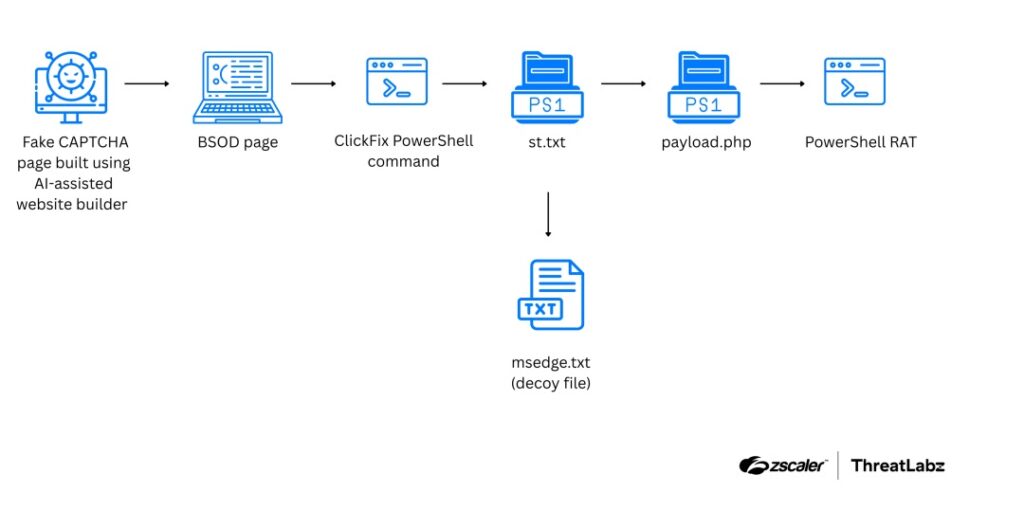
The attack does not begin with a traditional malware download button. Instead, victims are pushed through a fake Cloudflare CAPTCHA and then shown a full-screen fake Blue Screen of Death message that tells them to run a PowerShell command to recover their system.

Access content across the globe at the highest speed rate.
70% of our readers choose Private Internet Access
70% of our readers choose ExpressVPN

Browse the web from multiple devices with industry-standard security protocols.

Faster dedicated servers for specific actions (currently at summer discounts)
Once the command runs, the infection chain downloads a PowerShell dropper and then loads SmartRAT, a remote access tool built for financial theft. The malware can record keystrokes, capture screens, control input, show fake banking forms, and intercept payment QR codes.
How the SmartRAT phishing attack works
The fake page advertises a credit card application and imitates a legitimate banking flow. According to the SmartRAT analysis, the attackers used the domain cartaobb.com to impersonate the real cartaobrb.com.br banking domain.
The page also appears to have been built with help from AI-powered website tools. Researchers found templated code comments and automated structure in the page source, which made the phishing site look more polished while allowing the attackers to build it quickly.
The technique is called ClickFix because it tricks users into believing they must paste and run a command to fix a fake computer problem. In this case, the page copies the malicious PowerShell command to the clipboard and then pressures the victim to open the Windows Run dialog, paste it, and press Enter.
| Attack stage | What happens | Risk for victims |
|---|---|---|
| Fake bank page | Victim lands on a typosquatting banking page | User trusts the page and continues the process |
| Fake CAPTCHA | The site imitates a Cloudflare-style check | The page looks like a normal security step |
| Fake BSOD | A full-screen crash warning appears | The user feels pressured to follow instructions |
| PowerShell command | The victim pastes a command into Windows Run | The system downloads the next payload stage |
| SmartRAT infection | The RAT installs and connects to attacker infrastructure | Banking sessions, credentials, and payment flows can be targeted |
SmartRAT targets banking sessions and payment flows
SmartRAT is a PowerShell-based banking RAT focused on Brazilian financial services. Trend Micro previously tracked the same malware family as Banana RAT and linked it to financially motivated activity against Brazilian financial institutions.
The malware monitors browser activity and can react when a victim opens a banking website or financial app. Operators can view the victim’s screen, inject keystrokes, block user input, and display fake bank-branded overlays that ask for passwords or verification details.
QR code interception is one of the more targeted features. The malware can replace payment QR codes on banking pages, which can redirect funds during a transaction while the victim believes they are still interacting with a legitimate banking service.
PowerShell makes the attack harder to spot
The infection chain uses PowerShell because it already exists on Windows systems and can execute commands, download payloads, and run code in memory. MITRE ATT&CK T1059.001 tracks this type of PowerShell abuse as part of the Command and Scripting Interpreter technique.
In this campaign, the first command retrieves a file named st.txt from attacker-controlled infrastructure. That file acts as a dropper, downloads an encrypted payload, decrypts it, and launches the SmartRAT PowerShell script.
SmartRAT then tries to blend in with legitimate Windows activity by using Microsoft Edge update-style names for files and scheduled tasks. It can also request User Account Control approval to gain higher privileges and install itself as a service.
- Users should never paste commands from a website into Windows Run or PowerShell.
- Security teams should watch for suspicious PowerShell commands launched from browsers.
- Unexpected scheduled tasks with browser update-style names should be reviewed.
- Outbound traffic to unknown IP addresses or lookalike update domains should be investigated.
- Banking overlays, full-screen warnings, and fake recovery prompts should be treated as high-risk signs.
AI-generated phishing is becoming easier to scale
The SmartRAT campaign fits a broader phishing trend. The ThreatLabz 2026 Phishing and Initial Access Report found 413,524 AI-generated site instances, with 37,447 flagged as malicious.
That matters because attackers can use AI site builders to create polished phishing pages faster than before. A fake bank page no longer needs to look sloppy to be dangerous, and users may find it harder to spot small differences under pressure.
The same report also found that 95.2% of phishing activity was delivered over encrypted channels. This can make malicious pages appear more legitimate to users who mainly look for a padlock icon or HTTPS in the browser.
Defenders should focus on behavior, not just file hashes
SmartRAT’s use of PowerShell, encryption, scheduled tasks, and service-based persistence means defenders should monitor behavior across the full attack chain. Hash-based detection alone may miss new or modified payloads, especially when attackers change scripts or generate new builds.
Microsoft’s PowerShell security features include execution policies, module logging, script block logging, AMSI support, constrained language mode, and application control. These controls can help security teams detect or limit malicious script activity when properly configured.
Organizations should also map suspicious activity to the PowerShell technique in MITRE ATT&CK and combine that with endpoint telemetry, browser activity, and network logs. A victim pasting a PowerShell command after visiting a banking page is a clear signal that deserves immediate investigation.
| Indicator type | Indicator | Purpose |
|---|---|---|
| Domain | cartaobb[.]com | Fake Brazilian bank page |
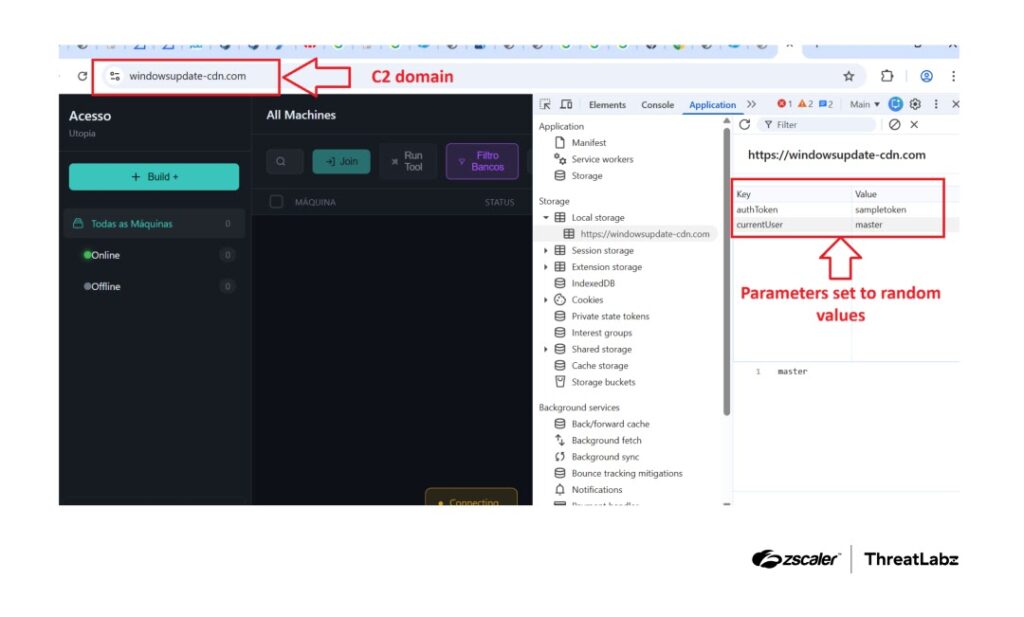
| Domain | windowsupdate-cdn[.]com | SmartRAT command-and-control infrastructure |
| IP address | 64[.]95[.]13[.]238 | Payload delivery infrastructure |
| IP address | 162[.]141[.]111[.]227 | Fallback command-and-control server |
| File name | st.txt | PowerShell dropper |
| File name | payload.php | Encrypted loader |
What users and banks should do now
For users, the safest rule is simple: do not run commands copied from any website, even if the page claims to be a bank, browser security check, CAPTCHA, or Windows recovery screen. Real banks do not ask customers to paste PowerShell commands to verify identity or fix a system issue.
For banks and security teams, the campaign shows why brand impersonation monitoring, domain takedowns, endpoint detection, and user education must work together. A fake page can start the attack, but unusual PowerShell execution, suspicious persistence, and banking overlay behavior can still expose it before fraud occurs.
The Banana RAT research also shows that this malware family supports real-time fraud, not just passive credential theft. That raises the urgency for banks, payment providers, and managed detection teams operating in Brazil.
- Block known malicious domains and IP addresses tied to the campaign.
- Enable script block logging and review suspicious PowerShell launch chains.
- Alert on PowerShell processes started shortly after browser visits to banking lookalike domains.
- Audit scheduled tasks and startup entries that imitate Microsoft Edge updates.
- Use the PowerShell security guidance to improve script controls and logging.
FAQ
SmartRAT is a PowerShell-based banking remote access tool used to target Brazilian banking users. It can record keystrokes, capture screens, control input, show fake banking forms, and intercept payment QR codes.
The attack uses a fake Brazilian bank page, a fake CAPTCHA, and a fake Blue Screen of Death warning. Victims are tricked into pasting a PowerShell command into Windows Run, which downloads and executes the malware chain.
Zscaler names the malware SmartRAT, while Trend Micro previously documented the same malware family as Banana RAT through a different attack path. Both reports describe a Brazil-focused banking malware operation built for financial fraud.
Attackers use PowerShell because it is built into Windows and can run scripts, download payloads, and execute code in memory. This can help malware blend in with normal administrative activity if defenders do not monitor it properly.
Users should never paste commands from a website into Windows Run, PowerShell, Terminal, or Command Prompt. Any page claiming that a command is needed to fix a browser, CAPTCHA, bank login, or system crash should be treated as suspicious.


Read our disclosure page to find out how can you help VPNCentral sustain the editorial team Read more


Improve this guide




User forum
0 messages