
WhatsApp Malware Campaign Targets Windows Users With VBS Files and Remote Access Tools


 8 min. read
  Published on
A new malware campaign is spreading through WhatsApp messages and targeting Windows users with malicious VBScript attachments disguised as financial documents.
Securelist said Kaspersky observed the campaign in June 2026 across several countries, with Malaysia accounting for about 80% of recorded infections. The campaign also reached users in Brazil, India, Mexico, Singapore, the United Kingdom, Spain, Taiwan, Australia, Russia, and Vietnam.

Access content across the globe at the highest speed rate.
70% of our readers choose Private Internet Access
70% of our readers choose ExpressVPN

Browse the web from multiple devices with industry-standard security protocols.

Faster dedicated servers for specific actions (currently at summer discounts)
The attack begins when a victim opens a .vbs file received through WhatsApp Desktop or WhatsApp Web on a Windows computer. The script then launches a multi-stage infection chain that installs a legitimate remote management agent, giving the attacker persistent remote access to the device.
How the WhatsApp Malware Spreads
The attackers use compromised WhatsApp accounts to send malicious attachments to contacts. Because the message appears to come from a known person, victims may trust the attachment and open it without checking the file type.
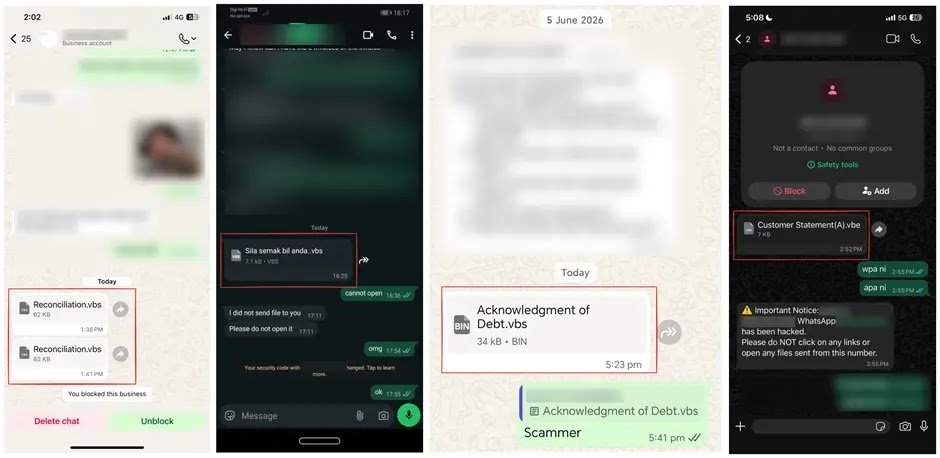
The files use business and finance-themed names such as Financial Reports.vbs, Debt Statement.vbs, Account Statement.vbs, and other localized versions in Portuguese, French, German, and Malay. This multilingual naming pattern suggests the campaign was designed for broad distribution.
The attack mainly affects Windows users. MyCERT also warned about malicious .vbs files delivered through WhatsApp Desktop on Windows, noting that VBS files do not execute the same way on iOS, Android, macOS, or Linux.
| Campaign detail | What researchers found |
|---|---|
| Initial delivery | Malicious VBScript files sent through WhatsApp messages |
| Main platform risk | WhatsApp Desktop and WhatsApp Web on Windows |
| Common lures | Financial reports, debt statements, account statements, and application forms |
| Final payload | Preconfigured ManageEngine Endpoint Central agent |
| Primary goal | Persistent remote access to the victim’s computer |
The Infection Chain Uses Windows Script Host
Once the victim opens the attachment, Windows Script Host runs the VBScript. The script creates a hidden folder and starts downloading additional scripts from attacker-controlled infrastructure.
The first stages prepare the machine for further compromise. They create folders with names that resemble Microsoft update components and attempt to weaken normal Windows security prompts.
Microsoft previously documented a related WhatsApp VBS malware campaign that used social engineering, renamed Windows utilities, cloud-hosted payloads, UAC tampering, and MSI installers to establish persistence and remote access.
Attackers Abuse a Legitimate RMM Tool
The final stage installs a preconfigured remote monitoring and management agent rather than a typical custom malware payload. This makes the attack harder to spot because remote management tools also serve legitimate IT support purposes.
The tool abused in the campaign is ManageEngine Endpoint Central, a legitimate endpoint management platform used by organizations for patching, software deployment, asset management, remote troubleshooting, and endpoint security.
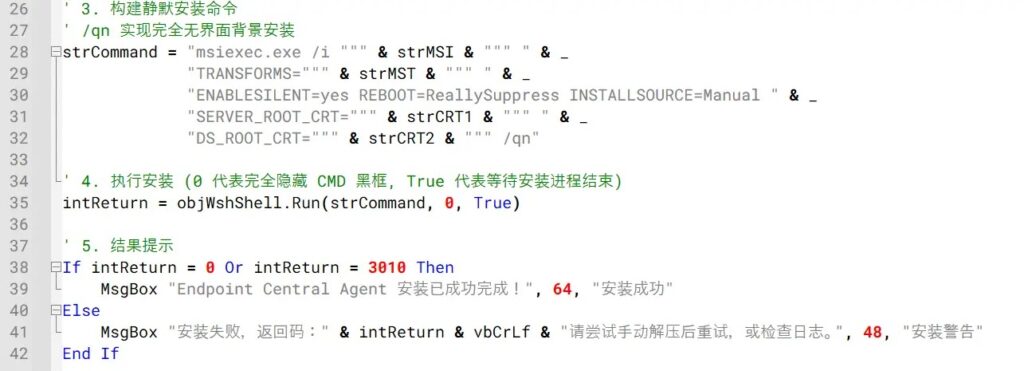
Kaspersky found that the downloaded package contained the Endpoint Central agent installer, configuration files, certificates, and scripts needed to silently install and register the agent with attacker-controlled servers.
Why Legitimate Tools Make Detection Harder
Remote management tools can give attackers the same capabilities that IT teams use every day. Once installed, they can support remote control, software deployment, command execution, and persistence across reboots.
That does not mean the vendor’s product is malicious. The risk comes from abuse of a legitimate tool in an unauthorized installation package. This tactic helps attackers blend into enterprise-style activity and avoid obvious malware signatures.
The Endpoint Central product page describes the platform as a unified endpoint management and security solution. Those same management capabilities explain why attackers value preconfigured agents when they can install them without permission.
Malaysia Was Hit the Hardest
Kaspersky telemetry showed infections across multiple countries and territories, but Malaysia had the highest concentration of victims. Researchers said the campaign appeared broad and opportunistic rather than focused on a specific organization or industry.
In a separate Malaysian alert, MyCERT said attackers were also using fake government job lures on Threads that pushed victims into WhatsApp chats where malicious .vbs files were delivered.
That campaign used fake “Jawatan Kosong” recruitment posters and typosquatted domains. The warning shows how attackers can change the lure while keeping the same core delivery method: convince a Windows user to open a script file sent through chat.
Possible Chinese-Speaking Operator, But No Firm Attribution
Kaspersky said it could not confidently attribute the activity to a known threat actor or intrusion set. Several artifacts point to a possible Chinese-speaking operator, but the evidence remains limited.
Some VBScript samples included comments and execution notes written in simplified Chinese. Researchers also found infrastructure overlap with IP addresses previously linked to ValleyRAT and Gh0st RAT activity.
However, Kaspersky’s analysis assessed that attribution with low confidence. Infrastructure reuse, shared hosting, and copied code can make actor attribution unreliable without stronger evidence.
Warning Signs Users Should Watch
The biggest warning sign is a script or executable attachment arriving through WhatsApp, even from someone the user knows. Attackers often rely on the trust created by a compromised contact list.
- Unexpected .vbs, .vbe, .js, .ps1, .bat, .cmd, or .exe files sent through WhatsApp.
- Financial, debt, invoice, bank statement, or job application names attached as scripts.
- Messages urging users to open a file quickly or apply through a suspicious chat link.
- Windows prompts or hidden folder creation after opening an attachment.
- Unknown remote management agents or new services on the computer.
Users should confirm any unexpected document through a separate channel before opening it. A real sender may not know that their WhatsApp account has been used to spread malware.
What Organizations Should Do
Security teams should treat unexpected script execution from WhatsApp, browsers, Downloads, Desktop, temporary folders, or Public folders as suspicious. This campaign uses normal Windows components, so behavioral detection matters.
Microsoft recommends controls such as cloud-delivered protection, EDR in block mode, tamper protection, network protection, and attack surface reduction rules in its malware campaign guidance.
One relevant control is Microsoft Defender’s attack surface reduction rule that blocks JavaScript or VBScript from launching downloaded executable content. Microsoft says this rule targets scripts that fetch and launch additional malware from the internet.
| Defense step | Why it helps |
|---|---|
| Block risky script execution | Stops VBS-based downloaders from launching follow-on payloads |
| Monitor wscript.exe and cscript.exe | Helps detect malicious script execution from user folders |
| Control RMM tool installation | Prevents unauthorized remote access agents from becoming persistent |
| Review services and installed agents | Finds silent remote management installations |
| Educate users on file extensions | Reduces the chance that a victim opens a disguised script |
What to Do if a File Was Opened
If a user already opened a suspicious WhatsApp attachment on Windows, the device should be treated as compromised. Disconnecting it from the internet can help cut off remote access while investigation begins.
Passwords, banking PINs, one-time codes, and other credentials typed on the device after compromise should be considered exposed. Those credentials should be changed from a clean device, not from the suspected infected system.
MyCERT also advised affected users to seek professional cleanup because the remote access agent may install as a Windows service and may not be removed by a basic antivirus scan.
Indicators for Defensive Hunting
Kaspersky published a larger list of indicators, including malicious VBScript hashes, payload-hosting domains, and attacker-controlled management server IP addresses. Organizations should use those indicators alongside behavioral detection, because domains and infrastructure can change quickly.
| Indicator type | Examples to hunt for |
|---|---|
| File type | Unexpected .vbs files received through WhatsApp |
| Process activity | wscript.exe or cscript.exe launching from user-accessible folders |
| Installer activity | Silent msiexec.exe execution tied to remote management software |
| Remote access tools | Unexpected Endpoint Central or AnyDesk installations |
| Network activity | Connections to unapproved RMM servers or suspicious payload hosting |
Microsoft’s ASR rules reference can help defenders harden Windows endpoints against script downloaders, obfuscated scripts, and other common malware behaviors.
The campaign shows why messaging apps have become a powerful delivery channel for Windows malware. Attackers do not need to exploit a WhatsApp vulnerability when they can convince users to run a script file themselves.
FAQ
It is a malware campaign that sends malicious VBScript files through WhatsApp messages. When a Windows user opens the file, the script starts a multi-stage infection chain that can install a remote management agent for attacker access.
The main risk is to Windows users who open .vbs attachments through WhatsApp Desktop or WhatsApp Web. Kaspersky observed victims in several countries, with Malaysia accounting for the largest share of infections.
The reports describe social engineering through WhatsApp messages, not a WhatsApp software vulnerability. The attack works when a user opens a malicious script file on a Windows computer.
Endpoint Central is a legitimate remote management tool. Attackers abuse a preconfigured agent because it can provide remote access and persistence while looking more like normal IT administration software than custom malware.
They should disconnect the computer from the internet, change passwords from a clean device, treat any credentials typed on the infected computer as exposed, and seek professional cleanup or rebuild the system if needed.


Read our disclosure page to find out how can you help VPNCentral sustain the editorial team Read more


Improve this guide




User forum
0 messages