
Microsoft Tells IT Admins to Prepare for Windows 11 Version 26H2


 8 min. read
  Published on
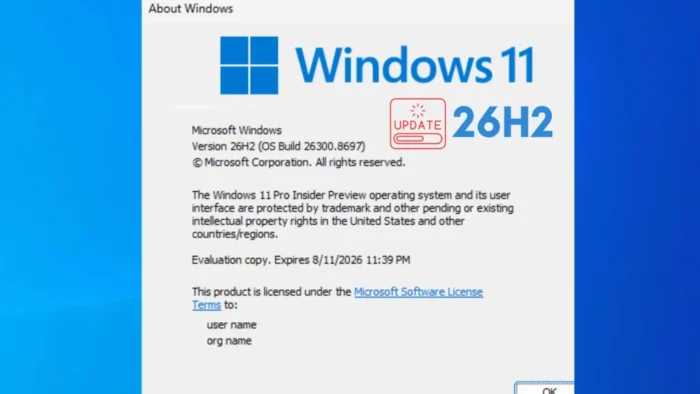
Microsoft is telling IT administrators to start preparing for Windows 11 version 26H2, the next annual feature update for Windows 11. The update is already available for early testing through the Windows Insider Program, but it is not ready for broad production deployment yet.
The company outlined the guidance in its Windows IT Pro Blog, where it described 26H2 as a predictable, low-disruption release for organizations. Microsoft wants admins to begin compatibility testing, review deployment rings, and prepare existing management tools before general availability.

Access content across the globe at the highest speed rate.
70% of our readers choose Private Internet Access
70% of our readers choose ExpressVPN

Browse the web from multiple devices with industry-standard security protocols.

Faster dedicated servers for specific actions (currently at summer discounts)
For most existing Windows 11 fleets, the main point is simple: version 26H2 will arrive as a smaller enablement-package style update for supported devices on the same servicing branch. That means many organizations should be able to treat it more like a monthly update than a full operating system replacement.
Windows 11 26H2 Uses the Shared Servicing Model
Microsoft says Windows 11 version 26H2 uses the same shared servicing model as recent annual releases. Devices on Windows 11 version 24H2 or 25H2 share the same broad codebase, receive the same security and quality updates, and differ mainly in which features are enabled.
The company used a similar approach for Windows 11 version 25H2. Microsoft’s 25H2 enablement package explains that new features can sit inactive inside monthly updates until a small package turns them on.
That approach reduces upgrade downtime because the device already has much of the required code. When the feature update arrives, the enablement package works more like a switch that changes the Windows version and enables the new release.
| Area | Windows 11 26H2 approach |
|---|---|
| Update type | Enablement-package style feature update for eligible devices |
| Best starting versions | Windows 11 version 24H2 and 25H2 |
| Testing availability | Windows Insider Program Experimental channel |
| Deployment tools | Microsoft Intune, Windows Autopatch, and WSUS |
| Key exception | Windows 11 version 26H1 devices will not upgrade directly to 26H2 |
26H1 Devices Are the Main Exception
Microsoft says Windows 11 version 26H1 devices will not update directly to version 26H2. That is because 26H1 uses a different Windows core than Windows 11 versions 24H2, 25H2, and 26H2.
The Windows Insider Blog confirmed the same limitation when announcing new builds on June 19, 2026. Microsoft said 26H1 devices will instead receive a path to update in a future Windows release.
This distinction matters for IT planning. Admins should not assume that every device with a 2026 Windows version number belongs to the same deployment path. Fleet inventory needs to identify which devices run 24H2, 25H2, 26H1, and Insider builds before any rollout begins.
Support Lifecycle Resets With 26H2
Microsoft says moving to Windows 11 version 26H2 will reset the support lifecycle for devices. Home, Pro, Pro Education, and Pro for Workstations editions will receive 24 months of support from release.
Enterprise, Education, IoT Enterprise, and Enterprise multi-session editions will receive 36 months of support. Microsoft’s Windows 11 release information also confirms that Windows 11 feature updates follow an annual cadence and usually arrive in the second half of the calendar year.
This lifecycle reset is one reason IT teams should not ignore annual feature updates. Staying on a supported release keeps devices eligible for security and quality updates, which reduces compliance risk.
| Edition group | Support length for annual Windows 11 feature updates |
|---|---|
| Home, Pro, Pro Education, Pro for Workstations | 24 months |
| Enterprise, Education, IoT Enterprise, Enterprise multi-session | 36 months |
How IT Admins Should Prepare
Microsoft recommends that organizations begin validation now. The first step is to test Windows 11 version 26H2 on a small set of devices that represent real business hardware, apps, drivers, policies, and security tools.
The Windows IT Pro Blog guidance says organizations can test 26H2 through the Windows Insider Program’s Experimental channel. Microsoft also says some organizations may prefer to wait until Release Preview, when the experience is closer to final shipping quality.

Admins should avoid treating Insider availability as a green light for broad deployment. Experimental builds help early validation, but production rollout should wait for stable release channels and normal enterprise deployment controls.
- Inventory Windows 11 versions across the organization.
- Identify devices on 24H2, 25H2, 26H1, and Insider builds.
- Validate core apps, drivers, VPNs, endpoint security tools, and device policies.
- Start with a small pilot ring before expanding to more departments.
- Keep devices current with monthly security and quality updates.
- Prepare helpdesk documentation for version changes and user questions.
Deployment Will Use Familiar Enterprise Tools
Microsoft says Windows 11 version 26H2 will be available through familiar management channels, including Microsoft Intune, Windows Autopatch, and Windows Server Update Services.
In Microsoft Intune, feature update policies let admins control which Windows version managed devices are offered and when they can install it. This gives organizations a dedicated policy surface for version targeting instead of relying only on broad update settings.
Windows Autopatch can also automate Windows update management for enrolled devices. For organizations already using Autopatch, 26H2 planning should fit into existing update rings, monitoring, and phased deployment practices.
Why the Update Should Be Less Disruptive
The shared servicing model reduces the size and complexity of the annual update because Windows features and quality improvements arrive continuously through monthly updates. The feature update then enables a defined release version.
The earlier enablement package documentation for 25H2 says this type of update can install with a single restart, reducing downtime compared with traditional feature upgrades.
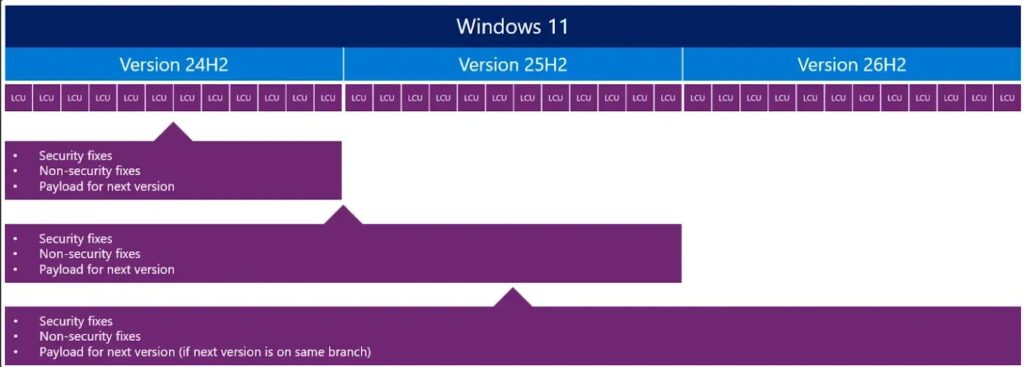
That does not mean admins can skip testing. A small update can still reveal issues with drivers, business applications, security products, management baselines, scripts, printers, VPN clients, and peripheral devices.
Windows Insider Testing Is Already Underway
Microsoft has started identifying new Experimental channel builds as Windows 11 version 26H2. The June 19 Windows Insider announcement says devices in the Experimental channel will begin showing version 26H2 under Settings, System, About, and winver.
Beta channel users who want to test 26H2 can move to Experimental, while users not already enrolled can join the Windows Insider Program and select the Dev channel while the transition to Experimental continues.
Organizations should keep Insider testing separate from production devices. Early builds help IT teams spot compatibility risks, but they can also include unfinished features, bugs, and changes that may not match the final release.
What 26H2 Means for Enterprise Planning
Windows 11 version 26H2 does not look like a traditional disruptive upgrade project. Microsoft wants it to serve as an annual servicing milestone that renews support while building on the same core platform used by 24H2 and 25H2.
The Windows release health page shows why this matters. Devices that fall out of support stop receiving normal security and quality updates, so annual release planning remains part of basic endpoint security.
IT departments should now focus on inventory, validation, policy checks, deployment rings, and communication. If those steps are in place before 26H2 reaches wider availability, the update should create fewer surprises for users and support teams.
Recommended Rollout Plan for IT Teams
Organizations can use the same phased approach they already use for Windows feature updates. The goal is to confirm readiness before a broad rollout.
- Start with lab devices that represent common hardware models and business roles.
- Move to an IT pilot group and validate helpdesk processes.
- Expand to early adopter users across departments.
- Deploy to standard business devices after compatibility checks pass.
- Hold back sensitive or specialized devices until app and hardware owners approve the update.
Admins managing updates through Intune feature update policies should also use reporting to monitor deployment status, device eligibility, and failures. Organizations using Windows Autopatch should review their rings and service readiness before 26H2 becomes broadly available.
FAQ
Windows 11 version 26H2 is Microsoft’s next annual feature update for Windows 11. It is currently available for testing through the Windows Insider Program and is expected to use an enablement-package style update for eligible devices on the same servicing branch.
No. Microsoft says Windows 11 version 26H1 devices use a different Windows core and will not update directly to version 26H2. They will receive a path to update in a future Windows release.
Microsoft says annual Windows 11 feature updates provide 24 months of support for Home, Pro, Pro Education, and Pro for Workstations editions, and 36 months for Enterprise, Education, IoT Enterprise, and Enterprise multi-session editions.
Microsoft says organizations can use familiar tools such as Microsoft Intune, Windows Autopatch, and Windows Server Update Services to deploy Windows 11 version 26H2 when it becomes available through enterprise channels.
Organizations should use the current Insider availability for testing only. Broad production deployment should wait for stable release channels and follow normal pilot, validation, and rollout-ring processes.


Read our disclosure page to find out how can you help VPNCentral sustain the editorial team Read more


Improve this guide




User forum
0 messages