
CodeStorm Phishing Campaign Abuses Compromised Microsoft 365 Accounts to Steal Credentials


 7 min. read
  Published on
A phishing operation known as CodeStorm is using compromised Microsoft 365 accounts to send convincing voicemail-themed emails and steal credentials from other Microsoft 365 users.
The campaign stands out because attackers are not relying only on newly created phishing domains. According to a Cyber Security News report citing ZeroBEC research, the operators use real Microsoft 365 accounts as sending infrastructure, which gives their messages a higher chance of passing email authentication and reaching inboxes.

Access content across the globe at the highest speed rate.
70% of our readers choose Private Internet Access
70% of our readers choose ExpressVPN

Browse the web from multiple devices with industry-standard security protocols.

Faster dedicated servers for specific actions (currently at summer discounts)
The phishing kit also performs live Microsoft 365 credential replay. When a victim enters a password, the backend can test it against Microsoft’s identity systems in real time, then continue the attack through multi-factor authentication prompts or codes.
How the CodeStorm phishing attack works
The attack starts with a voicemail notification email that mimics a Microsoft message. It includes familiar business details such as a call duration, a reference ID, and a button inviting the user to open a voicemail portal.
Under the visible message, the attackers add a long block of unrelated email-thread content. This padding can make the email look like a normal business conversation to automated scanning tools, even though the visible part remains a phishing lure.
After the victim clicks the link, the campaign routes them through redirect infrastructure and lands them on a phishing page protected by Cloudflare Turnstile. Turnstile is a legitimate bot-detection tool, but attackers can abuse it to keep automated scanners away from phishing pages.
| Attack stage | What happens | Why it matters |
|---|---|---|
| Compromised sender | Attackers send emails from real Microsoft 365 accounts | The email can look more trustworthy than mail from a newly registered domain |
| Voicemail lure | The message imitates a Microsoft voicemail notification | Users may click because the format looks familiar |
| Conversation stuffing | Dummy email-thread text appears far below the lure | Scanning tools may classify the email as a normal business thread |
| Credential replay | Submitted credentials are tested against Microsoft in real time | Attackers can quickly confirm valid passwords and trigger MFA workflows |
Why compromised Microsoft 365 accounts make the campaign harder to block
When attackers send phishing messages from compromised accounts, the email may pass checks that would normally flag unknown infrastructure. This can include SPF, DKIM, and DMARC alignment, depending on how the sender’s tenant is configured.
Microsoft warns in its compromised email account guidance that attackers often use stolen mailboxes to send messages inside and outside an organization. That makes account takeover both an initial compromise and a way to scale the next phishing wave.
CodeStorm also adapts to the target tenant. The kit can perform Microsoft-style home realm discovery, identify how the target organization handles authentication, and adjust the login flow instead of showing every victim the same fake page.
Turnstile and anti-analysis checks slow down scanners
The phishing page uses more than a fake login form. It also checks for signs of analysis, including browser automation, developer tools, and debugging behavior.
If the page detects suspicious activity, it can redirect the visitor to a legitimate Microsoft page. This helps the campaign appear harmless to researchers and some automated security systems.
Cloudflare says Turnstile runs browser-side checks to help websites confirm visitors are real users. In CodeStorm, criminals appear to use that same type of protection to make phishing infrastructure less visible to automated inspection.
- The lure uses a voicemail theme to encourage quick clicks.
- The hidden thread can confuse basic email-content analysis.
- Rotating frontend domains make blocklists less effective.
- The backend keeps a stable controller path under /google.php.
- Anti-analysis code can send researchers to legitimate Microsoft pages.
CodeStorm leaves traces in Microsoft Entra logs
One useful detection point sits in Microsoft Entra sign-in logs. The campaign’s live credential replay can generate real sign-in events against Microsoft services within seconds of a victim submitting credentials.
The ZeroBEC-linked analysis said defenders may see OfficeHome sign-in failures with error code 50126 shortly after a phishing click. Microsoft’s Entra error code reference lists AADSTS50126 as an invalid username or password error.
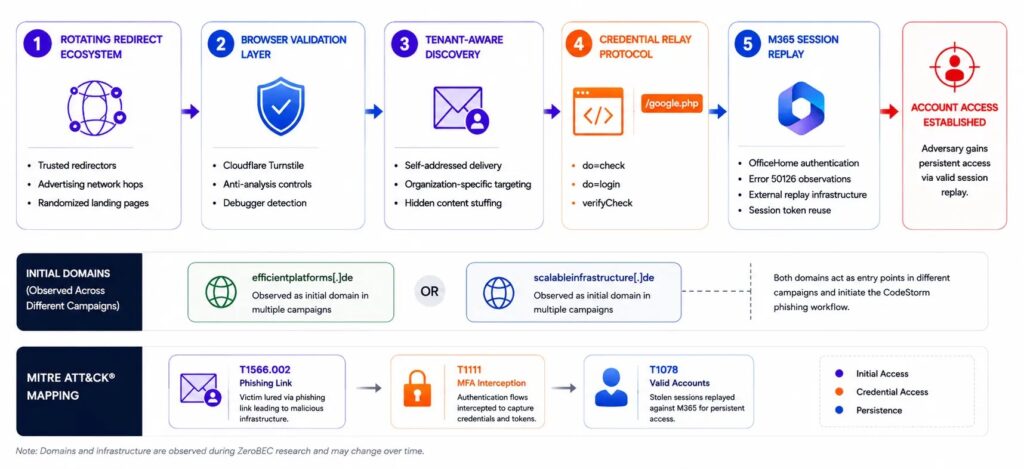
That signal becomes more useful when combined with geography and timing. A failed OfficeHome sign-in from an unexpected US-based IP address seconds after a user clicks a suspicious voicemail link should receive immediate attention.
| Detection area | Signal to review | Possible meaning |
|---|---|---|
| Email headers | From, To, and Return-Path values that match in unusual ways | Possible phishing message sent through compromised mail infrastructure |
| Email body | Short voicemail lure followed by large unrelated thread content | Possible conversation-stuffing evasion |
| Network traffic | POST requests to /google.php with form actions such as do=check or do=login | Possible CodeStorm backend communication |
| Entra logs | OfficeHome failures with error code 50126 from unexpected locations | Possible live credential replay |
| Mailbox activity | New inbox rules, OAuth grants, or unusual sign-ins after MFA prompts | Possible account takeover |
MFA bypass risk depends on user response
CodeStorm does not make MFA useless, but it can exploit users who approve unexpected prompts or type one-time codes into phishing pages. The kit reportedly supports several verification paths, including Authenticator push, SMS codes, voice calls, and recovery-code flows.
This is why organizations should train users to reject unexpected MFA prompts and report them immediately. A prompt that appears after clicking a voicemail email should not be approved unless the user deliberately started a trusted sign-in process.
Security teams should also compare MFA events with recent email clicks, suspicious IP addresses, and failed password attempts. Correlation matters because a single failed login may look ordinary, while a failed login after a phishing click can point to active credential replay.
What Microsoft 365 admins should do now
Administrators should first search for phishing messages that match the voicemail theme and include long unrelated thread content below the visible email. They should then identify users who clicked links and check their sign-in logs.
Microsoft’s Entra error code documentation can help teams interpret 50126 failures during incident review, while Microsoft’s mailbox compromise guidance outlines response steps for accounts that may have been abused to send phishing mail.
Teams should reset passwords for confirmed victims, revoke sessions, review MFA methods, remove suspicious inbox rules, audit OAuth app grants, and check whether compromised accounts sent mail to internal or external contacts.
- Hunt for voicemail-themed emails from internal or trusted Microsoft 365 accounts.
- Review messages with hidden or unrelated thread content below the lure.
- Correlate click events with OfficeHome failures and error code 50126.
- Check for MFA prompts from unfamiliar locations.
- Review mailbox rules, forwarding settings, and OAuth grants.
- Revoke active sessions for users who entered credentials.
- Move high-risk users to phishing-resistant MFA where possible.
Why CodeStorm matters for Microsoft 365 security
CodeStorm shows how phishing has moved beyond basic credential collection. The campaign combines compromised accounts, voicemail lures, scanner evasion, tenant-aware login flows, and live credential replay.
That combination gives defenders several places to respond, but it also means no single control will stop every attempt. Email filtering, identity monitoring, user training, session controls, and mailbox auditing all need to work together.
The most important response is speed. If an organization can connect a phishing click to a suspicious Entra failure, MFA prompt, or mailbox change within minutes, it has a much better chance of stopping full account takeover before attackers use the account to expand the campaign.
FAQ
CodeStorm is a Microsoft 365 phishing campaign that uses voicemail-themed lures, compromised Microsoft 365 accounts, anti-analysis checks, and live credential replay to steal credentials and target MFA workflows.
Compromised accounts help attackers because emails sent from real Microsoft 365 identities can look more trustworthy and may pass authentication checks that would block messages from suspicious new domains.
When a victim enters credentials, the phishing backend can test them against Microsoft identity systems in real time. This can create sign-in events in the victim tenant’s Microsoft Entra logs.
Microsoft lists AADSTS50126 as an invalid username or password error. In this campaign, repeated OfficeHome failures with this code from unexpected IP addresses may indicate credential replay after a phishing click.
MFA can reduce risk, but users can still be tricked into approving unexpected prompts or entering one-time codes. Phishing-resistant MFA, user training, and sign-in monitoring offer stronger protection.
Admins should review mail-click events, Entra sign-in logs, MFA prompts, mailbox rules, forwarding settings, OAuth grants, and recent outbound email from the suspected account.


Read our disclosure page to find out how can you help VPNCentral sustain the editorial team Read more


Improve this guide




User forum
0 messages