
Critical Ollama flaw can leak prompts, API keys, and server memory from exposed AI deployments


 6 min. read
  Published on

A critical Ollama vulnerability can let unauthenticated attackers steal sensitive data from exposed AI servers. The flaw, tracked as CVE-2026-7482 and nicknamed Bleeding Llama, affects Ollama versions before 0.17.1.
Cyera researchers said the bug can expose data from the Ollama process memory, including user prompts, system prompts, environment variables, API keys, tokens, and other secrets. The risk is highest for Ollama servers reachable from the internet without a firewall, authentication proxy, or strict network controls.

Access content across the globe at the highest speed rate.
70% of our readers choose Private Internet Access
70% of our readers choose ExpressVPN

Browse the web from multiple devices with industry-standard security protocols.

Faster dedicated servers for specific actions (currently at summer discounts)
The issue matters because Ollama is widely used to run large language models locally or on self-hosted infrastructure. In enterprise environments, those servers may process source code, internal documents, customer data, tool outputs, and private system instructions.
What is Bleeding Llama?
Bleeding Llama is a heap out-of-bounds read vulnerability in Ollama’s GGUF model loader. It happens when Ollama processes a specially crafted model file with tensor metadata that does not match the real file size.
When the vulnerable server handles that malformed file, it can read beyond the intended memory buffer. That memory may contain sensitive information from the same Ollama process.
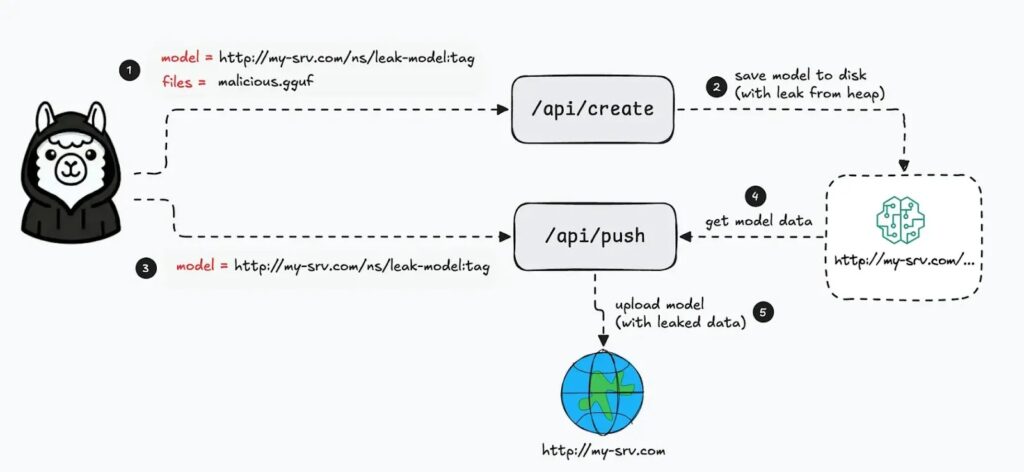
Cyera said attackers can then use Ollama’s model creation and push features to move the generated model artifact to an attacker-controlled server, carrying leaked memory with it.
At a glance
| Detail | What it means |
|---|---|
| CVE | CVE-2026-7482 |
| Nickname | Bleeding Llama |
| Affected software | Ollama before version 0.17.1 |
| Bug type | Heap out-of-bounds read in GGUF model processing |
| Main impact | Memory disclosure from the Ollama process |
| Possible leaked data | Prompts, system prompts, environment variables, API keys, tokens, and secrets |
| Highest-risk systems | Network-accessible Ollama deployments without authentication or strong access controls |
| Fixed version | 0.17.1 or later |
How the Ollama vulnerability works
Ollama supports GGUF files, a common format used for local AI model data. These files include metadata that describes tensors, including their shape and size.
Cyera found that Ollama did not properly validate whether the tensor metadata matched the real amount of data in the uploaded file. A crafted file could declare a much larger tensor than the file actually contained.
During model conversion, Ollama could then read past the end of the intended buffer. The extra data came from nearby heap memory and could include sensitive content from other AI interactions or configuration data.
Why the leaked data can be dangerous
Prompts and system prompts may include internal business logic, private instructions, customer details, employee messages, or unreleased product information. In coding workflows, prompts can also include source code, bug details, and technical architecture.
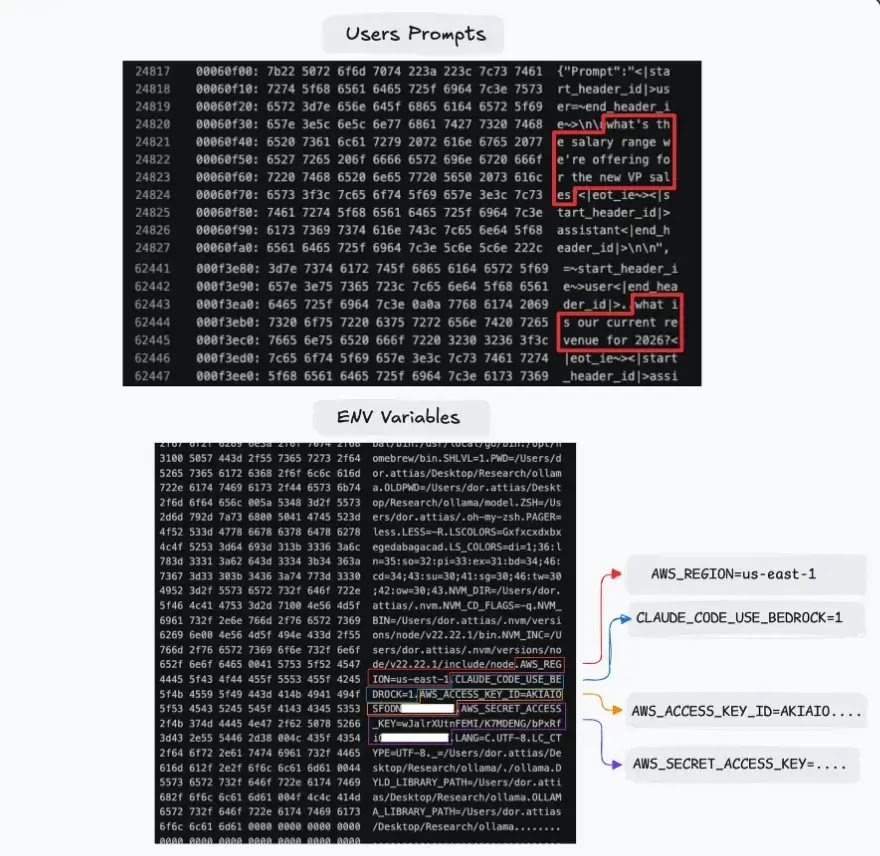
Environment variables can create an even bigger risk. They often store API keys, cloud tokens, database credentials, service account secrets, and authentication tokens used by connected tools.
The risk grows when Ollama runs with coding assistants, automation tools, or internal agents. Tool outputs and private context can pass through the same memory space and may become part of the exposed data.
Exposure depends on network access
Ollama’s official documentation says the service binds to 127.0.0.1 by default, which limits access to the local machine. Users can change that behavior with the OLLAMA_HOST environment variable when they want to expose Ollama on a network.
This distinction matters. A local-only Ollama instance has a smaller attack surface, while a server exposed to the internet or an internal network without access controls faces much higher risk.
Security researchers reported that hundreds of thousands of Ollama deployments may be reachable online. Organizations should not assume their AI servers stayed private unless they have verified network exposure directly.
Who should respond first?
- Teams running Ollama on internet-facing servers
- Organizations using Ollama behind weak or unauthenticated proxies
- Developers exposing Ollama with OLLAMA_HOST=0.0.0.0
- Companies using Ollama with coding assistants or AI agents
- Teams that pass secrets, source code, or customer data through local AI models
- Security teams managing AI infrastructure in cloud or container environments
What organizations should do now
Organizations should upgrade Ollama immediately to version 0.17.1 or later. Since newer Ollama releases are already available, the safest approach is to install the latest stable version rather than stopping at the minimum fixed version.
Teams should also remove direct internet exposure. Ollama should sit behind a firewall, VPN, private network, authentication proxy, or other access control layer.
Any exposed deployment should go through incident review. Security teams should check access logs, look for unusual model creation or push activity, and rotate secrets that may have existed in environment variables or prompts.
Recommended mitigation checklist
- Upgrade Ollama to the latest stable release.
- Confirm that all deployments run version 0.17.1 or later.
- Check whether port 11434 is reachable from the internet.
- Remove public access unless there is a strong business need.
- Place Ollama behind authentication and network controls.
- Restrict access to trusted users, hosts, and internal services.
- Review logs for suspicious model creation and push activity.
- Rotate API keys, tokens, and secrets that may have been loaded into the Ollama process.
- Review prompts and tool outputs for sensitive data exposure.
- Avoid placing long-lived secrets in environment variables available to AI services.
Why AI infrastructure needs closer monitoring
Bleeding Llama shows how AI infrastructure can become a sensitive data source even when it does not store a traditional database. The model runtime may still process prompts, secrets, configuration values, and tool responses in memory.
That makes AI servers attractive targets. Attackers do not always need to compromise the application database if they can extract secrets and business context from the inference layer.
Security teams should treat local AI systems like production infrastructure. They need patching, access control, logging, network segmentation, and secret-management rules just like web apps, APIs, and build systems.
FAQ
CVE-2026-7482 is a critical heap out-of-bounds read vulnerability in Ollama’s GGUF model loader. It can expose sensitive memory from the Ollama process.
Bleeding Llama is the nickname Cyera gave to CVE-2026-7482. The name refers to the vulnerability’s ability to leak memory from Ollama deployments.
Attackers may be able to access prompts, system prompts, environment variables, API keys, tokens, secrets, and other data present in Ollama process memory.
Ollama versions before 0.17.1 are affected. Organizations should upgrade to 0.17.1 or later, preferably the latest stable version.


Read our disclosure page to find out how can you help VPNCentral sustain the editorial team Read more


Improve this guide



User forum
0 messages