
Google reCAPTCHA QR Checks Could Lock Out De-Googled Android Users


 6 min. read
  Published on
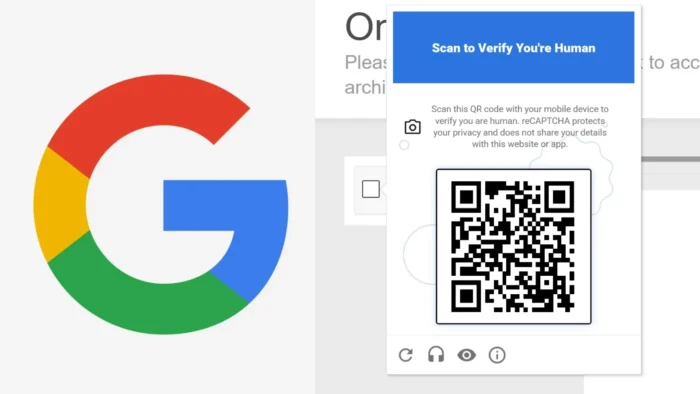
Google’s new reCAPTCHA mobile verification flow could make it harder for privacy-focused Android users to access websites that rely on Google’s anti-bot checks. The issue affects Android devices that do not run Google Play Services, including many de-Googled phones and custom ROM setups.
The change is tied to Google Cloud Fraud Defense, which Google describes as the next evolution of reCAPTCHA. When reCAPTCHA asks for mobile verification, Android users now need Google Play Services version 25.41.30 or newer to complete the process.

Access content across the globe at the highest speed rate.
70% of our readers choose Private Internet Access
70% of our readers choose ExpressVPN

Browse the web from multiple devices with industry-standard security protocols.

Faster dedicated servers for specific actions (currently at summer discounts)
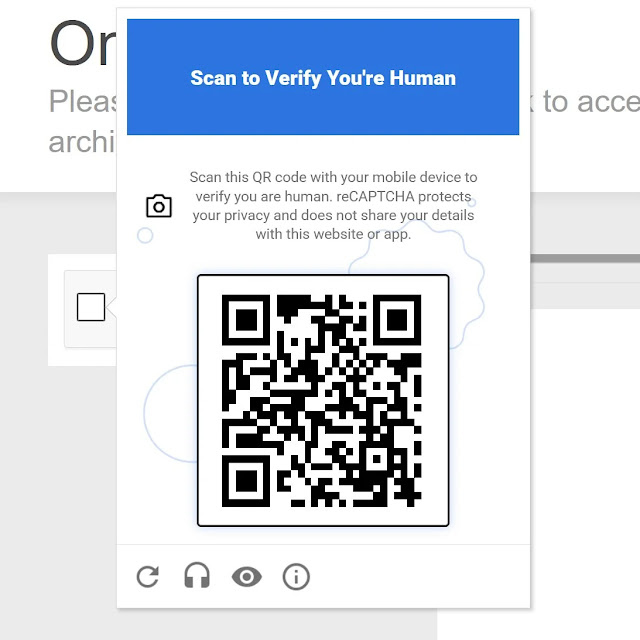
That creates a problem for users who intentionally avoid Google’s proprietary mobile services. If a website triggers the QR-based mobile verification challenge, those users may fail the check even if they are real people.
What changed in reCAPTCHA
Google Cloud announced Fraud Defense at Google Cloud Next 2026 as a broader trust platform for humans, bots, and AI agents. The company says the system aims to reduce visible puzzles for most trusted users while detecting fraud and automated abuse.
The controversial part is the mobile verification flow. Google’s support page says Android devices must use Google Play Services 25.41.30 or greater to complete reCAPTCHA Mobile Verification.
For iPhone and iPad users, Google lists iOS and iPadOS 15.0 or newer for QR code scanning. Google also lists iOS and iPadOS 16.4 or newer for the “Click to Verify” button, with a reCAPTCHA app option for some older supported iOS versions.
Key facts at a glance
| Item | Details |
|---|---|
| Product involved | Google reCAPTCHA and Google Cloud Fraud Defense |
| Main change | Mobile verification can use QR code scanning |
| Android requirement | Google Play Services version 25.41.30 or newer |
| Users most affected | Android users without Google Play Services |
| Examples | De-Googled Android setups and some custom ROM users |
| Why Google says it matters | Fraud Defense is designed to fight bots, fraud, and abuse |
| Main concern | Website access may depend on Google’s proprietary Android services |
Why de-Googled Android users are affected
Many privacy-focused Android users remove or avoid Google Play Services because it runs deeply in the background and connects many Google features across the device.
That choice is central to operating systems and device setups built around privacy, reduced tracking, and open-source components. However, the new reCAPTCHA mobile verification requirement can turn that choice into a website access problem.
If a user without Play Services receives the QR code challenge, the phone may not meet Google’s supported environment rules. As a result, the user can get blocked from completing verification on affected websites.
The issue is not limited to mobile browsing
The problem can also affect desktop users. If a person browsing on a laptop or desktop receives a QR-based reCAPTCHA challenge, they may need a compatible phone to scan and complete the verification.
That means a de-Googled Android user can run into the same issue even when the original website visit happens on a PC. The browser session still depends on a mobile device that can satisfy Google’s verification requirement.
This is why privacy advocates are treating the change as more than a small mobile inconvenience. reCAPTCHA appears across a large number of websites, so a failed verification step can block logins, signups, forms, purchases, and account recovery flows.
Google’s argument is security and fraud prevention
Google says Fraud Defense addresses a web environment where bots, fraud networks, and AI agents are becoming harder to separate from real human activity. The company says the platform uses Google-scale intelligence to assess trust and reduce unnecessary friction for legitimate users.
That argument reflects a real challenge. Traditional image CAPTCHAs have become less reliable as automated systems improve, and websites need better ways to stop fake account creation, scraping, credential stuffing, payment fraud, and abuse.
The dispute is about the tradeoff. Critics argue that Google is making basic web verification depend on Google-controlled Android infrastructure, while users without those services lose access even when they are not bots.
Why privacy advocates are criticizing the move
- It can exclude users who run Android without Google Play Services.
- It makes website access depend on a proprietary mobile component.
- It may affect desktop browsing when the challenge requires a phone scan.
- It gives website owners less visibility into who gets blocked by the verification layer.
- It may push privacy-focused users back toward Google-controlled Android services.
- It creates pressure on websites to consider alternative bot protection tools.
What users can try if verification fails
Users who fail the new mobile verification flow have limited options. The most direct route is to use a compatible Android phone with Google Play Services 25.41.30 or newer, or a supported iPhone or iPad.
If an audio challenge appears, users can try that option instead of the QR code flow. However, availability can vary depending on the website, risk score, and challenge shown.
Users can also try accessing the site through a different network, browser profile, or device. That may reduce the chance of receiving a higher-risk challenge, but it does not solve the core issue for people who want to avoid Google Play Services entirely.
What website owners should consider
Website owners should watch support tickets and analytics for sudden increases in failed reCAPTCHA verification attempts. A security system can stop bots, but it can also block legitimate users when the challenge path becomes too narrow.
Sites with privacy-focused audiences should test the user experience on Android devices without Google Play Services. They should also check how the flow behaves on desktop browsers when a phone scan is required.
Administrators may also want to evaluate alternatives such as hCaptcha, Cloudflare Turnstile, Friendly Captcha, or ALTCHA, especially for websites that want broader compatibility across devices and operating systems.
FAQ
No. Most Android users with current Google Play Services should be able to complete the flow. The issue mainly affects users without Google Play Services or with unsupported versions.
Google’s support page says Android devices need Google Play Services version 25.41.30 or greater for reCAPTCHA Mobile Verification.
Google is moving reCAPTCHA into Cloud Fraud Defense, which is designed to detect fraud, bots, humans, and AI agents across websites and applications.
It can affect GrapheneOS users who do not install Google Play Services. GrapheneOS users who choose to install sandboxed Play Services may have a different experience depending on the challenge and setup.
Summary
- Google’s new reCAPTCHA mobile verification flow can require QR code scanning.
- Android users need Google Play Services version 25.41.30 or newer for the supported mobile verification path.
- De-Googled Android users may fail verification when they receive the QR-based challenge.
- The issue can also affect desktop browsing if the challenge requires a phone scan.
- Website owners should test compatibility and consider fallback verification options.


Read our disclosure page to find out how can you help VPNCentral sustain the editorial team Read more


Improve this guide




User forum
0 messages