
Critical WP Maps Pro Flaw Lets Attackers Create WordPress Administrator Accounts


 8 min. read
  Published on

A critical vulnerability in the WP Maps Pro WordPress plugin can let unauthenticated attackers create administrator accounts and take over vulnerable websites. The flaw is tracked as CVE-2026-8732 and affects WP Maps Pro versions up to and including 6.1.0.
Wordfence disclosed the vulnerability after receiving a report from security researcher David Brown through its Bug Bounty Program. The researcher received a $1,950 bounty for the finding.

Access content across the globe at the highest speed rate.
70% of our readers choose Private Internet Access
70% of our readers choose ExpressVPN

Browse the web from multiple devices with industry-standard security protocols.

Faster dedicated servers for specific actions (currently at summer discounts)
The issue has a CVSS 3.1 score of 9.8, which makes it critical. Attackers do not need an existing account, user interaction, or special access to exploit sites running vulnerable versions.
What is CVE-2026-8732?
CVE-2026-8732 is an unauthenticated privilege escalation vulnerability in WP Maps Pro. The plugin is sold on CodeCanyon, where the listing shows more than 15,800 sales and describes it as a store locator and custom mapping plugin for WordPress.
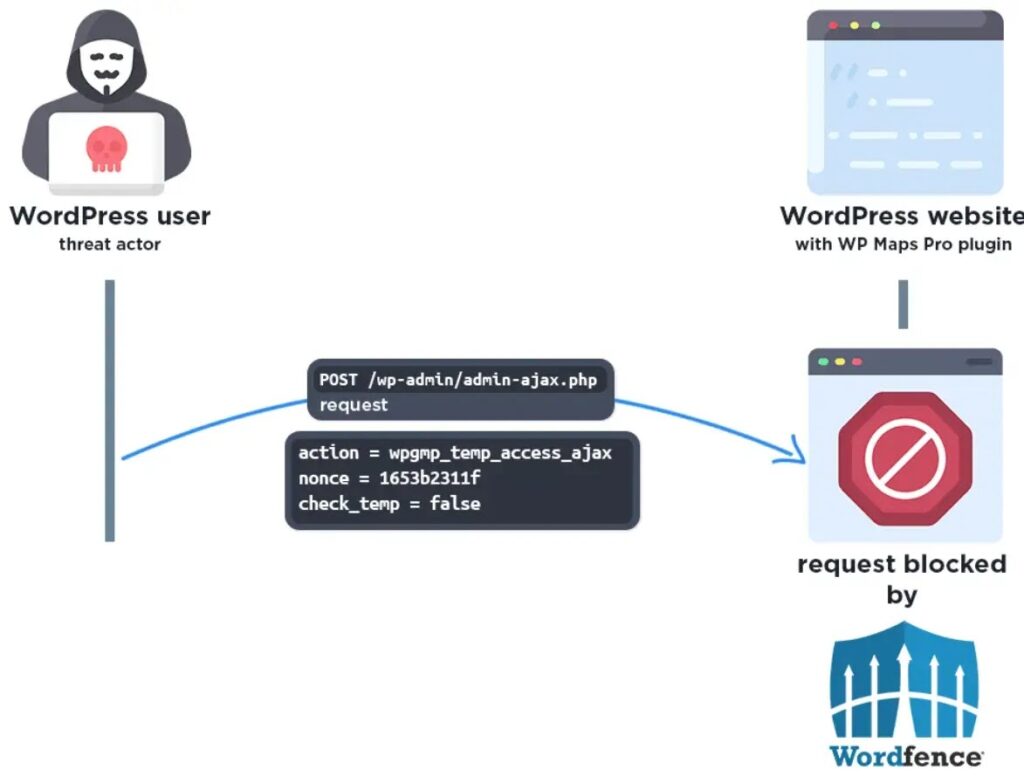
The official NVD entry says the flaw comes from an AJAX action that was exposed to unauthenticated users and protected only by a nonce that was publicly embedded on frontend pages.
That mistake meant the nonce did not work as a real access control barrier. A remote attacker could trigger the plugin’s temporary support access logic and cause the site to create a new WordPress administrator account.
| Detail | Information |
|---|---|
| CVE ID | CVE-2026-8732 |
| Plugin | WP Maps Pro |
| Affected versions | 6.1.0 and earlier |
| First patched version | 6.1.1 |
| Latest listed CodeCanyon version | 6.1.2 at the time of writing |
| Severity | Critical, CVSS 9.8 |
| Impact | Unauthenticated administrator account creation |
How the WP Maps Pro vulnerability works
The vulnerable code sits in a temporary access feature designed to help vendor support staff log in to customer sites for troubleshooting. That type of feature needs strict authorization because it can create a path into the WordPress admin area.
In vulnerable versions, the AJAX action was registered in a way that allowed unauthenticated requests. Wordfence said the action could reach a handler that created a new user with the administrator role and then returned a passwordless login link.
The Wordfence Intelligence entry lists the weakness as Missing Authentication for Critical Function. It also says the flaw can lead to complete site takeover because the attacker receives a working administrator session.
- The attacker sends a crafted unauthenticated request to the vulnerable plugin endpoint.
- The plugin’s temporary access logic creates a new administrator account.
- The plugin generates a passwordless login link for that new account.
- The attacker uses the link to enter the WordPress dashboard.
- The attacker can then install plugins, change content, add backdoors, or steal site data.
Attackers are already targeting vulnerable sites
Security researchers have reported active exploitation attempts against WP Maps Pro sites. BleepingComputer reported that hackers were targeting websites running vulnerable plugin versions to create rogue administrator accounts.
The risk is higher because exploitation does not require login credentials. A vulnerable public WordPress site can be targeted directly if the plugin is installed and exposed.
The attack also gives intruders a strong foothold. Once inside the dashboard as an administrator, they can upload malicious plugins, modify theme files, create more accounts, redirect visitors, inject SEO spam, or install persistent backdoors.
| Possible attacker action | Why it matters |
|---|---|
| Create rogue admin users | Gives attackers direct dashboard access |
| Install malicious plugins | Can add web shells, malware, or redirect scripts |
| Edit themes or templates | Can inject spam, phishing pages, or skimmers |
| Change site settings | Can damage SEO, email delivery, and user trust |
| Access stored data | Can expose user records, form entries, and configuration data |
Patch status and firewall protection
WP Maps Pro version 6.1.1 fixed the temporary access permission issue. The CodeCanyon changelog now also lists version 6.1.2, which removed the temporary access feature due to security reasons.
Wordfence said Premium, Care, and Response customers received a firewall rule on May 18, 2026. Free Wordfence users were scheduled to receive the same protection on June 17, 2026.
The vulnerability disclosure also moved through Envato because Wordfence said it could not find direct vendor contact information. Envato forwarded the report to the vendor, and the patched WP Maps Pro version 6.1.1 was released on May 20, 2026.
Why this bug is so dangerous for WordPress sites
Administrator account creation bugs sit among the most damaging WordPress plugin vulnerabilities. They bypass the normal login process and give attackers the highest practical role inside the site.
The CVE record lists the weakness as CWE-306, Missing Authentication for Critical Function. In this case, the missing authorization check allowed a support feature to become a takeover path.
Attackers often move quickly after public disclosure, especially when the affected plugin is commercial and used across many business sites. Even sites that do not display obvious WP Maps Pro branding may still expose the vulnerable backend action.
What site owners should do now
Site owners running WP Maps Pro should update the plugin immediately. Version 6.1.1 contains the initial fix, while version 6.1.2 removes the temporary access feature for security reasons.
The official WordPress security handbook recommends keeping WordPress core, plugins, and themes up to date. That guidance applies directly here because outdated plugin code is the main exposure path.
Administrators should also check whether unknown administrator accounts appeared after March 24, 2026, when the vulnerability was first reported to Wordfence, and especially after public disclosure in late May.
- Update WP Maps Pro to the latest available version.
- Confirm the installed version is newer than 6.1.0.
- Review all WordPress administrator accounts.
- Remove unknown users and reset passwords for legitimate admins.
- Check recent plugin, theme, and user activity logs.
- Scan the site for malware, backdoors, and suspicious file changes.
- Review server access logs for suspicious requests to WP Maps Pro endpoints.
- Restore from a known-clean backup if compromise is confirmed.
Signs a site may have been compromised
A vulnerable site may show no visible changes at first. Attackers often create a hidden admin account and wait before making major changes, especially if they want long-term access.
Still, there are warning signs administrators can check. Unknown administrator accounts, unexpected plugin installations, unfamiliar PHP files, modified theme templates, and sudden redirects all deserve immediate investigation.
BleepingComputer’s report also notes that the plugin supports Google Maps and OpenStreetMap features and is commonly used for interactive maps and store locators. That means many affected sites may belong to businesses that rely on location pages for customers.
- New administrator accounts with unfamiliar usernames or emails.
- Unexpected changes in wp_options, wp_users, or wp_usermeta tables.
- New plugins or themes that the site owner did not install.
- Theme files modified around the disclosure window.
- Unusual redirects from map pages or landing pages.
- Suspicious PHP files in uploads, cache, or plugin directories.
- Outbound connections from the web server to unfamiliar domains.
Developers should not rely on public nonces for authorization
The WP Maps Pro bug also shows a common WordPress security mistake. Nonces can help reduce cross-site request forgery, but they do not prove that a user has permission to perform a sensitive action when they are visible to the public.
The Wordfence vulnerability database says the vulnerable nonce was embedded into frontend JavaScript, which made it ineffective as an access control mechanism. Sensitive AJAX actions need server-side capability checks.
For administrator-only actions, developers should verify the user’s role or capability on the server before running the function. The patched version added a capability check so only authenticated administrators could use the temporary access path.
| Security control | What it should do |
|---|---|
| Nonce | Help protect requests from CSRF-style abuse |
| Capability check | Confirm the logged-in user has permission for the action |
| Authentication check | Confirm the request comes from a logged-in user when required |
| Audit logging | Record sensitive actions such as temporary access creation |
| Feature removal | Remove risky support access features if they are not essential |
How to harden WordPress after updating
Patching WP Maps Pro should come first, but site owners should also treat this as a reminder to harden the rest of the WordPress environment. Attackers who gain administrator access may leave files and accounts behind even after the vulnerable plugin is updated.
The WordPress security handbook recommends keeping software updated and choosing plugins and themes that actively receive updates. Site owners should also remove unused plugins rather than leaving inactive code installed.
Administrators should enable two-factor authentication for all admin users, disable the built-in file editor when possible, and keep reliable offsite backups. A plugin update closes the known entry point, but cleanup and monitoring reduce the chance that a previous compromise persists.
FAQ
CVE-2026-8732 is a critical unauthenticated privilege escalation vulnerability in WP Maps Pro. It allows attackers to create a WordPress administrator account on sites running vulnerable plugin versions.
WP Maps Pro versions up to and including 6.1.0 are affected. Version 6.1.1 introduced the first fix, and CodeCanyon now lists version 6.1.2 with the temporary access feature removed for security reasons.
Yes. The vulnerability can be exploited by unauthenticated attackers because the vulnerable AJAX action was exposed to public requests and lacked a proper server-side authorization check.
Users should update WP Maps Pro to the latest available version, confirm the site is no longer running 6.1.0 or earlier, review administrator accounts, scan for malware, and check logs for suspicious activity.
Look for unknown administrator accounts, unexpected plugins or themes, modified theme files, suspicious PHP files, unusual redirects, and unexplained database changes. If any appear, investigate immediately and consider restoring from a known-clean backup.


Read our disclosure page to find out how can you help VPNCentral sustain the editorial team Read more


Improve this guide




User forum
0 messages