
GoFlateLoader Uses Massive PE Overlay to Deliver Lumma, Vidar, and StealC Infostealers


 9 min. read
  Published on
GoFlateLoader is a Go-based malware loader that uses an unusually large Windows executable file to help deliver infostealers while avoiding some automated scanning systems. The loader has been observed delivering Amatera, Remus, Lumma, Vidar, StealC, and SvitStealer payloads.
Gen Threat Labs says it has protected more than 33,000 unique users from GoFlateLoader since the beginning of April 2026. The most affected countries include Brazil, India, Argentina, Mexico, Turkey, and Spain.

Access content across the globe at the highest speed rate.
🔥 Save 81% + 2 bonus months! 🔥
70% of our readers choose Private Internet Access
70% of our readers choose ExpressVPN
2
Browse the web from multiple devices with industry-standard security protocols.
🔥 Save 73%! 🔥

Faster dedicated servers for specific actions (currently at summer discounts)
🔥 Save 69%! 🔥
The loader stands out because it does not rely on many advanced anti-analysis features. Instead, it artificially inflates its own file size with a massive PE overlay, making the executable too large for some security tools, sandboxes, and cloud analysis pipelines to process normally.
GoFlateLoader Uses Size as an Evasion Technique
Most modern malware loaders use anti-debugging checks, virtual machine detection, sandbox evasion, API hashing, or complex control-flow tricks. GoFlateLoader is much simpler.
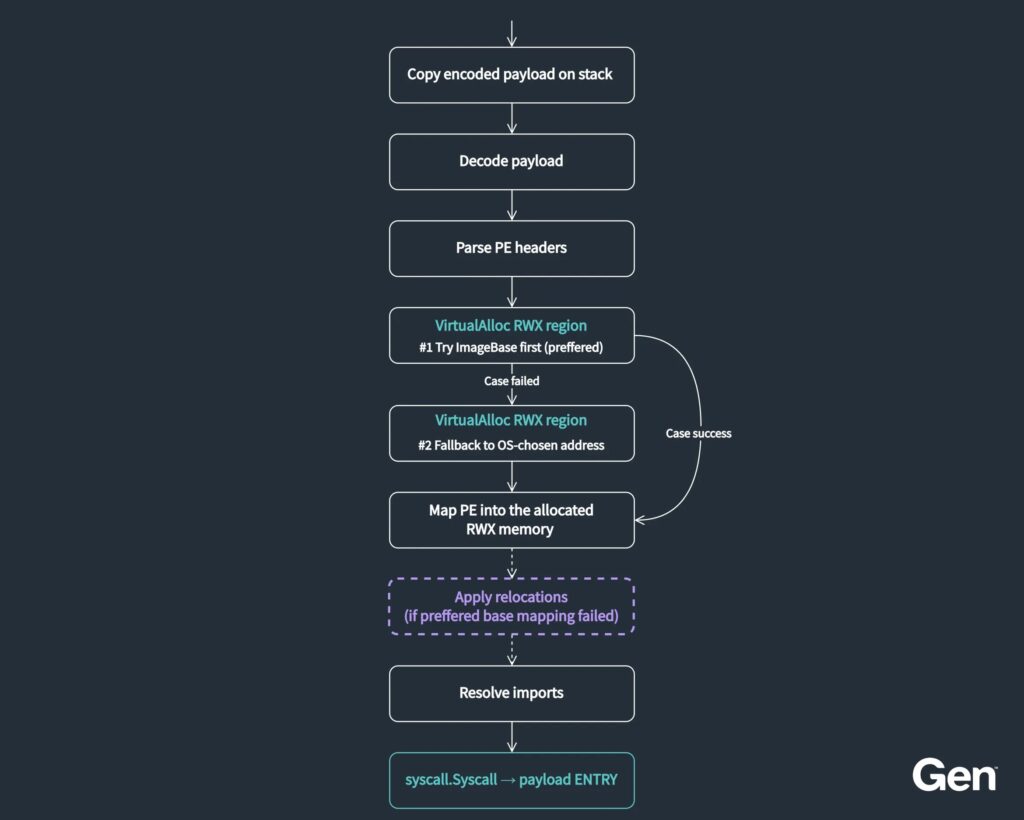
Its main job is to decode a hidden payload in memory, manually load it as a Windows PE file, resolve imports, apply relocations when needed, and transfer execution to the final malware. The payload does not need to be written to disk in its decoded form.
The unusual part is the file size. GoFlateLoader samples are typically between 700 MB and 950 MB because attackers append a huge block of extra data to the end of the executable. In most cases, that overlay contains null bytes, although some samples use random padding.
| Feature | What GoFlateLoader does | Why it matters |
|---|---|---|
| Language | Written in Go | Creates large binaries and adds analysis noise |
| File size | Typically 700 MB to 950 MB | Can exceed scanner and sandbox size limits |
| PE overlay | Large appended data block | Inflates the executable without changing its core function |
| Execution method | Manual in-memory PE loading | Final payload avoids being written to disk |
| Payloads | Infostealers | Targets browser data, credentials, wallets, and other sensitive information |
Why the Massive PE Overlay Works
A PE overlay is extra data appended after the normal end of a Windows executable. Legitimate software can include overlays, but malware authors can abuse them to hide data, inflate files, or interfere with automated analysis.
In GoFlateLoader’s case, the overlay appears designed to push the file above common scan and upload limits. VirusTotal’s large-file guidance notes that very large files can create performance problems for engines, cause timeouts, and reduce analysis value.
Gen says the loader’s size consistently sits just above VirusTotal’s 650 MB upload limit. That suggests the file inflation is intentional and aimed at platforms that enforce size limits for practical storage, bandwidth, and performance reasons.
Compressed Delivery Keeps the Campaign Practical
The inflated file would be expensive to move around if attackers had to distribute it at full size. However, the overlay often contains repeated null bytes, which compress very efficiently.
As a result, attackers can package the loader inside a much smaller archive, deliver it quickly, and still produce a very large executable after extraction. That makes the trick cheap for attackers and annoying for defenders.
The same tactic also complicates user-driven malware checks. If a user extracts the file and then tries to upload it to a public scanner, the sample may exceed the upload limit or trigger incomplete analysis.
How GoFlateLoader Reaches Victims
Researchers have seen two main delivery paths. The first involves fake cracked software downloads, where users are lured into installing what they believe is a pirated or free version of a paid application.
The second path involves a malicious traffic distribution system. A Check Point Research report described a large ecosystem of impersonation sites and redirect chains that can send selected users to malware delivery infrastructure.
In the GoFlateLoader cases, victims may reach a landing page that offers a password-protected archive and separately displays the password. That separation helps frustrate automated analysis because scanners may not automatically pair the password with the archive.
- Victim searches for cracked software or visits an impersonation site.
- The page routes the click through a traffic distribution system.
- The victim receives a compressed, password-protected archive.
- The password appears separately on the landing page.
- The extracted executable expands to hundreds of megabytes.
- GoFlateLoader runs and loads the infostealer payload in memory.
The Loader Manually Runs Payloads in Memory
Once executed, GoFlateLoader copies an encoded payload blob from its data section, decodes it through a custom byte-level transformation, and reconstructs it as a valid PE file in memory.
It then allocates executable memory, maps headers and sections, resolves imports with standard Windows APIs, applies relocations if needed, and transfers control to the payload entry point.
One interesting detection clue is how it uses Go’s syscall.Syscall. Instead of using it as a normal system call wrapper, GoFlateLoader abuses it as a generic transfer mechanism to jump into the final payload, while consistently passing hardcoded dummy values.
Infostealers Are the Main Payloads
The final malware families delivered by GoFlateLoader are mainly information stealers. These tools can steal saved browser credentials, cookies, cryptocurrency wallet data, autofill information, files, and other sensitive data.
Lumma remains one of the most widely discussed stealer families. Microsoft Threat Intelligence has described Lumma as a prolific infostealer used to target browsers, cryptocurrency wallets, and other applications holding user secrets.
Gen says the most prevalent GoFlateLoader payloads it observed are Amatera, Remus, and Lumma. Vidar, StealC, and SvitStealer were also seen in the wild.
| Payload family | Observed role | Risk to victims |
|---|---|---|
| Amatera | Commonly observed GoFlateLoader payload | Credential and data theft |
| Remus | Commonly observed GoFlateLoader payload | Browser, wallet, and application data theft |
| Lumma | Commonly observed GoFlateLoader payload | Browser credentials, cookies, and wallet theft |
| Vidar | Observed secondary payload | Credential, file, and wallet theft |
| StealC | Observed secondary payload | Credential and browser data theft |
| SvitStealer | Observed secondary payload | Information theft |
Why Fake Software Downloads Remain Effective
GoFlateLoader’s delivery paths show why fake software downloads remain useful for criminals. Users searching for free or cracked software often disable warnings, ignore reputation checks, or extract password-protected archives manually.
The TDS route can also filter traffic before malware delivery. The Check Point analysis found that these redirect systems can use geography, browser type, client fingerprint, VPN detection, click context, and frequency caps to decide what each visitor receives.
This means a researcher, sandbox, or repeat visitor may see a benign download, while a real user in a targeted region may receive a malware archive. That behavior makes consistent reproduction difficult.
Indicators of Compromise
| Type | Indicator | Description |
|---|---|---|
| SHA-256 | b88c5744975d2abb447aecc6c090fee9f8580413f4612eecdc6ed1973e8a1739 | Password-protected archive containing GoFlateLoader x64 loading Remus, password 1234 |
| SHA-256 | ed5ae7f36453c5a23e9868a5729d67e0549a11f6dea54f5f52d654a8f51d4902 | Archive containing GoFlateLoader x64 loading Remus |
| SHA-256 | 841c9297cb8a2e0ff89433d13c05bfc760eb2e98e251cb8fa785d2ad7cbac05f | Archive containing GoFlateLoader x86 loading Amatera |
| SHA-256 | ece7c48eb411b24f26762ede83badb4a644c41d5777129381ac2541804d64fc2 | Archive containing GoFlateLoader x86 loading Lumma |
| SHA-256 | 421ce2d2f49c23bbe9f60ef3b9cd38d7eb912ce02e56a61837656210069bd9e2 | Archive containing GoFlateLoader x64 loading Vidar |
| SHA-256 | 121c2dc793b3873f75a29ec02241f94136de19c049382a50a50d0d5b99507073 | GoFlateLoader x64 loading StealC |
| SHA-256 | 2415db5081cec9bfd14ad6da1a66169fd96f13a49010c319a73d1ed6fafd4efa | GoFlateLoader x64 loading Vidar |
| SHA-256 | d9917ade3b4c125a95b5d3e6343cde26145dfbf569bd7e2a843fd0c6fc8ddc28 | GoFlateLoader x64 loading Remus |
| SHA-256 | 4cf6893756f441522b94b36f10e5de0e47aeed4743f95c51650746d1ecf97e3d | GoFlateLoader x64 loading SvitStealer |
| SHA-256 | 8b89d6c9152d3aab97aadd515ecb69ca72654db2f25425759ba4b646853d737d | GoFlateLoader x86 loading Lumma |
| SHA-256 | 90ce4ff9da23ac150da0a8e17930cab1e369aa349fdc1b65691b70369145664a | GoFlateLoader x86 loading Amatera |
Gen notes that non-archive GoFlateLoader files listed in its indicators exceed 650 MB and may not be available on public scanning platforms. That limits simple hash lookup workflows for some defenders.
How Defenders Can Detect GoFlateLoader
Security teams should treat extremely large Windows executables from user download folders, temporary directories, and extracted archives as suspicious, especially when they originate from cracked software sites or password-protected archives.
VirusTotal documentation also explains why large bundles can create analysis blind spots. Defenders should not assume that a missing cloud scan result means a file is safe.
Behavior-based detection matters because GoFlateLoader executes its final payload in memory. Teams should monitor for suspicious memory allocation, RWX pages, manual PE loading patterns, abnormal Go binaries, and unusual use of syscall.Syscall followed by payload execution.
- Block downloads from known cracked software and impersonation sites.
- Flag unusually large PE files, especially files above 650 MB.
- Inspect password-protected archives that arrive with passwords shown separately.
- Monitor for manual PE loading and RWX memory allocation.
- Hunt for Go binaries using
syscall.Syscallwith dummy arguments. - Detect infostealer behavior such as browser database access and wallet file collection.
- Reset passwords and revoke sessions after confirmed stealer exposure.
- Use application control to block unapproved executables from Downloads and Temp paths.
Why GoFlateLoader Matters
GoFlateLoader shows that attackers do not always need sophisticated evasion to succeed. A simple oversized file can still create practical problems for endpoint scanners, sandboxes, and threat intelligence platforms.
It also reinforces the danger of infostealer delivery through fake software. Once payloads such as Lumma run, Microsoft’s Lumma analysis shows how stolen browser data, cookies, and wallet secrets can expose personal and business accounts.
Gen Digital’s technical analysis makes the key lesson clear: defenders need to look beyond file reputation and static scanning. GoFlateLoader’s size-based evasion, compressed distribution, and in-memory payload loading make behavior monitoring and download control just as important.
FAQ
GoFlateLoader is a malware loader written in Go. It decodes and manually loads infostealer payloads in memory, while using a massive PE overlay to inflate its file size and interfere with some scanning and sandbox systems.
GoFlateLoader has been observed delivering Amatera, Remus, Lumma, Vidar, StealC, and SvitStealer. These payloads are mainly information stealers designed to collect credentials, browser data, cookies, wallets, and other sensitive information.
GoFlateLoader files are usually 700 MB to 950 MB because attackers append a massive PE overlay to the executable. This can push the file beyond size limits used by some scanners, sandboxes, and cloud analysis platforms.
GoFlateLoader spreads mainly through fake cracked software downloads and malicious traffic distribution systems that redirect selected users to password-protected archives. The archive password may appear separately on the landing page.
Users should avoid cracked software, download apps only from official sources, avoid extracting password-protected archives from unknown sites, keep security tools updated, and reset passwords if an infostealer infection is suspected.


Read our disclosure page to find out how can you help VPNCentral sustain the editorial team Read more


Improve this guide




User forum
0 messages