
Hackers Exploit cPanel CVE-2026-41940 to Deploy Backdoors on Hosting Servers


 7 min. read
  Published on
Hackers are actively exploiting CVE-2026-41940, a critical authentication bypass vulnerability in cPanel and WHM, to take control of exposed hosting servers. The flaw lets unauthenticated remote attackers gain access to the control panel without valid credentials on affected systems.
cPanel released fixes on April 28, 2026, and urged administrators to update immediately. The vulnerability affects cPanel and WHM versions after 11.40, including DNSOnly, along with affected WP Squared versions before the fixed release.

Access content across the globe at the highest speed rate.
70% of our readers choose Private Internet Access
70% of our readers choose ExpressVPN

Browse the web from multiple devices with industry-standard security protocols.

Faster dedicated servers for specific actions (currently at summer discounts)
The risk remains serious because cPanel and WHM control websites, databases, email accounts, DNS settings, file managers, and server-level hosting functions. Once attackers gain access, they can steal data, add backdoors, modify accounts, deploy malware, or prepare ransomware attacks.
What CVE-2026-41940 allows attackers to do
CVE-2026-41940 sits in cPanel and WHM’s session management layer. cPanel said two separate code paths wrote session files to disk, but only one applied the needed input sanitization. The second path, used during Basic authentication handling, missed that protection.
That gap created a condition where a specially crafted request could cause an unauthenticated session to be treated as authenticated. In practical terms, attackers could bypass the normal login flow and reach powerful control panel functions without a username or password.
NVD describes the vulnerability as an authentication bypass in the login flow. The issue has a CVSS 3.1 score of 9.8, which places it in the Critical severity range.
| Item | Details |
|---|---|
| CVE | CVE-2026-41940 |
| Affected products | cPanel and WHM, DNSOnly, and affected WP Squared versions |
| Vulnerability type | Authentication bypass |
| Attack complexity | Low |
| Privileges required | None |
| User interaction | None |
| CVSS 3.1 score | 9.8 Critical |
| Fixed versions | Patched builds are available across supported and several legacy cPanel branches |
Attackers are using the flaw for backdoor campaigns
Security researchers have linked active exploitation of CVE-2026-41940 to multiple malicious outcomes, including backdoor installation, credential theft, cryptomining, botnet activity, and ransomware attempts. One campaign has been attributed to a threat actor tracked as Mr_Rot13.
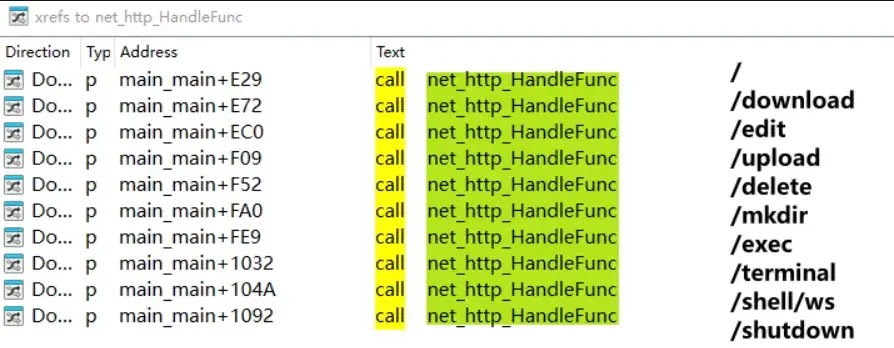
The Mr_Rot13 campaign reportedly uses a Go-based infector to deploy additional payloads on compromised servers. The attack chain can change root access, implant SSH keys, drop a PHP webshell, and install a cross-platform backdoor known as Filemanager.
Filemanager gives attackers a web-based interface for remote access. From there, they can manage files, execute commands, inspect server content, and maintain control even after the original authentication bypass gets patched.
Why cPanel and WHM servers are high-value targets
cPanel and WHM servers are attractive targets because a single compromised control panel can expose many websites at once. In shared hosting environments, one server may host customer sites, email accounts, databases, backups, and configuration files for multiple organizations.
Attackers can use that access in several ways. They may steal database passwords, harvest SSH data, inject malicious JavaScript into login pages, add hidden administrator accounts, or modify hosted websites to deliver malware to visitors.
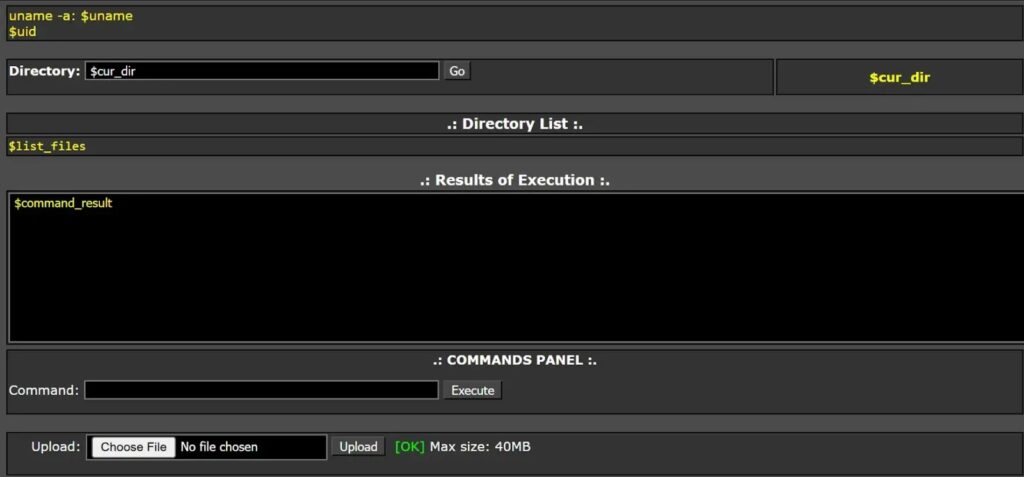
The danger increases when administrators patch the product but do not investigate compromise. If attackers already added SSH keys, changed passwords, or deployed webshells, updating cPanel alone may not remove the attacker from the server.
- Attackers can access hosting control panel functions without valid credentials on vulnerable systems.
- Compromised servers may expose websites, databases, email accounts, and backups.
- Backdoors can survive after patching if administrators do not remove them.
- Hosting providers need both patching and forensic checks.
Patched versions and immediate actions
cPanel published patched versions across multiple release branches. Administrators should update to the latest available build for their branch, then restart the cPanel service and verify the installed version.
cPanel says all later versions after the listed fixed builds include the patch. The company also released additional paths for some legacy and end-of-life environments, including CentOS 6 and CloudLinux 6 scenarios.
| Product branch | Fixed version or later |
|---|---|
| cPanel and WHM 11.86 | 11.86.0.41 |
| cPanel and WHM 11.94 | 11.94.0.28 |
| cPanel and WHM 11.102 | 11.102.0.39 |
| cPanel and WHM 11.110 | 11.110.0.97 |
| cPanel and WHM 11.118 | 11.118.0.63 |
| cPanel and WHM 11.124 | 11.124.0.35 |
| cPanel and WHM 11.126 | 11.126.0.54 |
| cPanel and WHM 11.130 | 11.130.0.19 |
| cPanel and WHM 11.132 | 11.132.0.29 |
| cPanel and WHM 11.134 | 11.134.0.20 |
| cPanel and WHM 11.136 | 11.136.0.5 |
| WP Squared | 136.1.7 |
How administrators should respond
Administrators should treat exposed and previously unpatched servers as potentially compromised. The right response includes updating cPanel, restarting services, running cPanel’s detection script, reviewing session files, checking logs, and hunting for unauthorized persistence.
Servers with pinned update settings, disabled automatic updates, or unsupported versions require urgent manual attention. cPanel also recommends temporary mitigations for systems that cannot receive the update immediately, including blocking inbound access to key cPanel service ports.
Administrators should rotate sensitive credentials after confirming exposure or compromise. This includes root passwords, cPanel account passwords, database credentials, API keys, SSH keys, WHM access tokens, and credentials stored in hosted applications.
- Run the forced cPanel update process.
- Verify the installed cPanel build version.
- Restart the cPanel service.
- Run the latest official cPanel detection script.
- Review cPanel session files and access logs.
- Check for new SSH keys, changed root passwords, and unexpected UID 0 accounts.
- Search for unknown webshells, login page changes, and suspicious JavaScript injection.
- Rotate credentials after cleaning the server.
- Restrict public access to cPanel and WHM ports where possible.
What defenders should hunt for
Compromise checks should go beyond version verification. A server can run a patched cPanel build and still remain compromised if attackers planted persistence before the update.
Security teams should inspect cPanel templates, custom login pages, CGI directories, SSH configuration, authorized keys, cron jobs, recently modified PHP files, and outbound traffic to suspicious infrastructure. They should also review whether any unknown processes expose web-based management consoles.
Reported indicators in public research include domains linked to malicious payload delivery and command activity, plus hashes tied to injected tools and Filemanager builds. Administrators should handle indicators carefully and avoid resolving suspicious domains outside controlled threat intelligence tools.
- Unexpected SSH public keys or new privileged users.
- Changed root password behavior or unexplained login failures.
- Unknown PHP files in cPanel-related paths.
- Injected JavaScript on login pages.
- Suspicious Go binaries or Filemanager-like processes.
- Outbound connections to newly observed attacker infrastructure.
- Ransomware notes or unusual encrypted file extensions.
Why patching alone may not be enough
cPanel said it moved quickly to publish updates after confirming the vulnerability, and it also released detection and remediation tooling. That lowers risk for systems that updated quickly and show no signs of compromise.
However, active exploitation changes the response model. Administrators should not assume that a successful update removes every malicious change from a server. Backdoors, stolen credentials, and modified access controls can remain after the vulnerable code path closes.
The safest approach is to combine patching with incident response. Hosting providers should notify affected customers when needed, preserve logs, review backups, and rebuild servers from trusted images if compromise appears deep or uncertain.
FAQ
CVE-2026-41940 is a critical authentication bypass vulnerability in cPanel and WHM. It can allow unauthenticated remote attackers to gain unauthorized access to affected control panels.
cPanel says the issue affects cPanel and WHM versions after 11.40. Fixed builds are available across supported branches and several legacy branches, with all later versions also patched.
Yes. cPanel says CISA added CVE-2026-41940 to the Known Exploited Vulnerabilities catalog, and security researchers have reported active exploitation tied to backdoors, ransomware activity, cryptomining, and credential theft.
Administrators should update cPanel immediately, verify the installed version, restart cPanel services, run the official detection script, review logs and session files, check for persistence, and rotate credentials if compromise is suspected.
Patching closes the vulnerable code path, but it may not remove backdoors or stolen credentials already created by attackers. Administrators should perform compromise checks and clean or rebuild affected servers where needed.


Read our disclosure page to find out how can you help VPNCentral sustain the editorial team Read more


Improve this guide




User forum
0 messages