
Hackers Use Fake DMG Installers to Target macOS Users With Infostealer Malware


 8 min. read
  Published on
Hackers are using weaponized DMG installers to deliver macOS infostealer malware through fake software downloads, poisoned search results, and piracy forums. A new Huntress report says these attacks focus on tricking users at the installation stage rather than exploiting a complex macOS flaw.
The campaigns use disk image files that look like normal Mac installers. Victims believe they are installing a legitimate app, but the installer pushes them to bypass Apple’s security prompts and run malware that can steal passwords, browser cookies, authentication tokens, and cryptocurrency wallets.

Access content across the globe at the highest speed rate.
70% of our readers choose Private Internet Access
70% of our readers choose ExpressVPN

Browse the web from multiple devices with industry-standard security protocols.

Faster dedicated servers for specific actions (currently at summer discounts)
This threat has grown as attackers pay more attention to Apple environments. The Objective-See Mac malware report found that information stealers were the most common type of new macOS malware observed in 2025, with many campaigns relying on social engineering instead of traditional persistence.
How the Fake DMG Attacks Work
The infection chain usually starts in a browser. Users land on a malicious download page through search engine poisoning, malvertising, torrent sites, or cracked software forums. The download then arrives as a DMG file, a familiar macOS format that users often associate with normal app installation.
When opened, the DMG mounts as a virtual drive under /Volumes. Attackers design the mounted window to look like a standard drag-to-Applications installer, but the background image often includes instructions that tell users how to bypass Gatekeeper or run commands manually.
That social engineering step matters because macOS security tools can warn users about unsigned, unnotarized, or suspicious software. Apple’s safe app opening guidance warns that running software that has not been signed and notarized may expose the Mac and personal information to malware.
| Attack stage | What the victim sees | Attacker goal |
|---|---|---|
| Search or forum lure | Fake download for a browser, utility, AI tool, or cracked app | Get the user to download the DMG |
| Mounted DMG window | Professional-looking installer window with app branding | Build trust and hide the malicious workflow |
| Bypass instruction | Prompt to override macOS security or drag a file into Terminal | Make the user approve execution |
| Infostealer execution | Little or no visible activity | Steal credentials, cookies, tokens, and wallets quickly |
Why Infostealers Often Do Not Need Persistence
Many macOS infostealers do not need to stay on the machine after a reboot. They focus on fast theft. Once they run, they collect high-value data and send it to attacker-controlled infrastructure as quickly as possible.
Microsoft has observed the same shift across platforms. A Microsoft Security Blog report said macOS-targeted infostealer campaigns have used malicious DMG installers, ClickFix-style prompts, fake apps, and native macOS utilities to steal browser credentials, session data, secrets from keychains, and developer environment data.
That makes these campaigns dangerous for both consumers and companies. Stolen cookies can support account takeover. Stolen cloud tokens and developer credentials can expose source code, cloud resources, internal tools, and customer data.
- Browser passwords and saved credentials
- Session cookies and authentication tokens
- Crypto wallet files and seed-related data
- Keychain items and system prompts used to unlock data
- Cloud and developer access keys
- Messaging, email, and social media account access
Why Attackers Prefer DMG Files
DMG files are common in the Mac software ecosystem, which makes them useful for deception. A legitimate DMG may show a polished window with an app icon and an Applications shortcut. A malicious one can copy that same look while adding hidden instructions, background images, or misleading filenames.
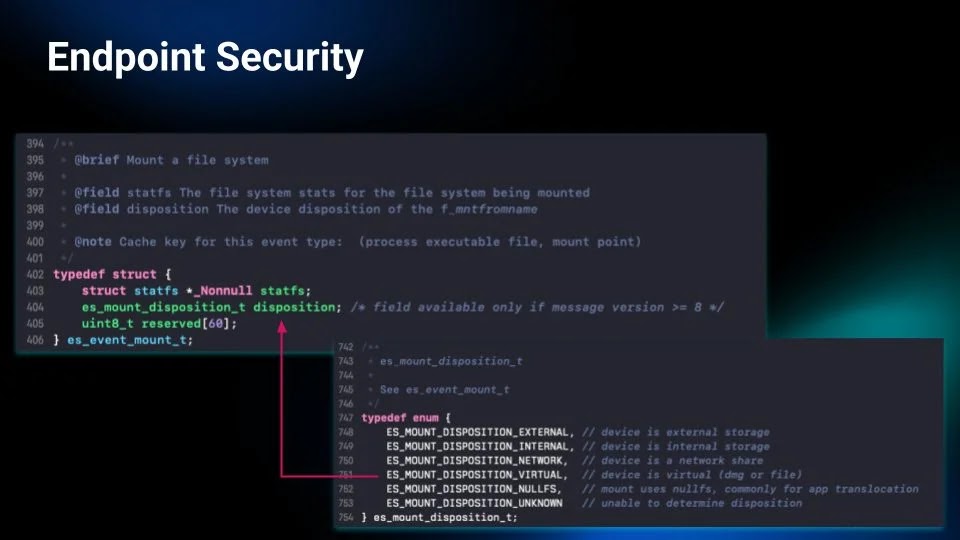
Huntress said attackers often use hidden .background directories inside mounted disk images to display installer instructions. Its detection approach focuses on the moment a disk image mounts, before the malware runs, because waiting for execution may give the infostealer enough time to steal data.
Apple’s Gatekeeper and runtime protection documentation explains that macOS checks downloaded software for known malicious content the first time it opens. However, users and organizations can still override Gatekeeper policies unless a management policy blocks that behavior.
| Installer clue | Why it is suspicious |
|---|---|
| Instructions to drag something into Terminal | Legitimate Mac apps rarely require this for installation |
| Directions to bypass Gatekeeper | Attackers often need the user to approve untrusted code |
| Download from a piracy or cracked software site | Users already expect warnings, which makes social engineering easier |
| Fake branding for known apps | Attackers copy trusted visuals to lower suspicion |
| Urgent wording or unusual install steps | Pressure tactics can push users past security warnings |
AMOS, Poseidon, Odyssey, and MacSync Are Part of the Trend
Security researchers have repeatedly seen macOS stealers distributed through fake installers and browser-based deception. Families and campaigns mentioned in recent reporting include Atomic macOS Stealer, also known as AMOS, as well as Poseidon, Odyssey, DigitStealer, and MacSync.
The Objective-See analysis says stealers remain the dominant macOS threat class and increasingly use malware-as-a-service distribution models. In this model, one group builds or sells the stealer while separate traffic teams spread it through fake updates, malvertising, ClickFix lures, and deceptive downloads.
Microsoft also warned that infostealers are expanding beyond traditional Windows campaigns. The second Microsoft report reference shows that attackers now target mixed environments where macOS devices hold business credentials, cloud access, and developer secrets.
Detection Is Moving Earlier in the Attack Chain
Traditional endpoint tools often focus on processes after they execute. That can work for many malware families, but it creates a problem with smash-and-grab infostealers. By the time the malware process looks clearly malicious, the stolen data may already have left the Mac.
The second Huntress analysis says defenders can gain time by inspecting DMG behavior at the mount stage. That includes watching for mounted volumes under /Volumes, hidden .background folders, deceptive installer artwork, suspicious text in background images, and files that push users toward Terminal or security overrides.
This kind of detection does not replace user education or Apple platform protections. It adds another point of control before the attacker gets the one action they need: a user approving something unsafe.
- Monitor newly mounted DMG volumes under /Volumes.
- Inspect hidden .background directories in installer images.
- Flag installer windows that include Gatekeeper bypass instructions.
- Watch for DMG files that push users to Terminal commands.
- Alert when a suspicious installer tries to access Keychain or browser data.
- Block known malicious domains used in fake download campaigns.
What Mac Users Should Do
Mac users should download apps from the App Store, the developer’s official website, or a trusted enterprise software portal. They should avoid cracked apps, torrent installers, fake browser updates, and sponsored search results that lead to unfamiliar domains.
Apple’s second Mac app safety page advises users to use caution when macOS displays an alert and to check for App Store versions or trusted alternatives when the developer cannot be verified.
For managed business devices, administrators should restrict Gatekeeper overrides where possible. Apple’s second Gatekeeper documentation notes that device management can restrict user overrides, which helps reduce the risk of social engineering-driven installs.
| For individuals | For organizations |
|---|---|
| Download software only from trusted sources | Use device management to limit unsafe overrides |
| Do not drag installer files into Terminal | Monitor DMG mounts and suspicious installer behavior |
| Do not bypass Gatekeeper for unknown apps | Block cracked software and risky download categories |
| Change passwords after any suspected infection | Rotate exposed tokens, cookies, and developer keys |
| Check browser extensions and wallet activity | Investigate Keychain access and unusual outbound traffic |
Mac Security Now Depends on Blocking Social Engineering
These DMG campaigns show that macOS malware does not always need a technical exploit to succeed. Attackers can win by making a fake installer look familiar and convincing the user to approve each unsafe step.
The most effective defense combines platform controls, earlier detection, and user awareness. macOS can warn users about untrusted software, but attackers design these campaigns to make warnings feel routine or harmless.
Any installer that asks users to bypass security settings, paste commands into Terminal, or ignore macOS warnings should be treated as suspicious. For infostealers, stopping the first click after the DMG opens can prevent the entire compromise.
FAQ
A weaponized DMG file is a macOS disk image designed to look like a legitimate installer while delivering malware or tricking the user into running unsafe commands. Attackers use it because DMG files are common in Mac software distribution.
Most fake DMG installers rely on social engineering. They show professional-looking installer windows and instruct users to bypass Gatekeeper, approve unknown software, or drag a file into Terminal. Once the user approves the action, the infostealer can run.
macOS infostealers can steal browser passwords, cookies, authentication tokens, cryptocurrency wallet data, Keychain-related data, cloud credentials, developer secrets, and other sensitive files stored on the device.
No. Macs include strong built-in security features, but attackers increasingly target macOS users through fake downloads, malicious DMG installers, ClickFix-style prompts, and other social engineering methods.
Users should download apps only from the App Store or official developer websites, avoid cracked software, ignore installers that ask them to bypass Gatekeeper, and never drag unknown files into Terminal.


Read our disclosure page to find out how can you help VPNCentral sustain the editorial team Read more


Improve this guide




User forum
0 messages