
Hackers use fake tax emails to deploy in-memory malware on Windows PCs


 7 min. read
  Published on
Hackers are using fake tax notification emails to trick Windows users into downloading a multi-stage malware package that runs mainly in memory and communicates with attacker-controlled servers through WebSocket traffic.
The campaign is tracked as Operation TaxShadow and has been active since at least May 20, 2026, according to a Cyfirma report published on June 4, 2026. The attacks impersonate Indian tax authorities and use urgency, penalties, and government-style branding to pressure victims into clicking.

Access content across the globe at the highest speed rate.
🔥 Save 81% + 2 bonus months! 🔥
70% of our readers choose Private Internet Access
70% of our readers choose ExpressVPN
2
Browse the web from multiple devices with industry-standard security protocols.
🔥 Save 73%! 🔥

Faster dedicated servers for specific actions (currently at summer discounts)
🔥 Save 69%! 🔥
Researchers found that the same infrastructure also hosted fake Japanese tax portals, which suggests the operators can reuse their phishing framework across countries and languages.
Operation TaxShadow uses tax notices as bait
The attack begins with a phishing email that looks like an official tax warning. It uses compliance language, financial penalty claims, and time-sensitive wording to push the recipient toward a malicious website.
The fake portal copies government-style visuals and includes bilingual English and Hindi content. Victims are told to download a ZIP archive described as an official tax document or notice package.
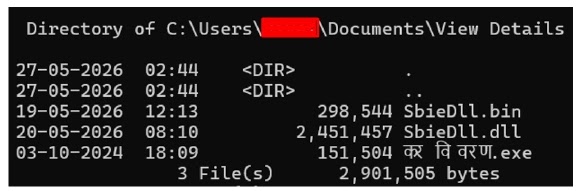
That ZIP file contains three main components: कर विवरण.exe, SbieDll.dll, and SbieDll.bin. Together, they form the full infection chain, from the initial launcher to the encrypted in-memory payload.
| Component | Role in the attack | Why it matters |
| कर विवरण.exe | Initial launcher | Prepares the environment, checks the system, and starts the loader chain. |
| SbieDll.dll | Polymorphic loader DLL | Uses DLL hijacking, API hooks, token manipulation, and anti-analysis methods. |
| SbieDll.bin | Encrypted payload | Decrypts at runtime and loads directly into memory through reflective PE loading. |
The malware runs mostly in memory
Operation TaxShadow uses DLL Search Order Hijacking to force Windows to load the malicious SbieDll.dll file. This technique abuses the way Windows searches local application folders before system folders when loading some libraries.
After the loader starts, it decrypts SbieDll.bin using a modified RC4-style cipher. The final payload then loads through Reflective PE Loading, which allows it to execute in memory without writing the final malware file to disk.
The Cyfirma analysis also describes advanced evasion methods, including API hooking, access token manipulation, COM callback-based execution, dynamic API resolution, Mersenne Twister-based execution logic, and LLVM-style control flow flattening.
- The malware avoids leaving many disk artifacts after the final stage loads.
- It changes execution behavior to complicate signature-based detection.
- It hooks Windows APIs to manipulate access checks and file operations.
- It uses reflective loading instead of standard library loading.
- It communicates through web-like traffic to blend into normal activity.
WebSocket C2 helps the malware hide
Once active, the malware establishes command-and-control communication through WebSocket traffic. WebSocket sessions start as normal HTTP requests and then upgrade into persistent channels, which can make malicious traffic harder to separate from legitimate web application activity.
Cyfirma also found HTTP CONNECT support, which means the malware can communicate through corporate proxy environments. This is important for enterprise defenders because proxy support can help malware reach external servers even in monitored networks.
The malware was observed communicating with the external IP address 43.128.54[.]184 on port 1234. Researchers also noted that the samples did not expose all infrastructure details through simple static analysis, which makes memory and behavior monitoring more important.
| Observed behavior | Detection angle |
| Suspicious ZIP download from tax-themed portal | Alert on government-themed archive downloads from non-government domains. |
| Execution of कर विवरण.exe | Investigate localized tax-themed executable names from Downloads or Temp paths. |
| Loading of SbieDll.dll | Monitor suspicious DLL loading near recently extracted files. |
| Reflective PE loading | Use EDR and memory scanning to detect fileless execution. |
| WebSocket C2 traffic | Inspect unusual HTTP upgrade activity and outbound proxy tunneling. |
Authentication checks did not prove the emails were safe
One important detail is that the phishing emails passed SPF, DKIM, and DMARC checks. However, those checks applied to the attacker-controlled domain used to send the messages, not to an official Indian government domain.
This is why users and mail security teams should not treat authentication results alone as proof that a message is legitimate. Attackers can use properly configured domains and trusted email delivery services while still impersonating a government body in the visible message content.
The broader risk is not limited to this campaign. Microsoft previously warned that tax-themed phishing often uses links, attachments, QR codes, and legitimate services to improve delivery and avoid detection in its tax-themed phishing research.
Indian taxpayers should verify tax emails directly
Users should not open attachments or click links in unexpected tax messages. The official Income Tax Department phishing advisory tells users not to reply, not to open attachments, and not to click links in suspicious messages claiming to come from the department.
If a message claims that a tax issue needs attention, users should manually visit the official tax portal in the browser rather than following links from email, SMS, messaging apps, or downloaded files.
Organizations should also train employees to recognize panic-based tax lures, especially around filing periods, refund windows, and compliance deadlines. Attackers use these moments because people expect tax messages and may act quickly without verifying the source.
- Do not run ZIP files or executable files from tax-themed emails.
- Do not enter personal or financial data on links received by email.
- Check tax notices through the official portal only.
- Report suspected impersonation messages to the appropriate government channels.
- Delete suspicious messages after reporting them.
Security teams should hunt for in-memory behavior
Defenders should look beyond standard file hashes because Operation TaxShadow relies on memory-resident execution and obfuscation. Endpoint tools should monitor for suspicious DLL search order hijacking, reflective loading, COM callback execution, token manipulation, and API hooking.
Network teams should inspect unusual WebSocket connections, HTTP protocol upgrades, and proxy tunnel behavior from endpoints that recently interacted with tax-themed sites or unknown ZIP archives.
Microsoft’s tax phishing guidance also reinforces the need to monitor abuse of links and trusted services in phishing chains, since attackers often route victims through infrastructure that looks normal at first glance.
| Indicator | Type | Action |
| guhxmg[.]com | Domain | Block and investigate related traffic. |
| naiqja[.]icu | Domain | Block and investigate related traffic. |
| taxations.indiagov[.]it[.]com | Subdomain | Treat as government impersonation infrastructure. |
| taxations.cn-web-okooo[.]com | Subdomain | Block and hunt for related visits. |
| 43.128.54[.]184 | IP address | Block outbound traffic and review endpoint logs. |
| 3a8f6454927b8993aded75de0de2bd00 | MD5 | Initial launcher, कर विवरण.exe. |
| e83ff54e58f0b295a392c7fc39a7d0de | MD5 | Loader DLL, SbieDll.dll. |
| b498256cb086a6962077cdd6d2f65327 | MD5 | Encrypted payload, SbieDll.bin. |
What users and admins should do now
Users who downloaded and ran a tax-themed ZIP archive from an email should disconnect the affected device from the network and contact their IT or security team. They should also change passwords from a clean device if they entered credentials on a suspicious page.
Security teams should isolate affected endpoints, collect memory where possible, review WebSocket and proxy logs, check for the listed file names and hashes, and hunt for suspicious process injection or DLL loading activity.
The Income Tax Department says suspicious emails or websites pretending to be the department can be reported to [email protected], with a copy also forwarded to [email protected].
FAQ
Operation TaxShadow is a tax-themed phishing campaign reported by Cyfirma. It impersonates government tax authorities and delivers a ZIP archive containing Windows malware that runs mainly in memory.
Victims are directed to a fake tax portal and prompted to download a ZIP file. The archive contains कर विवरण.exe, SbieDll.dll, and SbieDll.bin. The executable starts the infection chain, the DLL loads through DLL Search Order Hijacking, and the encrypted payload runs in memory through reflective PE loading.
In-memory malware is harder to detect because its final payload does not need to be written to disk. Security tools that rely mainly on file scanning may miss the payload unless they also monitor runtime behavior, memory activity, and suspicious process actions.
Users should not reply, open attachments, or click links. They should visit the official tax portal directly in the browser and report suspected phishing emails or fake websites through the official reporting channels.
Security teams should monitor for suspicious tax-themed ZIP downloads, execution of कर विवरण.exe, unexpected SbieDll.dll loading, reflective PE loading, process injection, token manipulation, WebSocket C2 traffic, HTTP CONNECT proxy tunneling, and traffic to known campaign infrastructure.


Read our disclosure page to find out how can you help VPNCentral sustain the editorial team Read more


Improve this guide




User forum
0 messages