
How to Fix VPN Disconnect Problem (Easy Step-by-Step Guide 🧩)


 5 min. read
  Published on
If your VPN keeps disconnecting every few minutes, the secure tunnel between your device and the VPN server suddenly breaks.
This guide explains how to fix VPN disconnect problems by addressing every possible cause, from unstable networks to app conflicts, so your connection stays private and uninterrupted.
How to Fix VPN Disconnecting Problem
Table of contents
A VPN disconnect problem occurs when something interrupts the encrypted tunnel linking your device to the VPN server. Below are the most common reasons, grouped by category to help you identify and fix the issue faster.
1. Network Instability Problems
Unstable internet is one of the leading causes of VPN drops.
Here’s what typically happens:
- Wi-Fi switches or drops: When your device changes from Wi-Fi to mobile data or between access points, the VPN tunnel resets.
- Weak signal: Poor connectivity leads to packet loss, forcing the VPN server to close your session for security.
- ISP interruptions: Some ISPs throttle or momentarily block encrypted traffic, similar to a VPN connected but not working situation.
Fix:
- Stay on a stable connection.
- Disable your device’s Wi-Fi auto-switch.
- Use a wired Ethernet connection whenever possible.
2. VPN Server or Protocol Issues
Sometimes, a VPN disconnect problem happens because of issues with the provider’s server or protocol setup.
Possible causes include:
- Overloaded server: Too many users on one server cause timeouts.
- Protocol mismatch: Some networks block specific protocols like OpenVPN UDP.
- Server downtime: The VPN endpoint might be offline, similar to what happens when your VPN isn’t connecting properly.
Fix:
- Switch to another server location nearby.
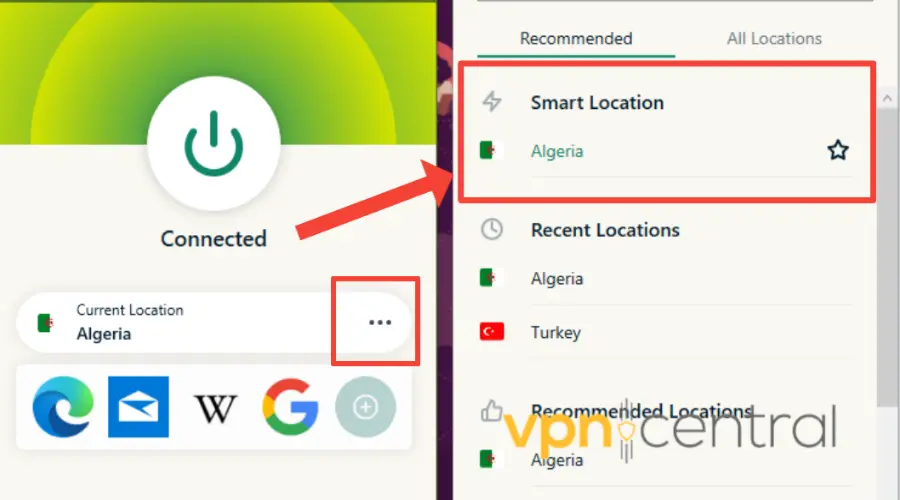
- Change protocol to WireGuard or IKEv2.
- Check your VPN provider’s status page for ongoing maintenance.
3. Power or Sleep Settings
Your laptop or smartphone may pause network activity to save power, which instantly breaks the VPN connection.
Common triggers:
- Sleep mode: Suspends all background network tasks.
- Battery saver: Closes VPN apps to reduce battery use.
Fix:
- Exclude your VPN from battery optimization settings.
- Keep your device awake during long sessions or downloads.
4. Firewall or Antivirus Interference
Firewalls and antivirus programs sometimes interfere with VPN connections by blocking or inspecting encrypted packets.
This is especially common on restricted or monitored networks, like when you can’t connect to VPN on public Wi-Fi.
Fix:
- Disable HTTPS inspection in your antivirus.
- Add your VPN app to your firewall’s exception list.
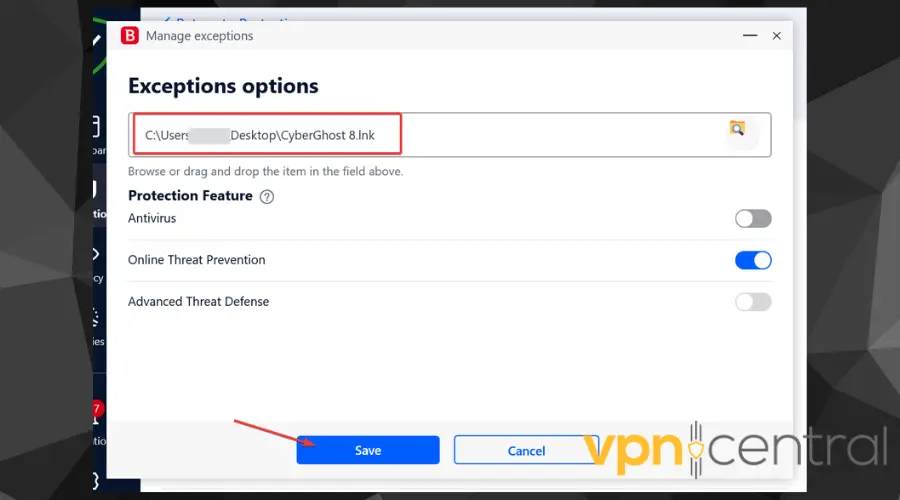
- Restart both apps after making changes.
5. VPN App Bugs or OS Conflicts
An outdated or buggy VPN client can easily cause disconnect problems, especially after system updates.
You might notice issues like:
- Old VPN versions failing after updates.
- Broken TAP/TUN drivers on Windows.
- App-specific errors.
Fix:
- Update your VPN app to the newest version.
- Reinstall network drivers.
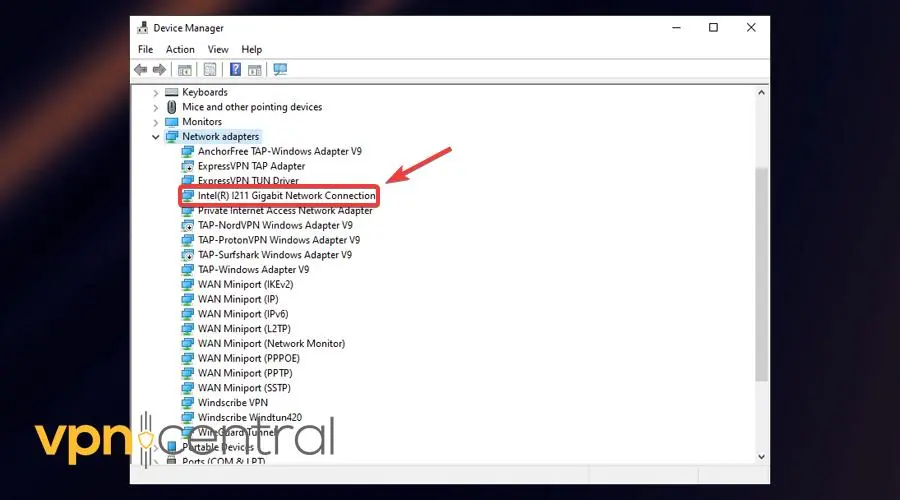
- Restart your device to refresh adapters and connections.
6. Geo-Blocks and VPN Detection
Some streaming sites, networks, and ISPs actively block VPN IP addresses.
If your VPN keeps disconnecting while streaming or browsing, it could be due to these restrictions.
Typical symptoms:
- VPN connects but disconnects after opening Netflix or similar sites.
- Works on Wi-Fi but fails on mobile data, which is common when VPN isn’t working on 4G networks.
Fix:
- Enable obfuscation or stealth mode in your VPN.
- Use custom DNS or OpenVPN TCP instead of UDP.
- Connect through another region or less crowded server.
7. Try a More Stable VPN Provider
If you’ve tried all these fixes and your current VPN still keeps disconnecting, the issue might be with the provider itself. Some VPNs use unstable servers or older tunneling technologies that cause frequent drops.
A proven alternative is Private Internet Access (PIA), a VPN known for its stability and advanced connection management.
PIA offers:
- A reliable WireGuard protocol that maintains stable connections even on weak networks.
- Auto-reconnect and kill switch features to prevent sudden exposure.
- Thousands of servers in 90+ countries for faster rerouting when one server is overloaded.
If your current VPN struggles to stay connected, switching to PIA can often solve the problem entirely while keeping your browsing private and secure.
Tips to Keep Your VPN Stable 🔧
- Always use the latest app version for better compatibility.
- Avoid public Wi-Fi when possible, as these networks often disrupt encrypted tunnels.
- Enable auto-reconnect in your VPN settings to restore lost connections instantly.
- Experiment with different protocols, since WireGuard and IKEv2 are often the most reliable.
- If disconnects persist, contact your provider’s support as it may be a known server issue.
Quick Comparison of Common Fixes
| Problem Type | Example Symptom | Best Fix |
|---|---|---|
| Network instability | VPN drops on weak Wi-Fi | Use wired or disable Wi-Fi switching |
| Server overload | VPN slows before disconnecting | Switch server or region |
| Sleep mode | VPN disconnects after idle time | Disable sleep or battery saver |
| Firewall conflict | VPN won’t connect | Add VPN to firewall exceptions |
| Geo-blocks | Disconnects on Netflix | Enable obfuscation or stealth mode |
| Unstable provider | VPN drops repeatedly | Switch to a reliable VPN like PIA |
Keep Your VPN Secure and Connected
When troubleshooting how to fix VPN disconnect problems, never disable your kill switch or DNS leak protection, as these keep your identity safe during temporary drops.
Instead, check your connection stability, adjust protocols, and ensure all software is updated.
With these steps, your VPN will remain fast, secure, and consistently connected.


Read our disclosure page to find out how can you help VPNCentral sustain the editorial team Read more


Improve this guide




User forum
0 messages