
iOS 26.5 Brings End-to-End Encrypted RCS Messaging Between iPhone and Android


 7 min. read
  Published on
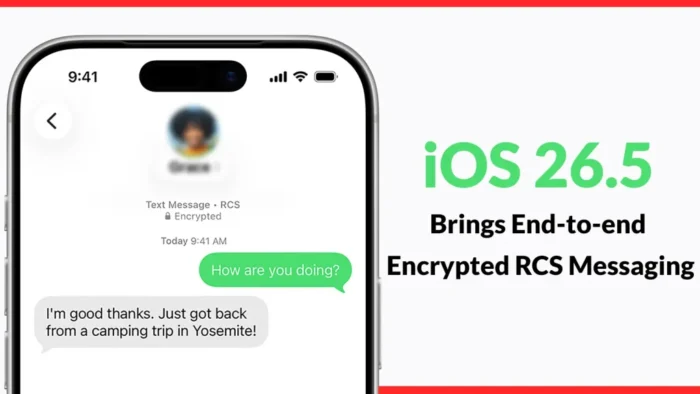
Apple and Google have started rolling out end-to-end encrypted RCS messaging between iPhone and Android users. The feature arrives with iOS 26.5 and is available in beta for supported carriers and Android users running the latest version of Google Messages.
This is a major privacy upgrade for default texting between the two platforms. Until now, iPhone-to-Android conversations could use SMS, MMS, or RCS depending on device and carrier support, but cross-platform RCS did not offer the same interoperable end-to-end encryption now being introduced.

Access content across the globe at the highest speed rate.
70% of our readers choose Private Internet Access
70% of our readers choose ExpressVPN

Browse the web from multiple devices with industry-standard security protocols.

Faster dedicated servers for specific actions (currently at summer discounts)
When the feature is active, users will see a lock icon in RCS chats. Encryption is enabled by default and will become available over time for both new and existing RCS conversations.
What changes with iOS 26.5
iOS 26.5 adds support for encrypted RCS conversations between Apple Messages and Google Messages. That means supported chats between iPhone and Android users can now protect message content during transmission so Apple, Google, carriers, and intermediate servers cannot read the conversation content.
The update does not replace iMessage. Apple says iMessage remains end-to-end encrypted for Apple-to-Apple conversations and continues to serve as the main private messaging system between Apple devices.
The change matters because many users rely on their default messaging apps instead of third-party apps like Signal or WhatsApp. With this rollout, more everyday conversations can receive stronger protection without users needing to install a separate app.
| Feature | What users get |
|---|---|
| Cross-platform RCS encryption | End-to-end encryption for supported iPhone and Android RCS chats. |
| Default protection | Encryption turns on automatically when all requirements are met. |
| Visual indicator | A lock icon shows when the conversation is encrypted. |
| Required iPhone version | iOS 26.5. |
| Required Android app | The latest version of Google Messages. |
| Rollout status | Beta rollout with carrier and device availability expanding over time. |
Why encrypted RCS matters
RCS is designed as the modern replacement for SMS. It supports features such as higher-quality media sharing, read receipts, typing indicators, better group chats, and improved message delivery.
Apple brought RCS support to iPhone earlier, improving the basic texting experience between iPhone and Android users. The missing piece was interoperable encryption across both platforms.
With iOS 26.5, that gap begins to close. Cross-platform RCS chats can now gain protection closer to what users already expect from secure messaging apps, as long as every technical requirement is met.
How the encryption works
The new encrypted RCS system relies on the GSMA RCS Universal Profile 3.0 specification. That standard uses Messaging Layer Security, or MLS, to support interoperable end-to-end encryption across different messaging clients.
MLS is built for secure messaging at scale. It can support both one-to-one and group conversations while letting different providers implement the same encryption standard.
This is important because Apple and Google do not use the same messaging app. Interoperable encryption requires a shared standard, not a private system controlled by only one company.
- Messages are encrypted on the sender’s device.
- Only the intended recipient devices can decrypt the message content.
- Apple, Google, and carriers should not be able to read encrypted message content in transit.
- The lock icon helps users confirm when encryption is active.
- Encryption depends on supported software, devices, and carrier support.
Who can use encrypted RCS now
The rollout is not universal on day one. iPhone users need iOS 26.5 and a supported carrier. Android users need the latest version of Google Messages, with RCS enabled.
If the lock icon does not appear, the conversation may not meet all requirements yet. The other person may need an app update, carrier support may not be ready, or the rollout may not have reached that account yet.
Group chats add another limitation. Encryption can fail if one participant does not use a compatible device, app, carrier, or RCS setup. In those cases, users should check the conversation indicator before sharing sensitive information.
| Conversation type | Encryption status |
|---|---|
| iMessage between Apple devices | End-to-end encrypted through iMessage. |
| Google Messages RCS between Android users | End-to-end encrypted when requirements are met. |
| RCS between iPhone and Android | End-to-end encrypted in beta when both sides and carriers support it. |
| SMS or MMS | Not end-to-end encrypted. |
| Mixed unsupported group chats | May fall back without end-to-end encryption. |
What users should look for
The easiest way to confirm encryption is to look for the lock icon inside the RCS conversation. Google Messages also uses a lock indicator on encrypted conversations and on the send button when composing protected messages.
Users should not assume every blue, green, or RCS-labeled chat is encrypted. The visible lock indicator matters because RCS support and RCS encryption are not always the same thing.
If a message falls back to SMS or MMS, it does not receive RCS end-to-end encryption. Users who need stronger privacy should verify the lock icon or use a dedicated encrypted messaging app when needed.
- Update the iPhone to iOS 26.5.
- Make sure the carrier supports encrypted RCS.
- Ask Android contacts to update Google Messages.
- Confirm that RCS is turned on in Google Messages.
- Open the conversation and check for the lock icon.
- Avoid sending sensitive details if the conversation falls back to SMS or MMS.
Privacy improves, but limits remain
End-to-end encrypted RCS protects message content during transmission, but it does not solve every privacy concern. Metadata may still exist, including information about who communicated, when messages were sent, and which services handled the conversation.
Cloud backups can also affect privacy depending on device settings and platform behavior. Users who need stronger protection should review backup settings and consider additional privacy controls.
The Electronic Frontier Foundation welcomed the rollout as a major improvement, but also noted that dedicated encrypted messaging apps can still offer better protection for some conversations.
Why Apple and Google’s cooperation matters
Cross-platform messaging has long been one of the weakest points in everyday mobile privacy. Users could have secure chats inside iMessage or within Google Messages, but security often dropped when conversations crossed platform lines.
Apple and Google’s support for the GSMA standard changes that direction. Instead of using a proprietary bridge, both companies are backing a shared standard that can work across different providers.
This could make encrypted messaging more common for people who never think about privacy tools. The feature works through the default apps users already open every day.
What happens next
The rollout will expand gradually as software updates, carrier support, and app updates reach more users. Some people may see encrypted RCS immediately after updating, while others may wait longer.
Apple and Google describe the feature as a beta rollout, so users should expect uneven availability at first. The most reliable signal remains the lock icon inside the chat.
For now, iOS 26.5 marks a major step toward safer default messaging between iPhone and Android. It does not eliminate the need for privacy awareness, but it makes everyday cross-platform texting much harder to read in transit when encryption is active.
FAQ
Yes. iOS 26.5 adds beta support for end-to-end encrypted RCS conversations between supported iPhone users and Android users on the latest version of Google Messages.
Look for the lock icon in the conversation. If the lock icon is missing, the chat may not meet all requirements for end-to-end encrypted RCS yet.
No. End-to-end encryption applies to supported RCS conversations. SMS and MMS messages are not end-to-end encrypted.
Android users need the latest version of Google Messages with RCS turned on. The conversation also needs supported device, app, and carrier conditions.
No. iMessage remains Apple’s encrypted messaging service for Apple devices. Encrypted RCS improves messaging between iPhone and Android users when all requirements are met.


Read our disclosure page to find out how can you help VPNCentral sustain the editorial team Read more


Improve this guide
User forum
0 messages