
Iran-Linked Hackers Use AppDomainManager Hijacking to Evade Endpoint Detection


 9 min. read
  Published on
Iran-linked hackers tracked as Screening Serpens are using AppDomainManager hijacking to make their malware harder to detect on Windows systems. The campaign uses tailored recruitment lures, spoofed meeting tools, DLL sideloading, and new RAT variants to target organizations in the United States, Israel, the United Arab Emirates, and other Middle Eastern entities.
According to Unit 42, the activity intensified between February and April 2026 and aligns with a regional conflict that began in the Middle East on February 28, 2026. Researchers grouped six newly observed remote access trojan variants into two malware families named MiniUpdate and MiniJunk V2.

Access content across the globe at the highest speed rate.
70% of our readers choose Private Internet Access
70% of our readers choose ExpressVPN

Browse the web from multiple devices with industry-standard security protocols.

Faster dedicated servers for specific actions (currently at summer discounts)
Screening Serpens is also tracked as UNC1549, Smoke Sandstorm, and Iranian Dream Job. The group has operated since at least 2022 and has focused on cyberespionage against high-value sectors such as aerospace, defense manufacturing, telecommunications, and technology.
How AppDomainManager hijacking helps the malware hide
AppDomainManager hijacking abuses a legitimate .NET feature. Instead of injecting code through a noisy memory technique, attackers modify an application configuration file so the .NET runtime loads attacker-controlled code during application startup.
The MITRE ATT&CK AppDomainManager technique describes this as a hijack of how .NET applications load assemblies. In this campaign, the method lets the malware run before the host application fully starts, giving it a chance to weaken visibility early in execution.
Microsoft’s AppDomainManager documentation explains that an AppDomainManager object can participate in the creation of new application domains and customize them before other managed code runs. That design gives defenders a clear reason to monitor suspicious .NET configuration changes.
Key details at a glance
| Item | Details |
|---|---|
| Threat group | Screening Serpens |
| Known aliases | UNC1549, Smoke Sandstorm, Iranian Dream Job, Nimbus Manticore |
| Reported targets | U.S., Israel, UAE, and likely other Middle Eastern entities |
| Targeted sectors | Aerospace, defense manufacturing, telecommunications, and technology |
| Malware families | MiniUpdate and MiniJunk V2 |
| Main evasion method | DLL sideloading combined with AppDomainManager hijacking |
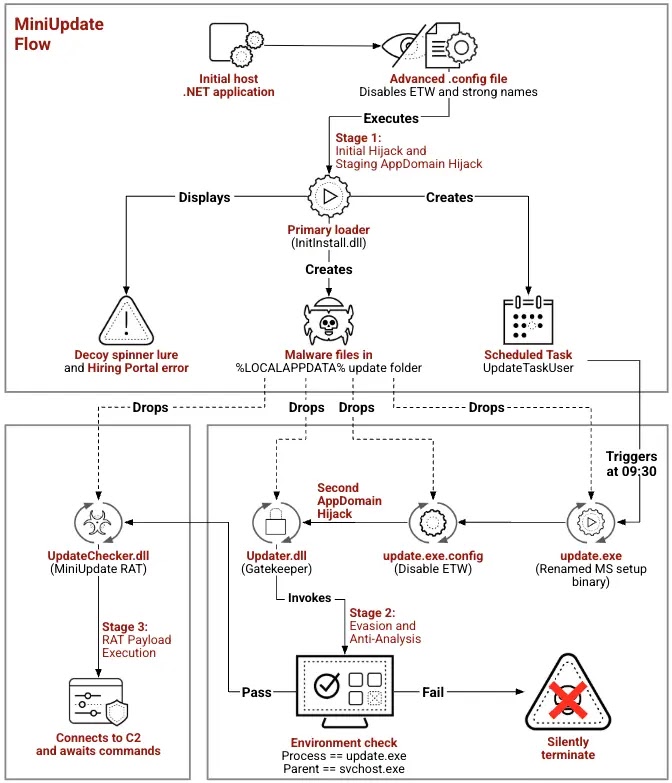
The attackers use this technique to change how legitimate .NET applications initialize. Unit 42 said the malware can use configuration directives to disable Event Tracing for Windows and strong-name signature verification in the targeted application context.
This matters because many endpoint tools depend on .NET runtime telemetry to understand what managed code is doing. Microsoft’s CLR ETW provider documentation explains that the common language runtime has runtime and rundown ETW providers, with the runtime provider raising events depending on enabled categories.
Fake job lures remain central to the campaign
The campaign still relies heavily on social engineering. Victims receive fake recruitment material, spoofed job portals, or malicious video conferencing installers. These lures aim at professionals who may have access to sensitive projects, cloud environments, engineering data, or defense-related systems.
Check Point Research previously tracked the related Nimbus Manticore activity and reported a late-2025 expansion into Western Europe, including Denmark, Sweden, and Portugal. The group used fake job portals and impersonated aerospace, defense, and telecommunications organizations.
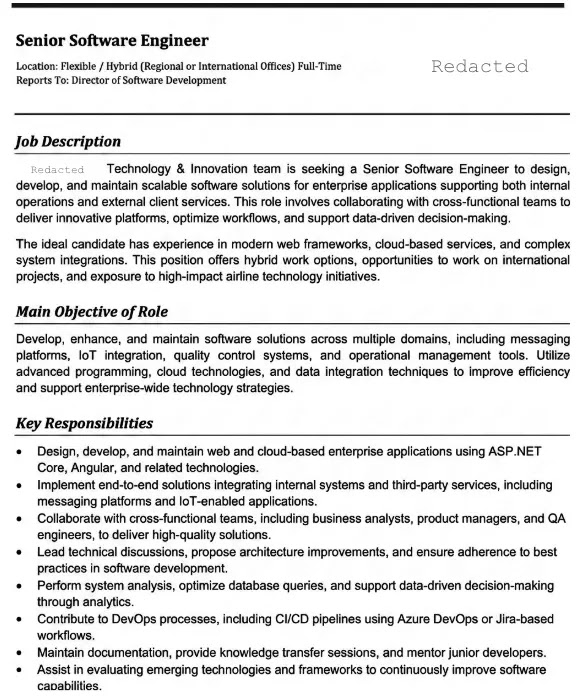
In the newer MiniUpdate activity, one archive impersonated a global air carrier and contained fake job description PDFs, including technical roles such as senior software engineer. A nested Hiring Portal.zip file launched the infection chain while showing a fake error message to keep the victim from suspecting malware activity.
MiniUpdate and MiniJunk V2 show different parts of the same playbook
| Malware family | Delivery style | Notable behavior |
|---|---|---|
| MiniUpdate | Fake recruitment archive or video conferencing lure | Uses AppDomainManager hijacking and Azure-hosted C2 domains |
| MiniJunk V2 | Recruitment or meeting-themed lure | Uses DLL sideloading, obfuscation, and RAT functionality |
| Both families | Targeted spear phishing | Use tailored social engineering and dedicated infrastructure |
Unit 42’s timeline shows MiniUpdate samples tied to U.S. and Israel activity in late March 2026, with additional variants appearing in mid-April from the UAE and another Middle Eastern entity. MiniJunk V2 samples appeared in February and March 2026.
The MiniUpdate variants used command-and-control domains hosted on Azure infrastructure and rotated domains between campaigns. The attackers used names that looked like business, transportation, health, or finance entities, making network review harder for defenders who only search for obviously suspicious domains.
Why the .NET configuration trick matters
AppDomainManager hijacking fits the living-off-the-land model because it turns a normal platform feature into an execution path. The attacker does not need to patch memory or exploit a vulnerability in the .NET application. The malware can instead rely on configuration behavior the runtime already supports.
Microsoft’s AppDomainManager class reference shows why this works: the object participates early in application domain creation. That early position makes changes to application configuration files especially important for threat hunting.
The attack also highlights the value of monitoring .config files near trusted binaries. A signed application that suddenly loads an unsigned DLL from a local directory should trigger investigation, especially when the process also suppresses telemetry or uses unusual network destinations.
Observed indicators of compromise
| Type | Indicator | Description |
|---|---|---|
| Domain | licencemanagers.azurewebsites[.]net | MiniJunk V2 C2 domain |
| Domain | LicenceSupporting.azurewebsites[.]net | MiniJunk V2 C2 domain |
| Domain | PeerDistSvcManagers.azurewebsites[.]net | MiniJunk V2 C2 domain |
| Domain | ThemesManagers.azurewebsites[.]net | MiniJunk V2 C2 domain |
| Domain | ThemesProviderManagers.azurewebsites[.]net | MiniJunk V2 C2 domain |
| Domain | NanoMatrix.azurewebsites[.]net | MiniJunk V2 U.S. campaign C2 |
| Domain | QuantumWeave.azurewebsites[.]net | MiniJunk V2 U.S. campaign C2 |
| Domain | ElementShift.azurewebsites[.]net | MiniJunk V2 U.S. campaign C2 |
| Domain | buisness-centeral.azurewebsites[.]net | MiniUpdate C2 domain |
| Domain | buisness-centeral-transportation.azurewebsites[.]net | MiniUpdate C2 domain |
| Domain | Buisness-centeral-transportation[.]com | MiniUpdate C2 domain |
| Domain | PremierHealthAdvisory[.]com | MiniUpdate UAE campaign C2 |
| Domain | PremierHealthAdvisory.azurewebsites[.]net | MiniUpdate UAE campaign C2 |
| Domain | Premier-HealthAdvisory.azurewebsites[.]net | MiniUpdate UAE campaign C2 |
| Domain | Ramiltonsfinance[.]com | MiniUpdate Middle East campaign C2 |
| Domain | Ramiltonsfinance.azurewebsites[.]net | MiniUpdate Middle East campaign C2 |
| Domain | Ramiltons-finance.azurewebsites[.]net | MiniUpdate Middle East campaign C2 |
| Domain | business-startup[.]org | Associated C2 infrastructure |
| Domain | business-startup.azurewebsites[.]net | Associated C2 infrastructure |
| Domain | docspace-y4cumb.onlyoffice[.]com | ONLYOFFICE payload delivery |
| Domain | docspace-twpf0e.onlyoffice[.]com | ONLYOFFICE payload delivery |
| File name | UpdateChecker.dll | MiniUpdate core RAT payload |
| File name | uevmonitor.dll | MiniJunk V2 primary loader |
| File name | Connection.dll | MiniJunk V2 U.S. campaign RAT payload |
| File name | unbcl.dll | Social engineering decoy DLL |
| File name | Hiring Portal.zip | Malicious archive delivery file |
| File name | Portable platform.zip | MiniJunk V2 U.S. campaign delivery archive |
Defenders should treat the IoCs as starting points, not full coverage. The threat actor rotates infrastructure and changes file names, so behavior-based detection will outlast static blocklists.
The most important behavior to hunt is the combination of a legitimate .NET application, a new or changed .config file, a locally staged unsigned DLL, and unexpected outbound traffic to Azure-hosted domains or attacker-controlled infrastructure.
Detection priorities for defenders
- Monitor changes to application .config files near signed .NET executables.
- Alert when trusted signed binaries load unsigned DLLs from unusual directories.
- Hunt for appDomainManagerAssembly and appDomainManagerType entries in unexpected configuration files.
- Watch for .NET processes with CLR ETW telemetry disabled or reduced unexpectedly.
- Review scheduled tasks created by suspicious installers, especially daily triggers tied to lure files.
- Inspect Azure-hosted domains that imitate Windows service, business, health, or finance names.
- Train targeted staff to verify job offers and meeting tools through official company channels.
The Microsoft CLR ETW provider guide gives defenders useful context on the telemetry surface attackers are trying to weaken. If a process should generate CLR runtime events but does not, that gap may deserve investigation.
Security teams should also map this activity to the MITRE AppDomainManager hijacking entry and build detections around the configuration files and environment variables that control .NET application domain loading.
Why fake recruitment lures remain effective
Screening Serpens continues to use job-themed lures because they work against high-value targets. Engineers, IT staff, aerospace employees, and telecommunications professionals may regularly review job descriptions, portals, file archives, and meeting tools, giving attackers a believable route into protected organizations.
Check Point’s earlier research showed the same broader actor set using fake HR outreach and job portals to reach defense, telecom, and aviation targets in Europe. The newer campaign keeps that theme but adds stronger .NET-based evasion.
Organizations in targeted sectors should tell employees that convincing job material can still be hostile. Staff should verify unexpected recruiting messages, avoid running archives from unofficial channels, and report any meeting installer or hiring portal that asks for unusual steps.
What organizations should do now
| Priority | Action | Why it matters |
|---|---|---|
| High | Hunt for AppDomainManager hijacking artifacts | Finds the main evasion method used by MiniUpdate |
| High | Review suspicious DLL sideloading events | Detects trusted binaries loading untrusted modules |
| High | Block or investigate listed C2 domains | Reduces communication with known attacker infrastructure |
| Medium | Audit scheduled tasks and installer-related persistence | Finds daily triggers and staged payload activity |
| Medium | Review recruitment-themed archives sent to high-risk staff | Identifies social engineering delivery paths |
This campaign shows that advanced attackers still rely on human trust, but they pair it with deeper platform abuse after the first click. The lure may look like a hiring portal or meeting tool, while the real objective is quiet remote access and long-term intelligence collection.
Defenders should not rely only on malware hashes. The stronger strategy is to combine user reporting, attachment analysis, config-file monitoring, DLL load telemetry, .NET runtime visibility, and network review for Azure-hosted C2 patterns.
FAQ
AppDomainManager hijacking is a technique that abuses how .NET applications load assemblies. Attackers can modify configuration files so malicious code runs early in the application startup process.
Screening Serpens is an Iran-nexus cyberespionage group also tracked as UNC1549, Smoke Sandstorm, Iranian Dream Job, and Nimbus Manticore. It has been active since at least 2022 and targets sectors such as aerospace, defense, telecommunications, and technology.
Unit 42 grouped six new RAT variants into two malware families named MiniUpdate and MiniJunk V2. MiniUpdate used AppDomainManager hijacking, while MiniJunk V2 used related DLL sideloading and RAT behavior.
The technique can run attacker-controlled code early in .NET application startup. In this campaign, researchers said the attackers used configuration directives to disable telemetry sources such as ETW before normal detection visibility could fully apply.
Organizations should monitor .NET configuration file changes, hunt for appDomainManagerAssembly and appDomainManagerType entries, detect signed binaries loading unsigned DLLs, review suspicious scheduled tasks, and investigate Azure-hosted domains that imitate legitimate services.


Read our disclosure page to find out how can you help VPNCentral sustain the editorial team Read more


Improve this guide




User forum
0 messages