
IronWorm npm Supply Chain Attack Targets Developers and Steals Secrets


 8 min. read
  Published on
A new npm supply chain attack called IronWorm used malicious package updates to target developers, steal secrets, and spread through trusted publishing workflows. JFrog Security Research says the malware was found inside packages tied to the asteroiddao npm account and the Arweave and WeaveDB developer ecosystem.
The campaign affected 36 npm packages, according to public reporting, and the malicious versions were designed to execute when developers installed them. The packages carried a hidden Linux binary inside a tools directory and ran it through an npm preinstall hook.

Access content across the globe at the highest speed rate.
70% of our readers choose Private Internet Access
70% of our readers choose ExpressVPN

Browse the web from multiple devices with industry-standard security protocols.

Faster dedicated servers for specific actions (currently at summer discounts)
IronWorm matters because it targets the systems that build and publish software. Once it steals credentials from a developer machine or CI environment, it can push malicious commits, publish poisoned package versions, and move deeper into the software supply chain.
What IronWorm did in npm packages
IronWorm was built as a Rust-based infostealer. Researchers said it scanned developer machines for credentials, API keys, cloud tokens, source control secrets, and cryptocurrency wallet data.
BleepingComputer reported that the malware targeted 86 environment variables and more than 20 credential file paths. Those targets included OpenAI, AWS, Anthropic, npm, Vault, SSH, and Exodus wallet data.
The malicious packages did not look like random typosquats. They were republished from an existing account, which gave them a stronger appearance of legitimacy than brand-new suspicious packages.
| Detail | Reported finding |
|---|---|
| Malware name | IronWorm |
| Language | Rust |
| Affected npm packages | 36 packages |
| GitHub activity | 57 backdated malicious commits across nine organizations |
| Main target | Developer machines and CI/CD environments |
| Main risk | Credential theft and package republishing |
How the install-time attack worked
The malicious packages used npm install behavior to run code automatically. The npm scripts documentation explains that lifecycle scripts such as preinstall, install, and postinstall can run during package installation.
In this campaign, the attackers placed a Linux ELF binary in a hidden-looking tools path and launched it during installation. This made the attack especially dangerous for Linux-based CI runners, developer workstations, and build systems.
The binary was packed with a modified UPX-style approach and used string encryption to slow analysis. JFrog also reported an eBPF rootkit component designed to hide processes and network connections from common monitoring tools.
Why developers and CI systems were exposed
Developers are valuable targets because their machines often hold credentials for GitHub, npm, cloud platforms, databases, AI services, deployment systems, and internal infrastructure. CI runners can carry even more sensitive secrets because they build and publish software automatically.
IronWorm used that trust model against its victims. If it reached a machine with repository write access or package publishing rights, it could plant new commits and prepare more poisoned releases.
OX Security said the campaign was detected early and mitigated before it spread into more popular npm packages. Even so, any team that installed an affected package version should treat the environment as potentially compromised.
Backdated commits helped the malware blend in
JFrog found 57 backdated malicious commits across nine GitHub organizations. Some commits were made to look older by copying timestamps from previous legitimate repository activity.
This matters because teams often review recent commits when investigating an incident. Backdating can make malicious changes appear like old maintenance work unless investigators compare push times, author identity, build logs, and package publish times.
The author identity also raised suspicion. Researchers observed commits attributed to a fake identity using a familiar automation-like name, while activity logs showed a different account behind the changes.
| Red flag | Why it matters |
|---|---|
| Backdated commits | Can make malicious code look older than it really is |
| Routine commit messages | Can blend into normal maintenance noise |
| Hidden tools directory | Can hide a malicious binary outside common review paths |
| Preinstall execution | Runs during npm install before normal user review |
| Rust binary payload | Can evade scanners focused mainly on JavaScript files |
How IronWorm tried to spread
The malware was designed to steal publishing credentials and use them to infect additional packages. This is the same broad pattern seen in earlier self-propagating npm attacks, including Shai-Hulud-style campaigns.
The npm Trusted Publishing documentation explains that trusted publishing lets packages publish directly from CI/CD workflows through OpenID Connect, avoiding long-lived npm tokens. That model improves security, but a compromised CI workflow can still become dangerous if attackers control the environment at publish time.
IronWorm’s propagation logic targeted that gap. If the malware ran in a trusted CI context, it could try to use the environment’s publishing path rather than relying only on a stored npm token.
What secrets IronWorm targeted
The credential theft list was broad. The malware searched environment variables and file paths tied to cloud providers, developer tools, source control systems, AI services, databases, and cryptocurrency wallets.
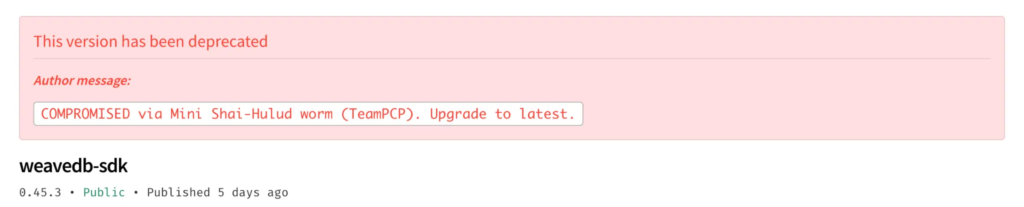
It also included modules for more specific targets. Researchers said one component targeted the Exodus desktop wallet and another looked for Kubernetes service account tokens and secrets reachable from pods.
- npm publishing credentials
- GitHub and source control tokens
- AWS, Google Cloud, and Azure credentials
- OpenAI and Anthropic API keys
- HashiCorp Vault tokens
- SSH keys and CI/CD secrets
- Kubernetes service account tokens
- Exodus wallet data and recovery material
Why rootkit behavior raises the stakes
IronWorm was not just a simple credential grabber. JFrog described an eBPF-based rootkit that could hide processes and network connections from normal Linux monitoring tools.
That makes endpoint review harder. A developer or administrator may run normal process-listing commands and see nothing suspicious, while the malware continues operating in the background.
The JFrog analysis also notes that the malware communicated through Tor and used custom infrastructure. That combination suggests a more deliberate operation than a basic npm credential theft script.
What teams should check now
Teams should first identify whether any affected package versions entered their dependency tree. This check should include package-lock files, pnpm-lock files, yarn.lock files, CI logs, dependency mirrors, and internal package caches.
The BleepingComputer report notes that affected packages were tied to WeaveDB and related package names. Teams using that ecosystem should review installs from the incident window with extra care.
Any system that installed a malicious version should be treated as compromised until credentials are rotated and logs are reviewed.
- Search lockfiles for affected package names and versions.
- Review npm install logs for unexpected preinstall execution.
- Inspect node_modules packages for unexpected tools/setup binaries.
- Check GitHub repositories for backdated commits and suspicious automation authors.
- Review npm publish history for unexpected package releases.
- Rotate tokens from exposed machines and CI environments.
- Rebuild affected CI runners from clean images.
How to reduce future npm supply chain risk
Organizations should inspect package tarballs, not only GitHub repository source. Attackers can publish files to npm that do not clearly appear in the public repository view or that hide inside rarely reviewed directories.
Teams should also treat install scripts as high-risk behavior. The npm lifecycle documentation shows how many scripts can run during install, publish, pack, and rebuild operations, which gives attackers several execution opportunities.
Trusted publishing still helps when configured correctly, especially because it reduces exposure from long-lived tokens. The npm trusted publishing guidance recommends using OIDC-based publishing and restricting token access, but teams still need strong CI hardening and review controls.
| Defense | Why it helps |
|---|---|
| Pin dependency versions | Reduces the chance of automatically pulling a poisoned release |
| Review package tarballs | Finds files added only during publish |
| Limit install scripts | Reduces automatic execution during dependency installation |
| Use short-lived credentials | Limits damage from stolen tokens |
| Harden CI runners | Reduces access to secrets during untrusted builds |
| Monitor publish history | Finds unexpected releases from compromised maintainer accounts |
Why IronWorm matters
IronWorm shows how npm supply chain attacks are becoming more specialized. Instead of relying only on obfuscated JavaScript, attackers used a native Rust binary, Linux rootkit behavior, CI/CD credential theft, and repository manipulation.
The campaign also shows that trusted accounts can become delivery channels. Once attackers compromise a maintainer or CI workflow, poisoned packages may look like normal updates from a legitimate project.
OX Security’s summary gives a shorter package-level impact view, while JFrog provides the technical malware breakdown. Together, the reports show why npm users should combine dependency scanning, publish monitoring, runtime telemetry, and fast credential rotation.
FAQ
IronWorm is a Rust-based npm supply chain malware campaign that targets developers and CI/CD systems. It steals credentials, searches for cloud and source control secrets, and can use compromised access to spread through trusted package publishing workflows.
Public reports say 36 npm packages were affected. The number 57 refers to backdated malicious commits found across nine GitHub organizations, not 57 npm packages.
IronWorm used npm lifecycle behavior. Malicious package versions included a hidden Linux binary that executed through a preinstall hook when a developer or CI system installed the package.
Teams should remove the malicious package version, treat the affected machine or CI runner as compromised, rotate credentials, inspect GitHub repositories for backdated commits, review npm publish history, and rebuild exposed CI runners from clean images.
No. Trusted Publishing reduces risk from long-lived npm tokens, but it cannot fully protect a package if attackers control a maintainer account, repository, or CI workflow that has permission to publish.


Read our disclosure page to find out how can you help VPNCentral sustain the editorial team Read more


Improve this guide




User forum
0 messages