
Kali Linux 2026.2 Released With 9 New Tools, Faster VM Booting, and NetHunter Updates


 9 min. read
  Published on

Kali Linux 2026.2 is now available with nine new tools, faster virtual machine boot behavior, desktop updates, NetHunter improvements, and changes to how Kali handles APT repository sources.
The release is the second Kali Rolling update of 2026. The Kali Linux release history lists Kali Linux 2026.2 as released on June 29, 2026, with Linux kernel 6.19 and Xfce 4.20.7.

Access content across the globe at the highest speed rate.
70% of our readers choose Private Internet Access
70% of our readers choose ExpressVPN

Browse the web from multiple devices with industry-standard security protocols.

Faster dedicated servers for specific actions (currently at summer discounts)
According to the official Kali Linux 2026.2 release notes, the update focuses on desktop refreshes, service helper-script consistency, a new APT sources format, VM boot optimization, and major mobile hacking updates through Kali NetHunter.
What is new in Kali Linux 2026.2?
The biggest practical change for many users is the faster boot path for pre-built virtual machines. Kali has stopped pre-installing graphics firmware in VM images, which reduces the initrd size and improves boot times in virtualized environments.
The release also updates GNOME to version 50 and KDE Plasma to version 6.6. These are not radical redesigns, but they bring performance, accessibility, and usability improvements across the desktop.
BleepingComputer reported that Kali Linux 2026.2 also adds nine tools to the network repositories and ships several NetHunter improvements for Android-based penetration testing workflows.
| Area | Kali Linux 2026.2 change |
|---|---|
| Desktop environments | GNOME 50 and KDE Plasma 6.6 |
| Kernel | Linux kernel 6.19, with kernel 7.0 available through experimental or rolling paths |
| Virtual machines | Smaller initrd and faster booting by skipping graphics firmware in VM images |
| APT sources | New deb822-style file at /etc/apt/sources.list.d/kali.sources |
| Tools | Nine new tools added to the repositories |
| NetHunter | Faster app launch, new device support, injection patches, and kernel updates |
VM images should boot faster
Kali 2026.2 changes how pre-built virtual machine images handle graphics firmware. Earlier images included firmware for AMD, Intel, and NVIDIA graphics hardware, even when the system was running inside a VM.
That extra firmware made sense for bare-metal installs, but it added weight to VM images. Kali says the firmware added nearly 300 MB and helped push the initrd to about 200 MB in previous builds.
In Kali Linux 2026.2, pre-built VM images no longer include that graphics firmware. The installer also detects virtual machine environments and skips graphics firmware installation, bringing the initrd down to about 60 MB and making QEMU VM boots roughly three times faster.
Bare-metal installs still get graphics firmware
The VM boot change does not remove graphics support from normal physical installations. Bare-metal users still receive the graphics firmware needed for supported hardware.
This distinction matters because Kali is used across many environments. Some users run it as a full operating system on laptops, while others rely on fast disposable VMs during testing and training.
The new approach gives virtual machine users faster startup without reducing hardware support for users who install Kali directly on a computer.
GNOME 50 and KDE Plasma 6.6 refresh the desktop
GNOME 50 brings file manager improvements, faster thumbnail and icon loading, better responsiveness, lower memory use, and accessibility updates. It also adds a new preferences window for accessibility settings.
KDE Plasma 6.6 focuses on usability and accessibility. The update includes an on-screen keyboard, OCR text extraction through Spectacle, color-vision support options, and support for the standardized Reduced Motion setting.
These desktop updates make Kali smoother for daily work, especially for users who keep Kali installed as a regular workstation instead of launching it only for short security tasks.
Kali moves to a new APT sources format
Kali Linux 2026.2 also changes the default APT repository source format. New installs now use the deb822-style file at /etc/apt/sources.list.d/kali.sources instead of the long-standing /etc/apt/sources.list file.
The Kali team says this follows a wider shift already happening in Debian and Debian-based distributions. Existing systems will continue to work, but APT may eventually warn users to migrate.
This change mostly affects administrators, image builders, and users who maintain custom Kali systems. Fresh installs get the new format automatically.
- Fresh Kali 2026.2 installs use /etc/apt/sources.list.d/kali.sources.
- Existing installations can continue using the old format for now.
- Users may see APT migration warnings later.
- The change aligns Kali with Debian and Ubuntu repository-source modernization.
Helper scripts now behave more consistently
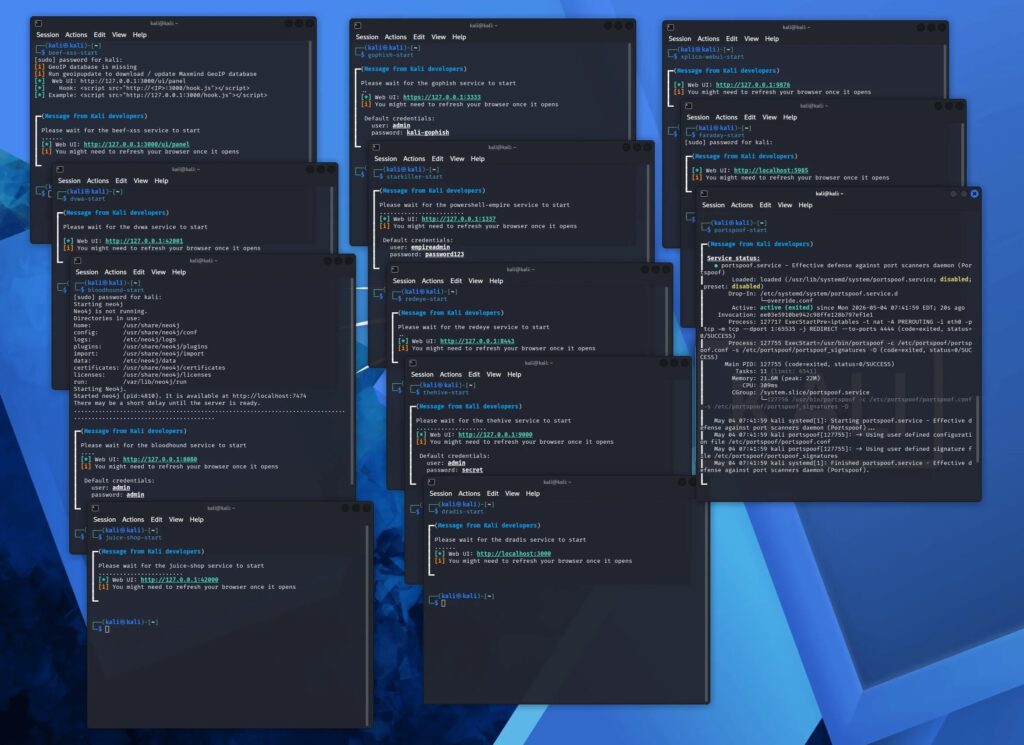
Kali has also updated helper scripts for several services. These scripts help users start and manage tools that run as local services, especially tools with web interfaces or default credentials.
The new scripts aim to make service behavior more predictable. They can start and stop services, check whether a service is already running, show status, display access details, and list default credentials when applicable.
This is a quality-of-life improvement for penetration testers who move quickly between tools during assessments. It reduces the time spent searching documentation for login details or service URLs.
| Helper-script function | Why it helps |
|---|---|
| Start and stop a service | Reduces manual service management |
| Check whether it is already running | Prevents accidental duplicate starts |
| Show status | Makes troubleshooting faster |
| Display default credentials | Reduces documentation lookups |
| Show access URLs | Helps users open web-based tools faster |
Linux kernel 6.19 stays for compatibility
Kali 2026.2 ships with Linux kernel 6.19 instead of moving fully to kernel 7.0 in the release images. The choice was made to avoid breaking NVIDIA DKMS driver compatibility for some users.
Users who want kernel 7.0 can still get it through kali-experimental or by updating through the relevant rolling package path. For most users, 6.19 is the safer default in this release.
The release also includes disruptive package updates that require a reboot. The Kali team specifically calls out polkit and xrdp or xorgxrdp v0.10, which matter for GUI root apps and Hyper-V Enhanced Session Mode users.
9 new tools added in Kali Linux 2026.2
Kali 2026.2 adds nine tools to the network repositories. The list covers cheat sheets, password testing, Office document analysis, shell handling, connectivity, OSINT, and URL cleanup.
BleepingComputer’s coverage highlights the same tool list, including the return of hydra-gtk and the addition of shell-gpt, tailscale, legba, and oletools.
These tools are available through Kali’s repositories, so users can install them on existing systems after updating package sources and upgrading the system.
| Tool | Purpose |
|---|---|
| arsenal-ng | Go-based command library with more than 200 cybersecurity cheat sheets |
| hydra-gtk | Re-added GTK interface for the Hydra network logon cracker |
| legba | Multiprotocol credential bruteforcer, password sprayer, and enumerator |
| oletools | Analysis toolkit for OLE2 files and Microsoft Office documents |
| penelope | Shell handler for post-exploitation workflows |
| shell-gpt | Command-line productivity tool powered by large language models |
| tailscale | Secure connectivity platform |
| tookie-osint | OSINT tool for finding social media accounts |
| uro | URL decluttering utility for crawling and pentesting |
NetHunter app and Wi-Fi testing updates arrive
Kali NetHunter also gets a large update in 2026.2. The NetHunter app now launches instantly, and the release fixes bugs affecting custom commands and chroot management.
The update adds an EvilTwin tab for Wi-Fi fake access point workflows, including a password verification captive portal. Kali also says related iptables fixes should help Android Hotspot work correctly after EvilTwin or Wifipumpkin3 use.
The most notable NetHunter change is the Qcacld-3.0 injection patch work. Kali says the patch brings Wi-Fi injection support to several devices using kernel 4.x and 5.x versions, including OnePlus, POCO, Redmi, Samsung, and Xiaomi models.
NetHunter Pro expands to more phones
Kali NetHunter Pro also expands bare-metal support. New device builds include Fairphone, Google Pixel, LG, Samsung, SHIFTphone, Sony Xperia, Xiaomi, and POCO devices.
The expanded device list makes NetHunter Pro more useful for users who want a mobile platform for security testing without relying only on a desktop or laptop environment.
For mobile users, the release is one of the larger NetHunter updates in recent cycles. It combines app speed improvements, kernel work, and wider device coverage.
Existing users should update and reboot
Existing Kali users do not need to reinstall to get 2026.2. They can update the system through APT after confirming the repository source configuration.
The Kali download page provides fresh images for users who want clean installs, live images, virtual machines, cloud images, ARM images, WSL, containers, and NetHunter builds.\
Users already on Kali Rolling can update with the normal full-upgrade process. Kali recommends rebooting after the upgrade because of the polkit and xrdp-related package changes.
- Confirm the Kali repository source is configured correctly.
- Run apt update and a full system upgrade.
- Review any package messages during the upgrade.
- Reboot after the upgrade completes.
- Verify the version through /etc/os-release.
Who should install Kali Linux 2026.2?
Kali Linux 2026.2 is most useful for penetration testers, security researchers, digital forensics teams, students, and IT professionals who need a rolling security distribution with up-to-date tooling.
VM users have a stronger reason to update because the release directly targets virtual machine boot performance. NetHunter users also get meaningful mobile improvements, especially on supported devices.
Users who want a fresh install can download Kali 2026.2 from the official Get Kali page. Existing users can upgrade in place, then reboot to complete the update cleanly.
Kali 2026.2 continues the rolling release cycle
Kali Linux 2026.2 is not a one-feature release. It brings several practical changes that improve everyday use, especially for virtual machines, service-based tools, and mobile testing.
The official release history confirms it as the second Kali Rolling release of 2026. It follows Kali 2026.1, which arrived in March with a 2026 theme refresh and BackTrack mode.
For most users, the main takeaway is simple. Kali 2026.2 should boot faster in VMs, offer a cleaner repository format for new installs, include newer desktops, and provide nine more tools for security workflows.
FAQ
Kali Linux 2026.2 adds nine new tools, GNOME 50, KDE Plasma 6.6, Linux kernel 6.19, faster VM booting, a new APT sources format, updated helper scripts, and several Kali NetHunter improvements.
Kali Linux 2026.2 adds nine new tools to the network repositories: arsenal-ng, hydra-gtk, legba, oletools, penelope, shell-gpt, tailscale, tookie-osint, and uro.
Kali removed pre-installed graphics firmware from pre-built VM images and skips graphics firmware installation when the installer detects a VM. This reduces initrd size and improves boot time in virtualized environments.
No. Kali Linux 2026.2 ships with Linux kernel 6.19 to avoid NVIDIA DKMS driver compatibility problems. Users who want kernel 7.0 can access it through experimental or rolling package paths.
No. Existing Kali Rolling users can upgrade in place through APT. Kali recommends rebooting after the upgrade because of disruptive polkit and xrdp-related package changes.


Read our disclosure page to find out how can you help VPNCentral sustain the editorial team Read more


Improve this guide




User forum
0 messages