
Malicious Chrome Extension Used Native Messaging to Run PowerShell Commands on Windows


 6 min. read
  Published on

A newly analyzed Chrome malware campaign used a rogue browser extension and a Native Messaging Host to turn infected Windows systems into remote-command backdoors.
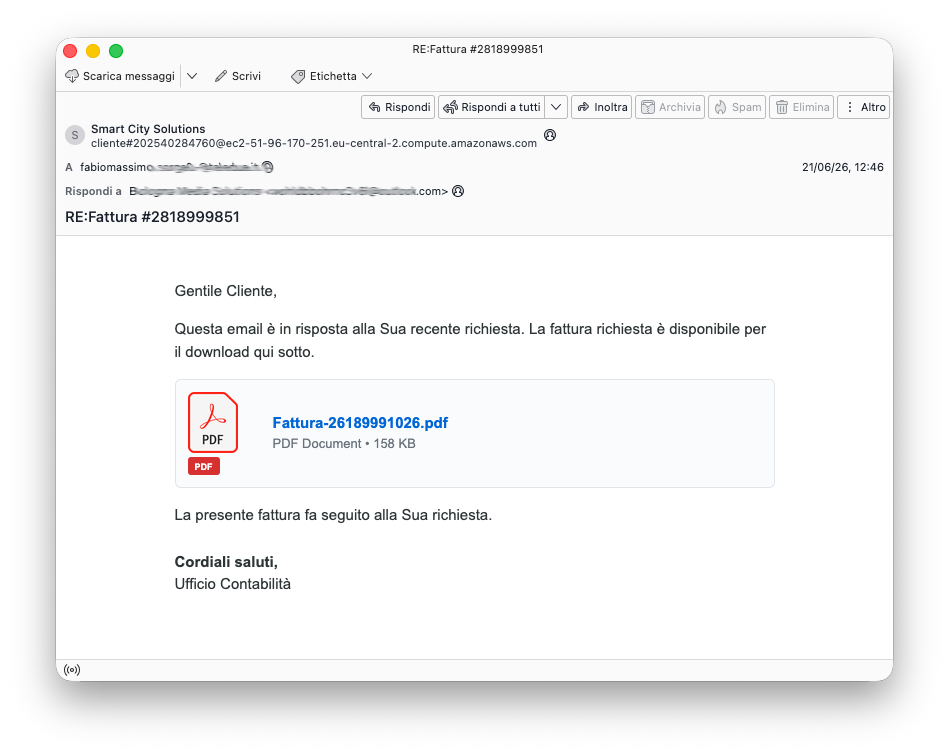
The campaign, detailed in a D3Lab analysis, began with Italian-language invoice phishing emails. Victims were shown what looked like a PDF invoice, but the downloaded file was actually an obfuscated JavaScript payload named Fattura-2819889242.pfd.js.

Access content across the globe at the highest speed rate.
🔥 Save 81% + 2 bonus months! 🔥
70% of our readers choose Private Internet Access
70% of our readers choose ExpressVPN
2
Browse the web from multiple devices with industry-standard security protocols.
🔥 Save 73%! 🔥

Faster dedicated servers for specific actions (currently at summer discounts)
🔥 Save 69%! 🔥
The attack did not rely on a public Chrome zero-day. Instead, it abused legitimate browser and Windows features, including Chrome extension policies, DLL side-loading, PowerShell, and Chrome Native Messaging.
How the Chrome extension malware worked
Once the victim executed the JavaScript file, Windows Script Host decoded the payload and dropped two files into a temporary folder. One was client_124578.exe, a signed executable associated with Epic Games. The other was a malicious d3d11.dll file.
The signed executable loaded the malicious DLL through DLL side-loading. This technique lets attackers place a rogue library next to a trusted application, so the trusted application loads the attacker-controlled file during startup.
The DLL then launched a hidden PowerShell process. From there, the malware prepared a Chrome extension named Cloud vn105rkj64 and changed local Chrome policy settings so the extension looked like an administrator-approved install.
| Stage | What happened | Why it matters |
|---|---|---|
| Phishing | Italian invoice email delivered a fake PDF download | The payload used a deceptive .pfd.js filename to imitate a document |
| Execution | Windows Script Host ran obfuscated JavaScript | The script dropped the files needed for the next stage |
| Side-loading | A signed executable loaded a malicious d3d11.dll | The attack blended into normal Windows activity |
| Chrome policy abuse | The extension was added through policy keys | The install appeared managed rather than user-driven |
| Remote command | Native Messaging connected Chrome to a local host | Attackers could run PowerShell commands on Windows |
Why Native Messaging made the attack more dangerous
Chrome extensions can read browser data when granted the right permissions, but they cannot normally launch arbitrary Windows programs. That restriction helps stop a browser compromise from becoming a full operating-system compromise.
Google’s Native Messaging Host rules create a legitimate exception for approved local applications. A registered native host lets an extension exchange messages with a local program through standard input and output.
In this campaign, attackers registered a Native Messaging Host named com.vn105rkj64.tr7qprrt7g. The malicious Chrome extension used that bridge to send commands outside the browser sandbox, while the native host ran actions on Windows with the current user’s privileges.
The attackers also abused Chrome enterprise policies
The malware wrote values under Chrome’s ExtensionInstallAllowlist and ExtensionInstallSources policy keys. These settings normally help IT teams control which extensions can run across managed devices.
Google’s own Chrome extension policy settings show how administrators can manage app and extension rules on Windows. In this case, the attackers used the same management path to make the rogue extension appear legitimate.
The extension ID observed in the campaign was gghagmhimhgfeajfdmjkgmmehbokmglg. The installation source also used a local URL pattern, which defenders should treat as suspicious on devices that are not supposed to receive locally managed Chrome extensions.
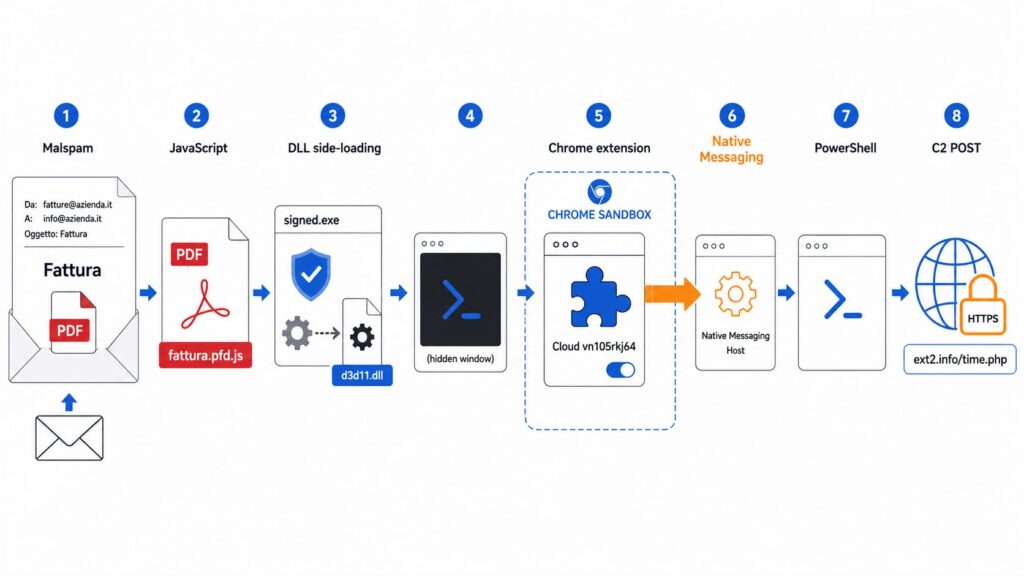
- Malicious extension name: Cloud vn105rkj64
- Native Messaging Host: com.vn105rkj64.tr7qprrt7g
- Observed command-and-control domain: ext2[.]info
- Observed request path: /time.php?q=ste_jstest2
- Suspicious policy value: http://localhost:8080/*
What data the malware collected
The D3Lab report said the extension contacted ext2[.]info over HTTPS using POST requests. The first observed exchange included a Google cookie, open tabs, URLs, browser language settings, user-agent details, and a stable victim identifier.
A stolen authenticated cookie can help attackers hijack an active web session without knowing the victim’s password. That makes cookie theft especially dangerous for corporate accounts, email accounts, cloud dashboards, and admin panels.
The attackers later sent a command that listed the contents of the C drive. The result went back through the same POST channel, confirming that the setup worked as a remote-command backdoor, not only a browser data stealer.
How defenders can detect the threat
Security teams should not limit detection to suspicious PowerShell activity. In this campaign, Chrome handled the browser-side control channel, while the Native Messaging Host handled the operating-system command execution.
Administrators should review unexpected entries under Chrome enterprise policy keys, especially on unmanaged systems. Google’s Chrome app and extension policies are useful for confirming which settings should exist on managed Windows machines.
Native Messaging registrations should also be checked against approved software. Unknown extension IDs, user-writable executable paths, suspicious host names, and unexpected allowed_origins entries can all indicate abuse.
| Item to inspect | Suspicious sign |
|---|---|
| Chrome policy keys | Unexpected ExtensionInstallAllowlist or ExtensionInstallSources entries |
| Native Messaging hosts | Unknown host names under HKCU registry locations |
| Chrome extensions | Unknown extension IDs installed outside normal user flow |
| PowerShell logs | Hidden processes launched shortly after script execution |
| Network activity | POST traffic to ext2[.]info or related infrastructure |
Incident response steps
Removing the extension alone may not fully clean an infected system. The Native Messaging Host registration and local host files can keep the bridge in place, even after the visible browser component disappears.
Response teams should remove the malicious Chrome extension, delete the Native Messaging Host registration, inspect temporary folders, review PowerShell execution history, and check for DLL side-loading artifacts.
Organizations should also invalidate exposed browser sessions and reset credentials for affected accounts. When attackers steal active cookies, password resets alone may not end every live session unless session tokens also get revoked.
- Audit Chrome extension policy keys on affected Windows systems.
- Remove unknown Native Messaging Host registry entries.
- Check for client_124578.exe and d3d11.dll in temporary paths.
- Block known command-and-control indicators at the endpoint and network level.
- Revoke exposed sessions for Google and other browser-based accounts.
FAQ
The malicious Chrome extension collected browser data, contacted a command-and-control server, and used a Native Messaging Host to pass commands to Windows. This allowed attackers to run PowerShell commands outside the Chrome sandbox.
No public Chrome zero-day was identified in the reported campaign. The attackers abused legitimate features, including Chrome enterprise policies and Native Messaging, after tricking the victim into running a malicious JavaScript file.
A Native Messaging Host is a local application that a Chrome extension can communicate with when properly registered. Legitimate software can use it to connect browser features with desktop applications, but attackers can abuse it to bridge Chrome and the operating system.
The confirmed data included a Google cookie, open tabs, URLs, browser user-agent details, language settings, and a stable victim identifier. D3Lab did not report direct theft from Chrome’s saved password store.
Organizations should inspect unexpected Chrome policy entries, unknown Native Messaging Host registry keys, suspicious extension IDs, hidden PowerShell activity, DLL side-loading artifacts, and network traffic to known command-and-control indicators such as ext2[.]info.


Read our disclosure page to find out how can you help VPNCentral sustain the editorial team Read more


Improve this guide




User forum
0 messages