
Malspam Campaign Abuses Google DoubleClick Redirects to Deliver Fileless .NET Loader


 8 min. read
  Published on
A new malspam campaign is abusing Google DoubleClick click-tracking redirects to help deliver a fileless .NET loader to Windows systems.
The attack starts with a malicious HTML attachment disguised as a purchase order. Once opened, the file silently redirects the victim through Google’s ad-tracking infrastructure before sending them to attacker-controlled pages that serve the real payload.

Access content across the globe at the highest speed rate.
70% of our readers choose Private Internet Access
70% of our readers choose ExpressVPN

Browse the web from multiple devices with industry-standard security protocols.

Faster dedicated servers for specific actions (currently at summer discounts)
Security researchers at Huntress said the campaign was observed in May 2026 after its SOC investigated a .NET loader infection. In its Huntress report, the company said the campaign uses trusted infrastructure, personalization, script-based staging, and in-memory execution to make detection harder.
Attackers use trusted ad redirects to hide the first stage
The lure arrives as an HTML file named Bestellung_2026.html. “Bestellung” means “order” or “purchase order” in German, which suggests the campaign may have targeted German-speaking users or companies.
The HTML file contains a zero-second meta-refresh redirect. That redirect sends the browser to an ad.doubleclick.net click-tracking URL before forwarding the victim to malicious infrastructure.
This matters because DoubleClick is tied to legitimate ad-tracking workflows. Google’s Campaign Manager 360 documentation explains how tracking ads can record clicks and send users through tracking URLs, which is the kind of trusted behavior attackers are trying to abuse in this campaign.
| Stage | What happens | Why it matters |
|---|---|---|
| Email lure | The victim receives a purchase order themed HTML attachment. | The attachment looks like a normal business document. |
| DoubleClick redirect | The browser is sent through a Google-owned ad-tracking domain. | Security tools may treat the early URL as trusted. |
| Fake download page | The page reads the victim’s email, pulls company branding, and shows local details. | The lure feels personalized without manual work from the attackers. |
| ZIP payload | The “Download PDF” button delivers a ZIP archive instead of a PDF. | The archive contains the JScript loader that starts the infection chain. |
| Fileless loader | PowerShell and .NET components load code mostly in memory. | The payload leaves fewer obvious files for antivirus tools to scan. |
The fake PDF page personalizes itself for each victim
After the DoubleClick redirect, the victim reaches a malicious kit that reads the email address from the URL. It then extracts the company domain and uses it to rebrand the page automatically.
The page can fetch a company logo at runtime and display the victim’s city, region, country, and local time. This makes the page look more credible, while allowing the attackers to reuse the same kit across many targets.
The download button claims to provide a PDF. Instead, it posts data to the attacker-controlled server and returns a ZIP archive named A021185521S210008-11521.zip. Huntress has also published indicators of compromise for defenders who want to hunt for this activity in their environments.
JScript and PowerShell move the attack into memory
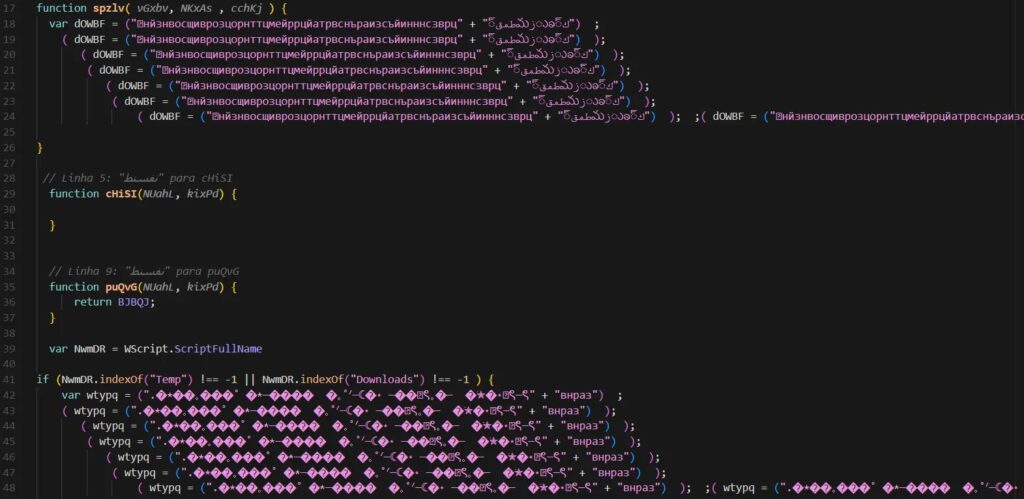
The ZIP file contains a JScript file named A021185521S210008-11521.js. This script is not the final malware. Its job is to relocate itself, decode hidden PowerShell code, and begin the next stage of the attack.
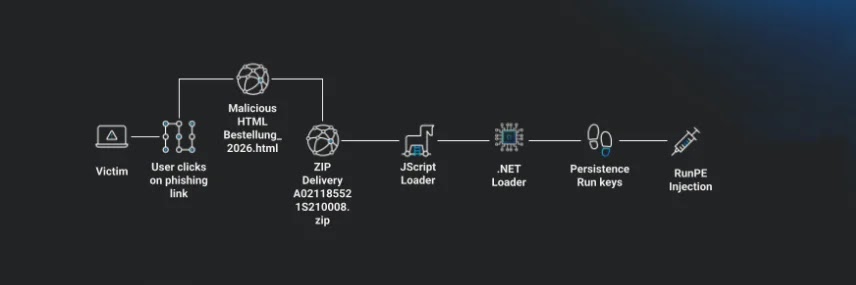
Once executed, the script copies itself to C:\Users\Public\ktncm.js and relaunches through wscript.exe. It then drops a PowerShell script named nlbzl.ps1, which checks internet connectivity and scans for analysis tools.
If the script detects tools such as Wireshark, any.run, debugger utilities, or sandbox-related processes, it can force a system reboot. This behavior aims to disrupt security analysis and make automated detonation less reliable.
- The attack uses HTML, JScript, PowerShell, and .NET components across multiple stages.
- The loader uses reflection to run .NET code in memory.
- It can inject into Microsoft-signed tools such as InstallUtil.exe or MSBuild.exe.
- It uses NVIDIA-themed folder names to make its staging path look less suspicious.
- It communicates with command-and-control servers through encrypted traffic on a non-standard port.
The loader tries to blind Windows security telemetry
The .NET loader uses several defense evasion methods after it reaches the system. It can add Microsoft Defender exclusions, stage files under LocalLow paths, and create persistence using registry Run and RunOnce keys, scheduled tasks, and a Startup folder copy.
The loader also targets AMSI and ETW, two important Windows security and telemetry mechanisms. Microsoft explains that AMSI helps Microsoft Defender detect fileless malware, dynamic script-based threats, and other nontraditional attacks.
ETW also plays a major role in Windows event collection. Event Tracing for Windows lets applications provide trace events that security and diagnostic tools can consume. By patching these systems at the native API level, the loader attempts to reduce the signals defenders rely on.
Why this malspam campaign is difficult to detect
This campaign is dangerous because it combines social engineering with trusted redirect infrastructure and layered fileless execution. The initial email does not point directly to an obvious malware domain. Instead, it hides the first step behind a high-reputation ad-tracking service.
The payload chain also avoids a simple one-file malware drop. It uses several scripting and .NET stages, removes earlier artifacts, and runs the core payload through memory and process injection.
The Huntress researchers also noted that the loader can enumerate installed antivirus products and detect NVIDIA and AMD GPUs. That GPU interest could support future payload decisions, masquerading, or follow-on activity such as crypto mining.
| Indicator type | Indicator | Description |
|---|---|---|
| File | Bestellung_2026.html | Malicious HTML attachment |
| Domain | fostercareintheus.optimizationprime[.]com | Redirector stage |
| Domain | bth.startthewave[.]org | Delivery kit host |
| URL | pengajian.muliastudy[.]com/images/edu/u.php | ZIP archive delivery endpoint |
| File | A021185521S210008-11521.js | JScript loader |
| File | nlbzl.ps1 | PowerShell dropper |
| Domain | xtadts.ddns[.]net | Command-and-control server |
| Domain | afxwd.ddns[.]net | Command-and-control server |
| Port | 7211 | C2 communication port |
How organizations can reduce the risk
Organizations should treat script attachments as high risk, especially when they arrive inside ZIP files from external senders. Blocking or quarantining .js, .vbs, .hta, and similar script files at the email gateway can stop this chain before it reaches the endpoint.
Huntress recommends using Group Policy to make script file types open in Notepad or Notepad++ by default instead of executing. The company also recommends email authentication controls such as SPF, DKIM, and DMARC, along with sandboxing for attachments and links.
Security teams should also review detections for wscript.exe launching from user-controlled folders, encoded PowerShell execution, suspicious scheduled task creation, Defender exclusions, and unexpected use of InstallUtil.exe or MSBuild.exe. The full Huntress threat intel CSV can help teams add known indicators to monitoring tools.
- Force script files to open in a text editor by default.
- Sandbox HTML, ZIP, and script attachments before delivery.
- Inspect links at time-of-click, not only at delivery time.
- Monitor for PowerShell using execution policy bypass.
- Alert when Microsoft-signed build tools run from unusual parent processes.
- Watch for Defender exclusions added through hidden PowerShell windows.
- Use the Microsoft AMSI guidance and Microsoft ETW documentation to understand which telemetry sources attackers may try to disable.
Google DoubleClick itself is not malware. The issue is that attackers are abusing legitimate ad redirect behavior to make malicious traffic look safer in the first stage. The same distinction appears in official Google documentation, which describes tracking URLs as part of normal advertising measurement workflows.
The campaign shows why reputation-based filtering alone is no longer enough. Defenders need attachment inspection, behavioral monitoring, script controls, and endpoint telemetry that can catch the later stages even when the first URL looks legitimate.
FAQ
It is a malicious email campaign that uses a Google DoubleClick click-tracking redirect as an early step in the delivery chain. The attack sends victims from a malicious HTML attachment to a fake download page that delivers a ZIP archive and starts a multi-stage fileless .NET loader infection.
No. Google DoubleClick is legitimate advertising and tracking infrastructure. In this campaign, attackers abused its redirect behavior to make the first stage of the attack look more trustworthy to email gateways and URL reputation tools.
The campaign delivers an unidentified fileless .NET loader. Huntress originally attributed the activity to DesckVB RAT, but later corrected the report after a follow-up review.
The attack uses a trusted redirect domain, a personalized fake download page, script-based staging, PowerShell, .NET reflection, and in-memory execution. It also attempts to disable or weaken security visibility by targeting Windows telemetry and antimalware interfaces.
Organizations should block or sandbox script and ZIP attachments, inspect links at time-of-click, force script files to open in a text editor by default, monitor suspicious PowerShell activity, and alert on unusual use of Microsoft-signed tools such as InstallUtil.exe and MSBuild.exe.


Read our disclosure page to find out how can you help VPNCentral sustain the editorial team Read more


Improve this guide




User forum
0 messages