
Microsoft Resolves MFA Setup Outage That Blocked My Sign-Ins Access


 6 min. read
  Published on
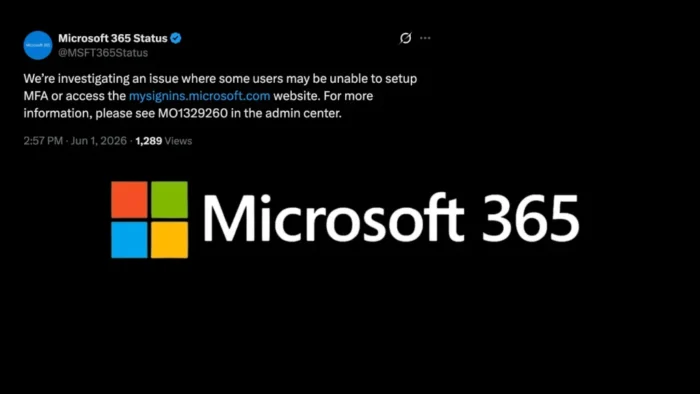
Microsoft has resolved a Microsoft 365 identity incident that prevented some users from setting up multi-factor authentication or accessing the My Sign-Ins portal. The company first acknowledged the problem through its Microsoft 365 Status account on June 1, 2026, and directed administrators to incident MO1329260 in the Microsoft 365 admin center.
The issue affected mysignins.microsoft.com, the portal many work and school account users rely on to manage security information and authentication options. Microsoft later said in a status update that a recent cache configuration change required a failover, and high traffic in Europe caused CPU and memory pressure that affected My Sign-Ins requests.

Access content across the globe at the highest speed rate.
70% of our readers choose Private Internet Access
70% of our readers choose ExpressVPN

Browse the web from multiple devices with industry-standard security protocols.

Faster dedicated servers for specific actions (currently at summer discounts)
The outage mattered because the portal sits close to Microsoft 365 identity security. Users can add or change authentication methods through Microsoft’s security info setup flow, while the My Sign-Ins area also lets them review recent sign-in activity for unusual access attempts.
What Happened During Incident MO1329260
During the incident, affected users were unable to complete MFA setup or reach the My Sign-Ins website. Some reports connected to the incident also described 504 Gateway Timeout errors, which usually means a service did not respond in time while handling a request.
Microsoft’s later explanation said the cache configuration change forced a failover. During that failover, the service faced elevated demand as European traffic peaked, which prevented the My Sign-Ins service from processing requests at the expected rate. The company said in the Microsoft 365 Status update that it restored access after rolling back mitigation actions and returning traffic to the original infrastructure.
Administrators were told to use the Microsoft 365 admin center for tenant-specific details. Microsoft’s service health guidance says incidents and advisories appear under Health > Service health, with updates on investigation status, mitigation work, and resolution progress.
| Item | Details |
|---|---|
| Incident ID | MO1329260 |
| Affected service | Microsoft 365 identity experience, including My Sign-Ins and MFA setup |
| User impact | Some users could not set up MFA or access mysignins.microsoft.com |
| Reported cause | Cache configuration change, failover, and high European traffic causing resource pressure |
| Status | Resolved, with Microsoft continuing post-incident review work |
Why The My Sign-Ins Outage Was Important
MFA setup is not just a convenience feature for Microsoft 365 customers. It often forms part of onboarding, password recovery, Conditional Access, and identity protection policies. Microsoft’s own Microsoft 365 MFA setup instructions show that users may need to configure an app, SMS, or another allowed method before they can complete sign-in requirements.
When that process fails, new employees can get stuck during onboarding. Existing users may also struggle if they need to add a new phone, replace a lost device, or refresh an authentication method after a security reset.
The same portal also connects to account recovery and security verification workflows. Microsoft’s security info documentation explains that security info methods can support two-factor verification and password reset, although not every method works for both scenarios.
- New users may fail MFA registration during first sign-in.
- Existing users may be unable to update authentication methods.
- Help desks may receive more account recovery tickets.
- Conditional Access policies may block users who cannot finish setup.
- Security teams may lose a self-service route for users reviewing account activity.
What Administrators Should Check Now
Because Microsoft has restored the service, the main task for IT teams is cleanup. Administrators should review affected users, confirm that MFA registration now works, and check whether any onboarding or account recovery tickets remain open from the outage window.
Admins should also check the Microsoft 365 admin center for tenant-level notes. Microsoft’s Service health page guidance explains that admins can view active incidents, advisories, service health history, and issue details from the admin center.
End users who still need to finish MFA registration can follow Microsoft’s MFA setup instructions after access to My Sign-Ins returns. Support teams should also remind users to review My Sign-Ins activity if they experienced failed or unusual sign-in prompts during the incident.
How Organizations Can Reduce Similar Disruption
The outage shows why identity portals need backup support processes. Companies that enforce MFA registration through Conditional Access should have a documented path for users who cannot complete registration because of a service problem, device change, or account recovery issue.
Temporary policy changes can help in some situations, but admins should use them carefully. Broadly relaxing MFA or Conditional Access rules can create risk. A safer approach is to use scoped exceptions, short expiration windows, and ticket-based approval for affected users.
The first Microsoft 365 Status notice framed the issue as an investigation into MFA setup and My Sign-Ins access. The follow-up restored service and gave administrators a clearer cause, which should help IT teams explain the incident to help desks and security stakeholders.
For now, organizations should treat MO1329260 as resolved but still review any users who failed MFA setup during the disruption. If those users remain unregistered, they may run into access problems later even though the Microsoft service has recovered.
FAQ
MO1329260 was a Microsoft 365 identity incident that prevented some users from setting up multi-factor authentication or accessing the My Sign-Ins portal at mysignins.microsoft.com.
Yes. Microsoft said it restored access after rolling back mitigation actions and returning traffic to the original infrastructure.
Microsoft said a recent cache configuration change required a failover. During high European traffic, the service experienced CPU and memory pressure that affected My Sign-Ins requests.
Admins should review Service health details, confirm that affected users can now complete MFA setup, check open help desk tickets, and document any users who still need authentication method registration.


Read our disclosure page to find out how can you help VPNCentral sustain the editorial team Read more


Improve this guide




User forum
0 messages