
Microsoft Teams Now Stops External Bots From Joining Meetings Without Approval


 8 min. read
  Published on
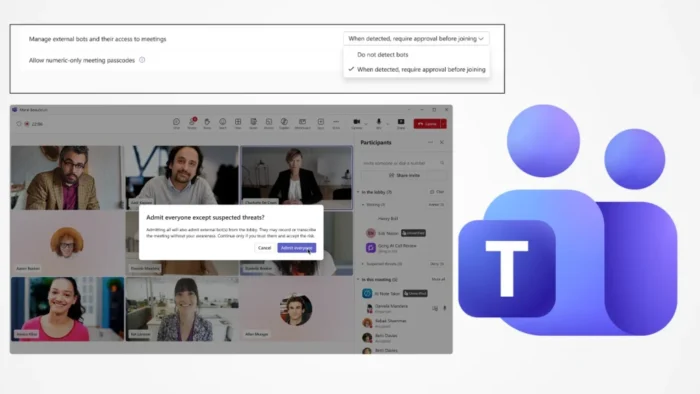
Microsoft Teams has added new controls that stop detected external bots from joining meetings without explicit approval. The feature gives Teams administrators and meeting organizers more control over AI note-taking bots, transcription assistants, and other automated meeting participants.
The change is aimed at a growing problem in workplace meetings. AI meeting assistants can help users capture notes and summaries, but they can also join calls without the meeting host clearly understanding who added them or where the meeting data will go.

Access content across the globe at the highest speed rate.
70% of our readers choose Private Internet Access
70% of our readers choose ExpressVPN

Browse the web from multiple devices with industry-standard security protocols.

Faster dedicated servers for specific actions (currently at summer discounts)
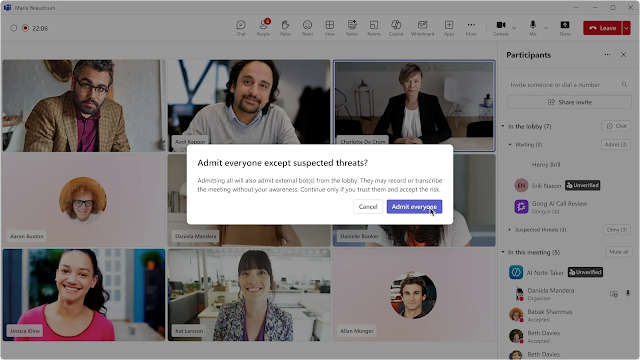
Microsoft says its new external bot controls detect possible bots during the meeting join process, place them in the lobby, identify them for organizers, and require approval before they can enter the meeting.
How the new Teams bot protection works
When Teams detects an external bot, it places the participant in the meeting lobby even if the meeting normally allows some participants to bypass the lobby. The organizer must then decide whether to admit the bot.
Microsoft says Teams uses a mix of infrastructure and behavioral signals to identify external AI bots during the meeting join process. The company says detected bots are marked and handled according to the organization’s configured admin policy.
The feature was highlighted in Microsoft’s Teams announcement, which positions the update as a response to the rise of AI-powered meeting assistants in business environments.
| Area | Previous risk | New Teams behavior |
|---|---|---|
| External bot joins | A bot could appear like another external participant | Detected bots are placed in the lobby |
| Organizer awareness | Hosts could miss that a bot was waiting or joining | Teams clearly identifies detected bots |
| Admission control | Participants could admit someone without enough scrutiny | Detected bots need explicit approval |
| Admin control | Bot handling depended more on broader meeting settings | Admins can use a dedicated policy setting |
The new admin policy is enabled by default
The key setting is called “Manage external bots and their access to meetings.” Microsoft says admins can configure it in Teams meeting policies at the tenant level, user level, or group level.
The default option is “When detected, require approval before joining.” With this setting, Teams does not let detected bots enter the meeting automatically. Instead, it holds them in the lobby until an authorized person admits them.
The same Manage external bots and their access to meetings documentation also lists a “Do not detect bots” option. Microsoft recommends keeping the default approval setting unless a specific business reason requires a different approach.
PowerShell includes stricter bot access controls
Admins can also manage the behavior through PowerShell. Microsoft’s Teams meeting policy documentation lists the ExternalBotAccessMode parameter for handling external third-party automated bots and meeting assistants.
The PowerShell values include RequireApprovalWhenDetected, which routes detected bots to the lobby and requires approval. The same documentation also lists BlockDetectedBots, a stricter option for blocking detected bots from joining.
This matters for organizations that handle sensitive business, legal, financial, healthcare, or government discussions in Teams. A tenant-wide block may reduce risk, but it could also disrupt approved tools that employees already use for note-taking or meeting summaries.
- Use RequireApprovalWhenDetected when organizers should make the final decision.
- Use stricter blocking only after reviewing which meeting assistants the organization allows.
- Tell employees how detected bots will appear in the lobby.
- Review meeting policies for external users and anonymous participants.
- Monitor unusual meeting participation patterns through admin and security processes.
Why Microsoft is changing Teams meeting security
The update reflects a broader shift in workplace collaboration. AI note-taking tools are now common in online meetings, but many of them work by joining as external participants and processing meeting audio or transcripts outside the host tenant.
That creates a governance problem. A meeting host may approve an external participant without realizing it is an automated assistant, or a user may connect a third-party tool that keeps joining future meetings.
Microsoft’s Teams Bot Identification Program page says organizations need confidence that only intended people and tools are joining meetings. The page also says detected bots require organizer approval even when other participants can bypass the lobby.
| Concern | Why it matters |
|---|---|
| Meeting recordings | External bots may capture audio or transcripts from private meetings |
| Data storage | Notes and summaries may end up in third-party systems |
| Compliance | Regulated organizations need clear records of who accessed meeting content |
| User consent | Participants may not realize an automated tool has joined |
Verified bot program is coming later
Microsoft also plans to introduce a registration path for independent software vendors that build Teams meeting bot experiences. The company says eligible providers will be able to register and include a self-identification marker in join requests.
When Teams recognizes that marker, it can identify the bot as a known and compliant participant. That does not mean every registered bot should be admitted automatically, but it can help organizers make a more informed decision.
The Teams Bot Identification Program is still marked as coming soon. Microsoft says it will provide a public intake page for eligible vendors at a later stage.
CAPTCHA is still documented, but bot detection is the new direction
Microsoft has also used verification checks to reduce automated meeting abuse. Its verification checks documentation explains how admins can require CAPTCHA challenges for anonymous users and people from untrusted organizations.
Those checks were designed to stop unwanted web-based bots from joining, recording, or disrupting meetings and webinars. However, the new bot detection system gives Teams a more targeted way to identify automated meeting assistants during the join process.
The older CAPTCHA verification approach still shows why Microsoft views automated meeting access as a real security issue. The new controls reduce friction for normal users while adding a dedicated approval path for detected bots.
External apps remain a separate admin concern
Bot detection does not replace broader app governance. Teams admins still need to control which apps external attendees and guests can use, especially when those apps touch meeting content, chat, files, or compliance-sensitive workflows.
Microsoft’s documentation on Teams apps for external users says admins control who can access Teams chats, meetings, and channels when collaborating with people outside the organization.
That means bot detection should become part of a wider meeting security policy. Admins should review external access, guest access, app permissions, recording rules, transcription settings, and user training together.
What Teams admins should do now
Organizations should first leave the default approval setting enabled unless they have tested another approach. This gives meeting organizers visibility without immediately breaking all third-party meeting assistants.
Admins should then build an approved list of meeting assistant tools. They should decide which tools can join internal calls, client calls, executive meetings, regulated meetings, or meetings involving customer data.
Microsoft’s ExternalBotAccessMode setting gives admins a way to align policy with risk. Some organizations may allow detected bots with approval, while others may block them in more sensitive environments.
- Keep bot detection enabled for baseline protection.
- Limit lobby admission rights to organizers and co-organizers where possible.
- Create clear rules for approved AI note-taking services.
- Explain to users why bots may appear separately in the lobby.
- Review external app policies alongside meeting bot controls.
- Use stricter controls for meetings involving confidential or regulated data.
The change gives Teams organizers more control
The most important change is simple: detected external bots can no longer quietly join Teams meetings without a separate decision. Teams now gives organizers a clearer warning and a dedicated approval step.
For everyday users, this may appear as an extra lobby prompt. For IT and security teams, it adds a practical control point around AI meeting assistants, third-party transcription services, and automated participants.
The update also signals where Microsoft Teams is heading. As AI tools become normal meeting participants, platforms will need stronger identity, consent, and governance controls for both people and bots.
Admins should treat the rollout as a policy moment, not just a feature update. The right question is no longer whether AI meeting assistants exist in the organization, but which ones should be allowed into meetings and under what rules.
Microsoft’s guidance on external Teams apps remains relevant here because bot protection works best when admins also manage external collaboration, app access, guest access, and meeting lobby settings together.
The result is a more controlled Teams meeting experience. Detected bots can still be used when needed, but they must be visible, intentional, and approved before entering the conversation.
FAQ
No. The default behavior is to detect external bots, place them in the lobby, clearly identify them, and require explicit approval before they can join. PowerShell documentation also lists a stricter BlockDetectedBots option for admins.
The policy is called Manage external bots and their access to meetings. It is available through Teams meeting policies and controls how detected external bots are handled when they try to join meetings hosted by the organization.
Microsoft is adding the feature because AI note-taking and meeting-assistant bots can create privacy, security, and compliance risks if they join meetings without clear organizer approval or participant awareness.
Teams admins should keep bot detection enabled, review meeting lobby settings, limit who can admit participants, define approved AI meeting assistants, and choose stricter bot access policies for sensitive meetings when needed.


Read our disclosure page to find out how can you help VPNCentral sustain the editorial team Read more


Improve this guide




User forum
0 messages