
New SHub Reaper Malware Targets Mac Browsers, Crypto Wallets, Keychains, and Files


 8 min. read
  Published on

A new SHub Stealer variant called Reaper is targeting macOS users with a more convincing infection chain that impersonates trusted technology brands and abuses Apple’s own Script Editor app. The malware can steal browser data, macOS Keychain information, Telegram sessions, cryptocurrency wallet data, and sensitive files from infected Macs.
SentinelLABS detailed the campaign in its SHub Reaper research, describing a multi-stage attack that uses fake software installers, Apple-themed prompts, Microsoft-style hosting tricks, and a fake Google update directory for persistence.

Access content across the globe at the highest speed rate.
🔥 Save 81% + 2 bonus months! 🔥
70% of our readers choose Private Internet Access
70% of our readers choose ExpressVPN
2
Browse the web from multiple devices with industry-standard security protocols.
🔥 Save 73%! 🔥

Faster dedicated servers for specific actions (currently at summer discounts)
🔥 Save 69%! 🔥
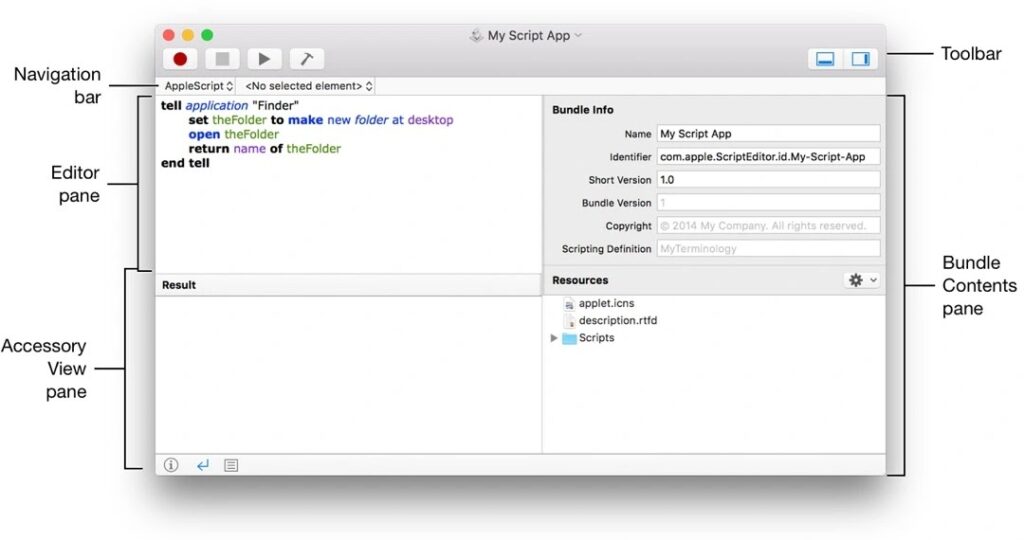
The campaign matters because it lowers the amount of work a victim must do. Older ClickFix-style attacks often asked users to copy and paste a command into Terminal. Reaper can instead launch macOS Script Editor with malicious AppleScript already loaded, leaving the user one click away from running the infection.
How SHub Reaper Gets Onto Macs
Reaper spreads through fake websites that impersonate popular software. Public reports describe fake WeChat and Miro installer pages as the main lures observed in this campaign.
Moonlock’s SHub Reaper analysis says the campaign automates the ClickFix technique by using a fake webpage button to open Script Editor with malicious code already loaded. If the victim clicks the Run button inside Script Editor, the infection chain begins.
This method abuses trust in built-in macOS tools. Script Editor ships with macOS and looks legitimate, so users may not treat it as suspicious when it opens from a webpage. That makes the lure more effective than a random app download.
Key Details At A Glance
| Malware name | Reaper |
| Family | SHub Stealer macOS infostealer variant |
| Target platform | macOS |
| Main delivery method | Fake software installer pages and automated Script Editor ClickFix |
| Browsers targeted | Chrome, Firefox, Brave, Edge, Opera, Vivaldi, Arc, and Orion |
| Wallets targeted | Exodus, Atomic, Ledger Live, Electrum, Trezor Suite, and wallet extensions |
| Other data targeted | Keychains, iCloud data, Telegram sessions, documents, spreadsheets, wallet files, and JSON files |
| Persistence method | Fake GoogleUpdate app directory and LaunchAgent |
Why The Script Editor Trick Is More Dangerous
Traditional ClickFix attacks rely on the user copying a command from a website and pasting it into Terminal. That gives users several chances to stop and question what they are doing.
Jamf Threat Labs previously documented a similar macOS approach in its Script Editor ClickFix research. The technique uses the applescript URL scheme to trigger Script Editor from a browser and preload a script for execution.
Reaper follows the same broader trend. The user still has to approve the action, but the attacker removes the obvious copy-and-paste step. That makes the attack feel more like a normal setup process to less cautious users.
Reaper Impersonates Apple, Google, and Microsoft
The campaign changes its disguise at different stages. The lure starts as a fake installer page. The payload can appear to come from a Microsoft-looking domain, the execution stage can present itself as an Apple security update, and the persistence stage hides inside a Google-themed update path.
SentinelLABS said the malware may use a typo-squatted Microsoft domain, show messaging that references Apple’s XProtectRemediator, and later create a fake Google Software Update directory on the infected Mac.
This branding chain helps the malware look familiar at every step. Users may see names they recognize, even though none of those brands are connected to the attack.
What SHub Reaper Steals
Reaper expands on earlier SHub Stealer behavior. Earlier SHub campaigns already targeted browser data, Apple Keychain contents, Telegram sessions, cryptocurrency wallets, and other valuable information.
Malwarebytes previously reported that older SHub activity used a fake CleanMyMac site to steal saved passwords, browser data, Keychain contents, wallet data, and Telegram sessions. Reaper builds on that same stealer foundation with a more advanced delivery and persistence chain.
- Saved browser credentials and cookies.
- Browser extension data from major browsers.
- Password manager extension indicators.
- Cryptocurrency wallet data and desktop wallet files.
- macOS Keychain information.
- iCloud account-related data.
- Telegram session data.
- Documents and files from Desktop and Documents folders.
Crypto Wallets Face A Higher Risk
Reaper does not only look for wallet files. Public analysis says it can also interact with legitimate desktop wallet applications already installed on the Mac.
The targeted wallet list includes Exodus, Atomic, Ledger Live, Electrum, and Trezor Suite. Reaper also looks for browser extensions tied to cryptocurrency wallets such as MetaMask and Phantom.
This makes primary work Macs especially risky for crypto users. A machine that holds browser sessions, email access, wallet apps, and recovery-related files gives stealers multiple ways to find valuable assets.
Filegrabber Adds Business Data Theft
Reaper also includes a Filegrabber component that searches common user folders for files that may contain financial, business, or identity data. SentinelLABS described it as similar to functionality seen in Atomic macOS Stealer.
The targeted file types include documents, spreadsheets, wallet files, key files, CSV files, and JSON files. That means developers, founders, finance staff, and crypto users face a higher risk if they keep sensitive files on the Desktop or in Documents.
The malware can package stolen data and send it to attacker-controlled infrastructure. It can also install a backdoor that helps the operators maintain access after the initial theft.
Indicators Of Compromise
| Type | Indicator | Description |
| Domain | mlcrosoft[.]co[.]com | Typo-squatted Microsoft-style domain reported in the campaign |
| URL pattern | support.apple[.]com/downloads/xprotect-remediator-150.dmg | Fake Apple security update lure path described in reporting |
| URL | hebsbsbzjsjshduxbs[.]xyz/gate/chunk | Reported attacker-controlled exfiltration endpoint |
| File path | ~/Library/Application Support/Google/GoogleUpdate.app/Contents/MacOS/ | Fake Google update directory used for persistence |
| File name | GoogleUpdate | Backdoor component disguised as Google update activity |
| LaunchAgent | com.google.keystone.agent.plist | Persistence plist used to register the fake update component |
Security teams should treat these indicators as useful but incomplete. Threat actors can rotate domains, file names, and infrastructure quickly, especially when the main delivery method relies on social engineering.
How Mac Users Can Avoid SHub Reaper
Mac users should treat any website that opens Script Editor or Terminal as suspicious, especially if the page claims to install software, fix an issue, or apply a security update.
Moonlock’s Reaper report warns users not to click the Play button in Script Editor unless they fully understand the code. The safer choice is to close the window and download software only from the developer’s official website or the Mac App Store.
- Do not run scripts opened from a webpage.
- Do not enter your Mac password into unexpected post-install pop-ups.
- Download apps only from official developer sites or the Mac App Store.
- Avoid sponsored or typo-squatted download pages.
- Keep macOS and security tools updated.
- Store crypto funds in cold wallets or on a dedicated device.
- Remove old wallet recovery files from Desktop and Documents folders.
What Organizations Should Monitor
Businesses should monitor for suspicious browser-to-Script Editor launches, AppleScript execution, unexpected curl activity, unusual archive creation in temporary folders, and LaunchAgent creation under Google-themed paths.
Jamf’s macOS ClickFix research shows why behavior-based detection matters. These attacks often use legitimate macOS tools, which means file-only scanning can miss early signs of compromise.
Security teams should also review endpoint logs for fake GoogleUpdate directories, suspicious LaunchAgents, and outbound connections to unknown domains. A user report that Script Editor opened unexpectedly should trigger an investigation, not a routine support response.
Why Reaper Shows Mac Stealers Are Evolving
Reaper shows how macOS infostealers are moving from simple fake installers toward more polished social engineering chains. The malware does not need a browser exploit or a macOS zero-day if it can convince the user to approve the next step.
The earlier SHub Stealer campaign already showed how fake Mac utility sites could steal credentials and tamper with crypto wallets. Reaper adds a more convincing Script Editor delivery method and a stronger brand impersonation chain.
For Mac users, the main rule is simple: a real installer should not suddenly open Script Editor with code and ask you to click Run. If that happens, close it immediately and assume the page is malicious until proven otherwise.
FAQ
SHub Reaper is a macOS infostealer variant that targets browser data, Keychains, Telegram sessions, cryptocurrency wallets, sensitive files, and other valuable information. It also installs a persistence mechanism disguised as a Google update component.
SHub Reaper spreads through fake software installer pages. The campaign can open macOS Script Editor with malicious code already loaded and trick users into clicking Run, starting the infection chain.
Public reporting says Reaper targets major browsers including Chrome, Firefox, Brave, Edge, Opera, Vivaldi, Arc, and Orion, along with browser extensions tied to password managers and crypto wallets.
Reported targets include Exodus, Atomic, Ledger Live, Electrum, Trezor Suite, and wallet browser extensions such as MetaMask and Phantom.
Users should avoid fake download sites, never run scripts opened by webpages, close unexpected Script Editor windows, avoid entering passwords into suspicious post-install prompts, keep macOS updated, and store crypto assets in cold wallets or on a separate device.


Read our disclosure page to find out how can you help VPNCentral sustain the editorial team Read more


Improve this guide




User forum
0 messages