
Tycoon 2FA Adds OAuth Device Code Phishing to Hijack Microsoft 365 Accounts


 8 min. read
  Published on
Tycoon 2FA operators have adopted OAuth device code phishing to compromise Microsoft 365 accounts without using the kit’s older credential-relay flow.
In the campaign analyzed by eSentire’s Threat Response Unit in late April 2026, victims were pushed through a phishing chain that ended on Microsoft’s real device login page. The victim entered a code, completed sign-in, approved MFA, and unknowingly granted tokens to an attacker-controlled device.

Access content across the globe at the highest speed rate.
70% of our readers choose Private Internet Access
70% of our readers choose ExpressVPN

Browse the web from multiple devices with industry-standard security protocols.

Faster dedicated servers for specific actions (currently at summer discounts)
The campaign shows how phishing groups continue to adapt after disruption. Microsoft, Europol, and industry partners disrupted Tycoon 2FA in March 2026, but eSentire found that the operators kept much of their kit intact and added a new lure type within weeks.
What changed in the Tycoon 2FA attack
Tycoon 2FA became known as a phishing-as-a-service platform that helped attackers run adversary-in-the-middle campaigns. In older attacks, the kit relayed login sessions to capture credentials and session cookies.
The newer campaign changes that flow. Instead of asking users to type their password into a phishing page, the kit pushes them to Microsoft’s legitimate device login process.
This matters because many users trust the page they see. The login happens on real Microsoft infrastructure, and MFA works normally. The problem is what the victim authorizes after entering the device code.
| Attack type | How it works | What attackers get |
|---|---|---|
| Older Tycoon 2FA credential relay | The phishing kit relays the victim’s login session through attacker infrastructure. | Credentials, MFA responses, and session cookies. |
| New OAuth device code phishing | The victim enters a code on Microsoft’s real device login page. | OAuth access and refresh tokens for an attacker-controlled session. |
How the device code phishing chain works
The attack begins with a lure email that uses a Trustifi click-tracking URL. This helps the message look more credible because the first visible link belongs to a legitimate email security platform.
From there, the victim moves through multiple layers before seeing the final lure. eSentire says the chain includes encrypted payloads, anti-analysis checks, vendor filtering, a fake Microsoft-branded CAPTCHA, and a check-domain mechanism that decides whether the visitor should see the phishing content or a decoy page.
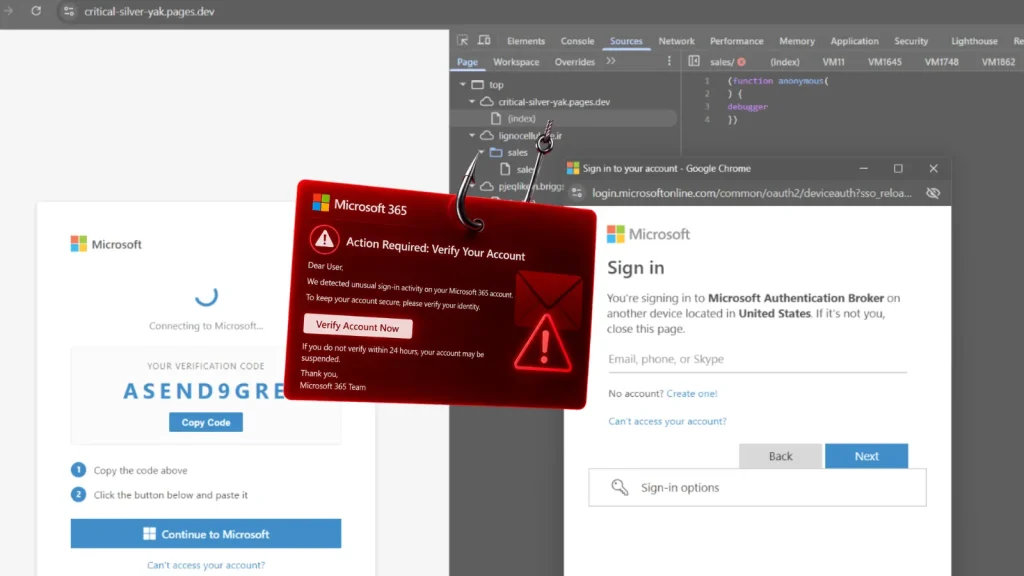
The final lure uses a Microsoft 365 voicemail theme. The page shows a code and instructs the victim to copy it, open microsoft.com/devicelogin, and paste the code.
- The victim clicks the lure email.
- The browser follows the Trustifi tracking link and later redirect layers.
- The phishing kit checks whether the visitor looks like a real target.
- The victim sees a Microsoft 365 voicemail-themed page.
- The victim copies a device code and opens Microsoft’s device login page.
- The victim signs in and approves MFA on Microsoft’s real infrastructure.
- Microsoft issues tokens to the attacker-controlled device that started the flow.
- The victim is redirected to their real Outlook inbox, which reduces suspicion.
Why MFA still fails to stop the account takeover
This attack does not need to steal a password from the phishing page. The victim enters the password on Microsoft’s real login page, and Microsoft handles the MFA process.
The weakness comes from the device authorization flow. It was designed for devices that cannot easily support normal browser sign-in, such as smart TVs, command-line tools, and shared devices.
Attackers abuse that trust model by starting the device flow themselves. When the victim enters the code, the victim is not signing in to the page they were shown. They are authorizing the session created by the attacker’s device.
The kit still carries old Tycoon 2FA fingerprints
eSentire found several code-level fingerprints that match earlier Tycoon 2FA activity. This suggests the operators did not rebuild the platform from scratch after the March 2026 disruption.
The campaign still uses the Check Domain architecture, CryptoJS AES-CBC encryption with the hardcoded key and IV 1234567890123456, anti-debugging checks, and Base64 XOR HTML wrapping patterns seen in previous Tycoon 2FA research.
The device-code variant changes the data being handled by the encrypted channel. Instead of protecting stolen credentials, the kit uses the channel to coordinate victim sessions and move Microsoft-issued device authorization data between the victim’s browser and the operator backend.
- The kit blocks many cloud providers, sandboxes, VPNs, security vendors, and analysis platforms.
- It redirects suspicious visitors to legitimate Microsoft or decoy pages.
- It uses a fake Microsoft-branded HumanCheck CAPTCHA before the final lure.
- It includes a campaign expiry timestamp to reduce the investigation window.
- It uses Node.js automation on the operator side to poll for token status.
Alibaba Cloud infrastructure and unusual user agents
eSentire also observed operator activity tied to AS45102, which belongs to Alibaba Cloud. The same ASN has appeared across both the credential-relay and device-code variants of Tycoon 2FA activity since around April 10, 2026.
The post-compromise telemetry also showed unusual user-agent strings, including node and undici. These are tied to Node.js automation and stand out when seen against Microsoft Authentication Broker activity in Entra sign-in logs.
Defenders should treat these signals carefully. A successful device-code sign-in from a user who normally never uses device code flow can be suspicious, especially when followed by token reuse from unexpected infrastructure.
Why this matters for Microsoft 365 defenders
Device code phishing creates a dangerous situation for organizations that rely on MFA alone. The victim may see a real Microsoft page, complete MFA correctly, and still lose control of the session.
Once attackers receive OAuth tokens, they can access Microsoft 365 services tied to that authorization. That can include email, files, calendar data, and other cloud resources depending on the token scope and tenant configuration.
The campaign also shows why takedowns do not always end a phishing operation. Microsoft and Europol disrupted Tycoon 2FA infrastructure in March 2026, but the operators adapted quickly by keeping core code and changing the delivery model.
| Defensive priority | Why it helps |
|---|---|
| Block device code flow for most users | It removes the attack path unless users have a real business need for it. |
| Restrict OAuth user consent | It stops users from approving risky app access without admin review. |
| Monitor Entra sign-in logs | It can reveal unusual deviceCode activity, user agents, and source networks. |
| Revoke refresh tokens after compromise | It cuts off persistence created through stolen OAuth tokens. |
| Review mailbox rules and forwarding | Attackers often create rules to hide fraud or exfiltrate email quietly. |
Recommended actions for security teams
Microsoft says device code flow is a high-risk authentication method and recommends blocking it wherever possible. Organizations should allow it only for clearly defined use cases, such as specific managed devices or developer workflows.
Security teams should also restrict user consent for OAuth applications. Admin consent helps prevent users from approving risky access requests during phishing attacks.
After a suspected device-code phish, defenders should revoke active sessions, revoke refresh tokens, force sign-out, and audit recent app consents. They should also check whether the attacker created inbox rules, forwarding rules, or suspicious mailbox access patterns.
- Block OAuth device code flow for standard users through Conditional Access.
- Allow device code flow only for approved scenarios and managed devices.
- Require admin consent for third-party OAuth apps.
- Enable Continuous Access Evaluation where available.
- Hunt for successful deviceCode authentications from unusual sources.
- Investigate node and undici user agents tied to Microsoft Authentication Broker activity.
- Revoke tokens and review mailbox rules after suspected compromise.
Tycoon 2FA remains a serious identity threat
Tycoon 2FA has already shown how quickly phishing services can scale. Microsoft said the platform was responsible for tens of millions of fraudulent emails reaching more than 500,000 organizations each month before the March 2026 disruption.
The new device-code campaign shows that the operators remain active and flexible. Instead of relying only on classic credential phishing, they now abuse a legitimate authentication flow that can make the attack look safer to victims.
For organizations, the lesson is clear. MFA remains important, but it cannot stand alone. Defenders also need Conditional Access controls, OAuth consent restrictions, token revocation playbooks, and continuous monitoring for abnormal Microsoft 365 authentication behavior.
FAQ
Tycoon 2FA is a phishing-as-a-service platform used by cybercriminals to impersonate trusted login pages and compromise online accounts, including Microsoft 365 accounts. It has been used in campaigns designed to defeat common MFA protections.
OAuth device code phishing abuses a legitimate sign-in flow built for devices that cannot easily accept passwords. Attackers generate a device code, trick the victim into entering it on a real Microsoft page, and then receive OAuth tokens when the victim approves the sign-in.
It does not bypass MFA in the traditional sense. The victim completes MFA on Microsoft’s real infrastructure, but the approval authorizes an attacker-controlled device session. This gives the attacker tokens without needing to steal the victim’s password through the phishing page.
Defenders should monitor successful deviceCode authentications, unusual source networks, unexpected OAuth consents, Microsoft Authentication Broker activity from abnormal locations, and suspicious user-agent strings such as node and undici in Entra sign-in logs.
Organizations should block device code flow for standard users through Conditional Access, restrict OAuth user consent, require admin approval for app access, enable Continuous Access Evaluation, revoke refresh tokens after suspected compromise, and review mailbox rules for attacker-created changes.


Read our disclosure page to find out how can you help VPNCentral sustain the editorial team Read more


Improve this guide



User forum
0 messages