
Android malware silently subscribes users to premium services through fake apps


 10 min. read
  Published on
A large Android malware campaign has been signing users up for paid mobile services without consent by abusing carrier billing systems. The operation used fake versions of popular apps to infect devices, then completed premium SMS or subscription flows in the background.
The Zimperium report says the campaign involved almost 250 malicious Android apps targeting users in Malaysia, Thailand, Romania, and Croatia. The malware checked the victim’s mobile operator before activating, which helped it avoid unnecessary activity on devices outside its target list.

Access content across the globe at the highest speed rate.
70% of our readers choose Private Internet Access
70% of our readers choose ExpressVPN

Browse the web from multiple devices with industry-standard security protocols.

Faster dedicated servers for specific actions (currently at summer discounts)
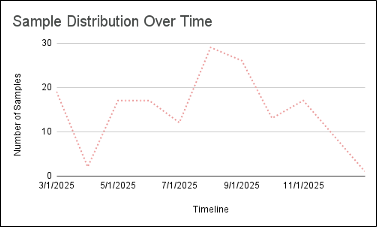
The campaign ran from March 2025 through the second week of January 2026, with some infrastructure still operational when the research was published. Fake apps impersonated Facebook Messenger, Instagram Threads, TikTok, Minecraft, Grand Theft Auto, and other well-known brands.
Carrier billing fraud was the main goal
Carrier billing lets users pay for services through their mobile phone bill instead of using a credit card. Attackers abused that system by silently subscribing victims to premium services after the malicious app confirmed that the device belonged to a targeted carrier.
This makes the fraud harder for victims to notice quickly. Instead of seeing an obvious card charge, users may only discover the problem later when they check their phone bill or receive carrier notifications.
Dark Reading reported that the malware used WebView automation, JavaScript injection, and OTP interception to complete fraudulent subscriptions without normal user interaction.
| Campaign detail | What researchers found |
|---|---|
| Target countries | Malaysia, Thailand, Romania, and Croatia |
| App count | Almost 250 malicious Android apps |
| Campaign window | March 2025 through the second week of January 2026 |
| Main fraud type | Carrier billing and premium SMS abuse |
| Fake app themes | Messenger, Threads, TikTok, Minecraft, GTA, games, and utilities |
| Main evasion method | Carrier checks and benign fallback pages on non-target devices |
The malware only acted on selected carriers
The apps did not run the fraud workflow on every infected Android device. First, they checked SIM card information to identify the victim’s mobile operator. If the operator matched a hardcoded target list, the subscription flow began.
If the operator did not match, the app displayed harmless content. This helped the fake app look normal to users, researchers, and security tools that tested it outside the targeted network conditions.
That carrier-specific design made the campaign more precise. It also reduced noisy behavior that might have exposed the operation earlier.
Three variants handled the fraud differently
Zimperium identified three main malware variants. Each one used a different method to subscribe victims to paid services, but all focused on mobile billing abuse.
The first variant targeted Malaysian users and automated the subscription process through hidden WebViews. It could open carrier billing pages in the background, click subscription buttons, request OTP codes, fill them in, and confirm payment flows.
The second variant focused on Thai users and combined premium SMS fraud with browser session hijacking. The third variant added Telegram-based reporting, sending operators updates when the malware installed, gained permissions, or sent premium SMS messages.
- Variant 1 used hidden WebViews and JavaScript automation.
- Variant 1 also disabled Wi-Fi to force cellular billing traffic.
- Variant 2 fetched updated subscription instructions from attacker servers.
- Variant 2 stole browser cookies from billing sessions.
- Variant 3 reported installs, permissions, carrier names, and SMS activity through Telegram.
- All variants used referrer tracking to measure which fake apps and platforms worked best.
OTP interception helped complete subscriptions
Some carrier billing flows use one-time passwords to confirm a paid subscription. The malware abused Google’s legitimate SMS Retriever API, which lets Android apps automatically verify SMS codes without requiring users to type them manually.
In a legitimate app, that feature improves user experience. In this campaign, attackers used it to capture billing OTP messages and complete paid subscriptions while the victim saw fake or harmless content.
The same automation allowed the malware to move quickly. Once the target carrier matched, the app could request a code, read the response, fill the confirmation field, and complete the subscription before the user understood what happened.
Wi-Fi disabling helped force carrier billing
The most advanced variant disabled Wi-Fi so the phone would use the cellular network. That mattered because carrier billing often depends on the mobile network connection to identify the subscriber and complete the transaction.
This step shows that the malware was designed around real billing workflows, not only generic SMS abuse. The attackers understood that cellular routing could make the subscription process more reliable.
For defenders, sudden Wi-Fi toggling during a suspicious app session can become a useful behavioral signal, especially when paired with hidden WebView activity and premium SMS attempts.
Fake apps used trusted brands to win installs
The campaign relied on social engineering before the malware could run. Fake apps used the names and icons of widely recognized social, gaming, and utility brands to appear safe.
Users may have believed they were installing a game, a beta app, a modded version, or a social platform tool. The malware then used the familiar app identity to reduce suspicion while the fraud happened in the background.
The campaign also tracked referrals using app names, countries, platforms, and operator codes. This gave the operators a way to measure which fake app identities and distribution sources generated successful infections.
| Fake app theme | Why attackers used it |
|---|---|
| Messaging apps | Users trust familiar social brands and may install updates quickly. |
| Short-video platforms | Trending app names can spread well through social channels. |
| Games | Fake mods, beta builds, and free versions often lure younger users. |
| Utilities | Utility apps can justify unusual permissions more easily. |
Google said the apps were not found on Google Play
The campaign appears tied to apps distributed outside the official store. In a statement quoted by Dark Reading, Google said its current detection found no apps containing this malware on Google Play.
That does not mean Android users can ignore the risk. Sideloaded apps, links from social platforms, direct APK downloads, fake beta programs, and unofficial app stores remain common distribution paths for mobile malware.
Users should treat any app that asks for SMS-related permissions, accessibility permissions, or unusual background access with caution, especially when it came from a link rather than an official store page.
Google Play Protect can help, but users still need caution
Google Play Protect checks apps and devices for harmful behavior, runs safety checks before downloads from Google Play, and scans apps from other sources for potentially harmful behavior.
Google also says Play Protect is on by default on Android devices with Google Play services, although users can turn it off. Keeping it enabled gives users another layer of protection against known malicious apps.
Even so, users should not rely on one control. Attackers often create new app builds, change names, rotate infrastructure, and use social engineering to convince users to bypass warnings.
What users should watch for
Victims may not see obvious signs of infection because the fraud runs silently. The first clue may come from a phone bill, premium SMS notification, carrier message, or unexpected subscription alert.
Users should also pay attention to apps that open harmless-looking pages while requesting sensitive permissions. A simple game or social media clone should not need SMS access or tools that help it read verification codes.
- Unfamiliar premium SMS charges on a phone bill.
- Subscriptions to services the user never requested.
- Unexpected SMS messages from short codes.
- Apps that ask for SMS access without a clear reason.
- Wi-Fi turning off during app activity.
- Fake apps using popular brand names outside official stores.
- Battery or data usage spikes from recently installed apps.
How to reduce the risk
Android users should download apps only from trusted stores and avoid APK files sent through messaging apps, social media posts, short links, or unofficial download pages.
They should also review permissions before installing an app. A game, clone app, wallpaper app, or social media helper that asks for SMS access should raise suspicion.
- Keep Google Play Protect enabled.
- Avoid sideloading APK files from unknown sources.
- Check app developer names before installing.
- Remove fake or duplicate versions of popular apps.
- Review SMS, notification, and accessibility permissions regularly.
- Check phone bills for premium SMS or subscription charges.
- Ask the mobile carrier to block premium SMS services if they are not needed.
- Report unauthorized subscriptions to the carrier quickly.
What mobile operators and security teams should monitor
Mobile operators can help reduce fraud by watching for abnormal premium SMS patterns, repeated subscriptions from the same app campaigns, and traffic tied to known malicious infrastructure.
Security teams managing Android fleets should monitor sideloaded apps, suspicious SMS permissions, hidden WebView behavior, carrier billing pages loaded from apps, and repeated attempts to use the SMS Retriever API outside normal authentication flows.
Enterprise mobile security controls should also flag apps that impersonate popular brands or use package names, icons, and labels that do not match the legitimate developer.
| Defensive area | Recommended action |
|---|---|
| Mobile device management | Block sideloading where business needs allow it. |
| App permissions | Alert on unnecessary SMS, notification, and accessibility access. |
| Carrier billing | Watch for rapid subscriptions or repeated short-code messages. |
| Threat intelligence | Block known domains, short codes, and app identifiers tied to the campaign. |
| User awareness | Warn users against fake app links and unofficial APK downloads. |
Why this campaign matters
This campaign shows how mobile fraud has moved beyond simple malicious SMS messages. Attackers now combine fake app branding, carrier targeting, hidden WebViews, OTP capture, Telegram reporting, and conversion tracking.
The Zimperium research also shows why mobile threats can stay quiet for months. When malware acts only on selected carriers and displays harmless content everywhere else, many users and analysts may not see the malicious behavior.
The safest response is practical. Android users should keep Google Play Protect enabled, avoid unofficial APKs, review SMS permissions, and check mobile bills for unexplained premium charges.
Mobile operators and enterprise teams should treat carrier billing fraud as a security issue, not just a billing dispute. Early detection can prevent small unauthorized subscriptions from becoming a wider fraud operation.
FAQ
The campaign used fake Android apps to silently subscribe victims to premium mobile services through carrier billing and premium SMS flows. It targeted users in Malaysia, Thailand, Romania, and Croatia.
The malware checked SIM card and mobile operator information first. If the device belonged to a targeted carrier, the fraud workflow activated. If not, the app displayed harmless content to avoid suspicion.
Researchers found fake apps impersonating Facebook Messenger, Instagram Threads, TikTok, Minecraft, Grand Theft Auto, and other popular games, social apps, and utilities.
Google told Dark Reading that, based on its current detection, no apps containing this malware were found on Google Play. The risk mainly comes from sideloaded apps and unofficial download sources.
Users should avoid sideloading APKs, keep Google Play Protect enabled, review SMS permissions, install apps only from trusted stores, and check phone bills for unfamiliar premium SMS or subscription charges.


Read our disclosure page to find out how can you help VPNCentral sustain the editorial team Read more


Improve this guide




User forum
0 messages