
AirDrop and Quick Share Vulnerabilities Could Let Nearby Attackers Crash Devices


 9 min. read
  Published on
Security researchers have disclosed six vulnerabilities in Apple AirDrop and Google/Samsung Quick Share that could let nearby attackers disrupt devices, manipulate protocol behavior, or crash file-sharing services.
The flaws affect proximity-sharing systems used to send files between nearby phones, tablets, computers, and PCs. Researchers found three issues in Apple AirDrop, two in Samsung’s Quick Share implementation, and one in Google Quick Share for Windows.

Access content across the globe at the highest speed rate.
70% of our readers choose Private Internet Access
70% of our readers choose ExpressVPN

Browse the web from multiple devices with industry-standard security protocols.

Faster dedicated servers for specific actions (currently at summer discounts)
The findings come from researchers at the CISPA Helmholtz Center for Information Security, who used reverse engineering and protocol-aware fuzzing to study how the proprietary sharing protocols handle unauthenticated nearby traffic.
What researchers found
The study, titled Protocol Prying, documents six vulnerabilities tracked in the paper as V1 through V6. The bugs span macOS, iOS, Android, and Windows implementations.
The most immediate risk comes from denial-of-service attacks. In those cases, an attacker within wireless range can send crafted protocol traffic that crashes AirDrop-related services on Apple devices or Quick Share for Windows.
The Quick Share findings also include protocol-layer weaknesses that may let an attacker interact with parts of the connection flow before proper authentication or inject certain control messages under specific conditions.
| ID | Target | Issue type | Main impact |
|---|---|---|---|
| V1 | Apple AirDrop | HTTP path handling error | Crash and denial of service |
| V2 | Apple AirDrop | Unbounded XML plist recursion | Stack overflow and crash |
| V3 | Apple AirDrop | HTTP/1.1 parser NULL pointer dereference | Crash and continuity-service disruption |
| V4 | Samsung Quick Share | Pre-authentication frame dispatch | Protocol-state manipulation |
| V5 | Samsung Quick Share | Device-to-device encryption bypass | Unencrypted control-frame injection |
| V6 | Google Quick Share for Windows | Use-after-free race condition | Reliable crash and possible code execution |
AirDrop flaws can disrupt Apple continuity services
Apple’s AirDrop lets users share photos, files, documents, and other content with nearby Apple devices using Wi-Fi and Bluetooth.
The researchers found that AirDrop’s receiving-side service exposes a network-facing attack surface when the feature is visible to nearby users. In the paper, the riskiest setting is “Everyone for 10 Minutes,” because it makes the AirDrop interface reachable by any nearby device during that window.
One AirDrop bug involves an unhandled HTTP path. A crafted request to an unexpected AirDrop endpoint can trigger a fatal error and crash the sharing daemon.
The Apple bugs are pre-authentication issues
The second AirDrop issue involves XML property lists. Researchers found that a deeply nested XML plist can exhaust the stack and crash the process because parsing lacks a safe recursion limit.
The third AirDrop issue affects HTTP/1.1 parsing in Apple’s Network.framework. Malformed request framing can put the parser into an inconsistent state and trigger a NULL pointer dereference.

According to the WOOT 2026 conference listing, the paper presents a systematic study of the AirDrop and Android Quick Share proximity transfer protocols, which researchers say had received limited application-layer security analysis because both stacks are proprietary.
- V1 can crash AirDrop through an unexpected HTTP path.
- V2 can crash a process through deeply nested XML plist content.
- V3 can crash the AirDrop sharing daemon through malformed HTTP framing.
- A crash in the sharing daemon can also disrupt related Apple continuity features.
Quick Share flaws affect Android and Windows paths
Google says Quick Share lets Android users send and receive files from nearby devices, and the feature was previously known as Nearby Share.
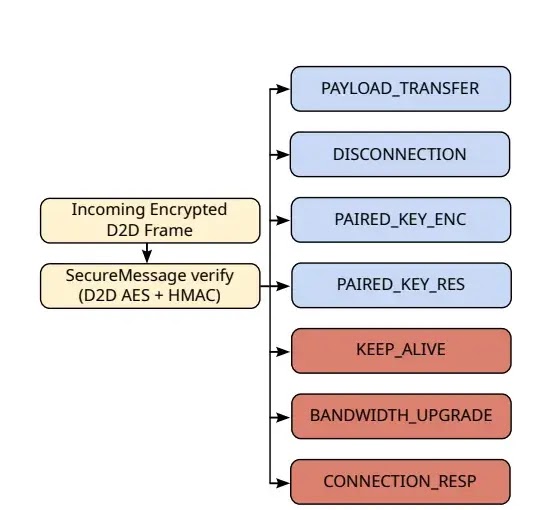
The research found two protocol-layer issues in Samsung’s Android Quick Share service. The first lets certain OfflineFrame messages reach the protocol state machine after an unauthenticated connection request but before the UKEY2 handshake completes.
The second Quick Share Android flaw involves post-handshake traffic. Researchers found that three control-frame types could still be accepted in plaintext if sent as raw OfflineFrame protobufs instead of being wrapped in the expected encrypted SecureMessage layer.
Windows Quick Share bug could be more serious
Google’s help page for Quick Share between Android and Windows says users can exchange images, videos, and documents between Android devices and Windows computers that are close together.
The Windows vulnerability is a race-condition use-after-free in endpoint management. The researchers said they could reliably trigger a crash when two connections collide on the same endpoint identifier and nonce.
The paper says the crash pattern creates a plausible path to code execution because the process dereferences a freed object during a virtual function call. The researchers confirmed denial-of-service impact but did not develop a full exploit.
| Platform | Attack requirement | User interaction | Likely result |
|---|---|---|---|
| iOS and macOS AirDrop | Nearby attacker while AirDrop is visible | No click needed for V1 and V2 | Sharing daemon crash |
| Samsung Android Quick Share | Nearby visible Quick Share device or same-network position for V5 | Depends on attack path | Protocol manipulation or control-frame injection |
| Quick Share for Windows | Connection race against the Windows client | No file acceptance required for the crash path described | Reliable denial of service, possible exploit path |
Why proximity-sharing bugs matter
AirDrop and Quick Share work by making devices discoverable to nearby hardware. That creates convenience, but it also means exposed components must handle unexpected traffic from strangers in wireless range.
The research paper says the attacker model covers a person within AWDL, Wi-Fi Direct, or nearby wireless range. The researchers describe typical reach as around 10 to 30 meters, depending on the wireless environment.
That distance may sound limited, but it matters in airports, trains, offices, conferences, classrooms, and public events. A single attacker in a crowded area could reach many visible devices.
What users can do now
Users should reduce exposure by turning off receive modes when they do not need them. Apple users should avoid leaving AirDrop visible to everyone, especially in public spaces.
Apple’s support page says the Everyone for 10 Minutes setting reverts after 10 minutes on iPhone and iPad when users enable it for unknown contacts. Users should still switch receiving off when they finish sharing.
Android and Windows users should also review Quick Share visibility. Google’s Android help says nearby sharing depends on receive mode, visibility settings, Bluetooth, and device proximity.
- Keep AirDrop set to Contacts Only or Receiving Off when not in use.
- Do not leave Quick Share visible in crowded public places.
- Install iOS, macOS, Android, Samsung, and Windows updates as soon as vendors release patches.
- Restart a device if AirDrop, Handoff, Universal Clipboard, or Quick Share stops working unexpectedly.
- Use stricter sharing settings on work devices that handle confidential files.
Vendor disclosure and patch status
The CISPA publication says Apple, Samsung, and Google were notified through coordinated disclosure channels.
Researchers said Apple acknowledged the AirDrop issues and had fixes in progress at the time of writing. Samsung transferred the Android Quick Share reports to Google after determining that the affected code paths came from Google Nearby/Quick Share components shipped to Samsung.
Google acknowledged the Windows Quick Share use-after-free and awarded a bounty. The researchers said the Quick Share Android issues remained under investigation when the paper was published.
What vendors should fix
The researchers recommend stronger input validation and safer failure behavior in AirDrop. They specifically call for replacing reachable fatal errors with graceful error handling, limiting XML plist nesting depth, and rejecting malformed HTTP framing.
For Quick Share, they recommend rejecting all non-handshake OfflineFrame messages until authentication completes. They also recommend enforcing decryption and integrity checks at the dispatcher level rather than leaving checks to individual handlers.
The USENIX WOOT entry lists the work as a conference paper, which means the findings form part of a broader academic review of proximity-transfer protocol security.
| Vendor area | Recommended fix |
|---|---|
| AirDrop HTTP routing | Return clean errors instead of crashing on unexpected paths |
| AirDrop XML plist parsing | Set safe nesting and body-size limits |
| AirDrop HTTP parser | Reject malformed framing before it reaches unsafe parser states |
| Quick Share authentication | Block non-handshake frames before authentication completes |
| Quick Share encryption | Verify every post-handshake frame at a central dispatcher |
| Quick Share for Windows | Protect endpoint objects from race-condition use-after-free bugs |
The risk is limited by range, but still important
These vulnerabilities do not let attackers strike from anywhere on the internet. The attacker must be physically nearby or, for one Quick Share scenario, positioned on the same network path during a session.
That limitation reduces the attack surface, but it does not remove the risk. Proximity attacks become more practical in dense spaces where many people keep wireless sharing features enabled.
Google’s Android Quick Share guidance tells users that receive mode can make the device visible to nearby users. That visibility is exactly why careful default settings and prompt handling matter.
What this means for AirDrop and Quick Share users
The safest short-term move is simple: keep nearby sharing features off when you are not actively using them. When you need to receive files, enable visibility only for the shortest practical time.
For businesses, the bigger lesson involves device policy. IT teams should set clear rules for AirDrop and Quick Share on managed devices, especially in sensitive environments such as finance, government, healthcare, legal work, and engineering.
Google’s Windows help page says Quick Share for Windows can receive files in the background when the app is open. That makes visibility and patching especially important on shared or work PCs.
The research does not mean users must stop using AirDrop or Quick Share. It does show that proximity-sharing tools need the same security attention as any other network-facing service.
FAQ
Researchers disclosed six vulnerabilities affecting Apple AirDrop, Samsung Quick Share, and Google Quick Share for Windows. The issues include AirDrop denial-of-service crashes, Quick Share protocol-state flaws, an encryption-bypass issue, and a Windows use-after-free bug.
Researchers found three AirDrop issues that can crash the sharing daemon when AirDrop is reachable in a visible receive mode. A crash can disrupt AirDrop and related Apple continuity services until the service recovers or the device is restarted.
The Windows Quick Share bug is a use-after-free race condition. Researchers confirmed reliable denial-of-service impact and described a plausible code-execution path, but they did not develop a full exploit in the paper.
For most scenarios, the attacker needs to be within nearby wireless range, which the researchers describe as roughly 10 to 30 meters depending on the environment. One Quick Share encryption-bypass scenario requires an on-path attacker on the same network.
Users should turn off AirDrop or Quick Share receive modes when they do not need them, avoid broad visibility settings in public spaces, install vendor security updates promptly, and use stricter sharing policies on work devices.


Read our disclosure page to find out how can you help VPNCentral sustain the editorial team Read more


Improve this guide




User forum
0 messages