
AsyncRAT Campaign Uses Fake Software Sites, DLL Sideloading and ScreenConnect for Remote Access


 7 min. read
  Published on
A large malware campaign is using fake freeware download sites to install ScreenConnect on Windows systems and then deploy AsyncRAT for remote access. The attack targets users searching for popular free tools, including OBS Studio, DNS Jumper, DS4Windows, Bandicam, Glary Utilities, and Process Hacker.
The campaign relies on a common but effective trick: users receive what looks like a normal installer, while attackers silently install a legitimate remote access tool in the background. Once ScreenConnect is active, the attackers use scripts and malware loaders to run AsyncRAT and keep access to the device.

Access content across the globe at the highest speed rate.
70% of our readers choose Private Internet Access
70% of our readers choose ExpressVPN

Browse the web from multiple devices with industry-standard security protocols.

Faster dedicated servers for specific actions (currently at summer discounts)
A Kaspersky press release says researchers found more than 90 fraudulent domains across 10 languages. The campaign affects both individual Windows users and corporate networks, where remote administration tools are often trusted by default.
Fake Download Sites Push Malicious Installers
The Securelist report says the investigation began after Kaspersky Managed Detection and Response flagged suspicious PowerShell and VBS scripts launched by a ScreenConnect process. That single alert led researchers to a wider infrastructure built around spoofed software portals.
One example involved a fake OBS Studio download site that delivered an archive named obs-studio-windows-x64.zip. The archive included a legitimate Microsoft-signed executable renamed to look like an installer, along with a malicious DLL named install.res.1033.dll.
When the fake installer ran, it loaded the rogue DLL through DLL sideloading. This allowed the attackers to install both the real software and ScreenConnect, which reduced suspicion because the user still saw the expected app installation process.
Why ScreenConnect Makes the Attack Harder to Spot
ScreenConnect, a legitimate remote support and remote access platform, gives IT teams a way to connect to devices for troubleshooting. In this campaign, attackers abused that trust to create remote access without using an obviously malicious tool at the first stage.
This matters because many organizations allow remote support tools in endpoint policies. If security systems only check whether the file looks legitimate, they may miss malicious behavior that happens after installation.
After installation, ScreenConnect created a PowerShell script that changed Windows security settings. Microsoft’s Add-MpPreference documentation shows that the cmdlet can modify Defender settings and add exclusions for paths, extensions, and processes.
How the AsyncRAT Infection Chain Works
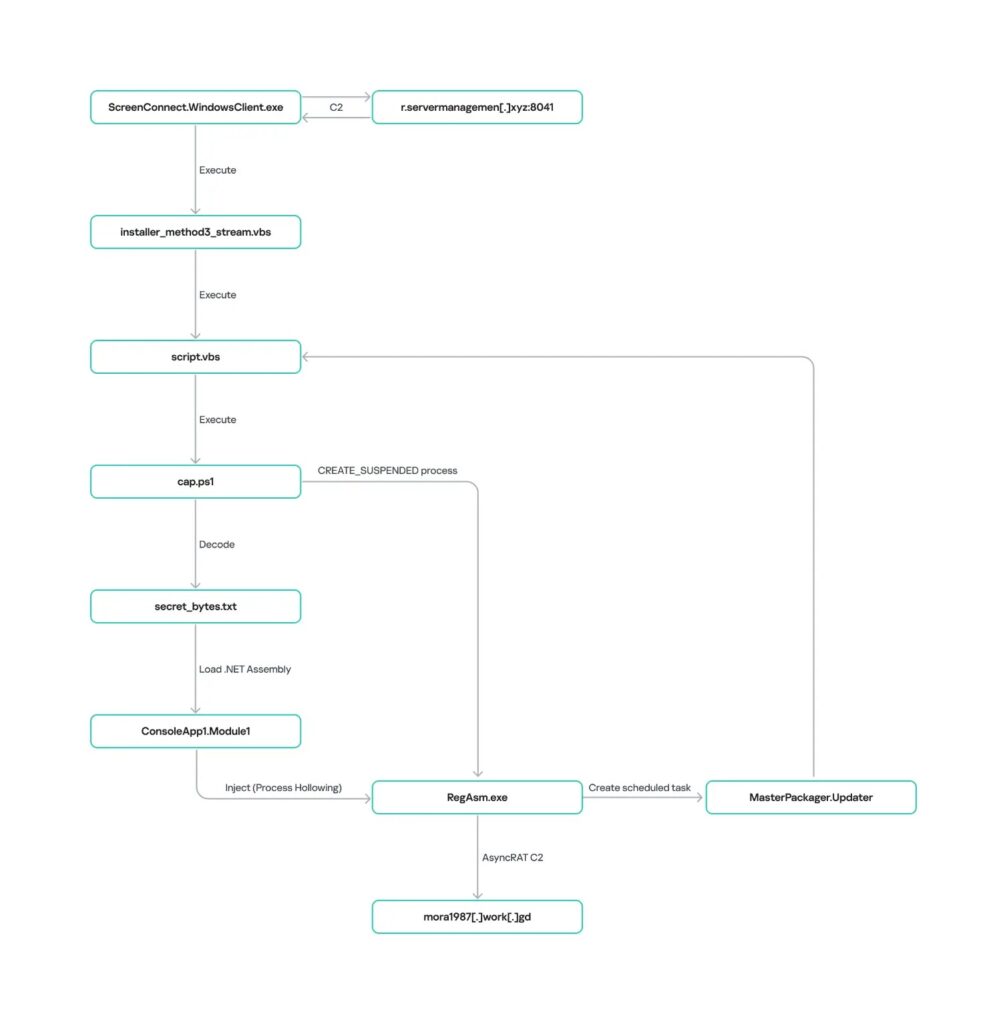
Kaspersky found that the malicious PowerShell script added Microsoft Defender exclusions for disks, root directories, the C:\Users\Public directory, and the RegAsm.exe process. It also disabled User Account Control prompts by changing a registry setting.
The next stage used VBScript to create several files in C:\Users\Public, including script.vbs, cap.ps1, secret_bytes.txt, msgbox.txt, and 1.vb. The chain then decoded an encrypted payload from secret_bytes.txt using an XOR key and loaded it into memory.
The payload used process hollowing to run inside RegAsm.exe. MITRE describes this technique as a way to execute malicious code inside a separate live process, which can help attackers evade process-based defenses.
| Attack stage | What happens | Why it matters |
|---|---|---|
| Initial access | User downloads a fake software archive from a spoofed site. | The attack starts from search results, not necessarily email phishing. |
| Execution | A signed executable loads a malicious DLL through sideloading. | Trusted files help hide the malicious code path. |
| Remote access | ScreenConnect installs silently in the background. | Attackers gain a remote management channel. |
| Defense evasion | PowerShell adds Defender exclusions and disables UAC prompts. | The system becomes easier to control and harder to monitor. |
| Persistence | A scheduled task named MasterPackager.Updater runs every two minutes. | The infection chain can restart after reboot. |
| Payload | AsyncRAT runs inside RegAsm.exe. | The attacker can maintain access and potentially steal data. |
Campaign Infrastructure Spanned More Than 90 Domains
Researchers linked the operation to two main infrastructure clusters across three IP addresses. One cluster first used gaming-themed lures before moving to fake freeware sites in January 2026, while another cluster focused on freeware impersonation from the beginning.
The domains were registered between October 2025 and March 2026, with activity pausing by the end of March. However, the report says many landing pages were still accessible through search results when the research was published.
The spoofed sites appeared in multiple languages, including English, Arabic, Spanish, Chinese, German, Portuguese, and Russian. That made the campaign more likely to reach users in different regions without needing targeted phishing emails.
Key Indicators Security Teams Should Check
The campaign used several recurring file names, domains, and behaviors. Security teams should not treat this as a complete detection list, but the following indicators can help with triage and threat hunting.
| Type | Indicator | Relevance |
|---|---|---|
| Domain | mora1987[.]work[.]gd | AsyncRAT command-and-control domain |
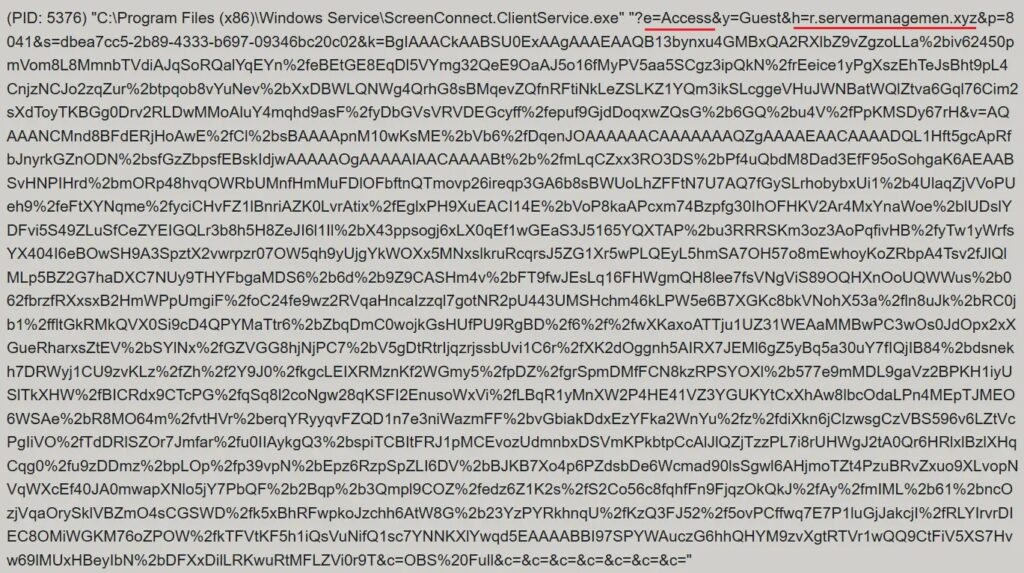
| Domain | servermanagemen[.]xyz | ScreenConnect command-and-control domain |
| Domain | r.manage-server[.]xyz | ScreenConnect command-and-control domain |
| IP address | 185.254.97[.]249 | Linked to ScreenConnect infrastructure |
| IP address | 45.145.41[.]205 | Linked to ScreenConnect infrastructure |
| File name | install.res.1033.dll | Malicious sideloaded DLL |
| File name | Fj5NmEsp9EuKrun.ps1 | PowerShell script used for exclusions and UAC changes |
| Scheduled task | MasterPackager.Updater | Persistence task that runs every two minutes |
How Organizations Can Reduce Risk
A warning from Kaspersky points to credential theft and unauthorized access as key risks. Stolen credentials can later help attackers move into larger networks or sell access to other criminals.
Organizations should review whether remote access tools can install without approval. They should also monitor for unexpected installations of ScreenConnect remote access, new services with unusual command-line parameters, and scheduled tasks created from public user directories.
The Securelist technical analysis recommends strict software installation controls, application allowlisting, blocking MSI execution from untrusted sources, and filtering outbound traffic to unknown domains and IP addresses.
- Download software only from official vendor websites or trusted app stores.
- Block lookalike domains that imitate popular free software projects.
- Alert on ScreenConnect child processes such as powershell.exe, cmd.exe, schtasks.exe, msiexec.exe, rundll32.exe, and mshta.exe.
- Review suspicious Microsoft Defender exclusions, especially broad disk and root-folder exclusions.
- Investigate scheduled tasks that launch scripts from C:\Users\Public.
- Check for RegAsm.exe activity linked to suspicious script execution.
What Users Should Do
Home users should uninstall any suspicious software downloaded from unofficial sites and run a full system scan with a trusted security tool. They should also change passwords from a clean device if they installed software from a fake download page.
Business users should report unusual remote support prompts, unexpected software installs, or antivirus exclusions to their IT team. Security teams should compare endpoint telemetry with MITRE ATT&CK process injection behavior and investigate any RegAsm.exe process that appears in an unusual execution chain.
Administrators should also audit Microsoft Defender exclusions because broad exclusions can create long-term blind spots. In this campaign, exclusions were not just a configuration change, but part of the attacker’s effort to keep the malware chain running.
FAQ
The AsyncRAT ScreenConnect campaign is a malware operation that uses fake freeware download sites to install ScreenConnect on Windows devices and then deploy AsyncRAT for remote access.
The attack starts when a user downloads a fake installer from a spoofed software website. The archive contains a legitimate signed executable and a malicious DLL that installs ScreenConnect in the background.
Attackers use ScreenConnect because it is a legitimate remote access tool that many organizations already trust. This can help malicious activity blend in with normal IT administration.
DLL sideloading is a technique where a trusted program loads a malicious DLL file instead of a legitimate one. Attackers use it to run hidden code through software that may look safe.
Users should download software only from official websites, avoid sponsored or unfamiliar download pages, check domain names carefully, and scan suspicious files before running them.


Read our disclosure page to find out how can you help VPNCentral sustain the editorial team Read more


Improve this guide




User forum
0 messages