
Azure AD Conditional Access Bypass Exposes Weak Device Trust in Microsoft Entra ID


 5 min. read
  Published on

Security researchers showed how Microsoft Entra ID Conditional Access can be bypassed when device registration, device code flow, Intune compliance, and privileged hybrid identities are not locked down together.
The attack path started with one valid user credential that Conditional Access initially blocked. Instead of giving up, the researchers used weak device trust controls to register a fake device, obtain a Primary Refresh Token, and make the session look like it came from a trusted endpoint.

Access content across the globe at the highest speed rate.
70% of our readers choose Private Internet Access
70% of our readers choose ExpressVPN

Browse the web from multiple devices with industry-standard security protocols.

Faster dedicated servers for specific actions (currently at summer discounts)
The finding matters because many companies rely on Conditional Access rules that require a compliant or joined device before allowing access. This research shows that those rules can fail if Microsoft Entra ID and Intune trust device claims without stronger validation.
What happened
Howler Cell, the red team unit at Cyderes, tested a production Microsoft Entra ID environment with about 16,000 users, 82,000 devices, and dozens of Conditional Access policies. The direct login attempt failed with a Conditional Access block, but the team found another route through device identity.
The researchers targeted the Device Registration Service path and used device code authentication to continue the attack. They then registered what they called a phantom device, meaning a device identity that Microsoft Entra ID accepted even though no real corporate Windows endpoint existed.
After that, the team obtained a Primary Refresh Token with device-related claims. Once exchanged for access, the token made the session appear device-authenticated, which allowed it to pass policies that expected a trusted device.
Why phantom device registration is dangerous
Phantom device registration creates a serious identity problem because it attacks the trust layer, not just a password. The attacker does not need malware on a corporate laptop. The attacker also does not need physical access to a managed endpoint.
In this case, the fake device helped the researchers move from a blocked credential to broader tenant visibility. That included user, group, device, application, and role data that can help attackers plan follow-up activity.
This is especially risky for organizations that treat a registered or compliant device as a strong signal without checking whether the device identity came from trusted hardware, approved enrollment, and verified health attestation.
Attack path at a glance
| Stage | What the attacker abuses | Why it matters |
|---|---|---|
| Initial access | Valid user credentials | A blocked login does not always stop the attack if other authentication paths remain open. |
| Device registration | Weak Device Registration Service enforcement | A fake device can gain an identity inside the tenant. |
| Token abuse | Primary Refresh Token claims | The session can look like it came from a trusted device. |
| Compliance bypass | Self-reported Intune device health | A device may appear compliant without strong external validation. |
| Privilege path | Synced privileged on-premises accounts | Compromise of Active Directory can create a route to cloud admin access. |
Intune compliance also became part of the problem
The research also found a weakness in how device compliance can work when health checks rely too much on device-reported information. The phantom device did not have the normal security posture expected from a managed Windows machine.
Despite that, the device could still reach a compliant state in the tested environment. This happened because missing health attestation responses did not stop the device from passing the relevant checks.
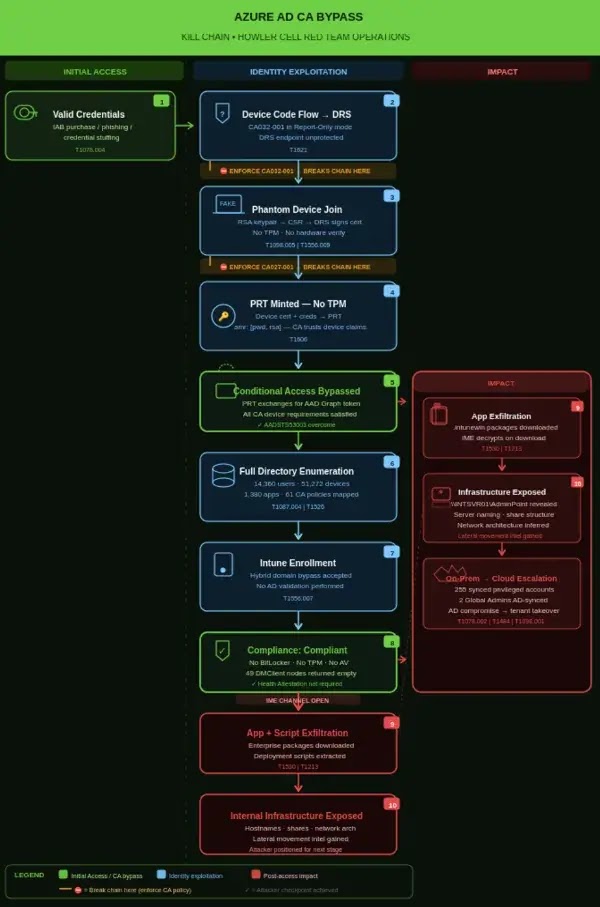
That point matters for IT teams using Intune compliance as a gate for Microsoft 365 access. A compliance label should not rely only on what the device reports about itself. It should come from hardware-backed and externally validated signals wherever possible.
The hybrid identity risk
Howler Cell also found a separate but related problem in the same environment. Many privileged directory roles were tied to accounts synced from on-premises Active Directory.
This creates a cloud takeover risk if attackers compromise the local Active Directory environment. They may not need a new Microsoft Entra ID exploit if synced privileged accounts already provide a path into high-impact cloud roles.
For mature environments, Global Administrator, Privileged Role Administrator, and similar roles should use cloud-only accounts protected through Privileged Identity Management. Break-glass accounts should also stay cloud-only and tightly monitored.
What Microsoft tenants should check now
- Move critical Conditional Access policies from report-only mode to enforced mode after testing.
- Block device code flow unless a documented business case requires it.
- Require MFA for device registration and limit who can register devices.
- Use hardware-backed device trust, including TPM-based validation where available.
- Require external health attestation for BitLocker, Secure Boot, and code integrity checks.
- Restrict broad Microsoft Graph directory read access for standard users.
- Review Intune enrollment restrictions and avoid trusting self-declared hybrid join status.
- Keep highly privileged Microsoft Entra roles on cloud-only accounts.
- Monitor for new device registrations that happen without MFA or from unusual locations.
Why report-only policies are not enough
Report-only mode helps administrators test the effect of a Conditional Access policy before enforcement. It should not remain the final state for high-risk controls.
In the Cyderes engagement, two policies could have disrupted the attack chain if they had been enforced. They covered device code flow blocking and MFA for device registration.
This makes the lesson clear for defenders. A policy that only records what would have happened does not stop an attacker. Security teams need an enforcement deadline for every report-only rule that protects identity, device registration, or privileged access.
FAQ
It is an attack path where a blocked user credential can still lead to access by abusing device registration, Primary Refresh Tokens, and weak device trust checks in Microsoft Entra ID and Intune.
PRT abuse involves misusing a Primary Refresh Token or its device claims to obtain access tokens that make a session appear trusted.
A phantom device is a fake or attacker-controlled device identity that a tenant accepts as if it were a legitimate registered or joined endpoint.
No. It means Conditional Access depends on the quality of the signals it receives. If device registration, token protection, Intune compliance, and hybrid identity controls are weak, attackers can abuse the gaps between them.


Read our disclosure page to find out how can you help VPNCentral sustain the editorial team Read more


Improve this guide




User forum
0 messages