
Bing Search for ManageEngine OpManager Led to Akira Ransomware Attack


 9 min. read
  Published on

A Bing search for ManageEngine OpManager led an IT user to a fake download page that delivered malware and eventually Akira ransomware, according to a new incident report.
The attack began with SEO poisoning, a technique that pushes malicious websites into search results for trusted software names. In this case, attackers used a lookalike ManageEngine OpManager page to trick a user into downloading a trojanized MSI installer.

Access content across the globe at the highest speed rate.
🔥 Save 81% + 2 bonus months! 🔥
70% of our readers choose Private Internet Access
70% of our readers choose Private Internet Access
2
Browse the web from multiple devices with industry-standard security protocols.
🔥 Save 73%! 🔥

Faster dedicated servers for specific actions (currently discounted)
🔥 Save 69%! 🔥
The incident was documented by The DFIR Report, which said the intrusion moved from initial malware execution to Akira ransomware deployment across the root domain in about 44 hours.
How the attack started
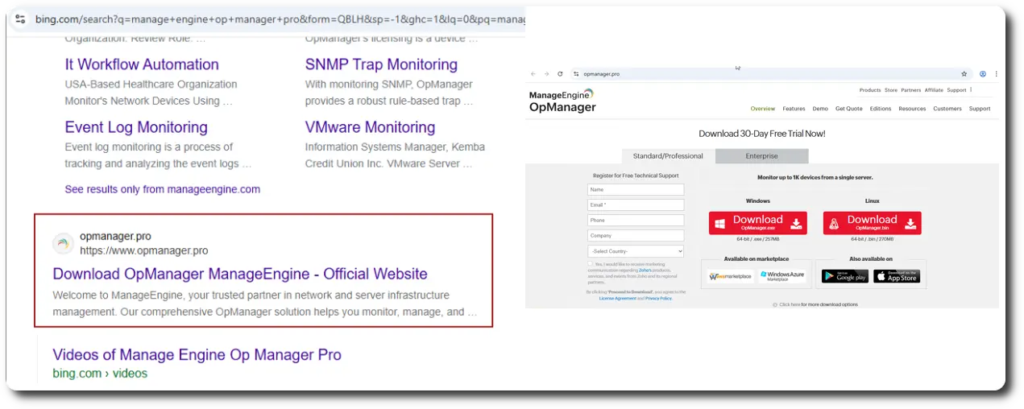
The victim searched Bing for ManageEngine OpManager, a network monitoring platform used by IT teams to track routers, switches, servers, firewalls, load balancers, virtual machines, and other infrastructure.
Instead of reaching the legitimate vendor page, the user landed on opmanager[.]pro, a deceptive domain built to look like a real software download site. The page then redirected the victim to download-center[.]online, which delivered the malicious installer.
The installer was named ManageEngine-OpManager.msi. It deployed the real OpManager software as a decoy, but it also staged BumbleBee malware through DLL side-loading.
| Stage | What happened | Impact |
|---|---|---|
| Search | User searched Bing for ManageEngine OpManager | SEO poisoning placed a fake download site in the path |
| Fake site | Victim reached opmanager[.]pro | The page impersonated a trusted IT tool |
| Installer | ManageEngine-OpManager.msi was executed | BumbleBee loader was launched through DLL side-loading |
| C2 access | AdaptixC2 beacon was deployed | Attackers gained hands-on-keyboard access |
| Ransomware | Akira was staged as locker.exe | Systems were encrypted across the environment |
The fake installer targeted IT administrators
The choice of OpManager was not random. Network monitoring tools often get installed by administrators, and those users may have elevated privileges across servers, network shares, and domain systems.
That made the fake OpManager download especially dangerous. A successful lure did not just infect a normal workstation. It increased the chance of execution by someone with access to sensitive infrastructure.
The malicious MSI dropped three files into a temporary folder: the legitimate OpManager installer, a legitimate Windows binary called consent.exe, and a malicious msimg32.dll file used as the BumbleBee loader.
- ManageEngine_OpManager_64bit.exe acted as a decoy installer.
- consent.exe served as the legitimate process abused in the loading chain.
- msimg32.dll ran as the BumbleBee first-stage loader.
- The MSI used a revoked code-signing certificate tied to LLC Resource+.
BumbleBee opened the door to AdaptixC2
After execution, BumbleBee established command-and-control communication with attacker infrastructure. About five hours later, the attackers deployed AdgNsy.exe, a renamed Windows Address Book utility injected with AdaptixC2 shellcode.
The AdaptixC2 beacon gave the attackers a stable channel for discovery, persistence, lateral movement, and credential theft. The attackers then ran common discovery commands, including systeminfo, nltest, and whoami, to map the network and identify domain assets.
The DFIR investigation said the threat actor created new privileged domain accounts and installed RustDesk as a Windows service on multiple servers to maintain access.
| Tool or file | Role in the intrusion |
|---|---|
| BumbleBee | Initial malware loader delivered by the fake installer |
| AdaptixC2 | Command-and-control framework used for follow-on activity |
| RustDesk | Remote access tool installed as a Windows service for persistence |
| FileZilla | Used for data exfiltration over SFTP |
| locker.exe | Akira ransomware binary used during encryption |
Attackers stole data before encryption
The attackers did not move straight to encryption. They first expanded access, collected credentials, and staged data theft. That pattern matches modern ransomware operations, where extortion often combines encryption with stolen data.
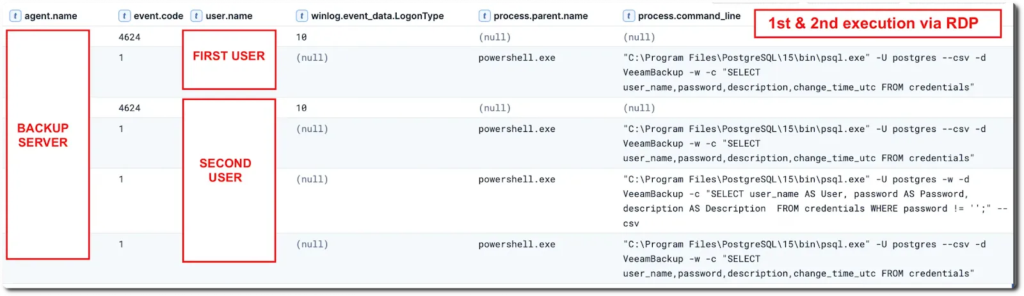
On the second and third days, the attackers moved laterally using RDP, reached a domain controller, and extracted the NTDS.dit Active Directory database with wbadmin.exe. They also dumped LSASS memory across several hosts and pulled Veeam credentials from a PostgreSQL database.
The attackers used FileZilla to exfiltrate more than 75GB of data to an external server in Ukraine. The stolen data included file shares, sensitive user credentials, and SYSVOL domain configuration data.
Akira ransomware completed the attack
Akira ransomware was deployed about 44 hours after the first infection. The ransomware binary was staged as locker.exe and used Windows Management Instrumentation to delete Volume Shadow Copies before encrypting systems.
The attackers later returned and encrypted a child domain, extending the damage beyond the initial domain. That return visit shows why incident response teams must verify the full Active Directory forest and not just the systems encrypted during the first wave.
CISA’s Akira ransomware advisory says Akira actors use double-extortion tactics, exfiltrate data before encryption, and pressure victims through leak-site threats.
- Initial access came from a poisoned search result.
- The fake installer delivered BumbleBee through DLL side-loading.
- AdaptixC2 enabled manual intrusion activity.
- Attackers created privileged domain accounts.
- They exfiltrated more than 75GB of data before encryption.
- Akira ransomware was deployed across the root domain and later a child domain.
Why SEO poisoning is effective against businesses
SEO poisoning works because it abuses normal user behavior. IT teams often search for software downloads, drivers, utilities, and documentation during routine work.
Attackers exploit that habit by creating search-optimized fake pages for trusted enterprise tools. If the page looks legitimate and serves a working installer, even experienced users can miss the malicious wrapper.
The risk grows when the targeted software belongs to IT operations. Users downloading network scanners, monitoring tools, VPN clients, or remote management software often have more privileges than normal employees.
| Defensive gap | Why it helped the attacker | What to improve |
|---|---|---|
| Search-based downloads | User trusted a search result instead of a known vendor URL | Use bookmarked vendor portals and software catalogs |
| MSI execution | Trojanized installer ran on a high-value system | Block unsigned or untrusted MSI files |
| Admin privileges | IT account execution increased attacker reach | Separate admin accounts from web browsing |
| Remote access tools | RustDesk provided persistence | Alert on new remote access services |
| Credential stores | Veeam and AD credentials were targeted | Monitor backup and domain credential access |
What security teams should monitor
Defenders should monitor for lookalike domains impersonating enterprise software, especially tools used by administrators. Brand monitoring should include search results, newly registered domains, and download pages that copy vendor branding.
Endpoint teams should also watch for Windows binaries executing from unusual locations. In this intrusion, consent.exe ran from a user-controlled folder and loaded a malicious local DLL, which is a strong sign of DLL side-loading.
Network teams should monitor for unexpected AdaptixC2, BumbleBee, RustDesk, FileZilla, reverse SSH tunnels, Cloudflare tunnels, and outbound SFTP activity from servers that do not normally use those tools.
- Alert on consent.exe running outside normal Windows paths.
- Block MSI execution from temporary folders, downloads folders, and network shares when possible.
- Alert on newly created domain admin or enterprise admin accounts.
- Monitor RustDesk and other remote access tools installed as services.
- Review RDP activity routed through loopback or tunneling tools.
- Detect LSASS dumping and suspicious access to NTDS.dit.
- Track large outbound transfers through FileZilla or SFTP.
How to reduce the risk from poisoned search results
Organizations should not rely on user judgment alone. Security teams should provide approved software portals, enforce application control, and stop users from installing administrative tools from unknown download sites.
Administrators should download software directly from known vendor domains or internal package repositories. They should avoid installing tools after reaching a site through sponsored or unfamiliar search results.
CISA’s Akira guidance recommends strong identity protections, network segmentation, offline backups, vulnerability management, and monitoring for ransomware-linked behavior.
| Priority | Action |
|---|---|
| Immediate | Block known malicious domains and IOCs from the incident |
| Immediate | Review recent MSI executions by admin users |
| High | Restrict software downloads to approved repositories |
| High | Separate privileged administration from internet browsing |
| Ongoing | Monitor search results for impersonation of company tools and vendors |
Indicators of compromise
The following indicators were associated with the reported campaign and related activity. Security teams should validate them against their own environment before blocking, because some infrastructure may change or become inactive over time.
| Type | Indicator | Description |
|---|---|---|
| Domain | opmanager[.]pro | Lookalike domain impersonating ManageEngine OpManager |
| Domain | download-center[.]online | Delivery gateway serving the trojanized installer |
| Domain | download-server[.]online | Related delivery gateway from an earlier wave |
| Domain | soft-server[.]online | Related delivery gateway from an earlier wave |
| Domain | zenmap[.]pro | Lookalike domain impersonating Zenmap |
| Domain | ip-scanner[.]org | Advanced IP Scanner impersonation domain |
| IP address | 188.40.187[.]145 | BumbleBee C2 infrastructure |
| IP address | 109.205.195[.]211 | BumbleBee C2 and AdaptixC2 payload delivery |
| IP address | 172.96.137[.]160 | AdaptixC2 beacon infrastructure |
| File | ManageEngine-OpManager.msi | Trojanized MSI installer |
| File | msimg32.dll | BumbleBee first-stage loader |
| File | AdgNsy.exe | Renamed Windows Address Book utility injected with AdaptixC2 shellcode |
| File | locker.exe | Akira ransomware binary |
| Account | backup_DA / backup_EA | Rogue domain accounts created during the intrusion |
The bottom line
This attack shows how a normal software search can become the first step in a ransomware intrusion. The threat did not begin with a zero-day exploit or a complex phishing email. It began with a trusted search habit.
For defenders, the lesson is clear. Software downloads by privileged users need tighter controls, and search engine results should not act as the trust boundary for enterprise tools.
Organizations should combine approved software distribution, application control, privileged access separation, endpoint monitoring, and ransomware-ready backups. Without those controls, one fake installer can give attackers enough time to move from a single download to a domain-wide ransomware event.
FAQ
A user searched Bing for ManageEngine OpManager and reached a fake download page through SEO poisoning. The page delivered a trojanized MSI installer that launched BumbleBee malware, which later enabled AdaptixC2 access and Akira ransomware deployment.
SEO poisoning is a tactic where attackers manipulate search results so malicious pages appear for trusted software or brand searches. Victims may then download malware from a fake site that looks legitimate.
Attackers likely chose ManageEngine OpManager because IT administrators use it for network monitoring. Those users often have elevated privileges, which can make a successful infection more valuable for ransomware operators.
The fake installer deployed BumbleBee as the first-stage loader. BumbleBee then helped deliver an AdaptixC2 beacon, which the attackers used for discovery, persistence, lateral movement, credential theft, and ransomware preparation.
Organizations should use approved software repositories, block untrusted MSI execution, separate admin accounts from web browsing, monitor for DLL side-loading, alert on new privileged accounts, and maintain offline backups for ransomware recovery.


Read our disclosure page to find out how can you help VPNCentral sustain the editorial team Read more


Improve this guide




User forum
0 messages