
Bluekit Phishing-as-a-Service Uses Browser-in-the-Middle Attacks to Steal Microsoft Logins


 10 min. read
  Published on

Bluekit, a phishing-as-a-service platform first documented earlier this year, has evolved into an operational phishing threat that can steal Microsoft login sessions and bypass common MFA checks.
A new Netcraft analysis says Bluekit now uses a Browser-in-the-Middle technique that streams a real login session from an attacker-controlled browser to the victim. Netcraft said it detected around 70 live Bluekit hostnames in one week.

Access content across the globe at the highest speed rate.
70% of our readers choose Private Internet Access
70% of our readers choose ExpressVPN

Browse the web from multiple devices with industry-standard security protocols.

Faster dedicated servers for specific actions (currently at summer discounts)
The approach is dangerous because victims are not simply typing credentials into a fake Microsoft page. They interact with the real Microsoft login page, but the session runs inside the attacker’s browser.
How Bluekit Differs From Traditional Phishing Kits
Most phishing kits use cloned login pages or reverse-proxy tools. Those methods try to capture credentials, MFA codes, or session cookies as the victim signs in.
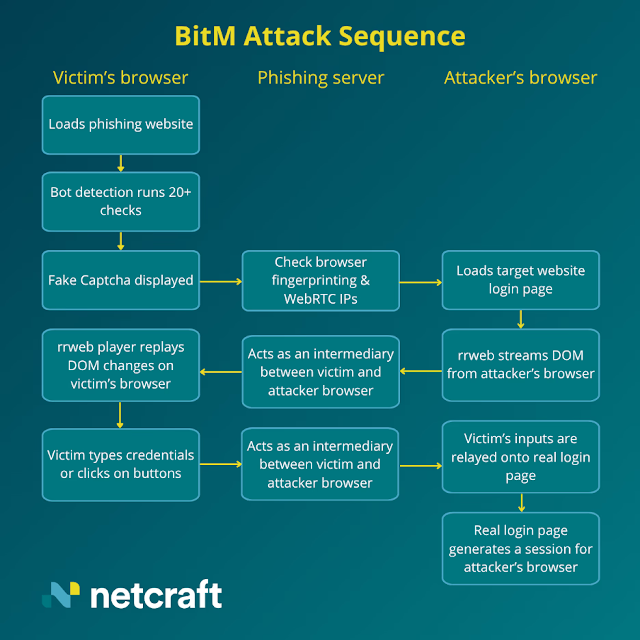
Bluekit takes a different route. It loads the real target login page in a browser controlled by the attacker and streams the page to the victim using the legitimate rrweb session replay library.
The victim sees a page that looks and behaves like a normal login flow. Mouse movements and keystrokes are sent back to the attacker’s browser, where the real authentication happens.
| Attack Type | How It Works | Why It Matters |
|---|---|---|
| Cloned phishing page | Victim enters credentials into a fake login page | Can be detected by page differences, bad domains, or poor copy |
| Adversary-in-the-Middle | Traffic is proxied between the victim and the real service | Can steal session cookies after MFA completion |
| Browser-in-the-Middle | Victim controls an attacker-owned browser session remotely | The session starts and remains active on the attacker’s machine |
Bluekit Uses rrweb for Live Login Streaming
rrweb is not malicious by itself. It is an open-source session replay technology used by developers and analytics teams to record and replay web interactions.
In Bluekit’s case, attackers repurpose the same idea for phishing. The phishing infrastructure sends the live page structure to the victim over a WebSocket connection, while page assets are fetched through attacker-controlled proxy endpoints.
The rrweb project describes itself as an open-source session replay library. Its presence alone should not be treated as proof of phishing, but rrweb appearing on a login page with suspicious WebSocket traffic deserves closer inspection.
Why Bluekit Can Defeat Common MFA Checks
Traditional MFA helps stop many credential attacks, but Bluekit targets the full login process rather than just the password field. If the victim approves a push prompt or enters a one-time code, that approval completes inside the attacker’s browser session.
That gives the attacker an already authenticated session without needing to replay a stolen cookie in a different browser later. This reduces one detection signal that can appear in some reverse-proxy phishing attacks.
The same architecture also makes some session theft protections less effective. Google says Device Bound Session Credentials bind authentication sessions to a specific device to reduce stolen-cookie reuse, but Bluekit creates the session on the attacker’s device from the start.
- SMS codes can still be entered by the victim during the attack.
- Authenticator app codes can still be relayed through the session.
- Push approvals can still complete the attacker-controlled login.
- Session cookies are not necessarily replayed in a separate browser.
- Detection must look beyond the MFA prompt itself.
Bluekit Was First Seen as an All-in-One Phishing Platform
Bluekit was first documented by Varonis Threat Labs, which described it as an all-in-one phishing kit with templates, domain setup, captured logs, delivery tooling, Telegram integration, and campaign support features.
At that stage, Bluekit already looked more advanced than a basic credential-harvesting page. It advertised more than 40 templates for services such as Outlook, Hotmail, Gmail, Yahoo, ProtonMail, iCloud, GitHub, Zoho, and Ledger.
Varonis also found an operator dashboard, site creation controls, anti-analysis options, and an AI assistant panel. That made Bluekit look more like a commercial phishing platform than a single-use kit.
From Phishing Panel to Live Session Theft
The newer Browser-in-the-Middle capability makes Bluekit more dangerous because it improves what happens after the victim reaches the phishing page. The attacker no longer needs only a static page that collects credentials.
Instead, Bluekit can give the operator a live view of the victim’s session. Netcraft said the kit still includes a monitoring system that lets operators observe victim activity during and after login.
The Bluekit report says this session consistency is a key advantage over tools such as Evilginx. The login session is created and used in the same attacker-controlled browser, which removes a browser-fingerprint mismatch that defenders may otherwise use.
| Bluekit Feature | Security Risk |
|---|---|
| Browser-in-the-Middle login delivery | Lets victims authenticate inside an attacker-controlled browser |
| WebSocket DOM streaming | Makes the fake experience highly interactive and convincing |
| Live operator monitoring | Allows attackers to watch and react during login |
| Anti-analysis checks | Helps the kit avoid researchers, scanners, and automated crawlers |
| Multiple brand templates | Makes the same platform useful across many campaigns |
Anti-Analysis Checks Help Bluekit Avoid Detection
Before showing the phishing content, Bluekit checks whether the visitor looks like a real target or a security tool. These checks help the kit avoid crawlers, sandboxes, and automated phishing detection systems.
The platform uses browser fingerprinting, WebRTC-based IP mismatch checks, randomized page changes, and custom CAPTCHA screens that may imitate trusted anti-bot services.
Large obfuscated JavaScript bundles also make static detection harder. If the code changes often, defenders cannot rely only on one hash or one fixed script pattern.
- Randomized CSS filters can defeat screenshot-hash detection.
- WebRTC checks can reveal analyst environments behind proxies.
- Browser fingerprinting can detect headless or automated tools.
- Custom CAPTCHA pages can delay scanners and crawlers.
- Rotating JavaScript bundles can break simple signature-based rules.
Why Bluekit Matters for Microsoft 365 Defenders
Microsoft 365 accounts remain a high-value target because they can expose email, documents, Teams chats, OneDrive files, and internal business workflows. A stolen session can quickly become a business email compromise risk.
Bluekit is built to make credential theft easier to run at scale. The Varonis research showed that the platform combines domain handling, phishing-page setup, captured logs, alerts, and campaign controls in one operator panel.
That level of packaging lowers the skill needed to launch convincing attacks. It also means defenders should expect more phishing kits to combine automation, live session control, and anti-analysis features.
What Security Teams Should Monitor
Bluekit does not produce one simple indicator that every organization can block forever. Security teams need to look for behavior, page context, and unusual authentication patterns together.
On the web side, defenders should investigate unexpected rrweb use around login pages, WebSocket traffic carrying binary or encrypted-looking data, and proxy endpoints that fetch assets instead of loading them directly from the legitimate service.
On the identity side, teams should look for risky sign-ins, unusual device fingerprints, impossible travel, suspicious new sessions, and account activity that starts immediately after a phishing report.
| Signal | Where to Look | Why It Matters |
|---|---|---|
| WebSocket traffic on login pages | Browser telemetry, proxy logs, web gateways | May indicate live DOM streaming |
| rrweb outside analytics context | Page scripts and content inspection | May show session replay abuse |
| Custom CAPTCHA pages | Phishing landing pages | May indicate victim qualification |
| WebRTC IP checks | JavaScript behavior analysis | May expose anti-analyst detection |
| New authenticated session from unusual device | Identity logs | May show attacker-controlled login completion |
Phishing-Resistant MFA Becomes More Important
Organizations should not treat all MFA methods as equal. Codes and push approvals can still be phished if the victim completes the login flow inside an attacker-controlled session.
Microsoft recommends moving toward passkeys and FIDO2 authentication because they use cryptographic credentials tied to the legitimate relying party. Microsoft’s documentation says a passkey cannot be used to sign in on another device controlled by an attacker.
For privileged users, finance teams, administrators, and executives, organizations should prioritize device-bound passkeys, FIDO2 security keys, certificate-based authentication, and Conditional Access policies that require stronger authentication methods.
Session Protection Must Go Beyond Login
Bluekit shows why defenders need session-level visibility. A login may appear successful because the victim completed the process, but the resulting session may belong to a browser the organization does not trust.
Google’s DBSC work reflects the broader shift toward binding sessions to trusted devices. While Bluekit changes the attack path by creating the session inside the attacker’s browser, the same defensive direction remains important: identity systems need stronger proof of device, session, and user context.
Companies should combine stronger MFA with device compliance checks, risk-based sign-in policies, token protection where available, continuous access evaluation, and rapid session revocation after phishing reports.
- Require phishing-resistant MFA for high-risk users.
- Use Conditional Access to block unmanaged or unknown devices.
- Review suspicious sessions after every reported phishing attempt.
- Revoke sessions quickly after suspected credential theft.
- Train users to report unexpected Microsoft login pages immediately.
How Users Can Spot a Bluekit-Style Attack
Bluekit is harder to spot than a low-quality cloned page because it can show a real login interface. Still, users may notice unusual delays, strange CAPTCHA pages, unexpected prompts, or a login page reached through a suspicious email or chat link.
Users should avoid logging into Microsoft 365 from links in unexpected messages. They should open the service directly from a saved bookmark, the official app, or a manually typed address.
Security teams should also make reporting simple. A fast user report can let defenders revoke sessions, reset passwords, and investigate the phishing domain before more accounts are exposed.
What Organizations Should Do Now
Organizations should review their Microsoft 365 sign-in protections and assume attackers will keep improving phishing kits. Bluekit is not only a credential theft tool; it is a sign that phishing platforms are becoming live-session attack systems.
The move to phishing-resistant authentication should start with administrators, executives, helpdesk staff, finance users, and anyone with access to sensitive systems. These users face the highest impact if a session gets hijacked.
Defenders should also tune identity detection around new browser sessions, suspicious device changes, and unusual post-login behavior. MFA remains important, but Bluekit shows why session trust, device trust, and fast response now matter just as much.
FAQ
Bluekit is a phishing-as-a-service platform that gives attackers tools for creating phishing pages, managing domains, collecting credentials, monitoring victims, and running campaigns through a central panel.
Bluekit can bypass common MFA flows by making the victim complete the login inside an attacker-controlled browser session. If the victim enters a code or approves a prompt, the attacker’s browser receives the authenticated session.
A Browser-in-the-Middle attack streams a real browser session controlled by the attacker to the victim. The victim interacts with the page remotely, while the actual login happens on the attacker’s machine.
No. rrweb is a legitimate open-source session replay library. Bluekit abuses it for phishing, so defenders should look at the context, such as login-page use, WebSocket traffic, proxy asset loading, and anti-analysis behavior.
Organizations should deploy phishing-resistant MFA such as passkeys or FIDO2 security keys, enforce Conditional Access, monitor new sessions and device changes, revoke suspicious sessions quickly, and train users not to sign in from unexpected links.


Read our disclosure page to find out how can you help VPNCentral sustain the editorial team Read more


Improve this guide




User forum
0 messages