
Critical FFmpeg PixelSmash Vulnerability Lets Attackers Weaponize Media Files


 8 min. read
  Published on
A high-severity FFmpeg vulnerability called PixelSmash can let attackers crash applications or, in some cases, execute code by tricking a system into processing a crafted media file.
The flaw is tracked as CVE-2026-8461 and affects FFmpeg versions before 8.1.2. It sits in FFmpeg’s MagicYUV decoder inside libavcodec and involves a heap out-of-bounds write.

Access content across the globe at the highest speed rate.
70% of our readers choose Private Internet Access
70% of our readers choose ExpressVPN

Browse the web from multiple devices with industry-standard security protocols.

Faster dedicated servers for specific actions (currently at summer discounts)
JFrog Security Research, which discovered and disclosed the bug, says a malicious AVI, MKV, or MOV file can trigger the issue when a vulnerable application decodes the file. The company demonstrated remote code execution against Jellyfin and Nextcloud using a small crafted AVI file.
What is PixelSmash?
PixelSmash is the name JFrog gave to a vulnerability in FFmpeg’s MagicYUV decoder. MagicYUV is a lossless video codec used mainly in editing and production workflows, but its decoder can be present in default FFmpeg builds.
The GitHub Advisory Database describes the issue as an out-of-bounds write in FFmpeg’s libavcodec library. The advisory says exploitation can lead to denial of service and, in some cases, remote code execution.
FFmpeg is widely used because it provides core multimedia libraries and tools. The FFmpeg repository describes the project as a collection of libraries and tools for processing multimedia content, including audio, video, subtitles, and metadata.
| Vulnerability detail | Information |
|---|---|
| Name | PixelSmash |
| CVE | CVE-2026-8461 |
| Affected software | FFmpeg before 8.1.2 |
| Affected component | libavcodec MagicYUV decoder |
| Weakness type | CWE-787, out-of-bounds write |
| CVSS score | 8.8, high |
How attackers can weaponize media files
The vulnerability can be triggered when vulnerable software decodes a crafted MagicYUV video stream. The file may sit inside common containers such as AVI, MKV, or MOV, so the danger can look like a normal media upload or video file.
The root cause involves how the MagicYUV decoder handles video slices and chroma plane heights. For subsampled pixel formats, the decoder must translate luma slice heights into chroma slice heights. A rounding mismatch can cause one row of chroma data to be written beyond the end of a heap buffer.
JFrog says the overflow can land on adjacent FFmpeg memory structures. With a refined exploit chain, that memory corruption can move beyond a crash and become remote code execution in the context of the application processing the file.
Which applications may be exposed?
Exposure depends on whether an application uses a vulnerable FFmpeg build and whether it processes attacker-supplied media. That can include desktop players, thumbnail generators, media servers, cloud transcoding systems, file-sharing platforms, and AI or ML pipelines that decode uploaded video.
JFrog reported crashes in applications such as Kodi, mpv, ffmpegthumbnailer, Jellyfin, Emby, Nextcloud, Immich, PhotoPrism, and OBS Studio. The same research demonstrated full exploitation against Jellyfin during an automatic library scan and against Nextcloud through video preview processing.
The risk becomes higher when systems automatically process files. On a desktop, opening a folder can trigger thumbnail generation. On a server, a media upload may trigger ffprobe, ffmpeg, or preview generation without a user deliberately opening the file.
- Desktop users may be exposed through media players or thumbnail generation.
- Media servers may process malicious files during automatic library scans.
- Collaboration platforms may generate previews from uploaded videos.
- Cloud transcoding pipelines may decode untrusted customer media.
- AI and ML workflows may ingest videos through FFmpeg-based libraries.
Why the supply chain impact is broad
FFmpeg is a foundational media dependency. Many applications do not build their own decoders. Instead, they bundle, link, or call FFmpeg to handle video parsing, metadata extraction, thumbnails, previews, and transcoding.
That makes PixelSmash a supply chain issue. Downstream projects may inherit the vulnerable decoder even if their own code has no direct memory-safety bug.
The FFmpeg project includes libavcodec, libavformat, libavfilter, libavutil, and other libraries used across the media ecosystem. A bug in one decoder can therefore affect many tools and services that depend on those libraries.
| Environment | Possible trigger | Potential impact |
|---|---|---|
| Desktop video player | User opens a crafted media file | Crash or possible code execution |
| Linux file manager | Thumbnailer processes a file in a folder | Crash or code execution in thumbnailing context |
| Media server | Library scan processes a new upload or download | Server compromise under service account privileges |
| Cloud transcoder | Customer media enters an automated pipeline | Worker compromise or denial of service |
| AI data pipeline | Video dataset gets decoded before processing | Pipeline crash or possible worker compromise |
Patch status and affected versions
The issue affects FFmpeg before version 8.1.2. The NVD listing says the vulnerability is associated with libavcodec/magicyuv.c and can allow denial of service or remote code execution in some cases.
FFmpeg also lists fixes for the vulnerability on its security page, including the commits tied to CVE-2026-8461. JFrog says FFmpeg released version 8.1.2 with the fix on June 17, 2026.
Administrators should not assume they are safe because the system package manager shows no update. Some applications bundle FFmpeg privately, statically link it, or ship their own build inside a container, appliance, desktop app, or media platform.
What users and admins should do now
The main fix is to update FFmpeg to version 8.1.2 or a vendor-supported build that includes the MagicYUV bounds-checking patch. Linux distributions and application vendors may backport the fix into older version numbers, so teams should check vendor advisories rather than relying only on upstream version strings.
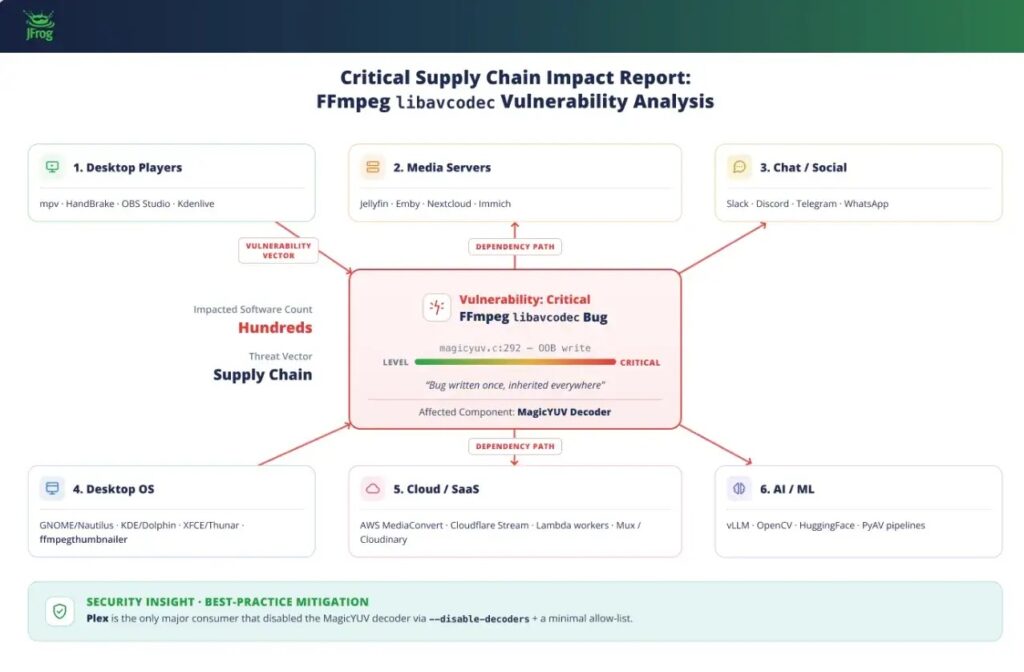
Teams that cannot update immediately can reduce risk by disabling the MagicYUV decoder in custom FFmpeg builds where it is not needed. They can also restrict automatic processing of untrusted media until patched builds are deployed.
The GitHub advisory links the issue to FFmpeg before 8.1.2 and confirms the high-severity rating. Security teams should use that advisory, vendor notices, and FFmpeg build inventories to track exposure.
- Upgrade FFmpeg to 8.1.2 or a patched vendor build.
- Check containers, appliances, and desktop apps for bundled FFmpeg copies.
- Review media servers that automatically scan upload or download folders.
- Disable MagicYUV in custom builds if the codec is not needed.
- Run media processing services with low privileges and strong isolation.
- Delay or sandbox automatic preview generation for untrusted uploads.
- Monitor media-processing services for crashes after new uploads.
Why media processing needs stronger isolation
PixelSmash shows why media parsers and decoders should not run with broad permissions. Media files are complex, and applications often process them automatically before a human reviews them.
Services such as Jellyfin, Nextcloud, photo libraries, file-sharing tools, and AI ingestion systems should run FFmpeg tasks in restricted sandboxes where possible. Containers, seccomp profiles, read-only filesystems, low-privilege service accounts, and separate worker processes can limit damage if another decoder bug appears.
The JFrog report recommends upgrading quickly and disabling MagicYUV at build time if the decoder is not required. The broader lesson is to reduce the number of enabled codecs wherever possible, especially in systems that process untrusted files.
| Mitigation | Best fit | Benefit |
|---|---|---|
| Update to FFmpeg 8.1.2 or patched vendor builds | All affected systems | Removes the known vulnerable code path |
| Disable MagicYUV | Custom FFmpeg builds | Reduces codec attack surface |
| Sandbox media workers | Servers and cloud pipelines | Limits impact if exploitation occurs |
| Restrict auto-scans | Media servers and file platforms | Reduces near-zero-click exposure |
| Inventory bundled FFmpeg | Enterprises and software vendors | Finds hidden vulnerable copies |
What makes PixelSmash dangerous
The danger comes from the gap between how users see media files and how software handles them. A short video can look harmless, but a vulnerable decoder may parse attacker-controlled structures before the file ever appears on screen.
The attack also travels well across the software supply chain. A single vulnerable FFmpeg build can sit inside desktop apps, servers, containers, cloud workers, and preview systems at the same time.
The latest FFmpeg security guidance confirms fixes for CVE-2026-8461, so organizations should treat this as an urgent dependency update. For any system that processes untrusted video, patching and sandboxing should happen together.
FAQ
PixelSmash is a high-severity vulnerability in FFmpeg’s MagicYUV decoder. It is tracked as CVE-2026-8461 and can allow denial of service or, in some cases, remote code execution when a vulnerable application processes a crafted media file.
CVE-2026-8461 affects FFmpeg versions before 8.1.2. Users should update to FFmpeg 8.1.2 or a vendor-supported build that includes the fix.
Attackers can create a malicious AVI, MKV, or MOV file that triggers the MagicYUV decoder bug when processed by vulnerable software. This can happen when a user opens the file or when a server automatically scans, previews, or transcodes it.
Yes. Advisories say the flaw can cause denial of service and, in some cases, remote code execution. JFrog demonstrated code execution against Jellyfin and Nextcloud in research environments.
Any application that uses a vulnerable FFmpeg build and decodes untrusted media may be at risk. Examples include media players, thumbnail generators, media servers, cloud transcoders, file-sharing tools, and AI or ML pipelines that process video.
Organizations should update FFmpeg, check for bundled copies in applications and containers, disable MagicYUV where it is not needed, sandbox media-processing workers, and restrict automatic processing of untrusted media until patched builds are deployed.


Read our disclosure page to find out how can you help VPNCentral sustain the editorial team Read more


Improve this guide




User forum
0 messages