
Critical Kirki WordPress Plugin Flaw Lets Attackers Take Over Admin Accounts


 8 min. read
  Published on
A critical vulnerability in the Kirki WordPress plugin can let unauthenticated attackers take over administrator accounts on vulnerable websites by abusing the plugin’s password reset feature.
The flaw, tracked as CVE-2026-8206, affects Kirki versions 6.0.0 through 6.0.6 and carries a CVSS score of 9.8. According to Wordfence, the issue was fixed in Kirki 6.0.7, and site owners should update immediately.

Access content across the globe at the highest speed rate.
🔥 Save 81% + 2 bonus months! 🔥
70% of our readers choose Private Internet Access
70% of our readers choose Private Internet Access
2
Browse the web from multiple devices with industry-standard security protocols.
🔥 Save 73%! 🔥

Faster dedicated servers for specific actions (currently discounted)
🔥 Save 69%! 🔥
Kirki has more than 500,000 active installations, but Wordfence estimates that about 150,000 sites were running vulnerable versions because the bug was introduced in the 6.0 major release. The plugin is listed on the WordPress.org plugin directory as a freeform visual builder and advanced Customizer tool for WordPress sites.
What makes CVE-2026-8206 so dangerous
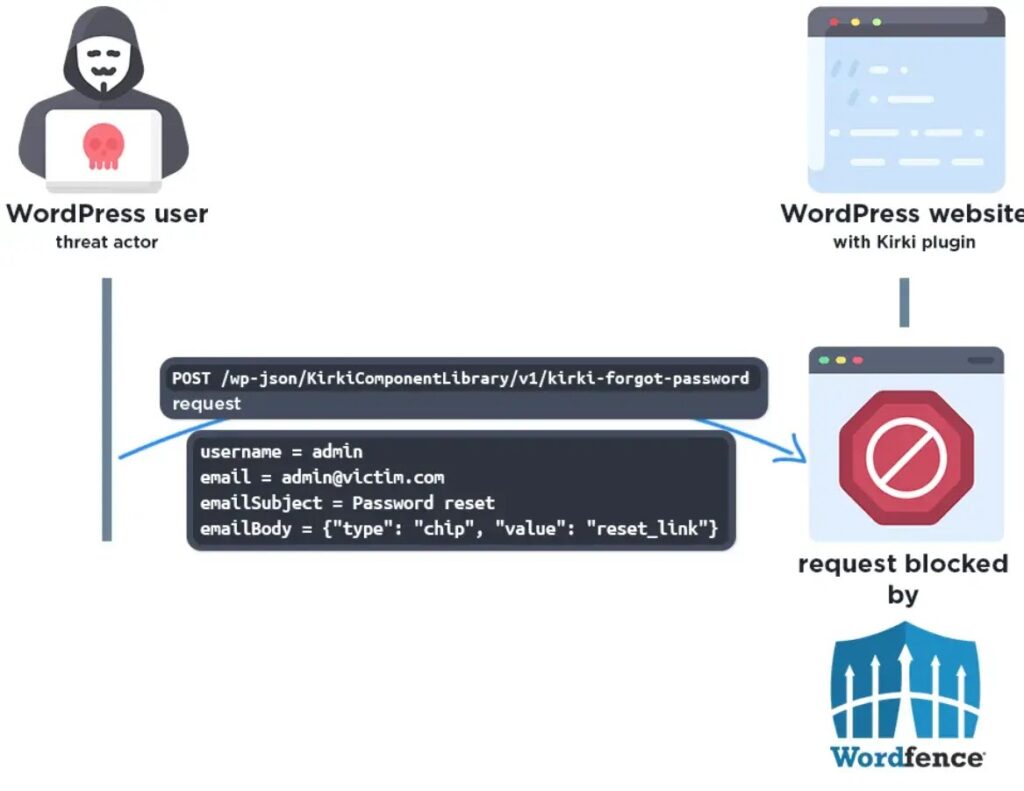
The vulnerability exists in Kirki’s frontend password reset flow. The affected versions expose a custom REST API endpoint that handles forgot-password requests through the handle_forgot_password() function.
In a safe password reset flow, a site should send the reset link only to the email address already tied to the user account. In this case, the vulnerable code accepted a valid username and an attacker-controlled email address in the same request.
The Tenable CVE entry describes the flaw as privilege escalation through account takeover, because an unauthenticated attacker can receive a password reset link for any registered user account.
| Detail | Information |
|---|---|
| CVE | CVE-2026-8206 |
| Plugin | Kirki – Freeform Page Builder, Website Builder & Customizer |
| Affected versions | 6.0.0 through 6.0.6 |
| Fixed version | 6.0.7 |
| Severity | Critical, CVSS 9.8 |
| Attack type | Unauthenticated privilege escalation and account takeover |
| Main risk | Administrator account takeover and full site compromise |
How the Kirki password reset flaw works
The vulnerable logic first checks the username supplied in the request and finds the matching WordPress account. If the username belongs to an administrator, the plugin correctly identifies that administrator account.
The problem starts after that lookup. Instead of sending the password reset link to the email address saved on the administrator account, the plugin continues using the email address supplied in the request.
That means an attacker can submit a request with the administrator’s username and their own email address. The plugin then generates a valid reset key and sends the reset link to the attacker.
Successful exploitation can compromise the whole site
After receiving the reset link, the attacker can change the password for the targeted account. If the targeted account has administrator privileges, the attacker can gain full control of the WordPress dashboard.
From there, the attacker could install malicious plugins, create new admin users, inject spam or malware, modify site content, steal private data, or deploy webshells for persistent access. The Patchstack database entry warns that vulnerabilities of this type are often used in mass-exploit campaigns.
This makes the issue more serious than a normal login security problem. It does not require a valid password, a subscriber account, or social engineering after the attacker knows or guesses a valid username.
Exploitation attempts have already been reported
Website owners should not treat CVE-2026-8206 as a theoretical risk. BleepingComputer reported that hackers were exploiting the flaw and that Defiant’s Wordfence firewall blocked more than 222 attempts against customers within a 24-hour window.
That active exploitation status raises the urgency for sites that still run Kirki 6.0.0 to 6.0.6. Attackers often scan WordPress sites quickly after public disclosure, especially when a bug allows account takeover without authentication.
The attack also becomes easier on sites where usernames are public. WordPress usernames can appear in author archives, REST API responses, login error behavior, exposed sitemaps, or older posts and comments.
Disclosure and patch timeline
Security researcher Choigyeongmin reported the vulnerability through the Wordfence Bug Bounty Program. Wordfence said the researcher received a $6,436 bounty for the discovery.
The developer, Themeum, released Kirki 6.0.7 on May 18, 2026. That patch closed the affected password reset issue and gave site owners a direct update path before broader public disclosure.
The Wordfence timeline shows that premium firewall users received protection on May 9, 2026, while free users were scheduled to receive the same firewall rule on June 8, 2026.
| Date | Event |
|---|---|
| May 4, 2026 | Wordfence received the vulnerability submission. |
| May 8, 2026 | Wordfence validated the report and confirmed the proof of concept. |
| May 9, 2026 | Wordfence Premium, Care, and Response users received firewall protection. |
| May 15, 2026 | Wordfence sent full disclosure details to Themeum. |
| May 16, 2026 | Themeum acknowledged the report. |
| May 18, 2026 | Kirki 6.0.7 was released with the fix. |
| June 8, 2026 | Wordfence Free users were scheduled to receive firewall protection. |
Who should update Kirki now
Every site running Kirki 6.0.0 through 6.0.6 should update to 6.0.7 or later immediately. Site owners who cannot update right away should temporarily disable the plugin or place additional firewall rules in front of the vulnerable password reset endpoint.
The official Kirki plugin page describes the plugin as a visual builder and Customizer enhancement tool used by designers, agencies, developers, and site owners. That broad use makes the patch important for both small sites and larger agency-managed deployments.
Administrators should also check whether their site exposes usernames publicly. Hiding usernames does not fix the vulnerability, but reducing username exposure can make opportunistic exploitation harder while updates roll out.
- Update Kirki to version 6.0.7 or later.
- Disable Kirki temporarily if an immediate update is not possible.
- Review administrator accounts for unexpected password changes.
- Check for newly created admin users.
- Review installed plugins and themes for suspicious additions.
- Inspect recent file changes for webshells or backdoors.
- Review access logs for unusual REST API password reset activity.
- Force password resets for administrator accounts after patching if compromise is suspected.
What site owners should check after updating
Patching stops the vulnerable behavior, but it does not automatically remove damage from a site that was already compromised. Administrators should review user accounts, filesystem changes, and recent plugin activity after applying the update.
Signs of compromise may include unknown administrator accounts, unfamiliar plugins, modified theme files, suspicious PHP files in uploads folders, unexpected redirects, spam pages, or password reset emails that no legitimate user requested.
The active exploitation reports make this review especially important. Sites that stayed on vulnerable versions after public disclosure may have already received automated takeover attempts.
Why this bug is easy to exploit at scale
Many WordPress vulnerabilities require an attacker to log in as a subscriber or trick an administrator into clicking a link. This one has a lower barrier because it can be triggered without authentication.
The attacker only needs a vulnerable site, a known or guessed username, and an email address they control. The vulnerable plugin then sends the reset link to the wrong address.
The CVE description confirms that the affected versions accept an arbitrary email address when a username is used in the password reset request. That is why the flaw scored critical severity.
How hosting providers and agencies should respond
Hosting companies, maintenance agencies, and managed WordPress providers should scan customer sites for vulnerable Kirki versions. They should prioritize sites with public login pages, exposed usernames, many administrators, or business-critical ecommerce workflows.
Agencies should also check staging sites and older client builds. Those environments often run outdated plugins, but they may still have valid credentials, database copies, or paths into production.
The Patchstack advisory recommends immediate updates and warns that high-risk plugin flaws can be targeted broadly, regardless of a site’s size or popularity.
Bottom line for WordPress administrators
CVE-2026-8206 is a high-impact WordPress plugin vulnerability because it turns a password reset feature into an account takeover path. A vulnerable site can lose administrator control without the attacker needing a valid login.
The fix is available, and the main mitigation is straightforward: update Kirki to 6.0.7 or later. After updating, administrators should review logs, users, plugins, and files for signs of exploitation.
For WordPress site owners, the larger lesson is simple. Password reset logic must always send reset links to the verified account email, never to an address supplied during the same reset request.
FAQ
CVE-2026-8206 is a critical vulnerability in the Kirki WordPress plugin that allows unauthenticated attackers to take over user accounts by abusing the plugin’s password reset process.
Kirki versions 6.0.0 through 6.0.6 are vulnerable. Site owners should update to Kirki 6.0.7 or later.
The vulnerable password reset handler accepts a valid username and an arbitrary email address. It generates a reset link for the targeted account but sends that link to the attacker-controlled email address.
Yes. If an attacker targets a valid administrator username on a vulnerable site, they can receive a reset link, change the password, and gain administrator access.
Security reports say exploitation attempts have been observed after public disclosure. Site owners should update immediately and review logs for suspicious password reset activity.
Site owners should update Kirki to version 6.0.7 or later, review administrator accounts, check for suspicious plugins or files, inspect logs for unusual REST API activity, and disable the plugin temporarily if they cannot update immediately.


Read our disclosure page to find out how can you help VPNCentral sustain the editorial team Read more


Improve this guide




User forum
0 messages