
Deno-Based RAT Uses Microsoft Teams Impersonation and Mailbombing to Target Employees


 9 min. read
  Published on
A new Deno-based remote access trojan is being used in attacks that combine email flooding with fake Microsoft Teams IT support calls. The attack starts by overwhelming employees with hundreds of emails, then moves to a Teams call where the attacker pretends to help fix the problem.
Researchers at InfoGuard Labs analyzed the intrusion and found that one employee was persuaded to download and run a malicious archive from a fake self-service portal. The payload was not a traditional compiled malware file. It was a modular JavaScript-based RAT and proxy framework built on Deno.

Access content across the globe at the highest speed rate.
🔥 Save 81% + 2 bonus months! 🔥
70% of our readers choose Private Internet Access
70% of our readers choose ExpressVPN
2
Browse the web from multiple devices with industry-standard security protocols.
🔥 Save 73%! 🔥

Faster dedicated servers for specific actions (currently at summer discounts)
🔥 Save 69%! 🔥
The case shows how attackers are mixing social engineering, trusted workplace tools, and less common scripting runtimes to bypass normal security assumptions. The endpoint protection tool on the compromised system did not initially block the implant or its command-and-control traffic, according to the researchers.
The attack starts with mailbombing and fake IT support
The intrusion began with a mailbombing campaign against three employees. The goal was to flood inboxes, create confusion, and make a follow-up IT support call feel believable.
Shortly after the flood of emails, the employees received Microsoft Teams calls from an external account impersonating internal help desk staff. Two employees missed the call. One answered, and the attacker used company context and employee names to make the interaction seem legitimate.
This technique fits a broader pattern. Microsoft has warned that attackers abuse Microsoft Teams messaging, calls, meetings, and screen sharing at different stages of attack chains, especially when external communication settings allow contact from outside tenants.
| Attack stage | What happened | Why it worked |
|---|---|---|
| Email bombing | Employees received hundreds of unwanted emails | The flood created urgency and confusion |
| Teams impersonation | An external caller pretended to be internal IT support | The fake support call matched the inbox problem |
| Fake portal | The victim was sent to a self-service-style page | The page made the download look like part of a support workflow |
| Malware execution | The victim extracted and ran a malicious archive | The payload used Deno instead of a traditional compiled implant |
The malware uses Deno as a modular RAT and proxy
Deno is a JavaScript and TypeScript runtime built on V8. Its security model is different from Node.js because sensitive actions such as file access, network access, environment access, and subprocess execution require explicit permissions, according to the Deno security documentation.
In this attack, the malware author adapted to that model by splitting the implant into separate JavaScript modules. Each module requested only the permissions it needed, which made the behavior less obvious than a single process asking for broad access.
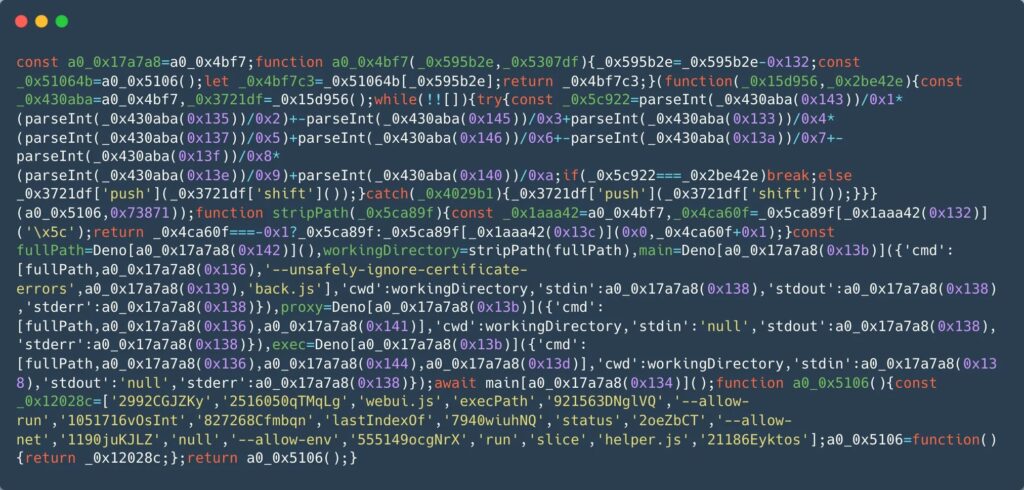
The implant included four JavaScript files named app.js, back.js, helper.js, and webui.js. Together, they acted as a remote access and tunneling framework that could communicate with a C2 server, execute commands, and route traffic through the infected machine.
| Module | Role | Defensive takeaway |
|---|---|---|
| app.js | Orchestrates the other modules | Watch for Deno launching multiple related child processes |
| back.js | Maintains command-and-control communication | Inspect unusual WebSocket traffic from scripting runtimes |
| helper.js | Handles local command execution | Alert when Deno spawns Windows command-line processes |
| webui.js | Acts as an internal network pivot module | Monitor uncommon loopback services and internal TCP forwarding |
The C2 channel hid behind a CloudFront domain
The main backdoor connected to a CloudFront-hosted WebSocket command-and-control endpoint. This helped the traffic look like contact with a legitimate content delivery network unless defenders inspected the hostname, process lineage, and connection pattern.
The malware also used local loopback services to separate command execution and proxy behavior from the network-facing component. That design can make triage harder because the suspicious activity does not appear in one process or one connection.
InfoGuard said the strongest signals were behavioral rather than static. They included Deno running from a user-writable AppData path, suspicious permission flags, loopback listeners, an external Teams impersonation alert, and mailbombing activity around the same time.
Why this attack is hard to catch
The JavaScript files were obfuscated with string array shifting, a common technique that scrambles readable strings and reconstructs them at runtime. This can defeat simple static detections that look for clear URLs, command-line arguments, or registry paths.
The attack also used a legitimate runtime. Deno itself is not malicious, and its permission model exists to reduce risk. The problem is that attackers can still abuse legitimate developer tools when users run untrusted files with dangerous permissions.
The Deno security model blocks sensitive operations by default, but those protections no longer help if a malicious command is launched with flags that grant network access, process execution, or environment access.
- Watch for Deno execution from user-writable directories such as AppData.
- Flag Deno processes that use high-risk permission flags.
- Investigate uncommon loopback listeners created by scripting runtimes.
- Correlate external Teams calls with sudden spikes in inbound email.
- Review persistence attempts under the current user’s Run registry key.
Teams impersonation is part of a wider trend
The Deno RAT case follows a broader rise in attacks that combine email bombing with IT support impersonation. eSentire reported an increase in Microsoft Teams-based phishing in 2026, with attackers pretending to be IT or help desk staff after flooding users with email.
These campaigns work because they turn a real disruption into a fake support opportunity. The victim sees a real inbox problem, then receives a call from someone claiming to fix it. That sequence lowers suspicion and increases the chance that the user will follow instructions.
Microsoft also recommends tightening Teams external communication settings. Its Teams external access guidance explains that admins can restrict communication to specific allowed domains or block external domains entirely for selected users and groups.
| Control | What it helps prevent |
|---|---|
| Restrict external Teams access | Reduces exposure to unknown external callers and chats |
| Enable Microsoft 365 audit logging | Helps detect Teams impersonation and suspicious collaboration activity |
| Correlate email and Teams telemetry | Connects mailbombing events with follow-up social engineering |
| Block unapproved remote access tools | Limits common post-vishing access paths |
| Verify IT requests through a separate channel | Gives employees a safe way to confirm suspicious support calls |
What security teams should monitor
Security teams should treat mailbombing as more than an inbox nuisance. A sudden wave of spam, subscription emails, or reset messages can be the opening move in a social engineering chain.
The same applies to external Teams calls or chats from accounts that resemble help desk, IT support, security operations, or service desk identities. Microsoft says organizations can limit external communication in Teams to trusted domains, which can reduce the attack surface for these campaigns.
Microsoft’s external meetings and chat controls are especially relevant for high-risk roles such as finance, executives, IT administrators, security teams, and employees with access to sensitive systems.
- Investigate TeamsImpersonationDetected events in the Microsoft 365 Unified Audit Log.
- Look for external Teams calls that occur soon after an email bombing spike.
- Monitor Deno execution from AppData or other user-writable paths.
- Alert on Deno processes that spawn command shells or create loopback services.
- Review CloudFront traffic from unexpected scripting runtimes.
Indicators of compromise
The following indicators come from the public InfoGuard report and can help defenders search endpoint, proxy, EDR, and SIEM telemetry. Domains are defanged for safe handling.
| Type | Indicator | Description |
|---|---|---|
| SHA-256 | d317371cf2b4cd524849551ffd3b97d91edbc17f6b39c8693217383ba6a0370d | app.js |
| SHA-256 | 9469268c421b7821f897deb2d4d2316b21ff5da35bef417aa4e284010ef78302 | back.js |
| SHA-256 | 3d8afae76c5982458849d21221e089ee161266a4248b12ea3048d1e79b76707e | helper.js |
| SHA-256 | 2ed6fdfa5f9120306167ba5d8d48a62dbe5fd0d05e87c33c9784f08698f8a66b | webui.js |
| SHA-256 | 3b48a334dcf0a08bed2a9766fd553474ae3014db600b65573dfee0f183e9d1d9 | patch09913.b |
| Domain | d2cff16eusb8mg.cloudfront[.]net | Command-and-control domain |
Employees need a clear verification process
The attack worked because the victim received a believable support call during a real disruption. Training should tell employees that real IT staff will not ask them to download unknown archives from external pages or run tools from AppData during an unsolicited Teams call.
Organizations should give employees a simple verification path, such as calling the official help desk number, opening a ticket in the approved portal, or using a trusted internal chat channel. eSentire also recommends user awareness training and a process for verifying unexpected IT requests through a secondary channel.
The eSentire advisory also recommends restricting external Teams messages and calls unless they are needed for business. When external communication is required, organizations should limit it to trusted partners where possible.
The Deno RAT case shows why cross-signal detection matters
This campaign did not depend on one exotic technique. It combined several familiar ideas in a way that made each step more convincing: inbox flooding, help desk impersonation, a fake portal, a legitimate runtime, obfuscated JavaScript, and CDN-hosted C2.
Security teams should not rely only on file hashes or malware signatures. The better approach is to correlate user reports, mail flow spikes, Teams audit events, endpoint process behavior, network destinations, and registry changes.
Microsoft has already warned that Teams has become a high-value target because attackers can abuse normal collaboration features across the attack chain. This case adds another example: attackers can turn a workplace communications tool into the first step of a malware delivery operation.
The practical lesson is clear. Treat email bombing as a possible precursor to social engineering, restrict external Teams communication where possible, and monitor uncommon runtimes such as Deno when they appear on employee endpoints without a business reason.
FAQ
It is a malware campaign in which attackers use email bombing and fake Microsoft Teams IT support calls to convince employees to download and run a malicious archive. The payload is a modular remote access trojan and proxy framework built with the Deno JavaScript and TypeScript runtime.
Attackers use Microsoft Teams because employees trust it for workplace communication. In this campaign, the attackers called users from an external account that impersonated IT support after the users had been hit by email flooding.
Deno is a legitimate scripting runtime with a permission-based security model. The malware abused it by splitting capabilities across several JavaScript files and launching them with the permissions needed for C2, command execution, and proxy behavior.
Organizations should correlate mailbombing activity with external Teams calls, monitor TeamsImpersonationDetected audit events, alert on Deno running from user-writable paths, and investigate Deno processes that use high-risk permission flags or create loopback services.
Employees should verify unexpected IT support calls through a trusted channel before downloading files, granting access, or running tools. They should use the official help desk number, an approved ticketing system, or a known internal contact.


Read our disclosure page to find out how can you help VPNCentral sustain the editorial team Read more


Improve this guide




User forum
0 messages