
DPAPISnoop Update Extracts CREDHIST Hashes for Offline Windows Credential Analysis


 6 min. read
  Published on
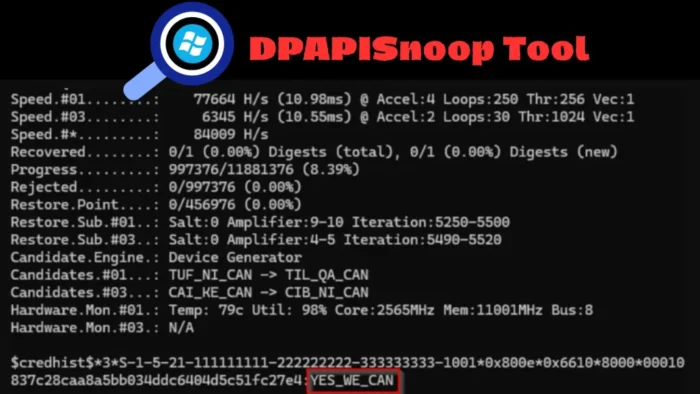
Security researchers have updated the open-source DPAPISnoop tool to extract Windows CREDHIST entries, giving red teams and defenders a clearer way to analyze historical Windows password material stored by DPAPI. The update was detailed by LRQA principal security consultant Lefteris Panos in a new LRQA Cyber Labs research post.
The change matters because CREDHIST can reveal how a user’s passwords changed over time. If an attacker already has access to a user profile or DPAPI protection files, those historical password records may help identify password reuse, predictable naming patterns, and older credentials that still work elsewhere.

Access content across the globe at the highest speed rate.
70% of our readers choose Private Internet Access
70% of our readers choose ExpressVPN

Browse the web from multiple devices with industry-standard security protocols.

Faster dedicated servers for specific actions (currently at summer discounts)
DPAPISnoop now supports CREDHIST extraction alongside its existing DPAPI Master Key hash extraction. The DPAPISnoop GitHub repository describes the tool as a C# project that extracts crackable DPAPI hashes from user MasterKeys and CREDHIST files.
What DPAPI and CREDHIST Do in Windows
Microsoft’s Data Protection API helps Windows applications protect sensitive data such as passwords, private keys, browser secrets, and connection strings. Microsoft says the CryptProtectData function usually allows only a user with the same logon credentials to decrypt protected data, and decryption typically happens on the same computer.
CREDHIST exists because users change passwords. When that happens, Windows still needs a way to access older DPAPI-protected blobs that were tied to previous password material. CREDHIST keeps a chained history that lets Windows continue decrypting older protected data after password changes.
The CREDHIST file sits under the user’s DPAPI protection directory, usually at %APPDATA%\Microsoft\Protect. LRQA said each CREDHIST entry stores encrypted historical password material in sequence, with the newest entry protected by material derived from the current password.
| Component | Role |
|---|---|
| DPAPI | Windows feature used to protect user or machine secrets |
| Master Key | Key material used to decrypt DPAPI-protected data |
| CREDHIST | Password history chain used to keep older DPAPI data accessible |
| DPAPISnoop | Tool that can extract DPAPI Master Key and CREDHIST hash material |
How the DPAPISnoop Update Changes Credential Analysis
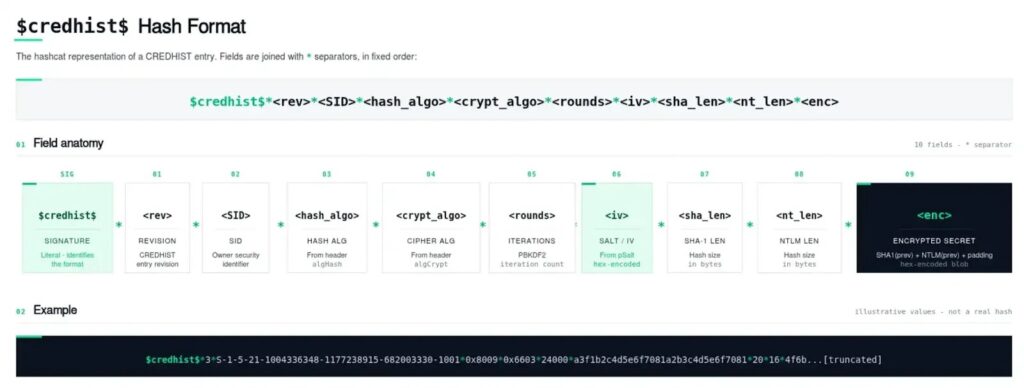
The updated tool can parse CREDHIST files and output entries in an offline-crackable format that starts with the $credhist$ identifier. This lets authorized testers assess whether older password material can be recovered without first decrypting every DPAPI secret.
The research also introduced two Hashcat modes for CREDHIST entries. Mode 15920 applies to legacy entries that use 3DES with HMAC-SHA1, while mode 15930 applies to entries that use AES-256 with SHA-512.
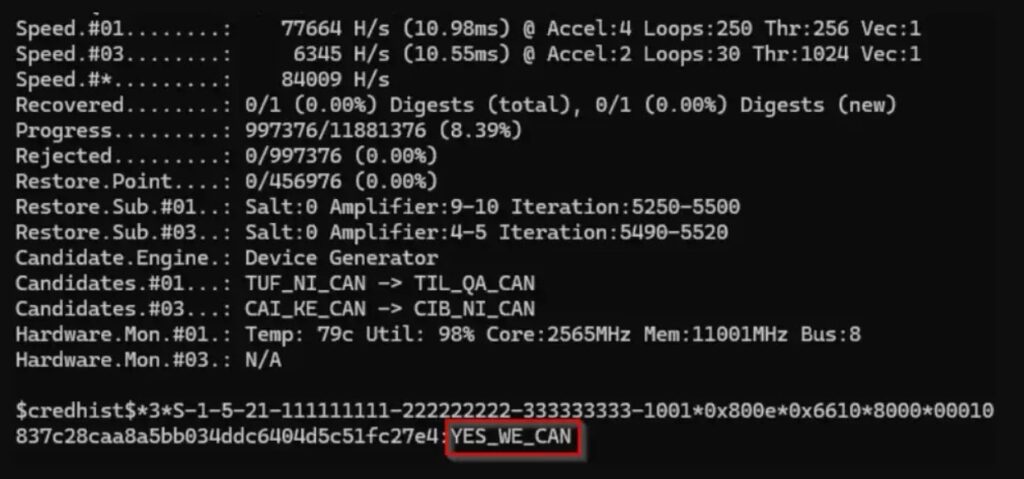
The project documentation says DPAPISnoop targets both $DPAPImk$ MasterKey hashes and the full $credhist$ chain. It also notes that CREDHIST entries can reveal SHA1 and NTLM material from older passwords after a successful recovery.
Why Historical Windows Passwords Matter
Historical passwords can carry real security value for attackers. Even if the current password has changed, older passwords can expose patterns such as seasonal words, reused suffixes, small number changes, or naming schemes tied to company culture.
That intelligence can speed up password guessing against other systems, especially when organizations allow password reuse across VPNs, internal apps, service accounts, or legacy portals. It can also help attackers move laterally after they already have filesystem access to a compromised machine.
LRQA said modern CREDHIST entries usually use SHA-512 PBKDF2 with AES-256 and 8,000 rounds. Older entries can be weaker because legacy 3DES and HMAC-SHA1 entries rely on SHA1-based PBKDF2, which can reduce cracking cost compared with newer SHA-512-based entries.
- Recovered history can reveal password reuse across accounts.
- Old credentials may still work on legacy systems.
- Password patterns can help attackers guess future passwords.
- Historical NTLM material can support further investigation during authorized testing.
- Weak older entries may prove easier to recover than newer ones.
Defenders Should Treat CREDHIST Access as a Warning Sign
This technique does not point to a new Windows bug. The LRQA research says the behavior comes from DPAPI’s password history design and becomes useful to attackers only when they can collect and process the relevant files.
That makes detection important. A SigmaHQ rule listed by Detection.FYI looks for access to Windows Credential History files by uncommon applications and maps the activity to credential access.
Security teams should monitor access to %APPDATA%\Microsoft\Protect\CREDHIST, bulk reads of user DPAPI directories, and access to user DPAPI protection folders over SMB or administrative shares. The most useful signal is not ordinary DPAPI use, but unusual access to sensitive DPAPI files.
What Organizations Should Do Now
Organizations should assume that any attacker with local profile access may try to collect DPAPI and CREDHIST material. Endpoint detection should flag unusual file reads from user protection directories, especially when the accessing process does not match normal Windows or application behavior.
Microsoft’s DPAPI documentation explains that protected data usually depends on the user’s logon credentials. That makes strong password policy, phishing resistance, endpoint isolation, and privilege control central to reducing the value of stolen DPAPI files.
| Defensive priority | Recommended action |
|---|---|
| Monitoring | Alert on unusual access to CREDHIST and user DPAPI protection paths |
| Endpoint control | Limit administrative shares and remote filesystem access where possible |
| Password security | Block predictable password patterns and reduce password reuse |
| Incident response | Treat suspicious CREDHIST access as potential credential theft activity |
| Detection tuning | Use file access telemetry to distinguish normal DPAPI activity from abnormal reads |
The SigmaHQ detection rule provides a useful starting point, but organizations should tune it for their environment. Some security tools, backup processes, and legitimate administrative software may access user profile paths, so context matters.
The broader lesson is clear: credential history can become a security liability after compromise. DPAPI remains an important Windows protection feature, but defenders need visibility into the files and access paths that attackers use after they reach a user profile.
FAQ
DPAPISnoop is an open-source C# tool that extracts crackable DPAPI Master Key hashes and, after its latest update, CREDHIST hashes from Windows user protection files.
CREDHIST is a Windows DPAPI password history chain. It helps Windows keep older DPAPI-protected data accessible after a user changes their password.
No. LRQA describes it as a consequence of DPAPI’s password history design. It becomes risky when an attacker already has access to the user’s DPAPI protection files and can process them offline.
Historical passwords can reveal reuse and predictable patterns. Attackers may use those patterns to guess current passwords, test legacy systems, or support lateral movement after gaining access to a machine.
Defenders should monitor unusual access to %APPDATA%\Microsoft\Protect\CREDHIST, bulk reads of user DPAPI directories, and access to DPAPI protection folders over SMB or administrative shares.


Read our disclosure page to find out how can you help VPNCentral sustain the editorial team Read more


Improve this guide




User forum
0 messages