
EvilTokens Phishing Kit Hides Microsoft Device Code Attack Flow From Static URL Scans


 7 min. read
  Published on
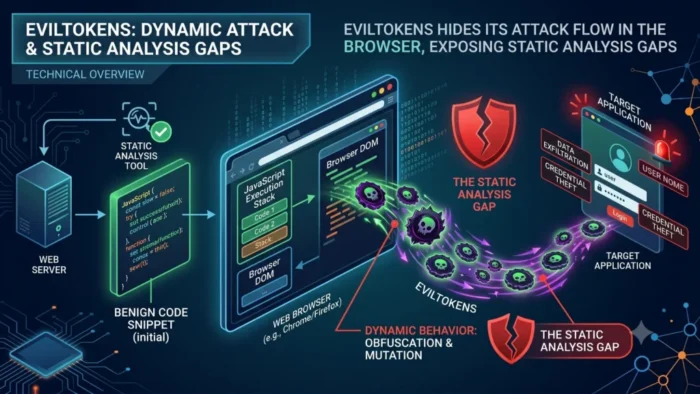
EvilTokens is making Microsoft 365 phishing investigations harder by hiding the real phishing page until the victim’s browser runs JavaScript. A new ANY.RUN analysis shows that the initial HTML response can look limited, while the important phishing content appears only after browser-side decryption.
The technique matters because many security teams still start phishing triage with static URL checks. In this case, those checks may miss the Microsoft-branded page, the device code, and the instructions shown to the victim. The attack flow becomes visible only after the page executes and renders changes into the DOM.

Access content across the globe at the highest speed rate.
70% of our readers choose Private Internet Access
70% of our readers choose ExpressVPN

Browse the web from multiple devices with industry-standard security protocols.

Faster dedicated servers for specific actions (currently at summer discounts)
EvilTokens is a phishing-as-a-service kit focused on Microsoft 365 and Entra ID accounts. EvilTokens does not need to steal a password in the traditional way. Instead, it abuses Microsoft’s legitimate device code login process to get valid OAuth tokens after the victim completes authentication.
How EvilTokens hides the phishing page
According to ANY.RUN’s browser-level investigation, the phishing page can arrive as an AES-GCM encrypted payload. Browser-side JavaScript then decrypts the content and places it into the DOM, where analysts can finally see the phishing workflow.
This creates a clear gap between what a static scan sees and what the user sees. A static tool may record the URL, reputation data, page source, and network metadata, but still miss the final page that asks the victim to complete a Microsoft device login.
Microsoft’s own OAuth 2.0 device authorization grant was built for devices that have limited input options, such as TVs, IoT hardware, and printers. The user signs in on another device, and the requesting device receives access and refresh tokens after authorization.
| Investigation method | What it may show | What it may miss |
|---|---|---|
| Static URL analysis | Initial HTML, URL reputation, domain data, and visible requests | Encrypted content that appears only after browser execution |
| Browser-level sandboxing | DOM changes, rendered phishing page, HTTP requests, screenshots, and artifacts | May still require analyst review to separate useful IOCs from noisy infrastructure |
| Identity-layer monitoring | Unusual device code authentication, token use, and suspicious sign-in patterns | Early phishing page behavior before the user completes the flow |
Why device code phishing is dangerous for Microsoft 365 users
The device code flow gives attackers a convincing path because it can send users to real Microsoft authentication pages. Microsoft Defender Security Research warned in April 2026 that device-code phishing was being used at scale to compromise organizational accounts.
The victim may believe the process is safe because the login page looks legitimate and may even involve MFA. But the user is authorizing an attacker-controlled session. Once the flow succeeds, the attacker can receive tokens that may give access to Microsoft 365 resources such as email, files, Teams, and SharePoint, depending on permissions.
Sekoia reported that EvilTokens phishing pages had been circulating since mid-February 2026 and were quickly adopted by cybercriminals focused on adversary-in-the-middle phishing and business email compromise. This shows how fast device-code phishing has moved from a niche technique into a commercialized threat.
What analysts can see with browser-level visibility
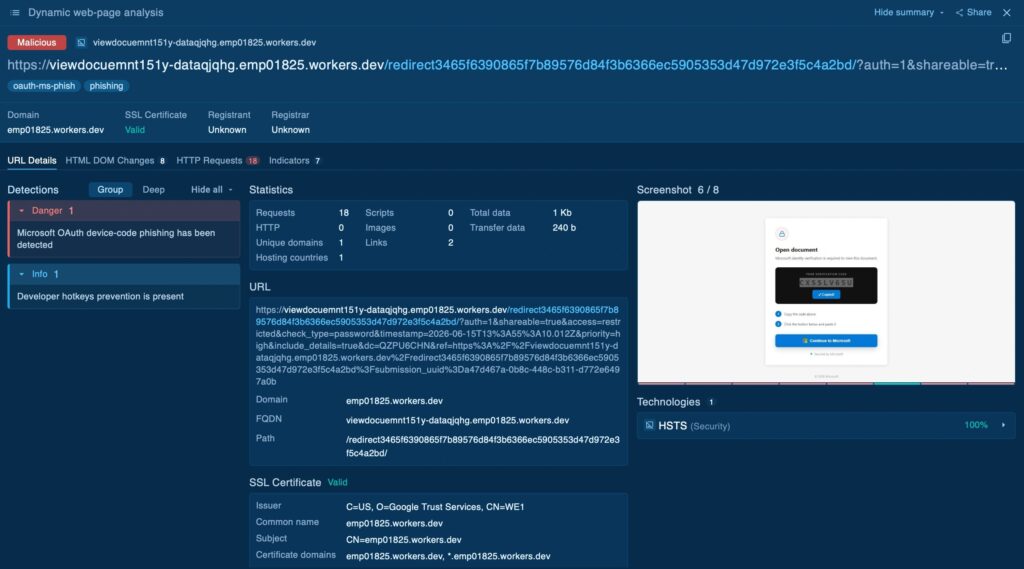
A dynamic browser session gives analysts a more complete view of the attack. It can show when the hidden page appears, which API endpoints the browser contacts, what code is displayed to the victim, and how the phishing page changes after the payload decrypts.
ANY.RUN’s sample highlights the importance of DOM snapshots, browser-generated HTTP requests, URL details, and triggered signatures. The ANY.RUN’s EvilTokens profile also describes the kit as a tool that automates device code phishing against Microsoft 365 and Entra ID environments.
For SOC teams, this evidence can reduce guesswork. Instead of escalating a weak URL alert with limited proof, analysts can capture the rendered phishing page, extract the device-code workflow, and identify useful artifacts for hunting.
- DOM changes can reveal decrypted phishing content that was absent from the initial response.
- HTTP requests can show API calls used to start or track the device-code session.
- URL details can help review domain, DNS, SSL, and infrastructure context.
- Threat intelligence pivots can help find related phishing pages or repeated code patterns.
- Indicator review can separate useful domains, paths, and hashes from noisy shared infrastructure.
Defenders should not rely only on URL reputation
Device-code phishing creates a problem for defenses that focus mostly on suspicious links or fake login pages. In many cases, the final authentication step happens through legitimate Microsoft infrastructure, while the malicious part sits in the social engineering and token authorization flow.
Conditional Access authentication flows now give Microsoft Entra ID administrators a way to control higher-risk flows, including device code flow. Microsoft says organizations should allow device code flow only where needed and block it wherever possible.
The Microsoft identity platform documentation also makes clear that the device flow can issue access and refresh tokens after a user completes sign-in. That is exactly why phishing kits abuse it. The feature is legitimate, but attackers turn the user into the authorization step.
| Risk area | Why it matters | Recommended response |
|---|---|---|
| Static analysis blind spots | Encrypted browser-side content may stay hidden | Use dynamic browser analysis for suspicious URLs |
| Device code abuse | Users may approve attacker-controlled sessions | Restrict or block device code flow where possible |
| Token compromise | Attackers may gain access without stealing passwords | Revoke sessions and review sign-in activity after suspected compromise |
| Noisy IOCs | Shared infrastructure can create false positives | Prioritize specific domains, URIs, hashes, and code patterns |
What organizations should do next
Security teams should review whether device code flow is needed in their tenant. If it has no clear business use, administrators should block it or restrict it to trusted scenarios. Microsoft’s Conditional Access guidance gives teams a practical starting point for that review.
Microsoft’s broader device-code phishing research also recommends monitoring suspicious authentication activity, using Safe Links and identity protections, revoking refresh tokens when compromise is suspected, and forcing reauthentication when needed.
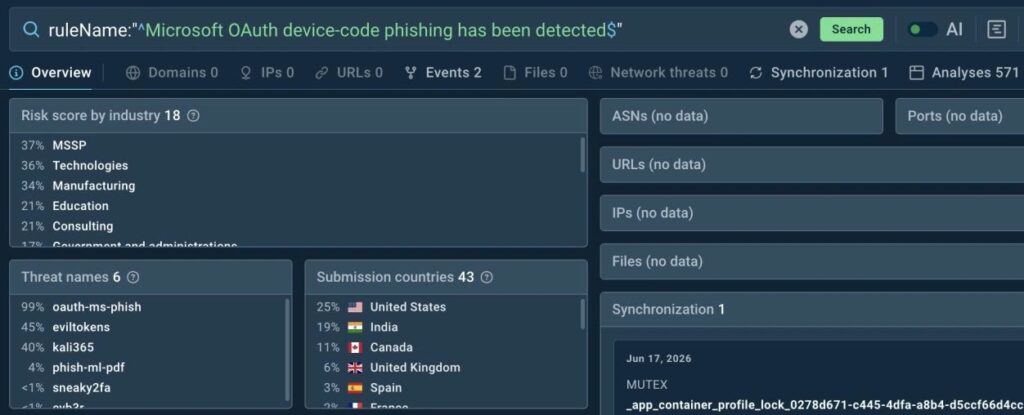
The wider threat picture suggests EvilTokens is part of a larger shift toward automated identity phishing. Sekoia’s EvilTokens report describes a PhaaS model that packages the phishing workflow for other criminals, lowering the skill needed to run these attacks.
- Train employees not to enter device codes unless they started the login themselves.
- Audit device code flow usage in Entra ID sign-in logs.
- Use Conditional Access to block or limit device code flow.
- Investigate suspicious URLs in a real browser environment, not only through static scans.
- Review OAuth grants, refresh tokens, and unusual Microsoft 365 access after suspected phishing.
- Build detections around identity behavior, not just malicious URLs.
FAQ
EvilTokens is a phishing-as-a-service kit that abuses Microsoft device code authentication to gain access to Microsoft 365 and Entra ID accounts. It can help attackers obtain OAuth tokens without directly stealing the victim’s password.
EvilTokens can deliver encrypted content in the initial page and decrypt it only after browser-side JavaScript runs. The phishing page then appears in the DOM, which means static URL analysis may not see the full attack flow.
Device code phishing is hard to detect because it abuses a legitimate authentication flow. Victims may enter a code on a real Microsoft login page, complete MFA, and unknowingly authorize an attacker-controlled session.
MFA still helps protect accounts, but it may not stop this specific technique by itself. In a device code phishing attack, the victim may complete MFA as part of authorizing the attacker’s session.
Organizations should audit device code flow usage, block or restrict it with Conditional Access where possible, monitor suspicious sign-ins, revoke tokens after suspected compromise, and use browser-level analysis for suspicious URLs.


Read our disclosure page to find out how can you help VPNCentral sustain the editorial team Read more


Improve this guide




User forum
0 messages