
Fake Claude Code Install Pages Deliver Fileless .NET Infostealer to Windows Users


 8 min. read
  Published on
Threat actors are impersonating Claude Code installation pages to trick Windows users into running a fileless infostealer. Cyderes Howler Cell says the campaign uses SEO poisoning, fake Anthropic-branded pages, and ClickFix-style instructions to push users into executing a malicious Windows command.
The campaign does not mean Anthropic or Claude Code was compromised. The attackers are abusing search visibility and brand trust around a fast-growing AI coding tool. Their goal is to reach users who search for Claude Code installation help and may not know what a legitimate setup process should look like.

Access content across the globe at the highest speed rate.
70% of our readers choose Private Internet Access
70% of our readers choose ExpressVPN

Browse the web from multiple devices with industry-standard security protocols.

Faster dedicated servers for specific actions (currently at summer discounts)
The final payload is a reflective .NET infostealer that runs in memory and attempts to steal credentials. Cyderes says the attack chain is six stages deep, uses an MP3/HTA polyglot file, and communicates with attacker-controlled infrastructure for credential exfiltration.
How the fake Claude Code installer attack works
The attack starts when a user searches for Claude Code installation instructions and lands on a spoofed setup page. The page tells the visitor to open the Windows Run dialog and paste a command, presenting the step as part of the installation process.
This is a ClickFix lure. Microsoft Threat Intelligence describes ClickFix as a social engineering technique where attackers lead users to a landing page and trick them into manually running a malicious command.
The real Claude Code quickstart tells users to install Claude Code through official terminal-based methods such as native install, Homebrew, or WinGet. Users should treat any page asking them to paste an unfamiliar command into the Windows Run dialog as suspicious.
| Stage | What happens | Why it matters |
|---|---|---|
| Search lure | User finds a fake Claude Code setup page | Attackers exploit search trust and AI tool interest |
| ClickFix prompt | User is told to paste a command into Windows Run | The user performs the execution step manually |
| MSHTA launch | A Windows living-off-the-land binary retrieves the first payload | Security tools may see legitimate Windows tooling |
| In-memory scripts | PowerShell stages run without normal executable files | File-based scanning becomes less effective |
| .NET infostealer | The final payload runs reflectively in memory | Credentials can be stolen without a normal malware file on disk |
Why Claude Code became the lure
Claude Code is an agentic coding tool that lives in the terminal and helps developers work with codebases through natural language. The official Claude Code GitHub repository describes it as a tool for coding, explaining code, and handling Git workflows.
That popularity creates a useful target for criminals. Many users trying Claude Code for the first time may be new to command-line tools. A fake setup page can look convincing if the victim expects installation to involve copying commands.
Trend Micro previously reported a related campaign called InstallFix that used fake Claude AI installer pages and realistic OS-specific instructions. The Trend Micro research found that attackers used fake installation flows to make users run malicious PowerShell commands.
What makes the payload difficult to detect
The payload chain uses several evasion techniques. The first downloaded file is a polyglot file that can look like playable audio to some inspection tools while still containing script content that MSHTA can process.
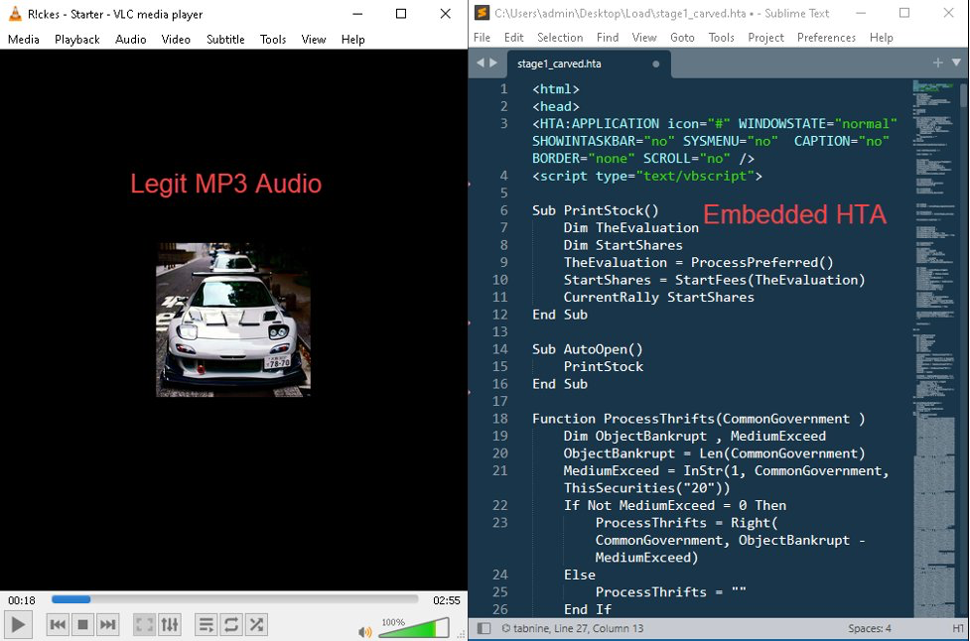
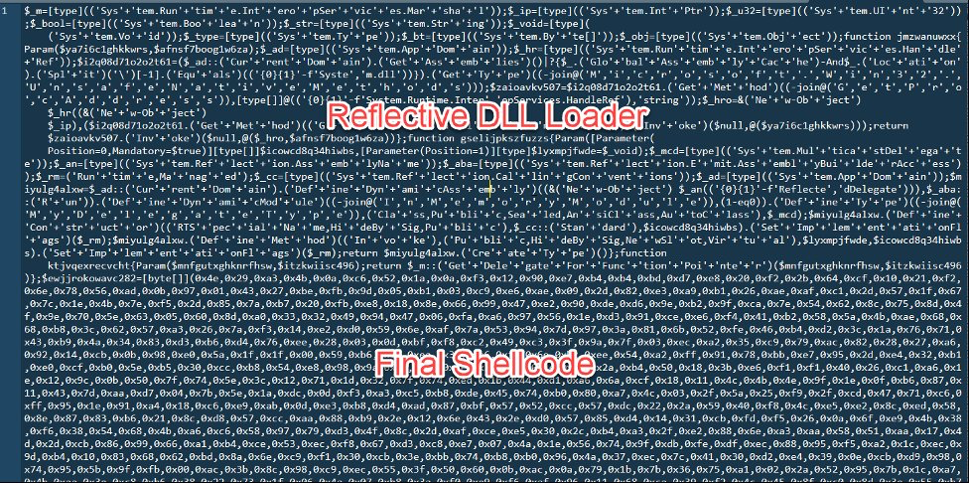
After that, the chain moves into PowerShell and memory execution. Cyderes reported AMSI bypass behavior, obfuscation, victim-specific staging, and a final reflective .NET payload that runs inside an existing PowerShell process.
The Cyderes analysis also notes that the campaign uses per-victim subdomains based on a machine and username fingerprint. This makes simple one-URL blocking less useful because every victim can receive a different-looking callback path.
- SEO poisoning pushes fake install pages into search results.
- ClickFix instructions shift execution onto the user.
- MSHTA and PowerShell reduce reliance on obvious malware files.
- The first payload uses a polyglot format to confuse file inspection.
- The final .NET stealer runs reflectively in memory.
- Per-victim infrastructure makes static URL matching weaker.
Connection to broader ClickFix activity
This fake Claude Code campaign fits a wider trend. Microsoft has observed ClickFix attacks delivering infostealers, remote access tools, loaders, and other payloads. The same ClickFix analysis says attackers often use phishing, malvertising, or compromised websites to bring users to a lure page.
Trend Micro’s earlier InstallFix report also described fake Claude AI installation pages promoted through Google Ads. Those pages displayed realistic installation instructions and used multi-stage payload chains involving mshta.exe, obfuscated scripts, and fileless delivery.
The pattern is clear. Attackers are watching which AI developer tools gain momentum, then building fake install pages around those names before many users learn what the legitimate setup process looks like.
How to install Claude Code safely
Users should start from official Anthropic or GitHub sources, not sponsored ads, random blogs, or unfamiliar setup pages. The official install docs list supported installation methods and explain the expected first-run flow.
The official repository also points users to the current setup documentation and notes that npm installation is deprecated. This matters because older or copied installation instructions may send users toward outdated or unsafe paths.
On Windows, users should be especially careful with pages that ask them to open Win+R and paste commands. Legitimate tools may use terminal commands, but a website that provides a hidden or pre-staged Run dialog command deserves extra scrutiny.
| Safe behavior | Risky behavior |
|---|---|
| Use official Anthropic or GitHub documentation | Follow a random search result that copies Anthropic branding |
| Read the command before running it | Paste a command into Win+R without understanding it |
| Use package managers such as WinGet where supported | Download installers from unknown domains |
| Check the domain and project source | Trust a page because it appears high in search results |
| Ask IT or a technical colleague before running unclear commands | Follow urgent setup instructions from a page that pressures the user |
What users should do if they ran the fake installer
Anyone who followed a suspicious Claude Code install page should treat the device as potentially compromised. The safest first step is to disconnect from sensitive accounts, stop using the machine for banking or work systems, and change passwords from a clean device.
Because the malware targets credentials, password changes should come with session revocation and multi-factor authentication checks. Users should also review browser-stored passwords, developer tokens, cloud accounts, and cryptocurrency wallets if they were used on the device.
- Disconnect the device from sensitive accounts and networks where possible.
- Change important passwords from a clean device.
- Revoke active sessions for email, GitHub, cloud, and banking accounts.
- Rotate developer tokens, API keys, SSH keys, and cloud credentials.
- Run a trusted endpoint security scan.
- Check for unusual account logins, new OAuth apps, or unexpected repository activity.
- Report the fake site to the search engine and to the affected brand.
What security teams should monitor
Defenders should treat reports of Claude Code install pages that requested Run dialog commands as likely infection events. Even if the user did not see a normal installer, the malicious chain may have already reached the in-memory stages.
Useful detection areas include MSHTA launching from a browser-driven workflow, PowerShell spawned shortly afterward, unusual scheduled task creation, AMSI bypass indicators, and outbound traffic to campaign infrastructure.
| Detection area | Why it matters |
|---|---|
| mshta.exe network activity | Stage 1 relies on MSHTA retrieving remote content |
| 32-bit PowerShell activity | The chain reportedly uses 32-bit PowerShell during staging |
| Scheduled task creation | Can indicate persistence or staged execution |
| AMSI bypass strings or behavior | Suggests the script attempted to weaken inspection |
| Wildcard DNS for suspicious staging domains | Per-victim subdomains reduce the value of single URL IOCs |
| .NET assembly load telemetry | Can catch reflective .NET execution where file scanning cannot |
The campaign shows why search-result trust has become a security weakness. AI coding tools attract new users quickly, and attackers can build fake setup pages faster than many users can learn the correct installation path.
The main defense is simple but important: install Claude Code only from official sources, avoid Run dialog copy-paste instructions from search results, and treat any fake setup page as a possible credential theft incident.
FAQ
It is a malware campaign that impersonates Claude Code installation pages. Attackers use SEO poisoning and ClickFix-style instructions to trick users into running commands that deliver a fileless .NET infostealer.
No. The campaign impersonates Anthropic and Claude Code, but the legitimate Claude Code installation path is not compromised based on the available research.
The fake page tells users to open the Windows Run dialog and paste a command. That starts a multi-stage chain using MSHTA, PowerShell, in-memory scripts, and a reflective .NET infostealer.
Use a clean device to change important passwords, revoke active sessions, rotate developer and cloud credentials, scan the affected machine, and review account activity for unusual logins or token use.
Users should install Claude Code only from official Anthropic documentation or the official GitHub repository, read commands before running them, and avoid pages that ask them to paste unfamiliar commands into the Windows Run dialog.


Read our disclosure page to find out how can you help VPNCentral sustain the editorial team Read more


Improve this guide




User forum
0 messages