
Fake Ghidra, dnSpy, and SpiderFoot Sites Use Search Results to Push Malware


 7 min. read
  Published on
Hackers are impersonating trusted security and developer tools, including Ghidra, dnSpy, and SpiderFoot, through fake download websites that can redirect selected users to malware. Check Point Research says the campaign uses polished project pages, real-looking GitHub links, and click hijacking to route visitors through a Traffic Distribution System.
The campaign is dangerous because it targets people who are likely to download technical tools from search results. Security researchers, developers, malware analysts, and system administrators may land on a fake page that looks official, hover over a download button, see a real-looking GitHub link, and still get redirected elsewhere after clicking.

Access content across the globe at the highest speed rate.
70% of our readers choose Private Internet Access
70% of our readers choose ExpressVPN

Browse the web from multiple devices with industry-standard security protocols.

Faster dedicated servers for specific actions (currently at summer discounts)
Check Point found more than 100 active websites in the cluster. The operation has been active since at least December 2025, with malware delivery observed from early January 2026. VirusTotal telemetry tied to related samples showed more than 5,000 submissions, although the real exposure may be higher.
How the fake download sites work
The fake pages do not always look like crude phishing sites. They often copy the branding and structure of trusted open-source tools. Some also keep visible links pointed toward real upstream repositories, which makes the browser status bar appear safe when a user hovers over a download button.
The real trick happens after the click. The sites load JavaScript hosted through Amazon CloudFront. That script intercepts the first eligible click and redirects the user into a Traffic Distribution System, or TDS, before the original download link opens.
The TDS can decide what to serve based on location, browser type, device details, VPN use, repeated visits, and anti-analysis checks. Some users may receive harmless software, while others may receive unwanted apps or malware.
| Impersonated tool | Legitimate purpose | Why attackers used it |
|---|---|---|
| Ghidra | Reverse engineering and software analysis | Trusted by malware analysts and security teams |
| dnSpy | .NET debugging and assembly editing | Common among developers and reverse engineers |
| SpiderFoot | OSINT automation and attack surface research | Used by threat intelligence and security teams |
Why these tools make attractive lures
Ghidra is a well-known software reverse engineering framework created and maintained by the NSA Research Directorate. The official Ghidra repository describes it as a toolset for analyzing compiled code across Windows, macOS, and Linux.
dnSpy is also a high-value lure because it is used to inspect and debug .NET and Unity assemblies. The official dnSpy repository describes it as a .NET debugger and assembly editor that can work even when source code is not available.
SpiderFoot gives attackers another trusted brand to abuse. The official SpiderFoot repository describes it as an open-source intelligence automation tool with a web UI, command-line mode, and more than 200 modules.
Three malware families were observed
Check Point said downstream branches led to several malware families, including RemusStealer, AnimateClipper, and SessionGate. The researchers also said the broader ecosystem appears to focus on traffic acquisition and monetization, but that same traffic pipeline can route selected users to malware.
| Payload | Type | Reported behavior |
|---|---|---|
| RemusStealer | Infostealer | Targets browser data, extensions, crypto wallets, password managers, and two-factor authentication tools |
| AnimateClipper | Crypto clipper | Monitors copied wallet addresses and replaces them with attacker-controlled addresses |
| SessionGate | Multi-stage loader framework | Uses gated delivery, heavy obfuscation, and per-session payload logic to frustrate analysis |
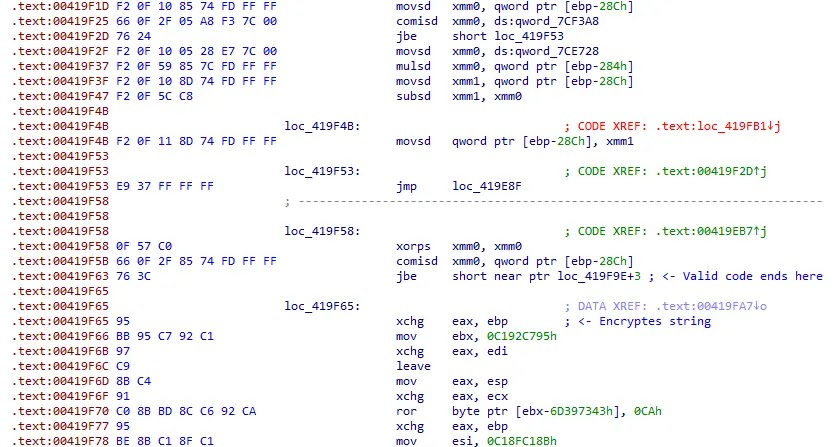
The Check Point report also found that SessionGate used aggressive anti-analysis techniques. The loader can present benign-looking behavior in some environments while keeping the final payload gated behind session checks and one-time key behavior.
AnimateClipper created a different risk. It can watch for cryptocurrency wallet strings in the clipboard and replace the copied address with an attacker-controlled one. If a victim does not verify the pasted address before sending funds, the transaction may go to the attacker.
Fake open-source project sites are not new
The wider problem of fake open-source project domains appeared before this campaign. In November 2025, Fullstory reported a large cluster of sites impersonating open-source and free software projects, including domains that ranked highly in Google results.
That earlier research found 165 suspicious sites, many of which copied project content and used names that looked tied to real tools. Fullstory said the sites created confusion for users and project owners, even when the downloaded files did not show clear malicious behavior at the time of review.
The newer Check Point findings show how that style of impersonation can evolve. A fake project portal can start as an SEO and traffic scheme, then become part of a gated delivery chain that sends selected users to malware or unwanted software.
Why hover checks are no longer enough
Many careful users hover over a download button before clicking. This campaign weakens that habit because the visible link can still point to a legitimate GitHub page while JavaScript intercepts the click before the browser follows the real link.
That means users should not rely only on the browser status bar. The safer approach is to reach the project from a verified source, bookmark trusted project pages, and compare the domain carefully before downloading anything.
For example, users looking for Ghidra should start from the official Ghidra GitHub project or an official NSA page, not a lookalike download portal found through search ads or unexpected search results.
How developers and security teams can reduce risk
Technical users should treat unfamiliar download portals with caution, even when they appear near the top of search results. Attackers know that open-source tools often have fragmented release pages, mirrors, forks, and community builds, which makes impersonation easier.
- Download tools only from official project pages or verified GitHub repositories.
- Check the domain name carefully before downloading installers or archives.
- Avoid third-party download portals for security tools and developer utilities.
- Verify hashes or signatures when the project provides them.
- Block or investigate domains that mimic trusted project names.
- Monitor endpoint detections for infostealers, clippers, and unexpected installer behavior.
- Train developers to distrust search-result ranking as a sign of authenticity.
Users who need dnSpy should rely on the official dnSpy GitHub page or a known continuation project they have verified. Users who need SpiderFoot should use the official SpiderFoot project rather than a domain that only looks related to the name.
What security teams should watch for
Defenders should monitor for suspicious downloads that originate after users visit fake open-source portals. The first visible site may not host the final payload, so proxy logs, DNS logs, endpoint telemetry, and browser history can all help reconstruct the chain.
| Signal | Why it matters |
|---|---|
| CloudFront-hosted click-routing scripts | May indicate a handoff from a fake project site into a TDS chain |
| Lookalike domains for developer tools | Can capture search traffic from users looking for legitimate tools |
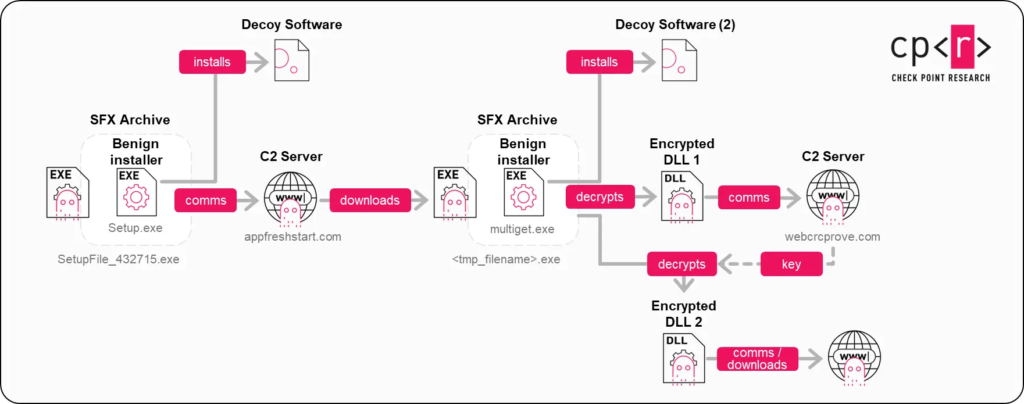
| Unexpected 7-Zip SFX archives or installers | May be used as loaders or decoys |
| Clipboard monitoring behavior | Can point to crypto clipper activity |
| Browser credential or extension data access | Can point to infostealer activity |
Organizations should also review earlier impersonation findings from Fullstory’s research because the same search-ranking problem affects many open-source communities. Project owners may not have the legal or operational resources to quickly remove every fake domain.
The broader lesson is simple. A polished website and a high Google ranking do not prove a download is safe. Attackers are now building convincing software portals that exploit brand trust, search visibility, and first-click behavior to push users into hard-to-analyze redirect chains.
FAQ
It is a malware and traffic-routing campaign that uses fake download sites impersonating trusted open-source and security tools. The sites can hijack the first download click and route selected users through a Traffic Distribution System.
Check Point Research highlighted fake sites impersonating tools such as Ghidra, dnSpy, and SpiderFoot. The broader ecosystem also includes many other open-source, developer, and freeware project lookalikes.
Researchers observed downstream delivery of RemusStealer, AnimateClipper, and SessionGate. These threats can steal browser data, replace cryptocurrency wallet addresses, or load additional payloads through gated delivery chains.
Some fake sites keep the visible download link pointed to a real GitHub page, so the browser status bar can look safe. JavaScript on the page then intercepts the first click and redirects the user elsewhere.
Users should download tools only from verified project pages or official GitHub repositories, check domains carefully, avoid unknown download portals, and verify hashes or signatures when available.


Read our disclosure page to find out how can you help VPNCentral sustain the editorial team Read more


Improve this guide




User forum
0 messages