
Fake utility downloads install ScreenConnect and GPU miners on Windows PCs


 8 min. read
  Published on
Hackers are using fake download sites for popular Windows utilities to install ScreenConnect and cryptocurrency miners on high-performance PCs. The campaign targets users looking for trusted tools such as CrystalDiskInfo, HWMonitor, Display Driver Uninstaller, FurMark, K-Lite Codec Pack, and PDFgear.
Microsoft detailed the campaign in a Microsoft Security Blog report published on May 26, 2026. The company said attackers are using poisoned search results and, in some cases, AI chatbot interactions to surface malicious download links.

Access content across the globe at the highest speed rate.
🔥 Save 81% + 2 bonus months! 🔥
70% of our readers choose Private Internet Access
70% of our readers choose ExpressVPN
2
Browse the web from multiple devices with industry-standard security protocols.
🔥 Save 73%! 🔥

Faster dedicated servers for specific actions (currently at summer discounts)
🔥 Save 69%! 🔥
The campaign is designed to infect fewer machines with higher mining value. That means gamers, hardware enthusiasts, and AI developers are especially attractive targets because they are more likely to own systems with powerful GPUs.
Fake utility sites lead to ScreenConnect and cryptominers
Microsoft said the attackers created more than 150 malicious domains tied to the campaign. These sites impersonate trusted utility brands and present download buttons that appear to offer legitimate software.
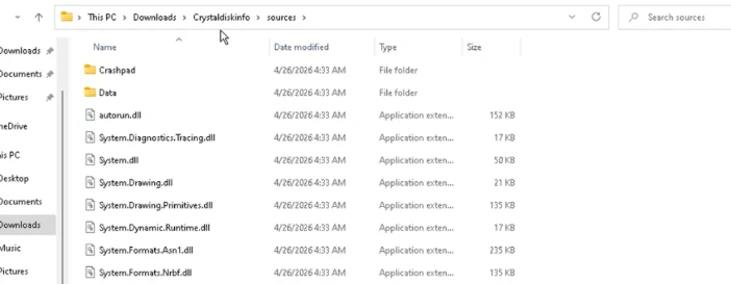
The download usually arrives as a ZIP archive. Inside, victims receive the real utility executable together with a malicious file named autorun.dll. When the legitimate program runs, it loads the rogue DLL from the same folder through DLL sideloading.
This method does not require a software vulnerability. It abuses normal Windows library loading behavior, which makes the first stage quieter and less obvious to the user.
| Fake utility lure | Why attackers use it | Likely target group |
| CrystalDiskInfo | Popular storage health utility | PC enthusiasts and IT users |
| HWMonitor | Used to check CPU, GPU, and system temperatures | Gamers and hardware users |
| Display Driver Uninstaller | Used during GPU driver cleanup | Users with dedicated graphics cards |
| FurMark | Used for GPU testing and stress tests | High-performance PC owners |
| K-Lite Codec Pack | Common media playback package | General Windows users |
| PDFgear | PDF utility used by regular office users | Business and consumer users |
How the infection chain works
After autorun.dll runs, it uses msiexec.exe to silently install another file named vcredist_x64.dll. Microsoft said this file masquerades as a Visual C++ Redistributable component, but acts as a packaged installer for ScreenConnect.
ConnectWise ScreenConnect, also known as ConnectWise Control, is a legitimate remote support and remote access product. The tool itself is not the problem. In this campaign, attackers abuse it to keep access to infected systems.
Once ScreenConnect is installed, the compromised machine connects to attacker-controlled infrastructure. Microsoft observed the ScreenConnect client communicating with 193.42.11[.]108 and a host value of directdownload[.]icu.
- The user searches for a popular Windows utility.
- A poisoned result or suspicious recommendation sends the user to a fake download site.
- The site delivers a ZIP file containing the real utility and autorun.dll.
- DLL sideloading runs the malicious autorun.dll file.
- The malware silently installs ScreenConnect through a disguised DLL.
- Attackers use the remote access session to drop SimpleRunPE.exe.
- The final stage deploys GPU cryptocurrency miners.
Attackers use SimpleRunPE for persistence and evasion
After the ScreenConnect session starts, attackers transfer a file named SimpleRunPE.exe to the device. Microsoft said the binary appears related to public process-hollowing proof-of-concept code, based on embedded debug path evidence.
SimpleRunPE.exe copies itself as RuntimeHost.exe into a hidden folder. If the preferred install location fails, it falls back to %LocalAppData%\Microsoft\Windows\Caches\D3F4E2A1\.
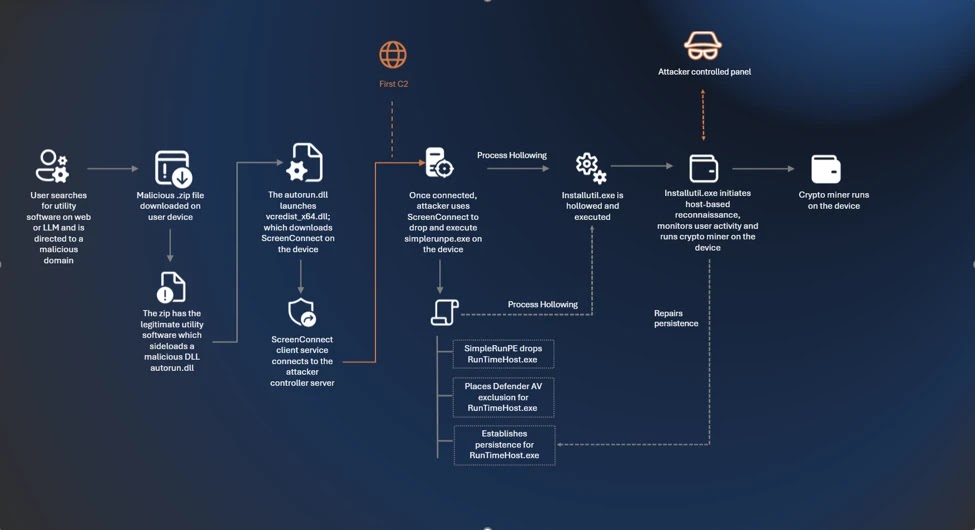
The malware then creates several persistence mechanisms. These include scheduled tasks, Registry Run keys, and a startup folder shortcut. The recurring identifier D3F4E2A1 appears in the install path, mutex name, and Defender exclusion entries.
| Persistence method | Observed name or location | Purpose |
| Scheduled task | Windows System Health | Runs at user logon with high privileges |
| Scheduled task | Windows System Health Monitor | Runs after system boot with a delay |
| Scheduled task | Windows System Health Check | Runs every five minutes |
| Registry Run key | WinSysCache | Restarts malware when a user logs in |
| Startup shortcut | RuntimeHost.lnk | Launches the hidden RuntimeHost.exe file |
GPU miners run inside trusted Windows processes
The malware uses process hollowing to run mining code inside legitimate Microsoft-signed .NET binaries. Microsoft listed possible targets including InstallUtil.exe, RegAsm.exe, RegSvcs.exe, MSBuild.exe, AppLaunch.exe, AddInProcess.exe, and aspnet_compiler.exe.
This helps the malware hide behind trusted process names. It also adds Microsoft Defender exclusions through PowerShell, covering several Windows utility names along with RuntimeHost.exe, lolMiner.exe, SRBMiner-MULTI.exe, miner.exe, and gminer.exe.
The mining stage does not embed one miner directly. Instead, the hollowed process downloads a miner archive at runtime. Microsoft said the campaign can deploy gminer, lolMiner, or SRBMiner-MULTI depending on the system.
- The malware collects CPU, GPU, RAM, Windows version, local IP, country, and antivirus details.
- It checks GPU usage, temperature, system uptime, and user activity.
- It pauses mining when GPU usage is high or the user is active.
- It can recreate deleted persistence entries.
- It can restore removed Microsoft Defender exclusions.
AI chatbot links expand the delivery risk
The campaign mainly relies on SEO poisoning, but Microsoft also observed signs that some users reached malicious domains through large language model-based tools. In those cases, users asking chatbots for software download recommendations were shown links to attacker-controlled domains.
The Microsoft threat research said this finding is based on observed patterns and correlated data sources. Microsoft also said the example does not show a systemic problem with any specific AI service.
The takeaway for users is simple: a chatbot answer should not be treated as a verified download source. Software should still come from the official vendor website, a trusted app store, or an approved company software portal.
Why ScreenConnect abuse increases the risk
Cryptocurrency mining can slow devices, increase power use, and shorten hardware lifespan. The bigger concern in this campaign is persistent remote access.
Because ScreenConnect remote access software can let an operator control a system, attackers could use the foothold for more than mining. Microsoft warned that the same access could support data theft, lateral movement, or ransomware activity.
Security teams should not stop after removing the miner. They should also check whether unauthorized ScreenConnect clients, services, scheduled tasks, and remote sessions remain on the device.
| Indicator | Type | Why it matters |
| autorun.dll | File name | Malicious DLL loaded through DLL sideloading |
| vcredist_x64.dll | File name | Disguised packaged ScreenConnect installer |
| SimpleRunPE.exe | File name | Dropper used for process hollowing and persistence |
| RuntimeHost.exe | File name | Hidden copy used for persistence |
| 193.42.11[.]108 | IP address | Attacker-controlled ScreenConnect communication endpoint |
| minemine.gleeze[.]com | Domain | Command-and-control endpoint used by the hollowed binary |
| directdownload[.]icu | Domain | Host used by the ScreenConnect client connection |
How defenders can reduce exposure
Microsoft recommends enabling cloud-delivered protection and using attack surface reduction rules to reduce the impact of this campaign. The company’s cloud-delivered protection guidance explains that Microsoft Defender Antivirus can use cloud-based protection to detect and block rapidly changing threats.
For managed environments, admins should also consider blocking executable files that do not meet reputation, age, or trusted-list criteria. Microsoft links this mitigation to the attack surface reduction rule with GUID 01443614-cd74-433a-b99e-2ecdc07bfc25.
Microsoft also recommends enabling network protection and web protection in Defender for Endpoint. The company’s Microsoft Defender SmartScreen documentation says SmartScreen can identify reported phishing and malware websites and warn users before they continue.
- Download utilities only from official vendor sites or trusted software portals.
- Block unapproved remote management tools where possible.
- Audit devices for unauthorized ScreenConnect installations.
- Look for autorun.dll loading from Downloads, Temp, Desktop, Public, ProgramData, or AppData paths.
- Investigate unusual msiexec.exe activity after a utility executable starts.
- Monitor for RuntimeHost.exe in hidden cache locations.
- Alert on sudden GPU usage spikes when no approved workload is running.
Security teams should hunt for remote access, not just miners
This campaign shows why fake software downloads remain effective. Users often trust search results, and now some may also trust AI-generated recommendations. Attackers can exploit that trust by copying familiar utility names and delivering working software alongside malware.
Organizations should treat this as both a cryptojacking incident and a remote access incident. If a device ran a fake utility package, security teams should remove the miner, uninstall unauthorized ScreenConnect clients, rotate exposed credentials, and review logs for follow-on activity.
Admins can use Microsoft Defender Antivirus cloud protection, strict download controls, browser protection, and Microsoft Defender SmartScreen to reduce the chance that users reach these malicious sites in the first place.
FAQ
It is an active campaign in which attackers create fake download sites for popular Windows utilities. The downloads contain real software plus malicious files that install ScreenConnect and GPU cryptocurrency miners.
Microsoft said the campaign impersonates utilities including CrystalDiskInfo, HWMonitor, Display Driver Uninstaller, FurMark, K-Lite Codec Pack, and PDFgear.
Attackers abuse ScreenConnect to keep persistent remote access to compromised devices. This access can support cryptocurrency mining, but it could also enable data theft, lateral movement, or ransomware activity.
The ZIP file includes a real utility executable and a malicious autorun.dll file. When the user runs the utility, the program loads autorun.dll from the same folder through DLL sideloading.
Users should download software only from official vendor websites or trusted company portals. They should avoid random search results, ads, and AI chatbot links when downloading installers or system utilities.


Read our disclosure page to find out how can you help VPNCentral sustain the editorial team Read more


Improve this guide




User forum
0 messages