
Hackers Abuse AI Chatbot Recommendations to Push Cryptojacking Malware


 8 min. read
  Published on

Microsoft has warned about an active cryptojacking campaign that uses poisoned search results and AI chatbot interactions to send users to fake software download sites. The attackers impersonate popular PC utilities and target systems likely to have powerful GPUs.
The campaign abuses names such as CrystalDiskInfo, HWMonitor, Display Driver Uninstaller, FurMark, K-Lite Codec Pack, and PDFgear. According to Microsoft’s security research, the goal is not just broad infection volume. The attackers want machines that can generate more cryptocurrency mining value.

Access content across the globe at the highest speed rate.
70% of our readers choose Private Internet Access
70% of our readers choose ExpressVPN

Browse the web from multiple devices with industry-standard security protocols.

Faster dedicated servers for specific actions (currently at summer discounts)
The infection chain also creates persistent remote access through ScreenConnect, which increases the risk beyond mining. A compromised device could later be used for data theft, lateral movement, or ransomware activity if attackers decide to expand their access.
AI Chatbot Recommendations Add a New Delivery Risk
The campaign started with a familiar tactic: SEO poisoning. Users searched for trusted utilities and landed on attacker-controlled pages that looked like legitimate download portals. Microsoft says the operation later expanded into a newer tactic involving large language model-based tools.
In April 2026, Microsoft observed reports suggesting that users may have been sent to malicious domains through AI chatbot interactions. In those cases, users asked chatbots for software download recommendations and received links pointing to attacker-controlled sites.
Microsoft describes this as consistent with AI search result poisoning. It extends the same basic idea behind poisoned search results into AI-generated answers, where users may be more likely to trust a recommended link without checking the source.
How the Fake Utility Downloads Infect Windows PCs
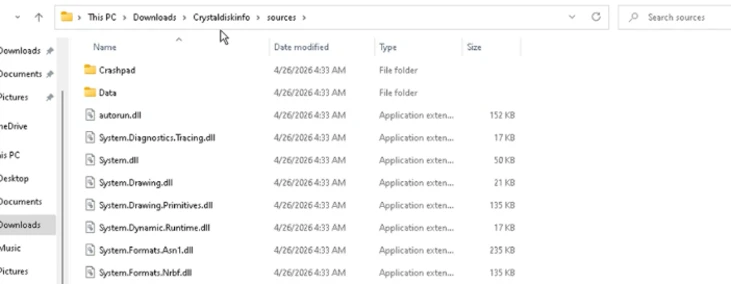
The fake sites deliver ZIP archives that appear to contain legitimate software installers. Inside the archive, attackers include a real executable and a malicious DLL named autorun.dll. When the victim launches the software, the DLL side-loading chain begins.
The malicious DLL triggers another file, vcredist_x64.dll, which installs ScreenConnect for remote access. ScreenConnect is legitimate remote support software, but in this campaign attackers abuse it to gain control of the machine and deliver later payloads.
After the attacker-controlled ScreenConnect session is established, the malware delivers SimpleRunPE.exe. That payload creates Registry Run keys and scheduled tasks for persistence, adds Microsoft Defender exclusions, and uses process hollowing to run mining code under a trusted Microsoft-signed process.
Campaign Details at a Glance
| Campaign element | What attackers use | Why it matters |
|---|---|---|
| Initial lure | Fake utility download sites | Users think they are downloading trusted PC tools |
| Traffic source | Poisoned search results and AI-assisted recommendations | Malicious links can appear where users expect help |
| Target audience | Gamers, PC enthusiasts, creators, and GPU-heavy users | High-performance GPUs produce more mining value |
| First payload | autorun.dll and vcredist_x64.dll | DLL side-loading starts the infection chain |
| Remote access | ScreenConnect | Attackers gain persistent control of the device |
| Final monetization | gminer, lolMiner, and SRBMiner-MULTI | The device is used for cryptocurrency mining |
Why High-Performance GPU Users Are Targeted
Cryptojacking usually tries to infect as many devices as possible, but this campaign is more selective. The fake downloads focus on software popular with people who may own powerful graphics cards, including system monitoring tools, GPU stress-test tools, driver cleanup utilities, codec packs, and PDF software.
That targeting gives attackers a better chance of landing on machines that can mine cryptocurrency efficiently. A gaming PC, creator workstation, or AI development machine can produce more mining output than a typical office laptop.
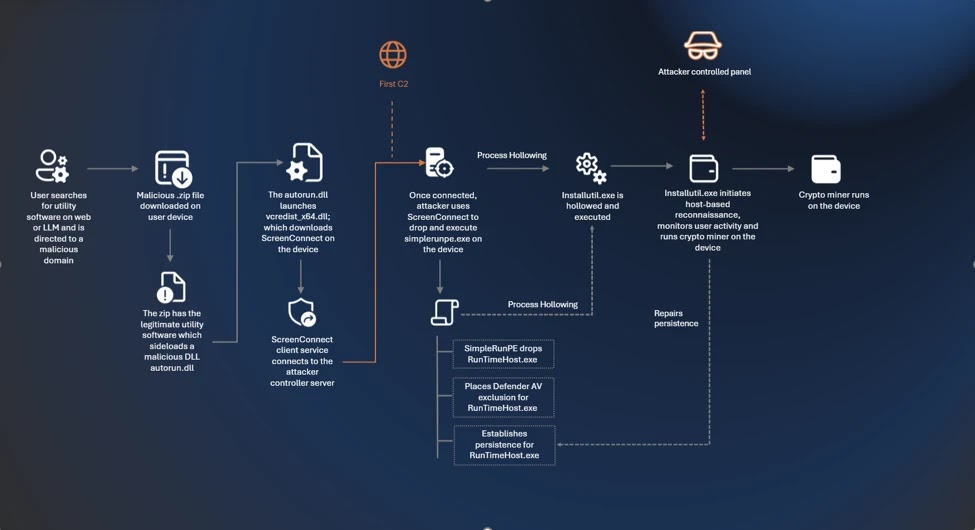
The malware also tries to stay quiet. Microsoft says it can monitor for tools such as Task Manager, Process Hacker, and Process Explorer, then pause mining when users open them. This reduces the chance that a victim notices unusual CPU or GPU activity during a quick inspection.
More Than 150 Malicious Domains Were Used
The infrastructure behind the campaign included more than 150 malicious domains. Many used dynamic DNS patterns and fake download branding to look like software portals. Examples in the reported indicators include domains tied to direct download and start download naming patterns.
Microsoft’s report says the attackers used a coordinated set of lookalike sites for multiple utility brands. That made the campaign broader than a single fake download page and allowed the same payload chain to appear under different software names.
The campaign shows why users should not rely only on a domain name, search ranking, or AI-generated recommendation. A page can look polished, use the right software name, and still deliver a malicious ZIP archive.
How Users Can Avoid Fake Software Download Sites
Users should download utilities only from official vendor websites or trusted app stores. This matters even when a link appears in a chatbot answer, search result, forum post, or video description.
- Type the official vendor website manually when downloading PC utilities.
- Avoid download portals that use generic names such as direct download or free download.
- Do not run ZIP archives from unknown software mirrors.
- Check whether the downloaded file has a valid publisher signature.
- Be suspicious if a utility installer also creates remote access software.
- Watch for sudden GPU usage spikes when the PC is idle.
- Remove unexpected ScreenConnect installations and investigate how they appeared.
Home users should also keep Microsoft Defender Antivirus and browser protection enabled. For suspicious downloads, deleting the file is not enough if it has already run. Users should scan the system, check startup items, review scheduled tasks, and remove unknown remote access tools.
What Organizations Should Do
Organizations should treat fake software downloads as an identity, endpoint, and remote access risk. Even if mining is the first visible payload, persistent remote access can give attackers a stronger foothold for later activity.
Microsoft recommends enabling cloud-delivered protection, which helps Defender Antivirus use cloud-based intelligence against new and emerging threats. This can improve protection when malware changes faster than traditional signatures.
Security teams should also consider EDR in block mode. Microsoft says this feature can remediate malicious artifacts detected by endpoint detection and response capabilities, including cases where the primary antivirus misses post-breach behavior.
Defender Hardening Can Reduce the Attack Surface
Microsoft also recommends attack surface reduction rules because this campaign uses risky behaviors such as DLL side-loading, process injection, persistence, and script-driven installation steps. ASR rules can block or limit common behaviors that malware relies on during early execution.
The attack surface reduction rules overview explains that ASR rules target risky software behavior used by malware, including suspicious script activity and executable abuse. Organizations should test rules in audit mode before moving to block mode to avoid disrupting business workflows.
For endpoints running Microsoft Defender for Endpoint, teams can combine cloud-delivered protection, EDR in block mode, and the ASR rules with software restriction policies and application control. That layered approach is more reliable than trying to block every fake download domain after it appears.
AI Answers Need the Same Skepticism as Search Results
The campaign does not mean users should stop using AI tools for general help. It does show that AI-generated recommendations can inherit poisoned or manipulated web signals, especially when a user asks for direct download links.
For downloads, users should treat AI recommendations like search results: useful for discovery, but not automatically trustworthy. The final check should always happen on the official publisher website.
Attackers are adapting to how people now search for software. Search engines, chatbots, video descriptions, and social posts can all become delivery paths. The safest habit remains simple: verify the source before downloading anything that can run on your machine.
FAQ
It is a malware campaign reported by Microsoft in which attackers use poisoned search results and AI chatbot-related referral patterns to send users to fake software download sites. The payload installs remote access software and cryptocurrency miners on targeted Windows PCs.
The campaign impersonates utilities such as CrystalDiskInfo, HWMonitor, Display Driver Uninstaller, FurMark, K-Lite Codec Pack, and PDFgear. These tools are popular with PC enthusiasts and users who may own powerful GPUs.
High-performance GPUs can mine cryptocurrency more efficiently than average computers. By targeting gamers, creators, and PC enthusiasts, attackers increase the chance of compromising systems that generate more mining value.
The malware uses ScreenConnect for remote access and creates persistence through Registry Run keys and scheduled tasks. This lets attackers regain access after reboot and continue deploying mining payloads.
Users should download software only from official vendor websites or trusted app stores. They should avoid generic download portals, unknown ZIP archives, and links supplied by ads, chatbot answers, video descriptions, or forum posts without verifying the publisher first.


Read our disclosure page to find out how can you help VPNCentral sustain the editorial team Read more


Improve this guide




User forum
0 messages