
Hackers Abuse Steam Workshop Wallpapers to Hijack Steam Sessions and Spread Malware


 8 min. read
  Published on
Hackers have been using malicious Wallpaper Engine wallpapers on Steam Workshop to steal active Steam sessions and infect Windows PCs with malware. According to a Securelist report from Kaspersky, the campaign has been active since late 2025 and mainly targets gamers in China and Russia.
The attack focuses on Wallpaper Engine’s application wallpaper format. Unlike a normal video or scene wallpaper, an application wallpaper can run executable code on the user’s computer. Attackers abused that feature to hide backdoors, infostealers, crypto miners, loaders, and ransomware-related payloads inside wallpaper packages.

Access content across the globe at the highest speed rate.
🔥 Save 81% + 2 bonus months! 🔥
70% of our readers choose Private Internet Access
70% of our readers choose ExpressVPN
2
Browse the web from multiple devices with industry-standard security protocols.
🔥 Save 73%! 🔥

Faster dedicated servers for specific actions (currently at summer discounts)
🔥 Save 69%! 🔥
Kaspersky says the malicious wallpapers were hosted on Steam Workshop, Valve’s system for community-created content. Some of the infected wallpapers had already been downloaded thousands or tens of thousands of times before they were removed.
Wallpaper Engine application wallpapers became the attack path
Wallpaper Engine supports several wallpaper types, including videos, scenes, web pages, and applications. The application category is the risky one because it can run Windows programs as part of the desktop background experience.
A Wallpaper Engine developer previously warned in a Steam Community discussion that application wallpapers are the only wallpaper type that can contain malicious code, while scene and video wallpapers are much safer. Kaspersky’s findings now show that attackers have turned that risk into a real malware distribution channel.
The attackers disguised the infected wallpapers as games, desktop tools, widgets, and attractive animated wallpaper content. Because users often trust Workshop content, many victims treated the downloads as harmless customization files rather than executable software.
| Wallpaper type | Risk level | Why it matters |
|---|---|---|
| Video wallpapers | Lower | They usually play media content rather than executable programs |
| Scene wallpapers | Lower | They are created inside Wallpaper Engine’s editor and are less likely to run arbitrary Windows code |
| Web wallpapers | Medium | They can use web content, scripts, and online resources |
| Application wallpapers | High | They can run executable software on the Windows desktop |
Attackers used two main malware delivery methods
Kaspersky found two common delivery methods. In the first, attackers bundled malicious executables, DLL files, or scripts directly inside the wallpaper package. In the second, they hid malware inside password-protected archives, with the password stored in the file name or in bundled configuration files.
Once a victim launched the infected wallpaper, the visible wallpaper or game could still appear to work normally. In the background, however, the package could drop malware, modify files, and contact attacker-controlled infrastructure.
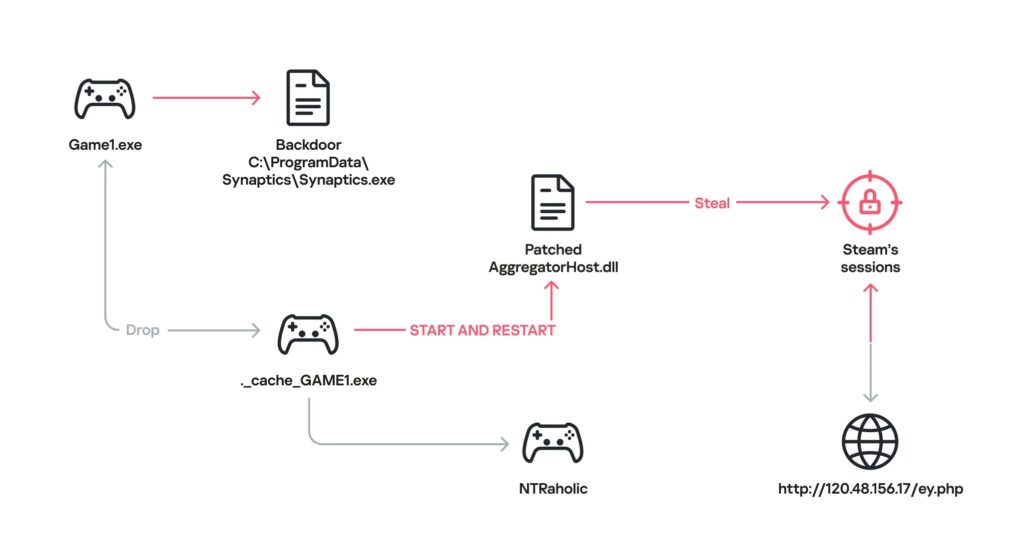
One analyzed sample launched what looked like a small game while installing the DarkKomet backdoor and a modified AggregatorHost.dll file. Kaspersky said the modified library searched for the Steam client and hijacked the user’s live Steam session.
Hijacked Steam sessions helped attackers spread more infected wallpapers
The Steam session theft is especially important. If attackers capture a live session, they may not need the account password to abuse the victim’s Steam account. They can use the hijacked session to access the account and upload more infected wallpapers to Steam Workshop.
That creates a self-reinforcing distribution cycle. A compromised user account can make malicious uploads look more legitimate to other users, especially if the account has history, friends, reviews, or other signs of normal activity.
The Kaspersky press release says the main goal of the attackers was stealing gaming accounts and deploying additional malware. It also says the campaign used several malware families, which suggests more than one threat group may be using the same technique.
- DarkKomet was used as a backdoor in at least one analyzed case.
- Lumma and Vidar infostealers were found in other malicious wallpapers.
- RenEngine loader activity was also observed.
- Kaspersky also found crypto miners, botnet loaders, and ransomware-related detections.
China and Russia were the main targets
Kaspersky says China accounted for 89% of malicious download attempts detected in the campaign. Russia followed with 5.5%. Other affected locations included Singapore, Hong Kong, Germany, Vietnam, India, and Canada.
The targeting appears to match the wallpaper themes and titles. Many of the malicious uploads used art styles and wording aimed at Chinese-speaking users, but the technique could easily shift to other languages or gaming communities.
The Securelist analysis also notes that the attackers were not relying on one new malware family. Instead, they used familiar payloads with a trusted distribution channel, which made the campaign easier to scale.
| Country or region | Share of malicious download attempts |
|---|---|
| China | 89% |
| Russia | 5.5% |
| Singapore | 1.4% |
| Hong Kong | 0.9% |
| Germany | 0.9% |
| Vietnam | 0.9% |
| India | 0.5% |
| Canada | 0.5% |
Steam Workshop’s trust model makes the campaign harder to stop
Steam Workshop exists to help users discover and install community-created content. Valve’s Steamworks documentation explains that Workshop can support ready-to-use content where users can upload and download items with little friction.
That model works well for mods, maps, skins, and wallpapers, but it also creates an opportunity for attackers when the content can execute code. In this case, the malware did not need to arrive through a suspicious email attachment or a random piracy site. It arrived through a familiar platform.
Valve removed the malicious wallpapers identified by Kaspersky, but Kaspersky warned that new infected uploads could still appear. Users should not treat Workshop downloads as automatically safe just because they appear inside Steam.
Steam Guard helps, but it does not remove the risk
Steam users should enable the Steam Guard Mobile Authenticator to add another layer of account protection. Two-factor authentication can make account theft harder and can protect trades, marketplace activity, and sign-ins.
However, Steam Guard is not a complete defense against malware running on the same PC. If a malicious wallpaper steals an active session, attackers may try to abuse access that already exists on the device. That is why users also need to avoid risky application wallpapers and scan suspicious content before running it.
Users who installed unknown application wallpapers should check their Steam account activity, revoke suspicious sessions where possible, change their password from a clean device, and scan the PC with an updated security tool.
What Steam and Wallpaper Engine users should do now
Users should avoid application-type wallpapers from unknown creators, especially if the wallpaper asks them to extract archives, run extra files, enter archive passwords, or disable security tools. A wallpaper should not need unusual manual steps to work.
Users can also reduce risk by staying with scene or video wallpapers from reputable creators. The Wallpaper Engine developer discussion makes clear that application wallpapers carry the main code-execution risk.
For added account protection, users should keep the Steam Guard Mobile Authenticator enabled and watch for unexpected marketplace activity, friend messages, Workshop uploads, or account setting changes.
- Avoid application wallpapers unless the creator is trusted and the content has a clear reason to run as an app.
- Do not open password-protected archives bundled with wallpapers.
- Scan downloaded Workshop content before applying it.
- Watch for suspicious files such as Synaptics.exe in ProgramData paths.
- Check for unexpected Steam Workshop uploads from your account.
- Change your Steam password from a clean device if you suspect compromise.
Indicators and detection names shared by Kaspersky
Kaspersky shared several detection names tied to malicious objects found during the investigation. These are useful for users and admins reviewing antivirus alerts, endpoint logs, or malware quarantine entries.
| Detection name | Type of threat |
|---|---|
| HEUR:Trojan-PSW.Win32.gen | Password-stealing malware detection |
| HEUR:Trojan-PSW.Win32.Python.gen | Python-based password-stealing malware detection |
| HEUR:Backdoor.Win32.DarkKomet | DarkKomet backdoor detection |
| Trojan-Dropper.Python.Agent | Python dropper detection |
| HEUR:Trojan-Ransom.Win32.Gen.gen | Ransomware-related heuristic detection |
| PDM:Trojan.Win32.Generic | Generic behavior-based trojan detection |
Trusted platforms can still be abused
The campaign is a reminder that user-generated content platforms can become malware delivery channels when attackers find a format that runs code. Steam Workshop did not need to be compromised for this attack to work. Attackers abused the upload and sharing model.
That makes user judgment and security scanning important. A popular wallpaper, a familiar platform, or an attractive preview image does not prove that the content is safe.
The Kaspersky advisory recommends caution even when downloading from trusted sources, checking the reputation of creators, and relying on security software to detect malicious packages.
The safest approach is simple: avoid unknown application wallpapers, keep Steam Guard enabled, scan Workshop content, and treat executable wallpapers like any other program downloaded from the internet.
FAQ
Hackers uploaded malicious Wallpaper Engine application wallpapers to Steam Workshop. These wallpapers looked like normal community content, but they could run executable code and install malware when launched.
Application wallpapers carry the main risk because they can run Windows programs as part of the wallpaper. Video and scene wallpapers are generally lower risk because they do not work like standalone executable apps.
Kaspersky found several payloads, including DarkKomet, Lumma, Vidar, RenEngine, crypto miners, botnet loaders, and ransomware-related detections.
Steam Guard can help protect Steam accounts, but it does not fully stop malware that runs on the same PC and steals an active session. Users should also avoid risky application wallpapers and scan downloaded content.
Remove the wallpaper, scan your PC with updated security software, check for suspicious Steam activity, change your Steam password from a clean device, and review whether your account uploaded unknown Workshop content.


Read our disclosure page to find out how can you help VPNCentral sustain the editorial team Read more


Improve this guide




User forum
0 messages