
Hackers Exploit Critical Everest Forms Pro Flaw to Inject PHP Code Into WordPress Sites


 8 min. read
  Published on

Hackers are actively exploiting a critical vulnerability in Everest Forms Pro that lets unauthenticated attackers inject and run PHP code on vulnerable WordPress sites. The flaw, tracked as CVE-2026-3300, affects Everest Forms Pro versions up to and including 1.9.12.
The bug can lead to full site compromise because attackers do not need a WordPress account to trigger it. Wordfence said its firewall had already blocked more than 29,300 exploit attempts, with mass exploitation observed in May.

Access content across the globe at the highest speed rate.
70% of our readers choose Private Internet Access
70% of our readers choose ExpressVPN

Browse the web from multiple devices with industry-standard security protocols.

Faster dedicated servers for specific actions (currently at summer discounts)
Site owners using Everest Forms Pro should update to version 1.9.13 or later immediately. The Everest Forms changelog lists version 1.9.13 as a Pro release that includes a security fix, while Wordfence identifies 1.9.13 as the patched version for the vulnerable code path.
What CVE-2026-3300 allows attackers to do
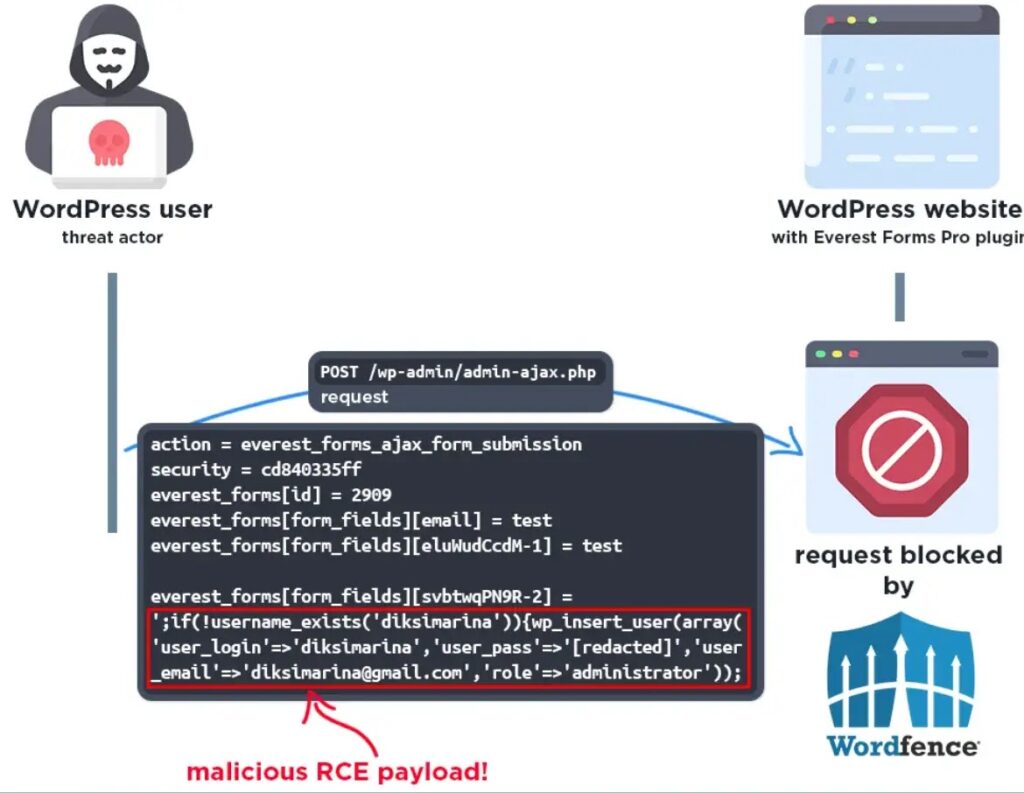
The vulnerability sits in the Calculation Addon, specifically in the process_filter() function used by the Complex Calculation feature. According to the Wordfence vulnerability database, the plugin concatenates user-submitted form field values into a PHP code string before passing it to eval().
That design creates a direct code injection risk. The plugin applies sanitize_text_field(), but that function does not escape single quotes or other characters that matter inside PHP code context. An attacker can break out of the expected string and inject malicious PHP through a normal form submission.
The NVD entry gives the vulnerability a CVSS 3.1 score of 9.8, with no authentication or user interaction required. It also classifies the weakness as CWE-94, Improper Control of Generation of Code.
| Vulnerability | Details |
| CVE | CVE-2026-3300 |
| Affected plugin | Everest Forms Pro for WordPress |
| Affected versions | Up to and including 1.9.12 |
| Fixed version | 1.9.13 or later |
| Severity | Critical, CVSS 9.8 |
| Weakness type | CWE-94, code injection |
| Attack requirement | No authentication required |
Why the Complex Calculation feature is exposed
Everest Forms Pro lets site owners build forms with advanced calculation logic. In vulnerable versions, the Complex Calculation feature can process values submitted through string-type fields such as text, email, URL, select, and radio fields.
The problem appears when those field values reach the server-side calculation logic. Instead of treating all submitted input as inert data, the vulnerable code places it inside PHP logic that later gets evaluated.
WPScan also lists the issue as an unauthenticated remote code execution vulnerability through the calculation field and confirms that the fix is available in version 1.9.13.
Attackers are creating rogue admin accounts
Wordfence said exploitation began on April 13, 2026, after the vulnerability was publicly disclosed on March 30. Attackers later increased activity, with a major spike observed on May 16.
Observed payloads focused on creating unauthorized administrator accounts. In one pattern, attackers attempted to call WordPress functions that create a new admin user, then used that account to control the site through the normal WordPress dashboard.
That kind of compromise gives attackers several options. They can upload web shells, install malicious plugins, modify theme files, inject redirects, add spam pages, steal data from form submissions, or use the website as part of a broader malware or phishing operation.
- Unknown administrator accounts in WordPress should receive immediate review.
- Sites should check for suspicious users, especially newly created admin accounts.
- Administrators should inspect plugin, theme, and uploads directories for unexpected PHP files.
- Server logs should be reviewed for unusual POST requests to WordPress AJAX endpoints.
- Hosting accounts should be checked for modified files, web shells, and unknown cron jobs.
Which sites face the highest risk
Any site running Everest Forms Pro 1.9.12 or older faces risk, but exposure is higher when the site uses forms with the Complex Calculation feature. Public-facing forms give unauthenticated attackers a direct route to the vulnerable processing path.
Patchstack warns that this type of vulnerability is highly dangerous because mass-exploit campaigns often target thousands of WordPress sites at once, regardless of site size or traffic.
Small sites should not assume they are safe because they have low traffic. Automated scanners often look for vulnerable plugins and known form endpoints, not brand value or audience size.
| Risk signal | Why it matters |
| Everest Forms Pro 1.9.12 or older | The vulnerable code exists in these versions |
| Complex Calculation feature enabled | The vulnerable function is tied to calculation processing |
| Public forms using text-like fields | Attackers can submit malicious values without logging in |
| Unknown administrator accounts | Attackers have used payloads that create rogue admins |
| Unexpected PHP files | A compromised site may contain web shells or backdoors |
| Suspicious admin-ajax.php requests | Exploit attempts may arrive through WordPress AJAX handling |
How administrators should respond
The first step is to update Everest Forms Pro to 1.9.13 or later. If a site cannot update immediately, administrators should disable the affected forms or the plugin until the update can be applied.
The official changelog shows newer Pro versions released after 1.9.13, so site owners should install the latest available release rather than stop at the first patched build.
After patching, administrators should assume that exposure may have occurred if the vulnerable plugin was active after April 13. A short compromise review can catch unauthorized accounts and backdoors before attackers return.
- Update Everest Forms Pro to the latest available version.
- Clear all site, server, and CDN caches after updating.
- Audit WordPress users and remove unknown administrator accounts.
- Change passwords for all administrator and hosting accounts.
- Review plugin, theme, uploads, and wp-content directories for unexpected PHP files.
- Check access logs for suspicious POST requests and unusual form submissions.
- Rotate database, FTP, SFTP, SSH, and API credentials if compromise is suspected.
Why firewall protection is not enough
Web application firewall rules can reduce exploitation risk, but they should not replace patching. Virtual patching helps block known payload patterns, while a plugin update removes the vulnerable behavior from the application.
Wordfence reported that premium firewall users received protection on February 27, while free users received it on March 29. Even so, the company urged users to update the plugin because active exploitation continued against unpatched sites.
Patchstack’s advisory also recommends updating to version 1.9.13 or later as the direct fix. Firewall mitigation can buy time, but it does not clean up a site that attackers may have already compromised.
What to monitor after patching
Administrators should continue monitoring for persistence even after updating. Attackers who created an admin account or uploaded a web shell may still control the site unless those changes are removed.
The Wordfence vulnerability record explains that exploitation can occur through crafted values in string-type form fields when Complex Calculation is used. That makes form submission logs, web server logs, and WordPress user changes important evidence sources.
WPScan’s entry also confirms the affected version range and fixed version, giving administrators a simple way to validate whether a site still runs a vulnerable build.
- Review recently created administrator accounts and profile changes.
- Search for PHP files added to uploads, cache, or temporary directories.
- Inspect .htaccess, wp-config.php, and active theme files for suspicious edits.
- Look for unexpected plugins or mu-plugins.
- Check access logs for repeated form submissions from the same IP addresses.
- Review outbound connections from the hosting account if server logs are available.
- Restore from a clean backup if unauthorized code appears widespread.
WordPress plugin security remains a major attack path
This incident shows why WordPress plugin updates need the same urgency as core platform updates. A single vulnerable premium plugin can expose an otherwise well-maintained site to unauthenticated code execution.
Form plugins deserve special attention because they intentionally accept public input. When that input reaches dangerous functions such as eval(), an ordinary contact form can become an attack surface for server-side code execution.
For site owners, the safest approach is straightforward. Keep paid plugins licensed and updated, remove unused plugins, limit administrator accounts, add file integrity monitoring, and investigate signs of compromise quickly when a critical plugin vulnerability enters active exploitation.
FAQ
CVE-2026-3300 is a critical code injection vulnerability in Everest Forms Pro for WordPress. It allows unauthenticated attackers to inject and execute PHP code through vulnerable calculation-field processing.
Everest Forms Pro versions up to and including 1.9.12 are affected. Site owners should update to version 1.9.13 or later, preferably the latest available release.
Attackers submit crafted values through form fields processed by the Complex Calculation feature. The vulnerable code can pass those values into eval(), allowing injected PHP code to run on the server.
Site owners should review WordPress administrator accounts, inspect plugin and theme files, search uploads for unexpected PHP files, check access logs, and rotate credentials if they see signs of compromise.
No. A firewall can help block exploit attempts, but site owners should still update Everest Forms Pro to a patched version. If attackers already compromised the site, administrators must also remove backdoors and rogue accounts.


Read our disclosure page to find out how can you help VPNCentral sustain the editorial team Read more


Improve this guide




User forum
0 messages